Note
Access to this page requires authorization. You can try signing in or changing directories.
Access to this page requires authorization. You can try changing directories.
Apps hosted outside of Azure, like on-premises or at a data center, should use an application service principal to authenticate to Azure when accessing Azure resources. Application service principal objects are created using the app registration process in Azure. When you create an application service principal, a client ID and client secret are generated for your app. Store the client ID, client secret, and your tenant ID in environment variables so the Azure SDK for Go can use them to authenticate your app to Azure at runtime.
Create a different app registration for each environment where the app is hosted. This setup lets you configure environment-specific resource permissions for each service principal and ensures that an app deployed to one environment doesn't access Azure resources in another environment.
1 - Register the application in Azure
You can register an app with Azure using either the Azure portal or the Azure CLI.
az ad sp create-for-rbac --name <app-name>
The command output is similar to the following. Note these values or keep this window open because you need them in the next steps and can't view the password (client secret) value again.
{
  "appId": "00001111-aaaa-2222-bbbb-3333cccc4444",
  "displayName": "msdocs-python-sdk-auth-prod",
  "password": "Ee5Ff~6Gg7.-Hh8Ii9Jj0Kk1Ll2Mm3_Nn4Oo5Pp6",
  "tenant": "aaaabbbb-0000-cccc-1111-dddd2222eeee"
}

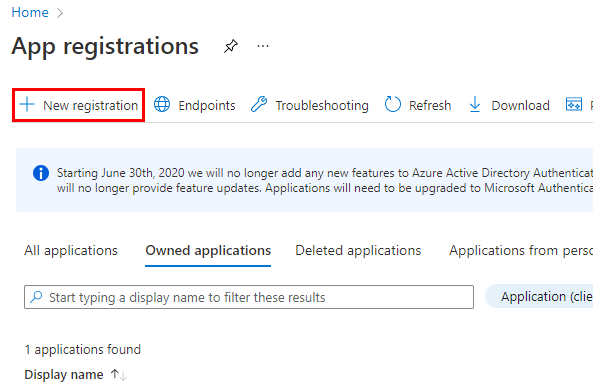

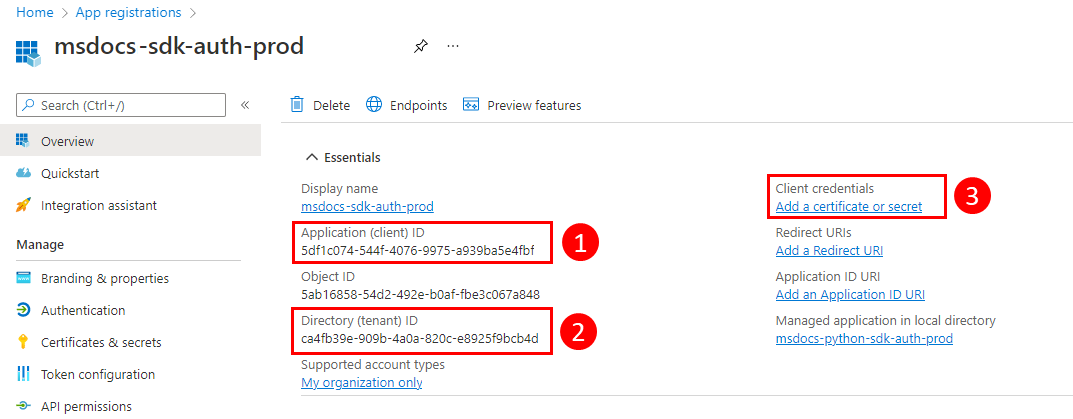
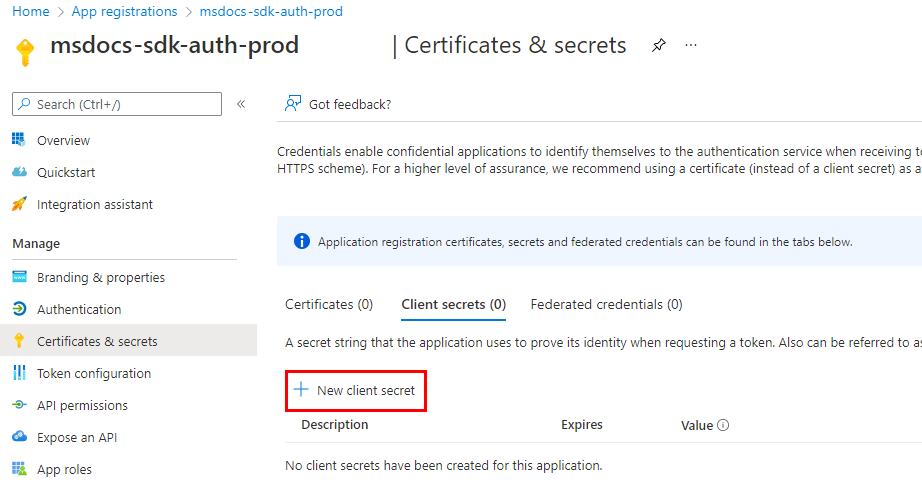

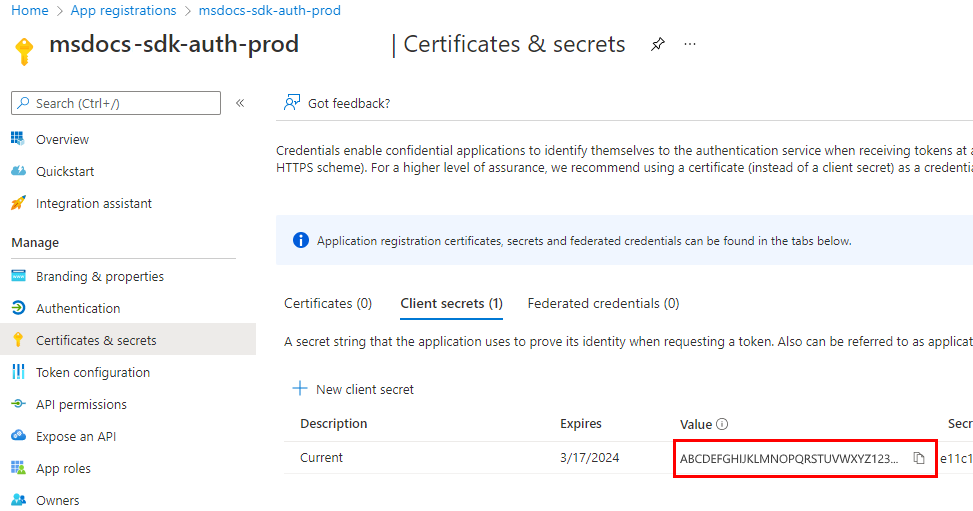
2 - Assign roles to the application service principal
Next, you need to determine what roles (permissions) your app needs on what resources and assign those roles to your app. Roles can be assigned a role at a resource, resource group, or subscription scope. This example shows how to assign roles for the service principal at the resource group scope because most applications group all their Azure resources into a single resource group.
Assign a role to a service principal in Azure using the az role assignment create command.
az role assignment create --assignee {appId} \
    --scope /subscriptions/{subscriptionId}/resourceGroups/{resourceGroupName} \
    --role "{roleName}"
To get the role names that a service principal can be assigned to, use the az role definition list command.
az role definition list \
    --query "sort_by([].{roleName:roleName, description:description}, &roleName)" \
    --output table
For example, to allow the service principal with the appId of 00001111-aaaa-2222-bbbb-3333cccc4444 read, write, and delete access to Azure Storage blob containers and data in all storage accounts in the msdocs-go-sdk-auth-example resource group in the subscription with ID aaaa0a0a-bb1b-cc2c-dd3d-eeeeee4e4e4e, you would assign the application service principal to the Storage Blob Data Contributor role using the following command.
az role assignment create --assignee 00001111-aaaa-2222-bbbb-3333cccc4444 \
    --scope /subscriptions/aaaa0a0a-bb1b-cc2c-dd3d-eeeeee4e4e4e/resourceGroups/msdocs-go-sdk-auth-example \
    --role "Storage Blob Data Contributor"
For information on assigning permissions at the resource or subscription level using the Azure CLI, see the article Assign Azure roles using the Azure CLI.
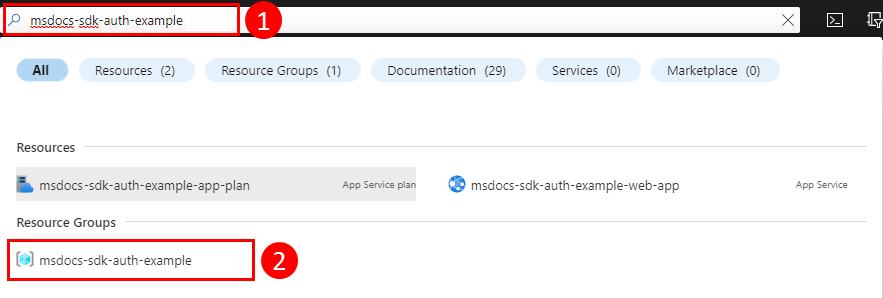

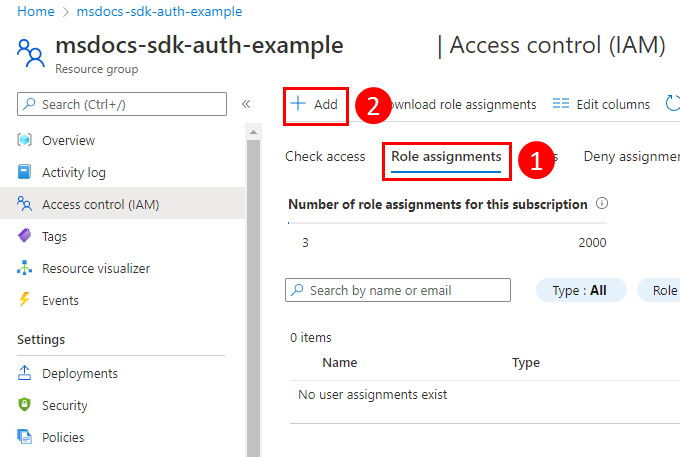


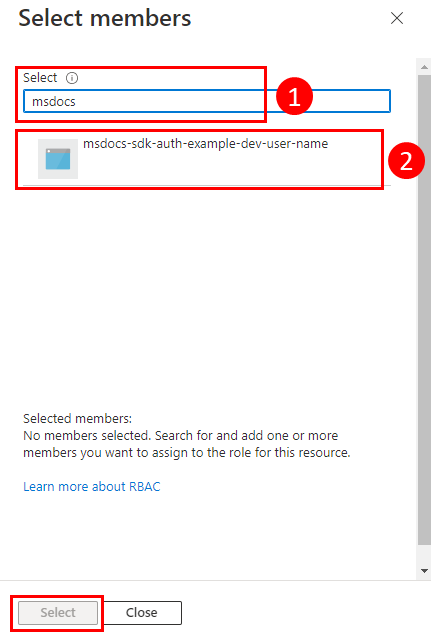

3 - Configure environment variables for application
Set the AZURE_CLIENT_ID, AZURE_TENANT_ID, and AZURE_CLIENT_SECRET environment variables for the process running your Go app to make the application service principal credentials available at runtime. The DefaultAzureCredential object retrieves the service principal information from these environment variables.
| Variable name | Value |
|---|---|
AZURE_CLIENT_ID |
Application ID of an Azure service principal |
AZURE_TENANT_ID |
Tenant ID of the application's Microsoft Entra tenant |
AZURE_CLIENT_SECRET |
Password of the Azure service principal |
export AZURE_TENANT_ID="<active_directory_tenant_id>"
export AZURE_CLIENT_ID="<service_principal_appid>"
export AZURE_CLIENT_SECRET="<service_principal_password>"
4 - Implement DefaultAzureCredential in your application
To authenticate Azure SDK client objects to Azure, your application should use the DefaultAzureCredential type from the azidentity package.
Start by adding the azidentity package to your application.
go get github.com/Azure/azure-sdk-for-go/sdk/azidentity
Next, for any Go code that instantiates an Azure SDK client in your app, follow these steps:
- Import the
azidentitypackage. - Create an instance of
DefaultAzureCredentialtype. - Pass the instance of
DefaultAzureCredentialtype to the Azure SDK client constructor.
The following code segment shows an example.
import (
	"context"

	"github.com/Azure/azure-sdk-for-go/sdk/azidentity"
	"github.com/Azure/azure-sdk-for-go/sdk/storage/azblob"
)

const (
	account       = "https://<replace_with_your_storage_account_name>.blob.core.windows.net/"
	containerName = "sample-container"
	blobName      = "sample-blob"
	sampleFile    = "path/to/sample/file"
)

func main() {
    // create a credential
    cred, err := azidentity.NewDefaultAzureCredential(nil)
    if err != nil {
      // TODO: handle error
    }

    // create a client for the specified storage account
    client, err := azblob.NewClient(account, cred, nil)
    if err != nil {
      // TODO: handle error
    }

    // TODO: perform some action with the azblob Client
    // _, err = client.DownloadFile(context.TODO(), <containerName>, <blobName>, <target_file>, <DownloadFileOptions>)
}
When the code instantiates DefaultAzureCredential, it reads the environment variables AZURE_TENANT_ID, AZURE_CLIENT_ID, and AZURE_CLIENT_SECRET to retrieve the application service principal information needed to connect to Azure.