Note
Access to this page requires authorization. You can try signing in or changing directories.
Access to this page requires authorization. You can try changing directories.
Azure DevOps Services | Azure DevOps Server | Azure DevOps Server 2022 | Azure DevOps Server 2020
Use an organization to connect groups of related projects and help scale up your enterprise. You can use a personal Microsoft account, GitHub account, or a work or school account. Using your work or school account automatically connects your organization to your Microsoft Entra ID.
Note
All organizations must be manually created via the web portal. Automated creation of organizations is not supported. However, we do support automated organization configuration, project creation, and resource provisioning via the REST API.
Prerequisites
| Category | Requirements |
|---|---|
| Authentication | Determine whether you want to use only Microsoft accounts or authenticate users with Microsoft Entra ID. For more information, see Choosing your organization administrator account type. |
| Planning | Understand how to plan your organizational structure. |
Create an organization
Sign in to Azure DevOps.
Select New organization.
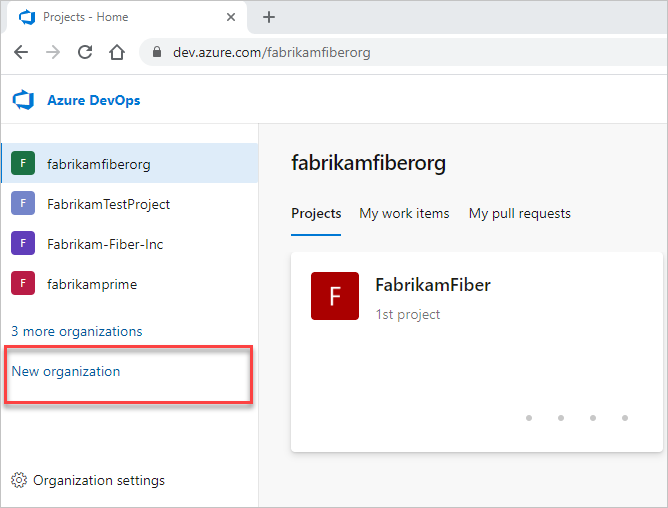
Enter the name for your organization, select its hosting geography, select an Azure subscription for billing, and then select Continue.
Important
Follow these guidelines when you create your organization name:
- Use only letters from the English alphabet
- Start your organization name with a letter or number
- Use letters, numbers, or hyphens after the initial character
- Keep your organization name under 50 Unicode characters
- End with a letter or number
If you use any disallowed characters, the following error message displays: VS850015: The specified name is not allowed to be used: {Organization name}.

Congratulations, you're an organization owner!
Sign in to your organization at any time,
https://dev.azure.com/{YourOrganization}.
Free tier benefits
Your new organization includes the following free tier benefits:
- First five users free (Basic license)
- Azure Pipelines:
- One Microsoft-hosted CI/CD (one concurrent job, up to 30 hours per month)
- One self-hosted CI/CD concurrent job
- Azure Boards: Work item tracking and boards
- Azure Repos: Unlimited private Git repos
- Azure Artifacts: Two GiB free per organization
If you exceed these free tier limits, your linked Azure subscription gets billed for additional usage. For more information, see What happens when free tier limits are reached?.