Note
Access to this page requires authorization. You can try signing in or changing directories.
Access to this page requires authorization. You can try changing directories.
Azure DevOps Services
GitHub-hosted agents provide higher performance virtual machines for Azure Pipelines with pay-as-you-go (PAYG) billing. Unlike the Microsoft-hosted agents that use a concurrency-based pool, GitHub-hosted agents bill per minute of usage and offer more powerful machine configurations. The charges depend on the operating system and dimensions of the agent used.
Important
This feature is being deployed and might not be available in all regions yet. To check if it's deployed to your region, check your Azure DevOps billing page for the GitHub-hosted agents setting.
This feature is currently in preview. It might change before general availability.
Prerequisites
To enable GitHub-hosted agents, you must have the following prerequisites:
| Category | Requirements |
|---|---|
| Permissions | You must have permission to configure billing settings in your Azure DevOps organization. For a complete list of required permissions, see Manage billing: Prerequisites. |
| Subscription | An Azure subscription in the same Microsoft Entra ID as your Azure DevOps organization. |
Enable GitHub-hosted agents billing
GitHub-hosted agents use pay-as-you-go billing. You're charged per minute of pipeline execution time based on the machine size. For pricing information, see Azure DevOps pricing.
Note
GitHub-hosted agents don't provide a free tier or free minutes. All usage is billed per minute. This pay-as-you-go billing model is separate from the parallel jobs concurrency billing used for Microsoft-hosted agents.
If billing isn't already enabled in your Azure DevOps organization, enable it first by following the instructions in Set up billing for your organization.
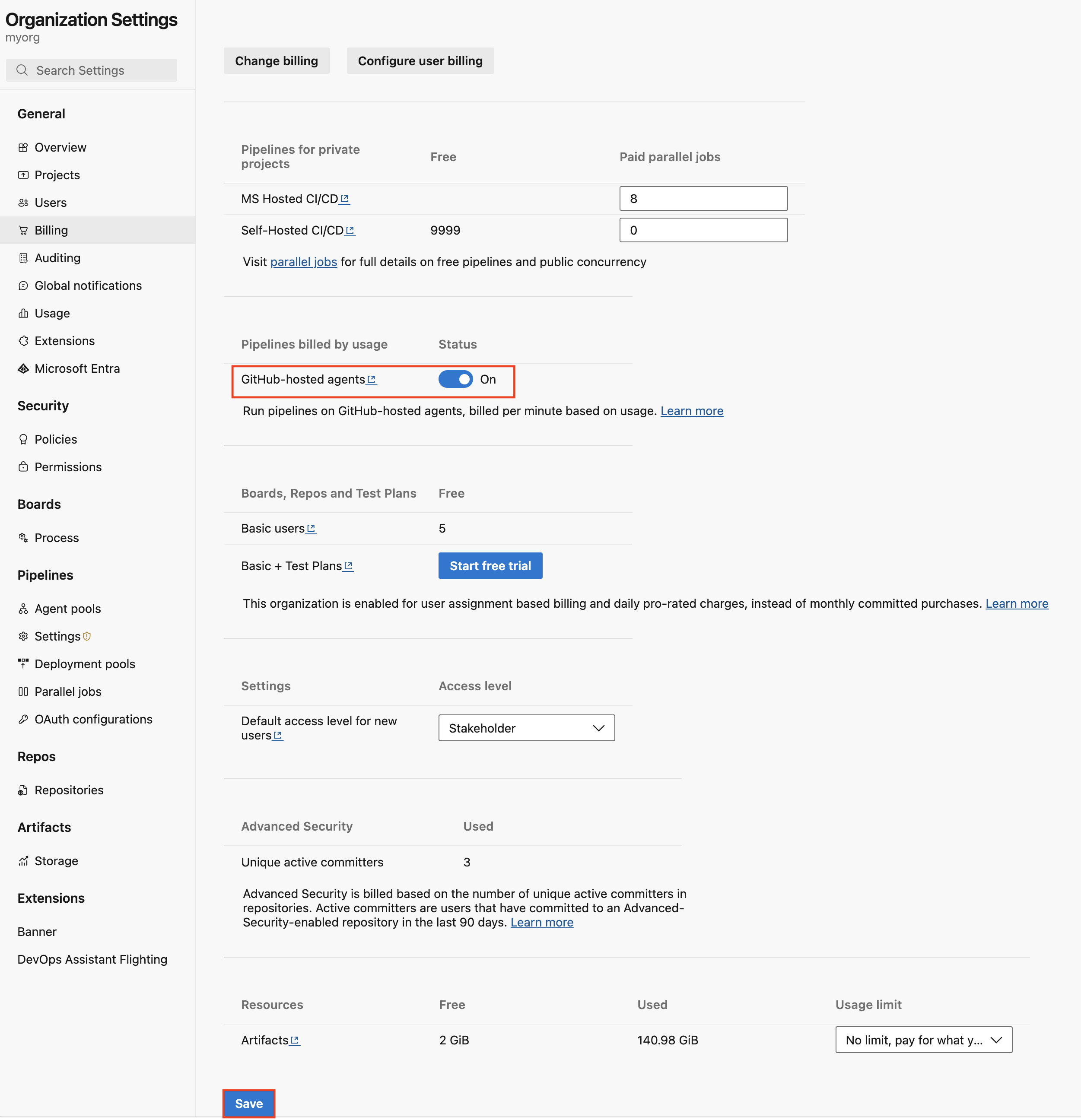
Turn on pay-as-you-go billing in billing settings. Set Enable GitHub-hosted agents to On and select Save at the bottom of the page.
Use a GitHub-hosted agent
When you enable pay-as-you-go billing, Azure DevOps creates a new GitHub-hosted agents pool in your organization. This pool offers extra image labels that charge by the minute.
To use a GitHub-hosted agent in your YAML pipeline, configure the pool section with the following properties:
name:'GitHub-hosted Agents'vmImage: The VM image label you want to use. For available image labels, see GitHub-hosted agent images.
pool:
  name: 'GitHub-hosted Agents'
  vmImage: 'macos-26-arm64'
steps:
- bash: |
    echo Hello from macOS Tahoe arm64
    uname -a
    sw_vers
Additional examples:
pool:
  name: 'GitHub-hosted Agents'
  vmImage: 'macos-26-arm64-xl'
steps:
- bash: |
    echo Hello from XL macOS Tahoe arm64
    uname -a
    hostinfo | grep memory
GitHub-hosted agent images
GitHub-hosted agents offer higher performance configurations compared to the standard Microsoft-hosted agent configurations. The GitHub-hosted agents pool offers the following hardware specifications and virtual machine images.
Important
During the public preview, organizations are limited to eight Standard and eight XLarge GitHub-hosted agents. If more than eight pipeline jobs queue per hardware specification, the first eight jobs run and the remainder queue until the initial jobs complete. If you need more than eight agents per hardware specification during the public preview, create a support case.
GitHub-hosted agents provides images for the following macOS versions:
| macOS version | Included software |
|---|---|
| macOS 26 ARM 64 | Link |
| macOS with XCode 27 (public preview) | Link |
Note
The Xcode 27 image is rolling out to the GitHub-hosted agents pool over the next few weeks. If you don't see the image in your organization, check back later.
This macOS image can run pipelines using the following hardware specifications:
| Hardware specification | vCPU | RAM | Storage (SSD) | Architecture |
|---|---|---|---|---|
| Standard | 3 | 7 GB | 14 GB | arm64 (M1) |
| XLarge | 5 (+ 8 GPU hardware acceleration) | 14 GB | 14 GB | arm64 (M2) |
To run your pipelines by using a GitHub-hosted agent, specify the image label that matches your desired operating system and hardware specification from the following list:
| Operating system (OS) | Hardware specification | Image | YAML VM Image Label |
|---|---|---|---|
| macOS 26 | Standard | macOS ARM64 | macos-26-arm64 |
| macOS 26 | XLarge | macOS ARM64 XL | macos-26-arm64-xl |
| macOS with Xcode 27 | Standard | macOS ARM64 | xcode-27 |
| macOS with Xcode 27 | XLarge | macOS ARM64 XL | xcode-27-xlarge |
Xcode-based naming convention for macOS images
With the release of the macOS with Xcode 27 (public preview) image, Microsoft introduced a new naming convention for macOS images. Each new image name is based on a major Xcode version rather than the underlying operating system. Each image version supports one major Xcode version.
This naming model enables developers to target the desired Apple toolchain. It reflects how macOS CI jobs are commonly defined, which is by their required Xcode toolchain rather than by the underlying operating system. The operating system might change over the lifetime of the image. To see the software included with the Xcode 27 image, including the macOS operating system version, follow the included software link for the image in the previous table.
Monitoring usage
You can monitor your pipeline usage in two ways: by using the analytics tab on the pool or by using Azure Cost Management.
Analytics view
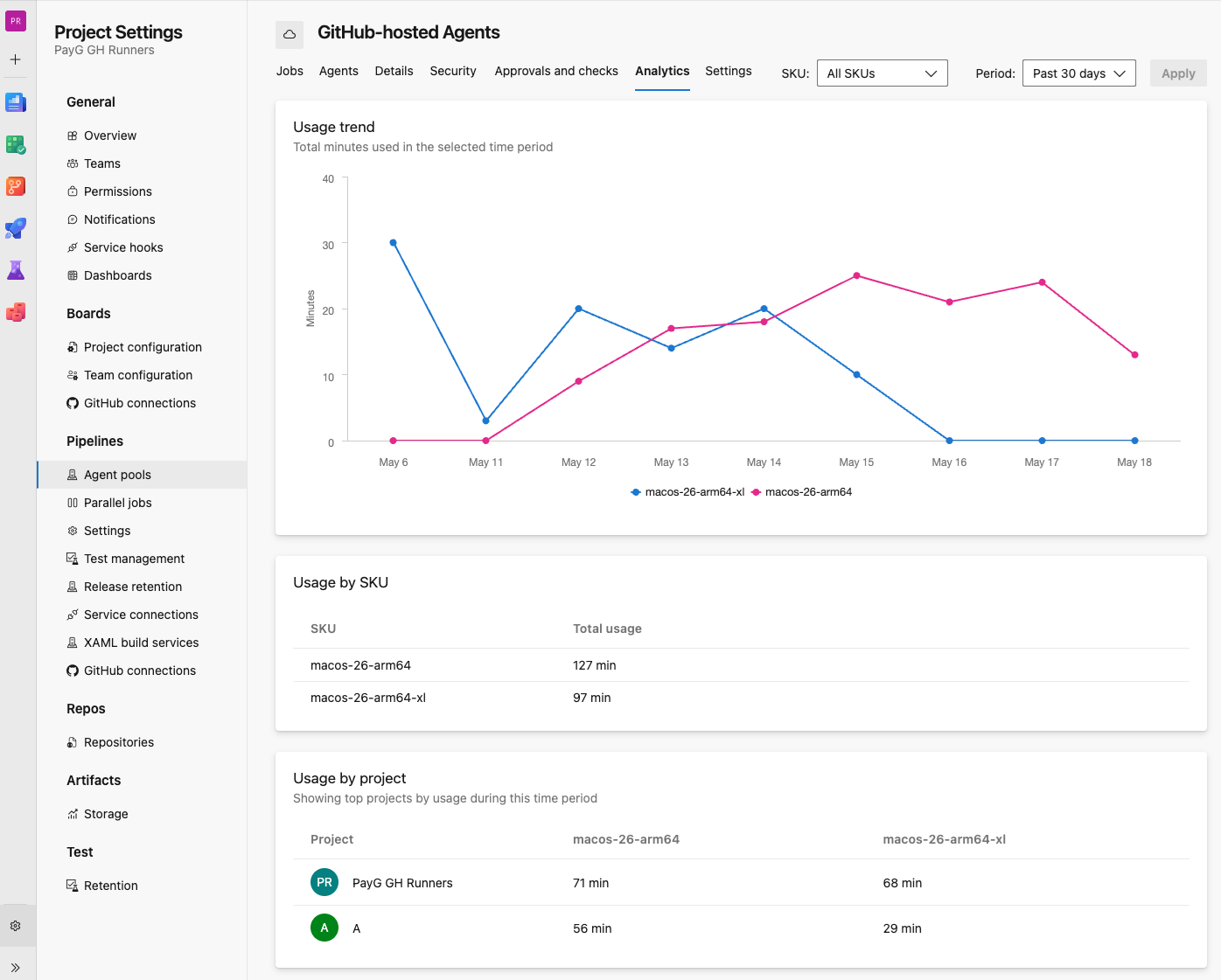
On the GitHub-hosted Agents pool, select the Analytics tab. Select the agent SKUs and usage period you want displayed. This selection renders a graph and lists top projects that use the selected agent SKUs. You can drill down to project and then pipeline level to show jobs that use the agent SKU.
Azure Cost Management
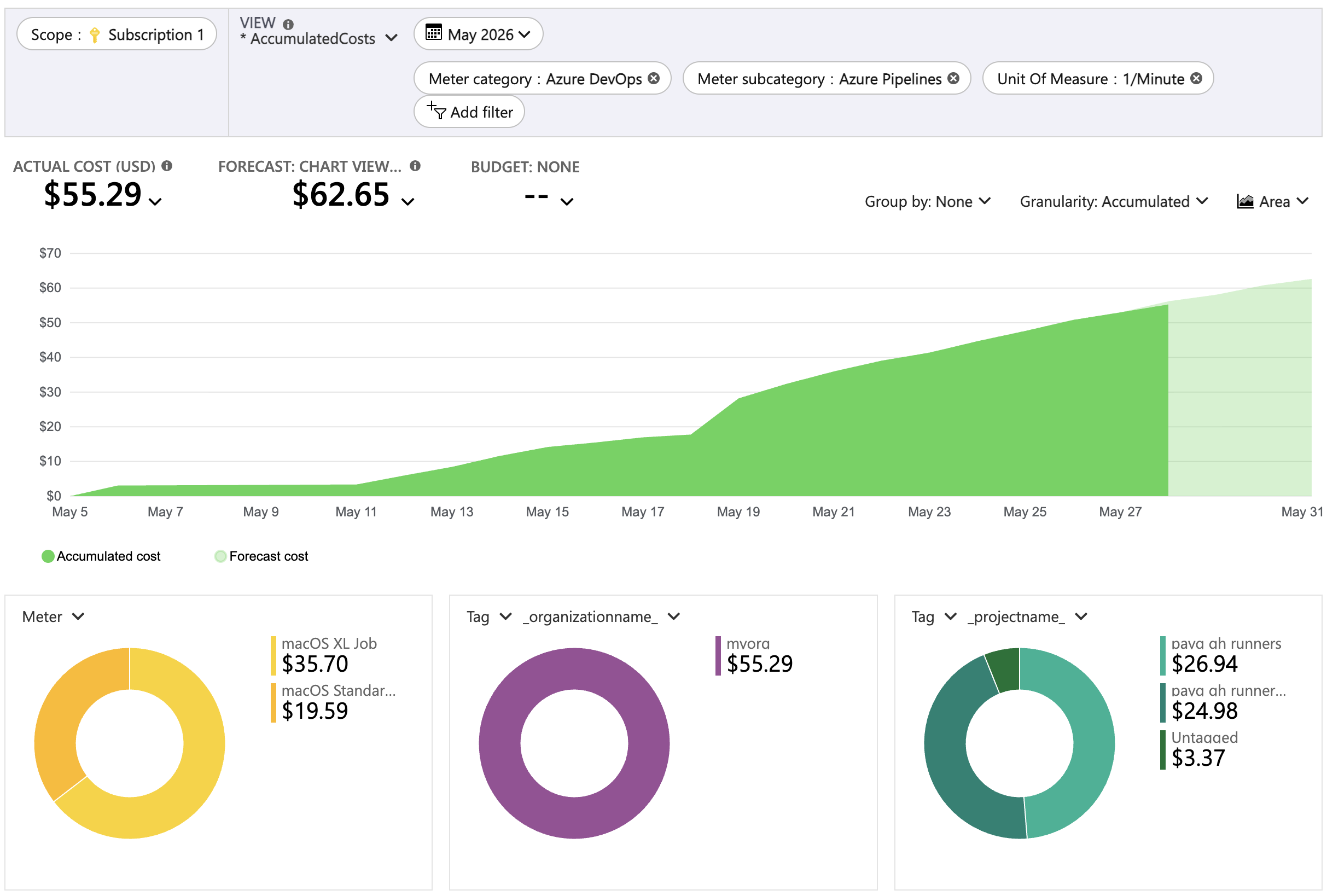
To filter on pay-as-you-go Pipelines usage, select:
- Meter category: Azure DevOps
- Meter subcategory: Azure Pipelines
- Unit Of Measure: 1/Minute
Additionally, you can filter on:
- Tag:
_organizationname_ - Tag:
_projectname_
The following screenshot shows a typical cost analysis view in Azure Cost Management:
Networking
GitHub-hosted agents have similar networking capabilities as Microsoft-hosted agents.
GitHub-hosted agents run on the same infrastructure as GitHub Actions larger runners. Network traffic between GitHub-hosted agents and your servers goes over the public network.
Important
You can't use private connections such as ExpressRoute or VPN to connect GitHub-hosted agents to your corporate network.
Security
GitHub-hosted agents have the same security features as Microsoft-hosted agents.
GitHub-hosted agents run on isolated virtual machines that are reimaged after each job. Each agent is dedicated to a single organization, and each VM hosts only a single agent.
- Agents don't have public IP addresses, so external entities can't target them directly.
- Each job runs on a freshly provisioned VM, so no data persists between jobs.
- Hosted images don't conform to CIS hardening benchmarks. To use CIS-hardened images, consider self-hosted agents or Managed DevOps Pools.
Capabilities and limitations
GitHub-hosted agents have similar capabilities and limitations as Microsoft-hosted agents, such as fresh virtual machines for each job and automatically updated images with the latest software, with the following key differences.
GitHub-hosted agents:
- Offer larger machine sizes with more vCPUs, RAM, and disk space than standard Microsoft-hosted agents.
- Bill per minute of usage with no free tier.
Compare agent pool options
| Feature | Microsoft-hosted agents | GitHub-hosted agents (PAYG) | Self-hosted agents |
|---|---|---|---|
| Billing | Parallel jobs (concurrency-based) | Per-minute (pay-as-you-go) | Your own infrastructure |
| Free tier | Yes (limited) | No | N/A |
| Machine sizes | Standard (2 vCPU, 7 GB RAM) | Various (larger than Microsoft-hosted) | Custom |
| Maintenance | Automatic | Automatic | Manual |
| Custom software | Install during pipeline run | Install during pipeline run | Preinstalled |
| Corporate network | No direct access | No direct access | Direct access |