Note
Access to this page requires authorization. You can try signing in or changing directories.
Access to this page requires authorization. You can try changing directories.
Features
- Extended YAML Pipelines templates can now be passed context information for stages, jobs, and deployments
- Updated retirement date for Windows 2016 hosted images
Extended YAML Pipelines templates can now be passed context information for stages, jobs, and deployments
With this update, we are adding a new templateContext property for job, deployment, and stage YAML pipeline components meant to be used in conjunction with templates.
Here is a scenario for using templateContext:
You use templates to reduce code duplication or to improve the security of your pipelines
Your template takes as parameter a list of
stages,jobs, ordeploymentsThe template processes the input list and performs some transformations on each of the stages, jobs, or deployments. For example, it sets the environment in which each job runs or adds additional steps to enforce compliance
The processing requires additional information to be passed by the pipeline author into the template for each stage, job, or deployment in the list
Let's look at an example. Say you are authoring a pipeline that runs end-to-end tests for pull request validation. Your goal is to test only one component of your system, but, because you plan to run end-to-end tests, you need an environment where more of the system's components are available, and you need to specify their behavior.
You realize other teams will have similar needs, so you decide to extract the steps for setting up the environment into a template. Its code looks like the following:
testing-template.yml
parameters:
- name: testSet
  type: jobList

jobs:
- ${{ each testJob in parameters.testSet }}:
  - ${{ if eq(testJob.templateContext.expectedHTTPResponseCode, 200) }}:
    - job:
      steps:
        - script: ./createSuccessfulEnvironment.sh ${{ testJob.templateContext.requiredComponents }}
        - ${{ testJob.steps }}
  - ${{ if eq(testJob.templateContext.expectedHTTPResponseCode, 500) }}:
    - job:
      steps:
        - script: ./createRuntimeErrorEnvironment.sh ${{ testJob.templateContext.requiredComponents }}
        - ${{ testJob.steps }}
What the template does is, for each job in the testSet parameter, it sets the response of the system's components specified by ${{ testJob.templateContext.requiredComponents }} to return ${{ testJob.templateContext.expectedHTTPResponseCode }}.
Then, you can create your own pipeline that extends testing-template.yml like in the following example.
sizeapi.pr_validation.yml
trigger: none

pool:
  vmImage: ubuntu-latest

extends:
  template: testing-template.yml
  parameters:
    testSet:
    - job: positive_test
      templateContext:
        expectedHTTPResponseCode: 200
        requiredComponents: dimensionsapi
      steps:
      - script: ./runPositiveTest.sh
    - job: negative_test
      templateContext:
        expectedHTTPResponseCode: 500
        requiredComponents: dimensionsapi
      steps:
      - script: ./runNegativeTest.sh
This pipeline runs two tests, a positive and a negative one. Both tests require the dimensionsapi component be available. The positive_test job expects the dimensionsapi return HTTP code 200, while negative_test expects it return HTTP code 500.
Updated retirement date for Windows 2016 hosted images
We have moved the retirement date for Windows 2016 images from April 1 to June 30. While most customers using this image have updated their pipelines, there are still customers who are using this image. To verify if your organization is using Windows 2016, use these instructions to identity pipelines using deprecated images.
To help customers identify pipelines, we will continue to perform brownouts. These are 24 hour periods in which the image will not be available, causing pipeline jobs that run during this time to fail. The brownouts will happen on:
- Monday April 18
- Tuesday April 26
- Wednesday May 4
- Thursday May 12
- Friday May 20
- Monday May 23
- Tuesday May 31
- Wednesday June 8
- Thursday June 16
- Friday June 24
- Monday June 27
Next steps
Note
These features will roll out over the next two to three weeks.
Head over to Azure DevOps and take a look.
How to provide feedback
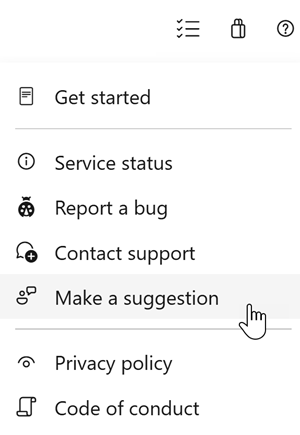
We would love to hear what you think about these features. Use the help menu to report a problem or provide a suggestion.
You can also get advice and your questions answered by the community on Stack Overflow.