Note
Access to this page requires authorization. You can try signing in or changing directories.
Access to this page requires authorization. You can try changing directories.
Features
- GitHub Integration: Improvements linking to commits, branches and pull requests
- GitHub Integration: Show build status for YAML pipelines
- Delivery Plans limit increased
GitHub Integration: Improvements linking to commits, branches and pull requests
We're continuously improving the Boards + GitHub integration to close usability gaps and align with the experience you're familiar with in Azure Repos.
With this update, we've introduced several improvements to streamline how branches, pull requests, and commits are linked to work items:
When a GitHub branch is linked to a work item, any associated pull requests will now be automatically linked. No need to manually use AB#.
Once a pull request is merged, the merge commit will be automatically linked to the work item.
If the branch is deleted after the pull request is merged, the branch link will be automatically removed from the work item.
These improvements make it easier to track your development progress and maintain clean, up-to-date work item associations.
GitHub Integration: Show build status for YAML pipelines
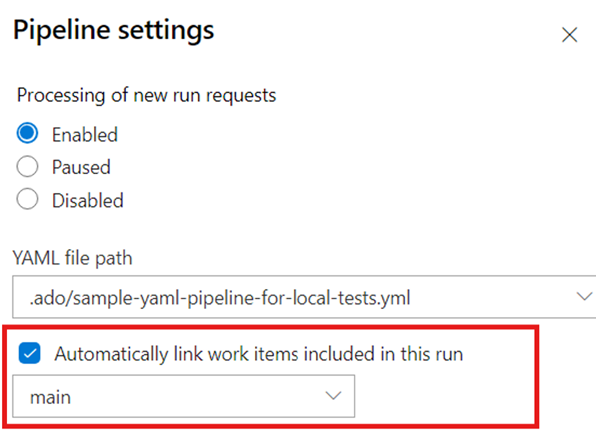
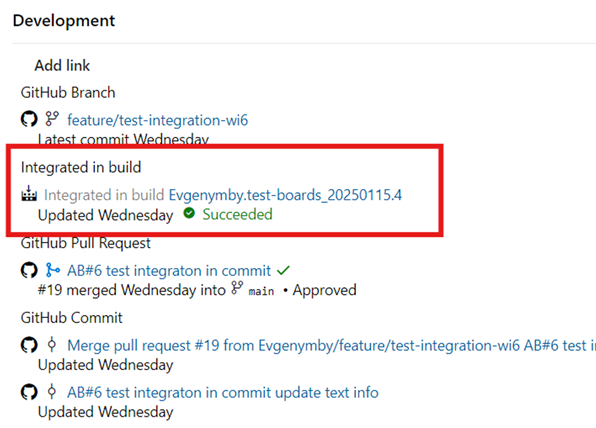
We're committed to achieving feature parity between YAML and Classic Pipelines. One key missing feature was the ability to provide an "Integrated in build" link when your repository is hosted in GitHub. With our latest release, we've addressed this gap by adding an option in YAML pipeline settings for you to check:
Once the build is complete, the corresponding link will automatically appear on the associated work items, improving the overall traceability story.
Delivery Plans limit increased
Previously, we limited the Delivery Plans per project to 1,000. With this update, we have increased the maximum Delivery Plans per project to 1,500. You can learn more about adding and editing Delivery Plans in the documentation here.
Next steps
Note
These features will roll out over the next two to three weeks.
Head over to Azure DevOps and take a look.
How to provide feedback
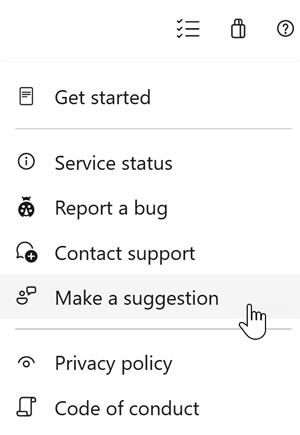
We would love to hear what you think about these features. Use the help menu to report a problem or provide a suggestion.
You can also get advice and your questions answered by the community on Stack Overflow.