Note
Access to this page requires authorization. You can try signing in or changing directories.
Access to this page requires authorization. You can try changing directories.
Features
Improved pipeline run debugging
In this sprint, we are improving your ability to debug pipeline runs.
It may happen that you need to cancel your run, but the job or stage continue to run, and you are confused. We've added warning messages to let you know when and why this is the case.
Imagine you have the following YAML:
stages:
- stage: WUS1
  jobs:
  - job: DeployWUS1
    condition: eq(variables['Build.SourceBranchName'], 'main')
    steps:
    - task: CmdLine@2
      inputs:
        script: echo "Deploying $(System.StageName)"
    - task: CmdLine@2
      inputs:
        script: sleep 60
- stage: WUS2
  condition: eq(variables['Build.SourceBranchName'], 'main')
  jobs:
  - job: DeployWUS2
    steps:
    - task: CmdLine@2
      inputs:
        script: echo "Deploying $(System.StageName)"
Now, imagine you cancel the run when running job DeployWUS1. The job will continue to run, and so will stage WUS2. Azure Pipelines tells you why the job and the stage continue running.
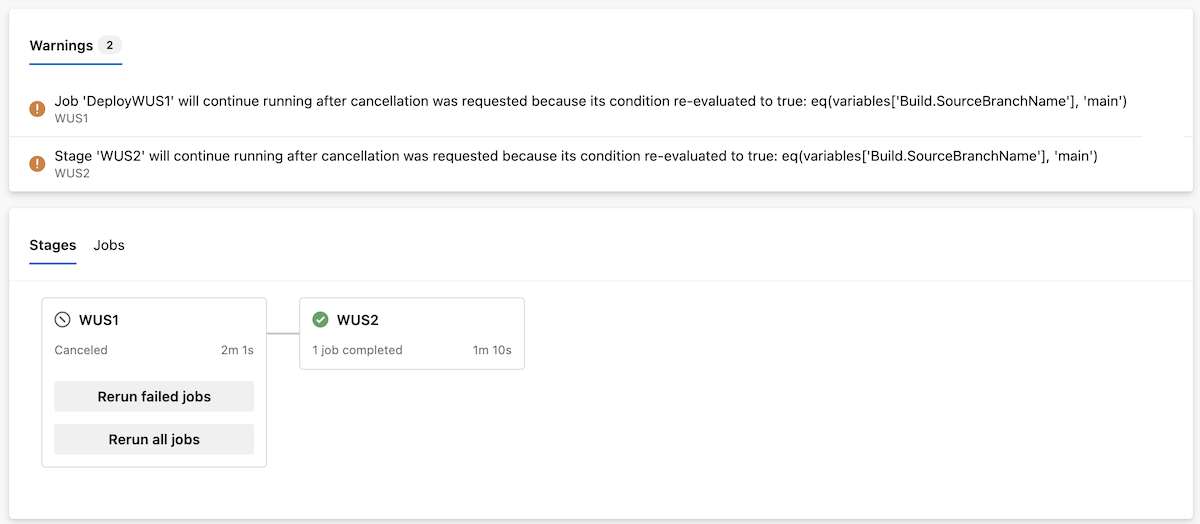
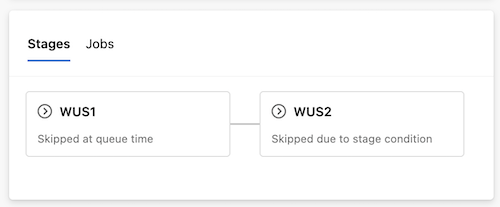
Another improvement we're bringing is letting you know why a stage is skipped.
Imagine you run the same YAML from a different branch, say, release_123, and you choose to only run stage WUS2. Previously, both WUS1 and WUS2 stages had the same status, Skipped, but it wasn't clear why each of the stages were skipped. Now, you know if the stage was skipped because you deselected it at queue run time or because of its runtime conditions.
Next steps
Note
These features will roll out over the next two to three weeks.
Head over to Azure DevOps and take a look.
How to provide feedback
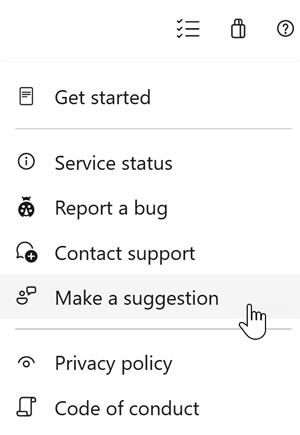
We would love to hear what you think about these features. Use the help menu to report a problem or provide a suggestion.
You can also get advice and your questions answered by the community on Stack Overflow.