Note
Access to this page requires authorization. You can try signing in or changing directories.
Access to this page requires authorization. You can try changing directories.
Features
- Finer-grained comment requirement for running PR validation runs from GitHub repositories
- Access Azure DevOps with Microsoft Entra authentication
- Apple Silicon for macOS pipeline agents (pay-as-you-go preview)
Finer-grained comment requirement for running PR validation runs from GitHub repositories
To help protect your pipelines against unauthorized use, you can require comments from team members or contributors before pull request validation runs begin.
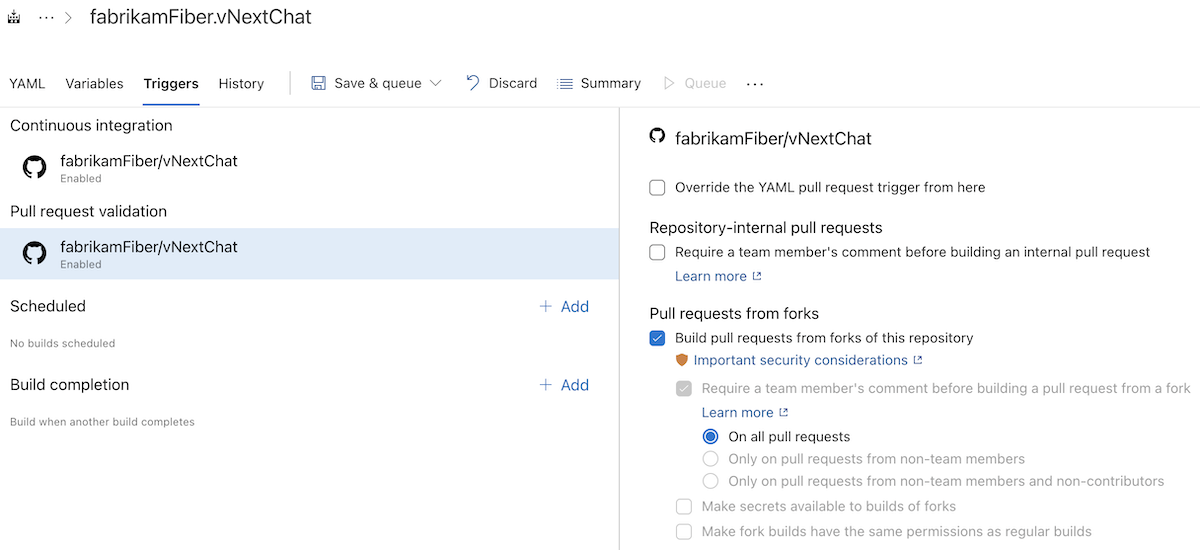
Before this sprint, the comment requirement applied to pull requests from both within the same repository and from forks. If you wanted to require team-member comments only for pull requests from forks, that wasn't possible.
Starting this sprint, you can configure comment requirements independently per pull request source. In the following example, comments are required only for pull requests that originate from repository forks.
Access Azure DevOps with Microsoft Entra authentication
You can now use the new Azure DevOps service connection to access Azure DevOps with a Microsoft Entra workload identity (service principal or managed identity) instead of personal access tokens (PATs) or session tokens.
Using Azure DevOps service connections helps improve pipeline security in several ways:
- Least privilege: Use scoped service connection permissions instead of broad shared build service account permissions
- PAT-free authentication: Eliminate the need to create, store, and rotate personal access tokens
- No persistent secrets: Use Microsoft Entra federated credentials instead of passwords
- Audit trail: Authentication attempts are logged in Azure DevOps audit logs
Configuring an Azure DevOps service connection
To create the Azure DevOps service connection, you first need to add a service principal or managed identity as a user to the organization and assign it permissions.
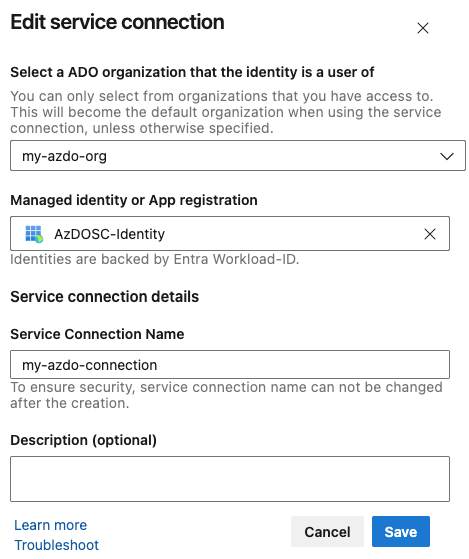
To create the service connection, choose Azure DevOps (Preview):

and select the service principal or managed identity you just created as the identity used:
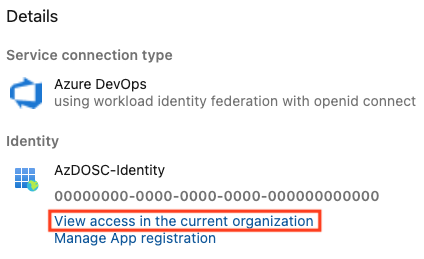
You should assign the identity the permissions to the organization it needs. You can do this by following the View access in the current organization link and e.g. adding it to the Readers group of the current project.
Using the new Azure DevOps service connection
To check out a repository from a different organization:
resources:
  repositories:
  - repository: external-repo
    type: git
    endpoint: my-azdo-connection
    name: 'external-project/external-repo'
    ref: 'refs/heads/main'

steps:
- checkout: self
- checkout: external-repo
To reference a YAML template from a different organization:
resources:
  repositories:
    - repository: templates
      type: git
      endpoint: my-azdo-connection
      name: 'external-project/external-repo'
      ref: "refs/heads/main"

steps:
- template: azdosc-template.yml@templates
To access an artifacts feed using one of the authentication tasks:
- task: NuGetAuthenticate@1
  inputs:
    nuGetServiceConnections: 'my-azdo-connection'

- task: DotNetCoreCLI@2
  inputs:
    command: 'restore'
    projects: '**/*.csproj'
Using the new Azure DevOps service connection in a script
The new AzureCLI@3 task can be used to access Azure DevOps with Entra authentication in a number of ways. In all cases, you configure the service connection by setting connectionType: 'azureDevOps' and assigning azureDevOpsServiceConnection to an Azure DevOps service connection you created:
- task: AzureCLI@3
  inputs:
    connectionType: 'azureDevOps'
    azureDevOpsServiceConnection: 'my-azdo-connection'
This creates an Entra ID authenticated session with the Azure DevOps CLI:
- task: AzureCLI@3
  displayName: Secret-less
  inputs:
    connectionType: 'azureDevOps'
    azureDevOpsServiceConnection: 'my-azdo-connection'
    scriptType: 'pscore'
    scriptLocation: 'inlineScript'
    inlineScript: |
      az devops configure -l

      az devops project list --query "value[].{Name:name, Id:id}" `
                            -o table

      az pipelines pool list --query "[].{Id:id, Name:name}" `
                            -o table

      az rest --method get `
              --url "https://status.dev.azure.com/_apis/status/health?api-version=7.1-preview.1" `
              --resource 499b84ac-1321-427f-aa17-267ca6975798 `
              --query "sort_by(services[?id=='Pipelines'].geographies | [], &name)" `
              -o table
If you do have a need for a token, for example you have an existing script where you use a PAT or System.AccessToken inline in script, there is also a method to obtain an Entra Access Token that can be used to access Azure DevOps:
- task: AzureCLI@3
  displayName: Use Entra access token
  inputs:
    connectionType: 'azureDevOps'
    azureDevOpsServiceConnection: 'my-azdo-connection'
    scriptType: 'pscore'
    scriptLocation: 'inlineScript'
    inlineScript: |
      # Get access token for Azure DevOps
      $token = az account get-access-token --resource "499b84ac-1321-427f-aa17-267ca6975798" `
                                           --query "accessToken" `
                                           --output tsv

      # Use token in REST API call
      $headers = @{
        Authorization = "Bearer $token"
        "Content-Type" = "application/json"
      }

      $body = @{
        name = "Test Build"
      } | ConvertTo-Json

      Invoke-RestMethod -Uri "$(System.CollectionUri)$(System.TeamProject)/_apis/build/definitions?api-version=7.1" `
                        -Method POST `
                        -Headers $headers `
                        -Body $body
More information
For more information on how to configure the Azure DevOps service connection, see the documentation.
Apple Silicon for macOS pipeline agents (pay-as-you-go preview)
We are making Apple Silicon macOS agents available in Azure Pipelines as a public preview. Starting with Apple Silicon, we will bring some of the same sizes available in GitHub Actions over to Azure Pipelines.
| Operating system | Hardware specification | Image | YAML VM image label | Pool |
|---|---|---|---|---|
| macOS 26 | Standard | macOS 26 arm64 | macos-26-arm64 |
GitHub-hosted Agents |
| macOS 26 | XLarge | macOS 26 arm64 XL | macos-26-arm64-xl |
GitHub-hosted Agents |
These agents use Pay-as-you-Go pricing with a per-minute rate tied to the size of the agent, see pricing.
To use the new agents, enable GitHub-hosted agents in billing settings:
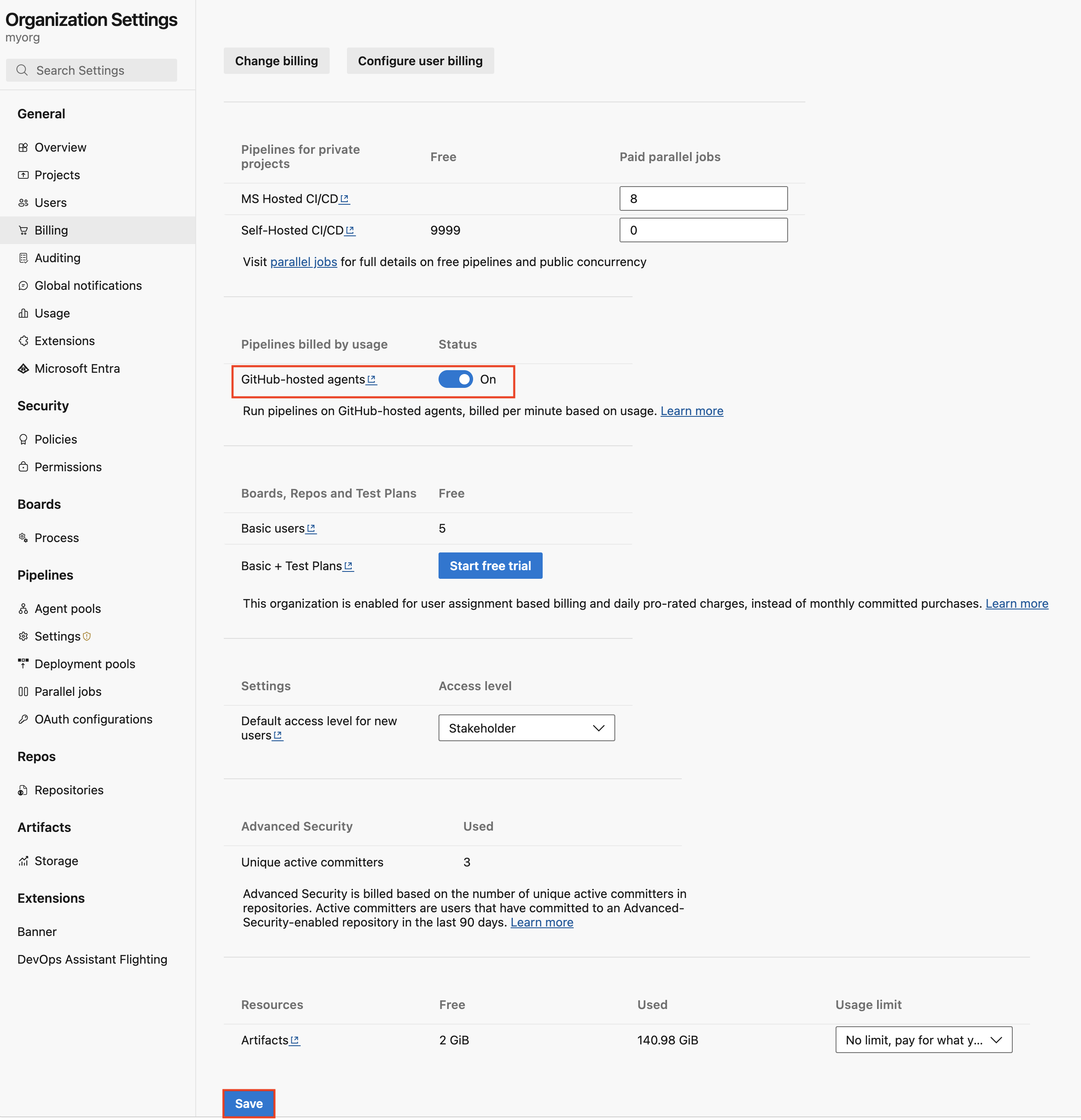
This will provision the new GitHub-hosted Agents pool used for Pay-as-you-Go agents.
Using Apple Silicon images
Once provisioned, you can use the Apple Silicon macos-26-arm64 image like this:
pool:
  name: 'GitHub-hosted Agents'
  vmImage: 'macos-26-arm64'
steps:
- bash: |
    echo Hello from macOS Tahoe arm64
    uname -a
    sw_vers
And for the even more powerful macos-26-arm64-xl image like this:
pool:
  name: 'GitHub-hosted Agents'
  vmImage: 'macos-26-arm64-xl'
steps:
- bash: |
    echo Hello from XL macOS Tahoe arm64
    uname -a
    hostinfo | grep memory
Monitoring per-minute usage
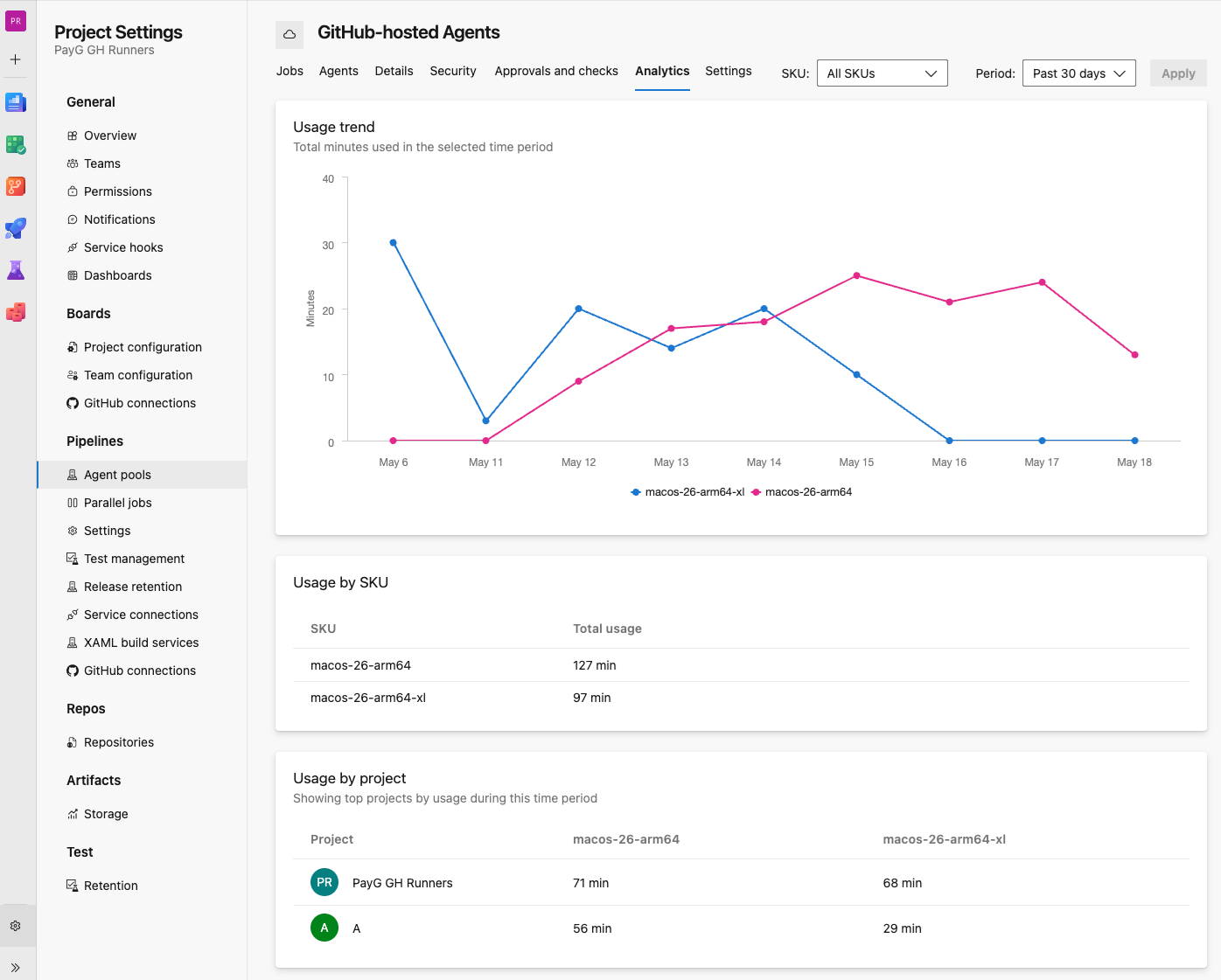
Pay-as-you-Go agents are charged per minute. To monitor the number of minutes used, the updated analytics tab of the GitHub-hosted Agents pool let's you view the number of minutes used per project, filter on image and drill down on Agent SKU and pipeline:
In Azure Cost Management you can track minutes used and break down the usage by Azure DevOps organization and project:
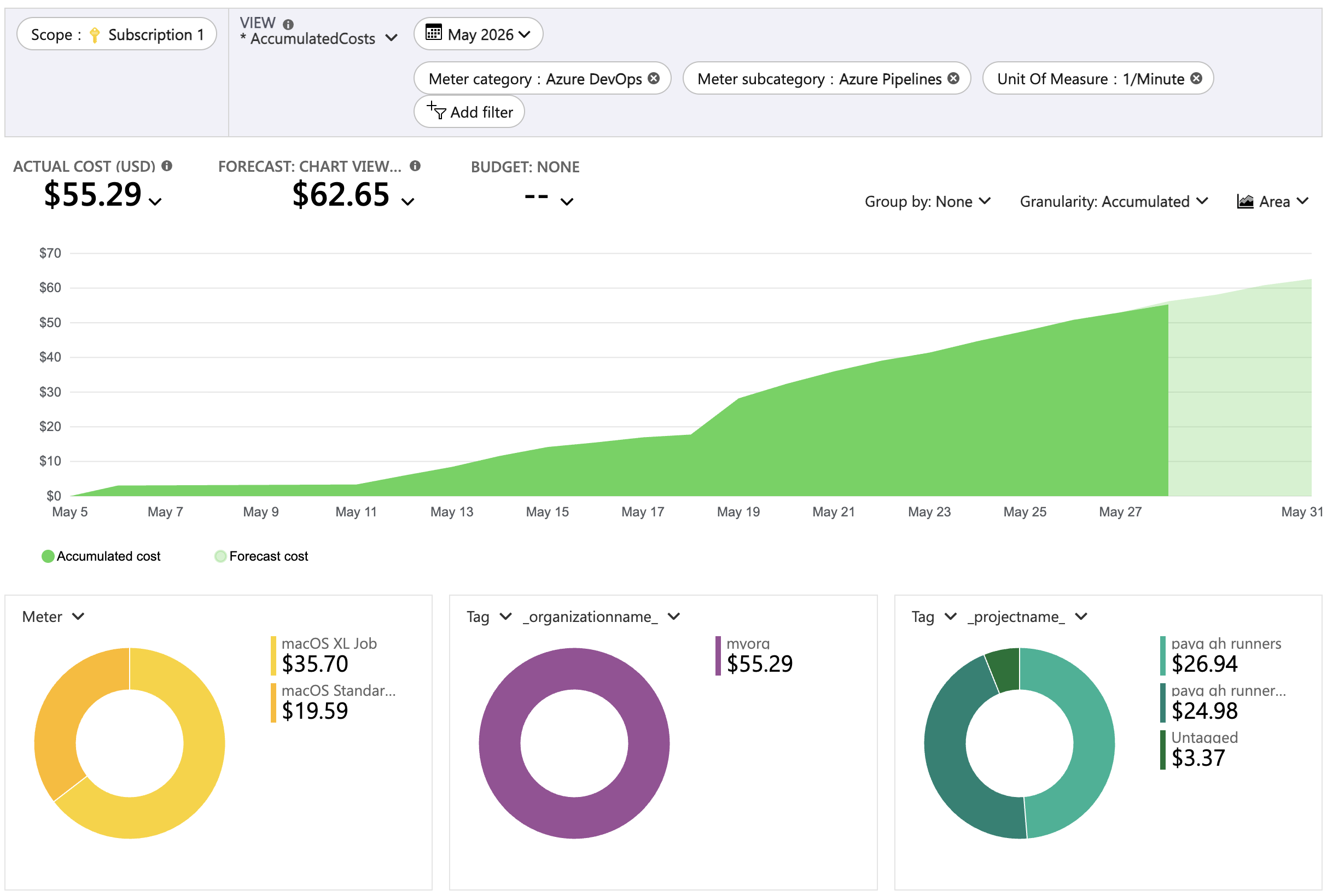
You can leverage Azure Cost Management support for budgets and alerts to forecast and monitor your spend.
More information
For more information on how to enable Apple Silicon agents and agent specifications, review the GitHub-hosted agents documentation.
Next steps
Note
These features will roll out over the next two to three weeks.
Head over to Azure DevOps and take a look.
How to provide feedback
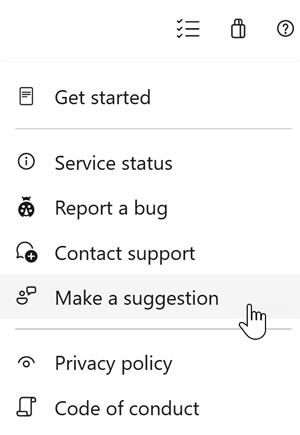
We would love to hear what you think about these features. Use the help menu to report a problem or provide a suggestion.
You can also get advice and your questions answered by the community on Stack Overflow.