Note
Access to this page requires authorization. You can try signing in or changing directories.
Access to this page requires authorization. You can try changing directories.
Features
Capture actual result per step in manual test runs in public preview
This feature has been one of the top requests from the community, and we're thrilled to make it available.
You can now record the Actual Result for each step during manual test execution in Azure Test Plans. This captures the factual outcome of each step alongside Pass/Fail, giving you structured evidence of what happened during the run, useful for audits, triage, and defect reporting.
The feature is configured per test plan, with three modes:
- Disabled (default): The field is hidden and inactive.
- Enabled - Optional: The field appears; entry isn't enforced.
- Enabled - Required: Testers must enter an actual result for every step that has a defined expected result before they can proceed.
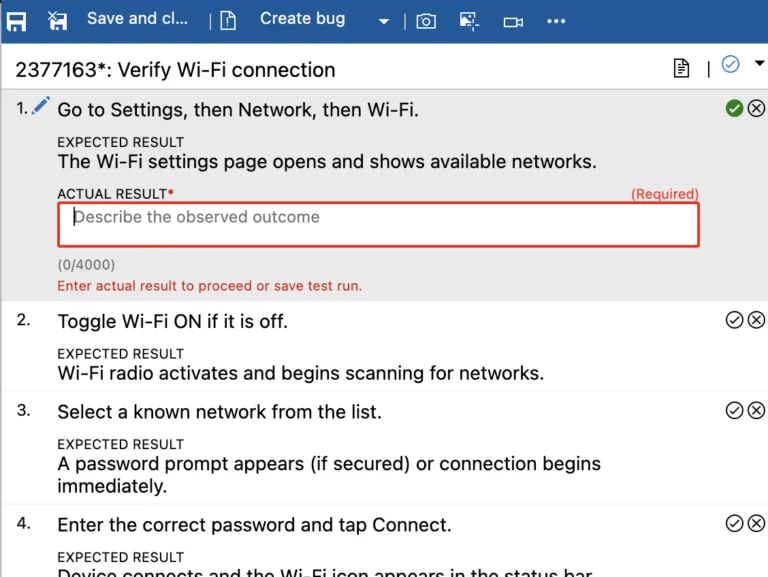
Learn more in the Actual Result documentation.
The feature is in public preview and your input is crucial. Please share your experiences, suggestions, and any issues you may encounter. You can send feedback directly via the Azure DevOps Developer Community or email us at azdo-testplans-uxr @ microsoft.com (remove the spaces).
Next steps
Note
These features will roll out over the next two to three weeks.
Head over to Azure DevOps and take a look.
How to provide feedback
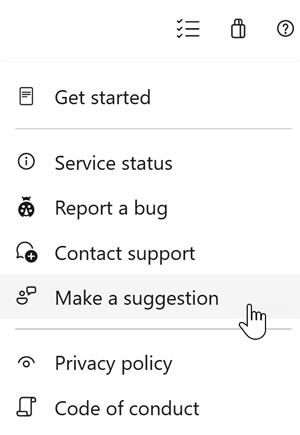
We would love to hear what you think about these features. Use the help menu to report a problem or provide a suggestion.
You can also get advice and your questions answered by the community on Stack Overflow.