Note
Access to this page requires authorization. You can try signing in or changing directories.
Access to this page requires authorization. You can try changing directories.
Features
New Wiki editor experience (public preview)
We've introduced a new Wiki editor powered by Monaco Editor, the same technology used in Visual Studio Code. The new editor provides an improved Markdown editing experience while maintaining existing Wiki functionality.
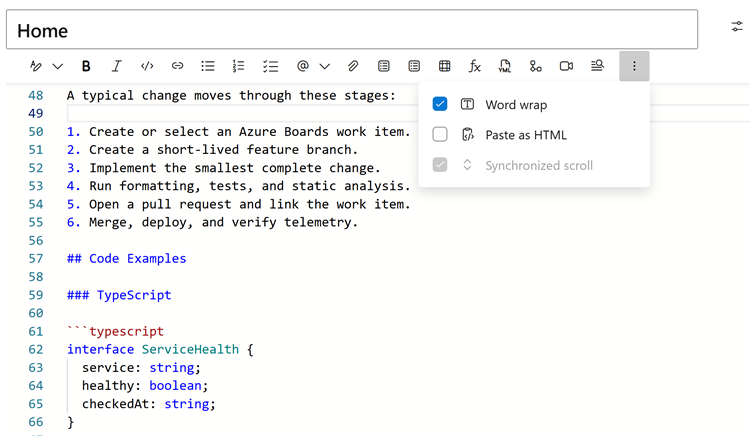
The new editor includes:
- Visual Studio Code-style editing with Markdown syntax highlighting and line numbers.
- Find and replace to quickly locate and update content.
- Improved undo and redo for formatting, pasting, attachments, and autocomplete.
- Autocomplete support for pull requests (
!), people (@), work items (#), Wiki links, and templates. - Persistent editor preferences for word wrap and synchronized scrolling.
To try the new editor, enable it through Preview features for yourself or your entire organization.
Improved Wiki page search
We've redesigned how Wiki page search works to improve responsiveness, especially for larger wikis. When you enter text in the Filter pages box, matching pages now appear faster.
The new solution also improves performance for other Wiki search operations, such as:
- Selecting a destination in the Move page panel.
- Viewing Wiki page suggestions when adding links in the Markdown editor.
- Filtering pages and folders by name in the Wiki page tree.
Note
Search results no longer follow custom page order. Pages appear alphabetically for a consistent, predictable experience. This order might differ from the custom order in the regular Wiki navigation tree.
Next steps
Note
These features will roll out over the next two to three weeks.
Head over to Azure DevOps and take a look.
How to provide feedback
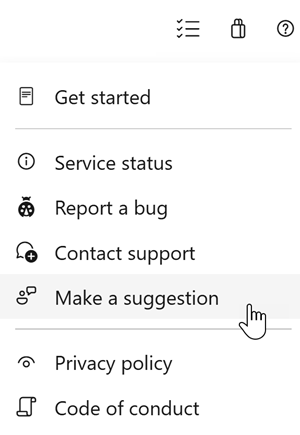
We would love to hear what you think about these features. Use the help menu to report a problem or provide a suggestion.
You can also get advice and your questions answered by the community on Stack Overflow.