Note
Access to this page requires authorization. You can try signing in or changing directories.
Access to this page requires authorization. You can try changing directories.
Change streams are a real-time stream of database changes that flows from your database to your application. This feature enables you to build reactive applications by subscribing to database changes, eliminating the need for continuous polling to detect changes.
Get started
The example code initiates a change stream on the exampleCollection collection, continuously monitoring for any changes. When a change is detected, it retrieves the change event and prints it in JSON format.
from pymongo.errors import OperationFailure, PyMongoError
from mongo_utils import get_collection, load_mongo_config, load_resume_token, ping_server, save_resume_token

def main() -> None:
    client = None
    try:
        _, _, source_collection_name, destination_collection_name = load_mongo_config()
        client, database, collection = get_collection()
        destination_collection = None
        if destination_collection_name:
            destination_collection = database[destination_collection_name]
            print(
                f"Mirroring change events from '{source_collection_name}' to '{destination_collection_name}'."
            )
        else:
            print(
                f"Watching source collection '{source_collection_name}' with publish-only mode (no destination collection configured)."
            )
        ping_server(client)

        # Try to resume from last known token
        resume_token = load_resume_token()
        if resume_token:
            print(f"Resuming from last token: {resume_token.get('_data', '')[:20]}...")
            stream = collection.watch(resume_after=resume_token)
        else:
            print("Starting fresh change stream (no prior token found).")
            stream = collection.watch()

        print("Watching for changes...")
        with stream:
            for change in stream:
                print(f"Change: {change['operationType']} on {change['ns']['coll']}")
                print(f"  Full doc: {change.get('fullDocument', {})}")

                if destination_collection is not None:
                    mirrored_event = {
                        "source": change.get("ns", {}),
                        "operationType": change.get("operationType"),
                        "documentKey": change.get("documentKey", {}),
                        "fullDocument": change.get("fullDocument", {}),
                        "resumeToken": change.get("_id", {}),
                    }
                    destination_collection.insert_one(mirrored_event)

                # Save token after each successful change
                save_resume_token(change["_id"])
                print()
    except OperationFailure as error:
        print("The change stream could not be opened on this collection.")
        print(error)
        print(
            "Check whether your Azure database deployment supports change streams for the configured aggregation properties."
        )
    except PyMongoError as error:
        print("Azure DocumentDB connection or driver error while watching for changes.")
        print(error)
    except KeyboardInterrupt:
        print("\nConsumer stopped by user.")
    finally:
        if client is not None:
            client.close()

if __name__ == "__main__":
    main()
Monitoring database changes with change streams
Let's understand the change stream output through the example.
In this change stream event, we see that a new record was inserted into the exampleCollection collection within the cs database, and the event details include the full content of the newly added document.
{
  "_id": { "_data": "AeARBpQ/AAAA" }, // "resume_token"
  "operationType": "insert",
  "fullDocument": {
    "_id": { "$oid": "66e6f63e6f49ecaabf794958" },
    "employee_id": "17986",
    "name": "John",
    "position": "Software Engineer",
    "department": "IT",
    "rating": 4
  },
  "ns": { "db": "cs", "coll": "exampleCollection" },
  "documentKey": { "_id": { "$oid": "66e6f63e6f49ecaabf794958" } }
}
Resume a change stream
Change streams are resumable by specifying a "resume token" to resumeAfter when opening the cursor. The _id field of each change event serves as the resume token. Store it durably and pass it back when reopening the stream.
Resuming from Active Change Logs
// Resume from the last stored\processed token
const stream = db.exampleCollection.watch([], {resumeAfter: savedResumeToken});

while (stream.hasNext()) {
  const event = stream.next();
  savedResumeToken = event._id;
  processEvent(event);
}
Recovering Streams from Historical checkpoints
Standard change streams are limited to events retained within the active 400-MB change log. Once rotated, older entries are archived and become inaccessible. Historical change streams remove this limitation by transparently retrieving archived logs, enabling stream replay or resumption from past timestamps.
// Replay all events since 2026-05-01 00:00:00 UTC, at current timestamp 2026-06-01 00:00:00 UTC
const startTime = new Timestamp(Math.floor(new Date("2026-05-01").getTime() / 1000), 1);

const stream = db.exampleCollection.watch([], {
  startAtOperationTime: startTime
});

while (stream.hasNext()) {
  printjson(stream.next());
}
Important
Change streams support resumability through the startAt, resumeAfter, and startAtOperationTime parameters. With point-in-time restore (PITR) log integration, stream recovery can extend up to 35 days or the cluster initialization point, whichever is earlier.
Processing historical checkpoints is recommended during low-traffic periods to minimize the effect of extra resource consumption. Keep more storage (for clusters with 128 GB or lower storage) depending on the volume of data to be processed from historical point.
updateDescription for field-level changes in change streams (preview)
For an update event, updateDescription identifies the fields that changed without requiring the application to compare the entire document. Use it when your change stream consumer only needs to react to specific field updates, removals, or array truncations.
The updateDescription document includes:
updatedFields: Fields added or assigned a new value.removedFields: Fields removed by the update.truncatedArrays: Arrays shortened by the update, including the field path and resulting size.
Enable updateDescription on the collection
db.runCommand({
  collMod: "exampleCollection",
  enableUpdateDescription: { enabled: true }
});
The following example checks whether position or rating changed and processes only the relevant values in the client application.
const stream = db.exampleCollection.watch();

while (stream.hasNext()) {
  const event = stream.next();

  if (event.operationType !== "update" || !event.updateDescription) {
    continue;
  }

  const changes = event.updateDescription;
  const positionChanged = Object.hasOwn(changes.updatedFields, "position");
  const ratingChanged = Object.hasOwn(changes.updatedFields, "rating");

  if (positionChanged || ratingChanged) {
    printjson({
      documentKey: event.documentKey,
      updatedFields: changes.updatedFields,
      removedFields: changes.removedFields,
      truncatedArrays: changes.truncatedArrays
    });
  }
}
A corresponding update event can include the following field-level description.
{
  "operationType": "update",
  "updateDescription": {
    "updatedFields": {
      "position": "SSE",
      "rating": 5
    },
    "removedFields": [],
    "truncatedArrays": []
  },
  "fullDocument": { ... }
}
Pre-images in change streams
By default, a change event shows you the document after a change. Enabling pre-images tells the system to also record the complete document before the change, exposed as fullDocumentBeforeChange in each event.
| Option | Behavior | When to use |
|---|---|---|
"off" (default) |
Pre-image never included | Standard streams |
"whenAvailable" |
Include if available; silently omit otherwise | Audit / change data capture (CDC) scenarios with graceful degradation |
"required" |
Include; throw an error if not available | Use when missing pre-images must be surfaced explicitly rather than skipped |
Important
Pre-images are only available for update, delete, and replace events.
Enabling pre-image increases storage and processing overhead, as the previous version of modified documents must be captured and retained for each eligible operation, which results in higher write amplification, extra I/O consumption, and increased change stream processing latency. To minimize long-term resource effects, continuous enablement in production environments is discouraged unless explicitly required by the workload.
Enable pre-images on the collection
db.runCommand({
  collMod: "exampleCollection",
  changeStreamPreAndPostImages: { enabled: true }
});
Sample event with pre-image enabled
{
  "_id": { "_data": "AWACAKM/AAAA" },
  "operationType": "update",
  "fullDocumentBeforeChange": {
    "_id": { "$oid": "66e6f63e6f49ecaabf794958" },
    "name": "John",
    "position": "Software Engineer",
    "rating": 4
  },
  "fullDocument": {
    "_id": { "$oid": "66e6f63e6f49ecaabf794958" },
    "name": "John",
    "position": "SSE",
    "rating": 5
  },
  "ns": { "db": "cs", "coll": "exampleCollection" },
  "documentKey": { "_id": { "$oid": "66e6f63e6f49ecaabf794958" } }
}
Multi-shard change streams (preview)
Azure DocumentDB supports change streams across physical shards in a multishard cluster. When you enable this capability, applications can monitor changes across the cluster through change streams without separately tracking changes from each individual physical shard.
Enable change streams from the Azure portal
To enable change streams for a multishard cluster:
Sign in to the Azure portal and navigate to your Azure DocumentDB cluster.
In the cluster resource menu, under Settings, select Features.
On the Features page, locate Change streams for multishard clusters.
Select Change streams for multishard clusters to open the feature configuration pane.
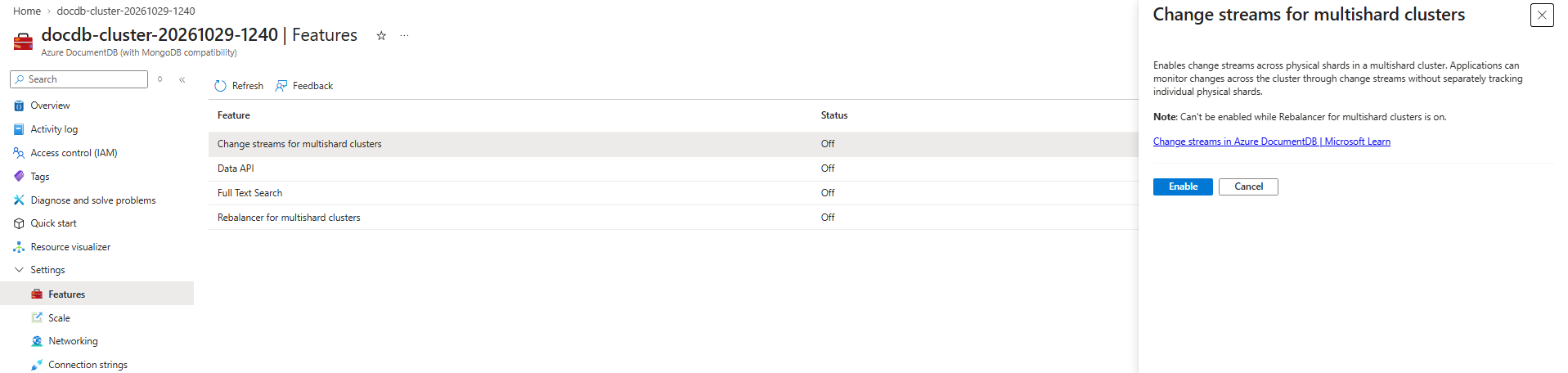
Review the feature information and prerequisites.
Important
You can't enable change streams for multishard clusters while Rebalancer for multishard clusters is enabled. Before enabling multishard change streams, verify that Rebalancer for multishard clusters is turned off for the cluster.
Select Enable.
After the operation completes, return to the Features page and verify that Change streams for multishard clusters shows as enabled.
After you enable change streams, applications can use change streams to monitor changes across physical shards in the multishard cluster. This capability removes the need for the application to independently track each physical shard.
Personalize data in change streams
Customize your change stream output by specifying an array of one or more pipeline stages during configuration. Supported operators include the following.
$addFields$match$project$set$unset
Example allows filtering insert operations only related to "IT" department.
const pipeline = [
  { $match: { operationType: "insert", "fullDocument.department": "IT" } },
  { $project: { "fullDocument.name": 1, "fullDocument.position": 1 } }
];

const stream = db.exampleCollection.watch(pipeline);
Limitations
- Cluster topology transition from single-shard to multi-shard breaks change stream resumability.
- Multi-shard deployments don't preserve global event ordering.
- Change stream cursors must be reinitialized after failover events, while resume capability remains preserved.
- UpdateDescription isn't supported for
updateevents within aggregation pipelines. However, update operators are supported. - Pre-image isn't supported for
historicalprocessing of logs, since the system didn't track the extra pre-image information. - Change streams don't support
showExpandedEvents.