Note
Access to this page requires authorization. You can try signing in or changing directories.
Access to this page requires authorization. You can try changing directories.
Build an intelligent AI agent by using Go and Azure DocumentDB. This quickstart demonstrates a two-agent architecture that performs semantic hotel search and makes personalized recommendations.
Important
This sample is a reference implementation that demonstrates agentic patterns in Go. It uses a custom-built agent architecture rather than an agent framework, which is the recommended approach for production agentic applications.
Prerequisites
You can use the Azure Developer CLI to create the required Azure resources by running the azd commands in the sample repository. For more information, see Deploy Infrastructure with Azure Developer CLI on GitHub.
Azure resources
Azure OpenAI resource, with the following model deployments in Microsoft Foundry:
gpt-4.1deployment (synthesizer agent). We recommend 50,000 tokens per minute (TPM) capacity.gpt-4.1-minideployment (planner agent). We recommend 30,000 TPM capacity.text-embedding-3-smalldeployment (embeddings). We recommend 10,000 TPM capacity.- Token quotas: To avoid rate limiting, configure sufficient TPM for each deployment.
- See Manage Azure OpenAI quotas for quota management.
- If you encounter 429 errors, increase your TPM quota or reduce request frequency.
Azure DocumentDB (with MongoDB compatibility) cluster, with vector search support.
- Cluster tier requirements based on vector index algorithm:
- IVF (Inverted File Index): M10 or higher (default algorithm)
- HNSW (Hierarchical Navigable Small World): M30 or higher (graph-based)
- DiskANN: M40 or higher (optimized for large-scale)
- Firewall configuration: required. Without proper firewall configuration, connection attempts fail.
- Add your client IP address to the cluster's firewall rules. For more information, see Grant access from your IP address.
- For passwordless authentication, enable role-based access control (RBAC).
- Cluster tier requirements based on vector index algorithm:
Development tools
Architecture
The sample uses a two-agent architecture in which each agent has a specific role.

This sample uses a custom implementation with the OpenAI SDK directly, without relying on an agent framework. It uses OpenAI function calling for tool integration, and it follows a linear workflow between the agents and the search tool. The execution is stateless, with no conversation history, making it suitable for single-turn query and response scenarios.
Get the sample code
To follow the quickstart, clone or download the repository Azure DocumentDB Samples on GitHub to your local machine.
Go to the project directory:
cd ai/vector-search-agent-go
Deploy Azure resources (optional)
If you want to use the Azure Developer CLI to provision all required resources:
Provision and deploy the infrastructure:
azd upWhen prompted, select your subscription and a location (for example,
swedencentraloreastus2).After deployment completes, generate your
.envfile from the deployed environment:azd env get-values > .env
Tip
Run azd env get-values at any time to view the current environment values.
To export these values to a .env file, run:
azd env get-values > .env
The infrastructure deploys Azure OpenAI with the Standard SKU (not GlobalStandard). You can customize the SKU and model parameters by using azd env set before you deploy. See the sample's README file for available parameters.
Customize Azure OpenAI deployment (optional)
The infrastructure deploys Azure OpenAI with default model and region settings defined in infra/main.bicepparam. Before running azd up, you can customize any of these parameters:
| Parameter | Default | Description |
|---|---|---|
AZURE_OPENAI_LOCATION |
Same as AZURE_LOCATION |
Region for OpenAI resource deployment |
AZURE_OPENAI_CHAT_MODEL |
gpt-4.1-mini |
Chat completion model name |
AZURE_OPENAI_CHAT_MODEL_VERSION |
2025-04-14 |
Chat model version |
AZURE_OPENAI_CHAT_MODEL_TYPE |
Standard |
Deployment type (Standard or GlobalStandard) |
AZURE_OPENAI_SYNTH_MODEL |
gpt-4.1 |
Synthesis/reasoning model name |
AZURE_OPENAI_SYNTH_MODEL_VERSION |
2025-04-14 |
Synthesis model version |
AZURE_OPENAI_SYNTH_MODEL_TYPE |
Standard |
Deployment type (Standard or GlobalStandard) |
AZURE_OPENAI_EMBEDDING_MODEL |
text-embedding-3-small |
Embedding model name |
AZURE_OPENAI_EMBEDDING_MODEL_VERSION |
1 |
Embedding model version |
AZURE_OPENAI_EMBEDDING_MODEL_TYPE |
Standard |
Deployment type (Standard or GlobalStandard) |
To override a default, use azd env set before running azd up:
# Deploy OpenAI to a different region than your other resources
azd env set AZURE_OPENAI_LOCATION swedencentral

# Switch deployment type from Standard (default) to GlobalStandard
azd env set AZURE_OPENAI_CHAT_MODEL_TYPE GlobalStandard

# Change the chat model
azd env set AZURE_OPENAI_CHAT_MODEL gpt-4.1-mini
azd env set AZURE_OPENAI_CHAT_MODEL_VERSION 2025-04-14
Note
Not all models are available in all regions or with all deployment types. Check Azure OpenAI model availability by region for supported combinations.
Troubleshoot Azure OpenAI provisioning failures
If azd up fails when creating the Azure OpenAI resource or model deployments, the problem is typically one of:
- Region availability: The model isn't available in your chosen region. Try
azd env set AZURE_OPENAI_LOCATION <different-region>(for example,eastus2orswedencentral). - Deployment type mismatch: The model doesn't support the selected deployment type in your region. Switch between
StandardandGlobalStandardusingazd env set AZURE_OPENAI_CHAT_MODEL_TYPE GlobalStandard. - Quota limits: Your subscription reached its quota for the selected model, region, or deployment type combination. Check your quota in the Azure portal under Azure OpenAI > Quotas. You can request a quota increase or try a different region where you have available capacity.
- Model retired or unavailable: Azure OpenAI periodically retires older model versions. If deployment fails because a model version is no longer available, update to a supported version using
azd env set AZURE_OPENAI_CHAT_MODEL_VERSION <new-version>(or the equivalent for embedding/synth models). Check Azure OpenAI model retirements for current model lifecycle status.
After changing any parameters, run azd up again to retry the deployment.
Configure environment variables
If you created your Azure resources manually or want to use your own existing resources, configure environment variables for the application to connect to Azure OpenAI and Azure DocumentDB. If you used azd up, you can skip this step. The necessary environment variables are automatically set in the azd environment, and you can access the variables with azd env get-values.
Create a .env file in your project root to configure environment variables. You can create a copy of the .env.sample file from the repository.
Edit the .env file and replace these placeholder values:
AZURE_OPENAI_PLANNER_DEPLOYMENT: Your gpt-4.1-mini deployment name.AZURE_OPENAI_SYNTH_DEPLOYMENT: Your gpt-4.1 deployment name.AZURE_OPENAI_EMBEDDING_DEPLOYMENT: Your text-embedding-3-small deployment name.
This quickstart uses a two-agent architecture (planner + synthesizer), with three model deployments (two chat models + embeddings). The environment variables are configured for each model deployment.
You can choose between passwordless authentication that uses Azure Identity (recommended), or a traditional connection string and API key.
Option 1: Passwordless authentication
Use passwordless authentication with both Azure OpenAI and Azure DocumentDB. Set USE_PASSWORDLESS=true, AZURE_OPENAI_ENDPOINT, and AZURE_DOCUMENTDB_CLUSTER.
# Enable passwordless authentication
USE_PASSWORDLESS=true

# Azure OpenAI Configuration (passwordless)
AZURE_OPENAI_ENDPOINT=your-openai-endpoint

# Azure DocumentDB (passwordless)
AZURE_DOCUMENTDB_CLUSTER=your-mongo-cluster-name
AZURE_DOCUMENTDB_DATABASENAME=Hotels
AZURE_DOCUMENTDB_COLLECTION=hotel_data
AZURE_DOCUMENTDB_INDEX_NAME=vectorIndex
Prerequisites for passwordless authentication:
Ensure you're signed in to Azure:
az login.Grant your identity the following roles:
Cognitive Services OpenAI Useron the Azure OpenAI resource.DocumentDB Account ContributorandCosmos DB Account Reader Roleon the Azure DocumentDB resource.
For more information about assigning roles, see Assign Azure roles by using the Azure portal.
Option 2: Connection string and API key authentication
Use key-based authentication by setting USE_PASSWORDLESS=false (or omitting it). Provide AZURE_OPENAI_API_KEY and AZURE_DOCUMENTDB_CONNECTION_STRING values in your .env file.
# Disable passwordless authentication
USE_PASSWORDLESS=false

# Azure OpenAI Configuration (API key)
AZURE_OPENAI_ENDPOINT=your-openai-endpoint
AZURE_OPENAI_API_KEY=your-azure-openai-api-key

# Azure DocumentDB (connection string)
AZURE_DOCUMENTDB_CONNECTION_STRING=mongodb+srv://username:password@cluster.mongocluster.cosmos.azure.com/
AZURE_DOCUMENTDB_DATABASENAME=Hotels
AZURE_DOCUMENTDB_COLLECTION=hotel_data
AZURE_DOCUMENTDB_INDEX_NAME=vectorIndex
Tip
Unlike some databases, Azure DocumentDB allows you to create and drop vector indexes at any time after you create a container. You don't need to define the vector indexing policy at the time that you create a container.
Project structure
The project follows the standard Go project layout. Your directory structure looks like the following structure:
mongo-vcore-agent-go/
├── cmd/
│   ├── agent/          # Main agent application
│   │   └── main.go
│   ├── upload/         # Data upload utility
│   │   └── main.go
│   └── cleanup/        # Database cleanup utility
│       └── main.go
├── internal/
│   ├── agents/         # Agent and tool implementations
│   │   ├── agents.go   # Planner and synthesizer agents
│   │   └── tools.go    # Vector search tool
│   ├── clients/        # Azure OpenAI client
│   │   └── openai.go
│   ├── models/         # Hotel data models
│   │   └── hotel.go
│   ├── prompts/        # System prompts and tool definitions
│   │   └── prompts.go
│   └── vectorstore/    # Azure DocumentDB vector store operations
│       └── store.go
├── .env                # Environment variable configuration
├── go.mod              # Go module file
└── go.sum              # Go module checksum file
Explore the code
This section walks through the core components of the AI agent workflow. It highlights how the agents process requests, how tools connect the AI to the database, and how prompts guide the AI's behavior.
Agent application
The cmd/agent/main.go file orchestrates an AI-powered hotel recommendation system.
The application uses two Azure services:
- Azure OpenAI uses AI models that understand queries and generate recommendations.
- Azure DocumentDB stores hotel data and performs vector similarity searches.
Agent and tool components
The three components work together to process the hotel search request:
- Planner agent interprets the request and decides how to search.
- Vector search tool finds hotels similar to what the planner agent describes.
- Synthesizer agent writes a helpful recommendation based on search results.
Application workflow
The application processes a hotel search request in two steps:
Planning: The workflow calls the planner agent, which analyzes the user's query (like "hotels near running trails") and searches the database for matching hotels.
Synthesizing: The workflow calls the synthesizer agent, which reviews the search results and writes a personalized recommendation explaining which hotels best match the request.
// Run planner agent
hotelContext, err := plannerAgent.Run(ctx, query, nearestNeighbors)
if err != nil {
    log.Fatalf("Planner agent failed: %v", err)
}

if debug {
    fmt.Printf("\n--- HOTEL CONTEXT ---\n%s\n", hotelContext)
}

// Run synthesizer agent
finalAnswer, err := synthesizerAgent.Run(ctx, query, hotelContext)
if err != nil {
    log.Fatalf("Synthesizer agent failed: %v", err)
}
Agents
The internal/agents/agents.go source file implements the planner and synthesizer agents that work together to process hotel search requests.
Planner agent
The planner agent is the decision maker that determines how to search for hotels.
The planner agent receives the user's natural language query and sends it to an AI model along with available tools it can use. The AI decides to call the vector search tool and provides search parameters. The agent then extracts the tool name and arguments from the AI's response, runs the search tool, and returns the matching hotels. Instead of hardcoding search logic, the AI interprets what the user wants and chooses how to search. This technique makes the system flexible for different types of queries.
// PlannerAgent orchestrates the tool calling
type PlannerAgent struct {
    openAIClients *clients.OpenAIClients
    searchTool    *VectorSearchTool
    debug         bool
}

// NewPlannerAgent creates a new planner agent
func NewPlannerAgent(openaiClients *clients.OpenAIClients, searchTool *VectorSearchTool, debug bool) *PlannerAgent {
    return &PlannerAgent{
        openAIClients: openaiClients,
        searchTool:    searchTool,
        debug:         debug,
    }
}

// Run executes the planner agent workflow
func (a *PlannerAgent) Run(ctx context.Context, userQuery string, nearestNeighbors int) (string, error) {
    fmt.Println("\n--- PLANNER ---")

    userMessage := fmt.Sprintf(
        `Search for hotels matching this request: "%s". Use nearestNeighbors=%d.`,
        userQuery,
        nearestNeighbors,
    )

    // Get tool definition
    toolDef := a.searchTool.GetToolDefinition()

    // Call planner with tool definitions
    resp, err := a.openAIClients.ChatCompletionWithTools(ctx, prompts.PlannerSystemPrompt, userMessage, []openai.ChatCompletionToolUnionParam{toolDef})
    if err != nil {
        return "", fmt.Errorf("planner failed: %w", err)
    }

    // Extract tool call
    toolName, argsMap, err := clients.ExtractToolCall(resp)
    if err != nil {
        return "", fmt.Errorf("failed to extract tool call: %w", err)
    }

    if toolName != prompts.ToolName {
        return "", fmt.Errorf("unexpected tool called: %s", toolName)
    }

    // Parse arguments using typed struct
    args, err := parseToolArgumentsFromMap(argsMap)
    if err != nil {
        return "", fmt.Errorf("failed to parse tool arguments: %w", err)
    }

    // Use default if nearestNeighbors not provided
    if args.NearestNeighbors == 0 {
        args.NearestNeighbors = nearestNeighbors
    }

    fmt.Printf("Tool: %s\n", toolName)
    fmt.Printf("Query: %s\n", args.Query)
    fmt.Printf("K: %d\n", args.NearestNeighbors)

    // Execute the tool
    searchResults, err := a.searchTool.Execute(ctx, args.Query, args.NearestNeighbors)
    if err != nil {
        return "", fmt.Errorf("search tool execution failed: %w", err)
    }

    return searchResults, nil
}
Synthesizer agent
The synthesizer agent is the writer that creates helpful recommendations.
The synthesizer agent receives the original user query along with the hotel search results. It sends everything to an AI model with instructions for writing recommendations. It returns a natural language response that compares hotels and explains the best options. This approach matters because raw search results aren't user-friendly. The synthesizer transforms database records into a conversational recommendation that explains why certain hotels match the user's needs.
// NewSynthesizerAgent creates a new synthesizer agent
func NewSynthesizerAgent(openaiClients *clients.OpenAIClients, debug bool) *SynthesizerAgent {
    return &SynthesizerAgent{
        openAIClients: openaiClients,
        debug:         debug,
    }
}

// Run executes the synthesizer agent workflow
func (a *SynthesizerAgent) Run(ctx context.Context, userQuery, hotelContext string) (string, error) {
    fmt.Println("\n--- SYNTHESIZER ---")
    fmt.Printf("Context size: %d characters\n", len(hotelContext))

    userMessage := prompts.CreateSynthesizerUserPrompt(userQuery, hotelContext)

    // Call synthesizer (no tools)
    finalAnswer, err := a.openAIClients.ChatCompletion(ctx, prompts.SynthesizerSystemPrompt, userMessage)
    if err != nil {
        return "", fmt.Errorf("synthesizer failed: %w", err)
    }

    return finalAnswer, nil
}
Agent tools
The internal/agents/tools.go source file defines the vector search tool that the planner agent uses.
The tools file defines a search tool that the AI agent can use to find hotels. This tool is how the agent connects to the database. The AI doesn't search the database directly. It asks to use the search tool, and the tool runs the actual search.
Tool definition
The GetToolDefinition method describes the tool to the AI model in a format it understands. It specifies the tool's name, a description of what the tool does, and the parameters defining what inputs the tool needs. This definition lets the AI know the tool exists and how to use it correctly.
// GetToolDefinition returns the Azure OpenAI tool definition
func (t *VectorSearchTool) GetToolDefinition() openai.ChatCompletionToolUnionParam {
    paramSchema := map[string]any{
        "type": "object",
        "properties": map[string]any{
            "query": map[string]any{
                "type":        "string",
                "description": "Natural language search query describing desired hotel characteristics",
            },
            "nearestNeighbors": map[string]any{
                "type":        "integer",
                "description": "Number of results to return (1-20)",
                "default":     5,
            },
        },
        "required": []string{"query", "nearestNeighbors"},
    }

    return openai.ChatCompletionToolUnionParam{
        OfFunction: &openai.ChatCompletionFunctionToolParam{
            Function: openai.FunctionDefinitionParam{
                Name:        prompts.ToolName,
                Description: openai.String(prompts.ToolDescription),
                Parameters:  paramSchema,
            },
        },
    }
}
Tool execution
When the AI calls the tool, the Execute method runs. It generates an embedding by converting the text query into a numeric vector. The method uses Azure OpenAI's embedding model. Then it searches the database by sending the vector to Azure DocumentDB, which finds hotels with similar descriptions (vectors). Finally, it formats results by converting the database records into readable text that the synthesizer agent can understand.
// Execute performs the vector search
func (t *VectorSearchTool) Execute(ctx context.Context, query string, nearestNeighbors int) (string, error) {
    // Generate embedding for query
    queryVector, err := t.openAIClients.GenerateEmbedding(ctx, query)
    if err != nil {
        return "", fmt.Errorf("failed to generate embedding: %w", err)
    }

    // Perform vector search
    results, err := t.vectorStore.VectorSearch(ctx, queryVector, nearestNeighbors)
    if err != nil {
        return "", fmt.Errorf("vector search failed: %w", err)
    }

    // Format results for synthesizer
    var formattedResults []string
    for i, result := range results {
        fmt.Printf("Hotel #%d: %s, Score: %.6f\n", i+1, result.Hotel.HotelName, result.Score)
        formattedResults = append(formattedResults, vectorstore.FormatHotelForSynthesizer(result))
    }

    return strings.Join(formattedResults, "\n\n"), nil
}
Why use this pattern?
Separating the tool from the agent provides flexibility. The AI decides when to search and what to search for, while the tool handles how to search. You can add more tools without changing the agent logic.
Prompts
The internal/prompts/prompts.go source file contains system prompts and tool definitions for the agents.
The prompts file defines the instructions and context given to the AI models for both the planner and synthesizer agents. These prompts guide the AI's behavior and ensure it understands its role in the workflow.
The quality of AI responses depends heavily on clear instructions. These prompts set boundaries, define the output format, and focus the AI on the user's goal of making a decision. Without modifying any code, you can customize these prompts to change how the agents behave.
const PlannerSystemPrompt = `You are a hotel search planner. Your job is to help users find hotels by calling the search tool.

CRITICAL INSTRUCTION: You MUST call the "search_hotels_collection" tool for every request. This is the ONLY way to search the database.

When you call the tool, use these parameters:
- query: A clear, detailed natural language description of what the user is looking for. Expand vague requests (e.g., "nice hotel" → "hotel with high ratings, good reviews, and quality amenities").
- nearestNeighbors: Number of results (1-20). Use 3-5 for specific requests, 10-15 for broader searches.

EXAMPLES of how you should call the tool:
- User: "cheap hotel" → Call tool with query: "budget-friendly hotel with good value and affordable rates", nearestNeighbors: 10
- User: "hotel near downtown with parking" → Call tool with query: "hotel near downtown with good parking and wifi", nearestNeighbors: 5

IMPORTANT: Always call the tool. Do not provide answers without calling the tool first.`

const SynthesizerSystemPrompt = `You are an expert hotel recommendation assistant using vector search results.
Only use the TOP 3 results provided. Do not request additional searches or call other tools.

GOAL: Provide a concise comparative recommendation to help the user choose between the top 3 options.

REQUIREMENTS:
- Compare only the top 3 results across the most important attributes: rating, score, location, price-level (if available), and key tags (parking, wifi, pool).
- Identify the main tradeoffs in one short sentence per tradeoff.
- Give a single clear recommendation with one short justification sentence.
- Provide up to two alternative picks (one sentence each) explaining when they are preferable.

FORMAT CONSTRAINTS:
- Plain text only (no markdown).
- Keep the entire response under 220 words.
- Use simple bullets (•) or numbered lists and short sentences (preferably <25 words per sentence).
- Preserve hotel names exactly as provided in the tool summary.

Do not add extra commentary, marketing language, or follow-up questions. If information is missing and necessary to choose, state it in one sentence and still provide the best recommendation based on available data.`
Run the sample
Before running the agent, upload hotel data with embeddings. The
cmd/upload/main.gocommand loads hotels from the JSON file, and generates embeddings for each hotel by usingtext-embedding-3-small. The command then inserts documents into Azure DocumentDB, and creates a vector index.go run cmd/upload/main.goRun the hotel recommendation agent by using the
cmd/agent/main.gocommand. The agent calls the planner agent, the vector search, and the synthesizer agent. The output includes similarity scores, and the synthesizer agent's comparative analysis and recommendations.go run cmd/agent/main.goQuery: quintessential lodging near running trails, eateries, retail Nearest Neighbors: 5 --- PLANNER --- Tool: search_hotels_collection Query: quintessential lodging near running trails, eateries, and retail shops with good amenities and access to outdoor activities K: 5 Hotel #1: Nordick's Valley Motel, Score: 0.498665 Hotel #2: White Mountain Lodge & Suites, Score: 0.487320 Hotel #3: Trails End Motel, Score: 0.479854 Hotel #4: Country Comfort Inn, Score: 0.474320 Hotel #5: Lakefront Captain Inn, Score: 0.457873 --- SYNTHESIZER --- Context size: 3233 characters --- FINAL ANSWER --- 1. COMPARISON SUMMARY: • Nordick's Valley Motel has the highest rating (4.5) and offers free parking, air conditioning, and continental breakfast. It is located in Washington D.C., near historic attractions and trails. • White Mountain Lodge & Suites is a resort with unique amenities like a pool, restaurant, and meditation gardens, but has the lowest rating (2.4). It is located in Denver, surrounded by forest trails. • Trails End Motel is budget-friendly with a moderate rating (3.2), free parking, free wifi, and a restaurant. It is close to downtown Scottsdale and eateries. Key tradeoffs: - Nordick's Valley Motel excels in rating and proximity to historic attractions but lacks a pool or free wifi. - White Mountain Lodge & Suites offers resort-style amenities and forest trails but has the lowest rating. - Trails End Motel balances affordability and essential amenities but has fewer unique features compared to the others. 2. BEST OVERALL: Nordick's Valley Motel is the best choice for its high rating, proximity to trails and attractions, and free parking. 3. ALTERNATIVE PICKS: • Choose White Mountain Lodge & Suites if you prioritize resort amenities and forest trails over rating. • Choose Trails End Motel if affordability and proximity to downtown Scottsdale are your main concerns.
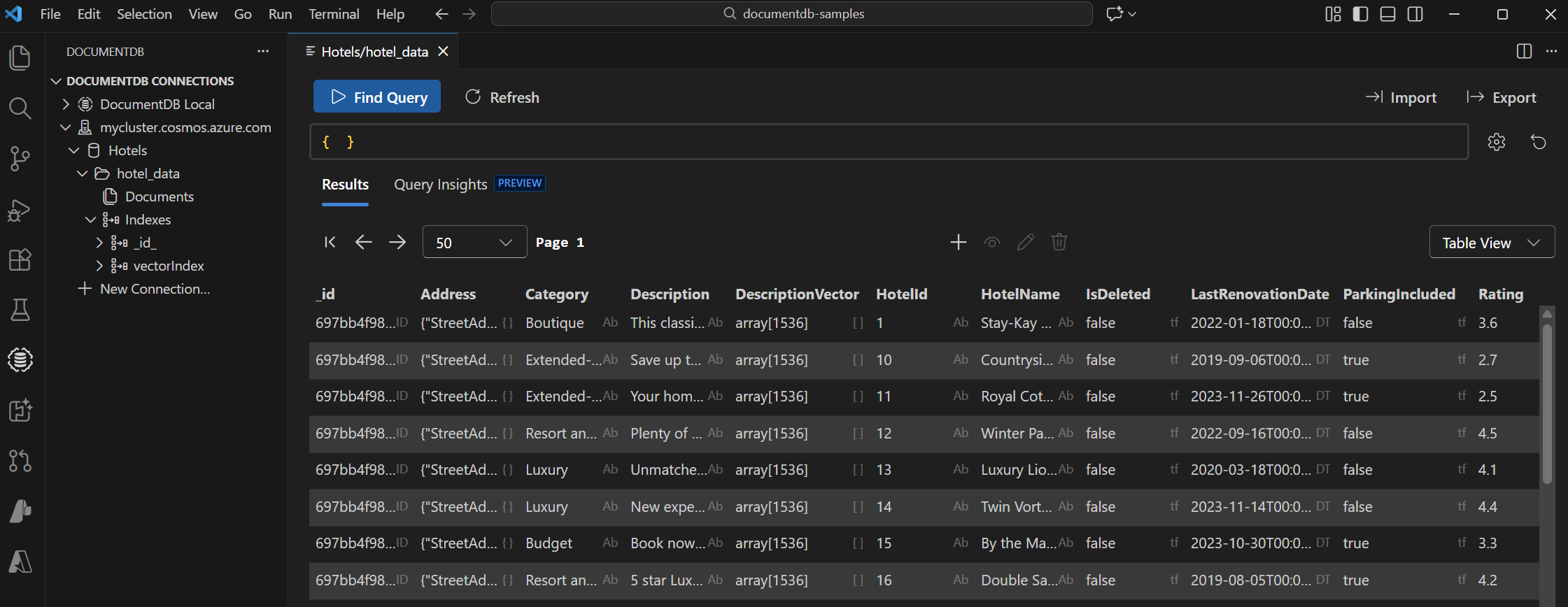
View and manage data in Visual Studio Code
Select the Azure DocumentDB extension in Visual Studio Code to connect to your Azure DocumentDB account.
View the data and indexes in the Hotels database.
Clean up resources
Use the cleanup command to delete the test database when you're finished. Run the following command:
go run cmd/cleanup/main.go
When you no longer need them, delete the resource group, Azure DocumentDB account, and Azure OpenAI resource to avoid unnecessary costs.