Note
Access to this page requires authorization. You can try signing in or changing directories.
Access to this page requires authorization. You can try changing directories.
Use vector search in Azure DocumentDB with the Go client library to store and query vector data efficiently.
This quickstart uses a sample hotel dataset in a JSON file with pre-calculated vectors from the text-embedding-3-small model. The dataset includes hotel names, locations, descriptions, and vector embeddings.
Find the sample code on GitHub.
Prerequisites
- An Azure subscription. If you don't have an Azure subscription, create a free account.
An existing Azure DocumentDB cluster. If you don't have a cluster, create a new cluster.
-
Custom domain is configured.
text-embedding-3-smallmodel is deployed.
Visual Studio Code. Ensure that you have the Azure DocumentDB extension.
Use the Bash environment in Azure Cloud Shell. For more information, see Get started with Azure Cloud Shell.

If you prefer to run CLI reference commands locally, install the Azure CLI. If you're running on Windows or macOS, consider running Azure CLI in a Docker container. For more information, see How to run the Azure CLI in a Docker container.
If you're using a local installation, sign in to the Azure CLI by using the az login command. To finish the authentication process, follow the steps displayed in your terminal. For other sign-in options, see Authenticate to Azure using Azure CLI.
When you're prompted, install the Azure CLI extension on first use. For more information about extensions, see Use and manage extensions with the Azure CLI.
Run az version to find the version and dependent libraries that are installed. To upgrade to the latest version, run az upgrade.
Tip
To customize Azure OpenAI model parameters before deployment, see the section Customize Azure OpenAI deployment later in this article.
- Go version 1.24 or later.
Create a data file with vectors
Create a new data directory for the hotels data file:
mkdir dataCopy the
Hotels_Vector.jsonraw data file with vectors to yourdatadirectory.
Create a Go project
Create a new directory for your project and open it in Visual Studio Code:
mkdir vector-search-quickstart
cd vector-search-quickstart
code .
Start a Go module:
go mod init vector-search-quickstartInstall the required Go packages:
go get go.mongodb.org/mongo-driver go get github.com/Azure/azure-sdk-for-go/sdk/azcore go get github.com/Azure/azure-sdk-for-go/sdk/azidentity go get github.com/openai/openai-go/v3 go get github.com/joho/godotenvgo.mongodb.org/mongo-driver: The MongoDB Go driver.github.com/Azure/azure-sdk-for-go/sdk/azcore: The Azure SDK core utilities for HTTP pipelines and auth.github.com/Azure/azure-sdk-for-go/sdk/azidentity: The Azure Identity library for passwordless token-based authentication.github.com/openai/openai-go/v3: The OpenAI Go client library to create vectors.github.com/joho/godotenv: The environment variable loading from.envfiles.
Create a
.envfile in your project root for environment variables:# Identity for local developer authentication with Azure CLI AZURE_TOKEN_CREDENTIALS=AzureCliCredential # Azure OpenAI Embedding Settings AZURE_OPENAI_EMBEDDING_MODEL=text-embedding-3-small AZURE_OPENAI_EMBEDDING_API_VERSION=2023-05-15 AZURE_OPENAI_EMBEDDING_ENDPOINT=<AZURE_OPENAI_ENDPOINT> EMBEDDING_SIZE_BATCH=16 # Azure DocumentDB configuration MONGO_CLUSTER_NAME=<DOCUMENTDB_NAME> # Data file DATA_FILE_WITH_VECTORS=../data/Hotels_Vector.json EMBEDDED_FIELD=DescriptionVector EMBEDDING_DIMENSIONS=1536 LOAD_SIZE_BATCH=50Replace the placeholder values in the
.envfile with your own information:AZURE_OPENAI_EMBEDDING_ENDPOINT: Your Azure OpenAI resource endpoint URL.MONGO_CLUSTER_NAME: Your Azure DocumentDB resource name.
We recommend that you use passwordless authentication, but this type of authentication requires additional setup. For more information on setting up managed identity and the full range of your authentication options, see Authenticate Go apps to Azure services by using the Azure Identity library.
Create Go source files for vector search
Continue the project by creating code files for vector search.
Create an src directory for your Go files. Add two files, diskann.go and utils.go, for the DiskANN index implementation.
mkdir src
touch src/diskann.go
touch src/utils.go
When you finish, the project structure looks like this example:
data
│── Hotels_Vector.json
vector-search-quickstart
├── .env
├── go.mod
├── src
│   ├── diskann.go
│   └── utils.go
Tip
Unlike some databases, Azure DocumentDB allows you to create and drop vector indexes at any time after you create a container. You don't need to define the vector indexing policy at the time that you create a container.
Create the code for vector search
Add the following code to the src/diskann.go file:
package main

import (
    "context"
    "fmt"
    "log"
    "strings"
    "time"

    "go.mongodb.org/mongo-driver/bson"
    "go.mongodb.org/mongo-driver/mongo"

    "github.com/openai/openai-go/v3"
)

// CreateDiskANNVectorIndex creates a DiskANN vector index on the specified field
func CreateDiskANNVectorIndex(ctx context.Context, collection *mongo.Collection, vectorField string, dimensions int) error {
    fmt.Printf("Creating DiskANN vector index on field '%s'...\n", vectorField)

    // Drop any existing vector indexes on this field first
    err := DropVectorIndexes(ctx, collection, vectorField)
    if err != nil {
        fmt.Printf("Warning: Could not drop existing indexes: %v\n", err)
    }

    // Use the native MongoDB command for DocumentDB vector indexes
    // Note: Must use bson.D for commands to preserve order and avoid "multi-key map" errors
    indexCommand := bson.D{
        {"createIndexes", collection.Name()},
        {"indexes", []bson.D{
            {
                {"name", fmt.Sprintf("diskann_index_%s", vectorField)},
                {"key", bson.D{
                    {vectorField, "cosmosSearch"}, // DocumentDB vector search index type
                }},
                {"cosmosSearchOptions", bson.D{
                    // DiskANN algorithm configuration
                    {"kind", "vector-diskann"},

                    // Vector dimensions must match the embedding model
                    {"dimensions", dimensions},

                    // Vector similarity metric - cosine is good for text embeddings
                    {"similarity", "COS"},

                    // Maximum degree: number of edges per node in the graph
                    // Higher values improve accuracy but increase memory usage
                    {"maxDegree", 20},

                    // Build parameter: candidates evaluated during index construction
                    // Higher values improve index quality but increase build time
                    {"lBuild", 10},
                }},
            },
        }},
    }

    // Execute the createIndexes command directly
    var result bson.M
    err = collection.Database().RunCommand(ctx, indexCommand).Decode(&result)
    if err != nil {
        // Check if it's a tier limitation and suggest alternatives
        if strings.Contains(err.Error(), "not enabled for this cluster tier") {
            fmt.Println("\nDiskANN indexes require a higher cluster tier.")
            fmt.Println("Try one of these alternatives:")
            fmt.Println("  • Upgrade your DocumentDB cluster to a higher tier")
            fmt.Println("  • Use HNSW instead: go run src/hnsw.go")
            fmt.Println("  • Use IVF instead: go run src/ivf.go")
        }
        return fmt.Errorf("error creating DiskANN vector index: %v", err)
    }

    fmt.Println("DiskANN vector index created successfully")
    return nil
}

// PerformDiskANNVectorSearch performs a vector search using DiskANN algorithm
func PerformDiskANNVectorSearch(ctx context.Context, collection *mongo.Collection, openAIClient openai.Client, queryText, vectorField, modelName string, topK int) ([]SearchResult, error) {
    fmt.Printf("Performing DiskANN vector search for: '%s'\n", queryText)

    // Generate embedding for the query text
    queryEmbedding, err := GenerateEmbedding(ctx, openAIClient, queryText, modelName)
    if err != nil {
        return nil, fmt.Errorf("error generating embedding: %v", err)
    }

    // Construct the aggregation pipeline for vector search
    // DocumentDB uses $search with cosmosSearch
    pipeline := []bson.M{
        {
            "$search": bson.M{
                // Use cosmosSearch for vector operations in DocumentDB
                "cosmosSearch": bson.M{
                    // The query vector to search for
                    "vector": queryEmbedding,

                    // Field containing the document vectors to compare against
                    "path": vectorField,

                    // Number of final results to return
                    "k": topK,
                },
            },
        },
        {
            // Add similarity score to the results
            "$project": bson.M{
                "document": "$$ROOT",
                // Add search score from metadata
                "score": bson.M{"$meta": "searchScore"},
            },
        },
    }

    // Execute the aggregation pipeline
    cursor, err := collection.Aggregate(ctx, pipeline)
    if err != nil {
        return nil, fmt.Errorf("error performing DiskANN vector search: %v", err)
    }
    defer cursor.Close(ctx)

    var results []SearchResult
    for cursor.Next(ctx) {
        var result SearchResult
        if err := cursor.Decode(&result); err != nil {
            fmt.Printf("Warning: Could not decode result: %v\n", err)
            continue
        }
        results = append(results, result)
    }

    if err := cursor.Err(); err != nil {
        return nil, fmt.Errorf("cursor error: %v", err)
    }

    return results, nil
}

// main function demonstrates DiskANN vector search functionality
func main() {
    ctx := context.Background()

    // Load configuration from environment variables
    config := LoadConfig()

    fmt.Println("\nInitializing MongoDB and Azure OpenAI clients...")
    mongoClient, azureOpenAIClient, err := GetClientsPasswordless()
    if err != nil {
        log.Fatalf("Failed to initialize clients: %v", err)
    }
    defer mongoClient.Disconnect(ctx)

    // Get database and collection
    database := mongoClient.Database(config.DatabaseName)
    collection := database.Collection("hotels_diskann")

    // Load data with embeddings
    fmt.Printf("\nLoading data from %s...\n", config.DataFile)
    data, err := ReadFileReturnJSON(config.DataFile)
    if err != nil {
        log.Fatalf("Failed to load data: %v", err)
    }
    fmt.Printf("Loaded %d documents\n", len(data))

    // Verify embeddings are present
    var documentsWithEmbeddings []map[string]interface{}
    for _, doc := range data {
        if _, exists := doc[config.VectorField]; exists {
            documentsWithEmbeddings = append(documentsWithEmbeddings, doc)
        }
    }

    if len(documentsWithEmbeddings) == 0 {
        log.Fatalf("No documents found with embeddings in field '%s'. Please run create_embeddings.go first.", config.VectorField)
    }

    // Insert data into collection
    fmt.Printf("\nInserting data into collection '%s'...\n", config.CollectionName)

    // Clear existing data to ensure clean state
    deleteResult, err := collection.DeleteMany(ctx, bson.M{})
    if err != nil {
        log.Fatalf("Failed to clear existing data: %v", err)
    }
    if deleteResult.DeletedCount > 0 {
        fmt.Printf("Cleared %d existing documents from collection\n", deleteResult.DeletedCount)
    }

    // Insert the hotel data
    stats, err := InsertData(ctx, collection, documentsWithEmbeddings, config.BatchSize, nil)
    if err != nil {
        log.Fatalf("Failed to insert data: %v", err)
    }

    if stats.Inserted == 0 {
        log.Fatalf("No documents were inserted successfully")
    }

    fmt.Printf("Insertion completed: %d inserted, %d failed\n", stats.Inserted, stats.Failed)

    // Create DiskANN vector index
    err = CreateDiskANNVectorIndex(ctx, collection, config.VectorField, config.Dimensions)
    if err != nil {
        log.Fatalf("Failed to create DiskANN vector index: %v", err)
    }

    // Wait briefly for index to be ready
    fmt.Println("Waiting for index to be ready...")
    time.Sleep(2 * time.Second)

    // Perform sample vector search
    query := "quintessential lodging near running trails, eateries, retail"

    results, err := PerformDiskANNVectorSearch(
        ctx,
        collection,
        azureOpenAIClient,
        query,
        config.VectorField,
        config.ModelName,
        5,
    )
    if err != nil {
        log.Fatalf("Failed to perform vector search: %v", err)
    }

    // Display results
    PrintSearchResults(results, 5, true)

    fmt.Println("\nDiskANN demonstration completed successfully!")
}
This main module:
Includes utility functions.
Creates a configuration structure for environment variables.
Creates clients for Azure OpenAI and Azure DocumentDB.
Connects to MongoDB, creates a database and collection, inserts data, and creates standard indexes.
Creates a vector index that uses IVF, HNSW, or DiskANN.
Creates an embedding for a sample query text by using the OpenAI client. You can change the query in the main function.
Runs a vector search that uses the embedding, and prints the results.
Create utility functions
Add the following code to src/utils.go:
package main

import (
    "context"
    "encoding/json"
    "fmt"
    "log"
    "os"
    "strconv"
    "strings"
    "time"

    "github.com/Azure/azure-sdk-for-go/sdk/azcore/policy"
    "github.com/Azure/azure-sdk-for-go/sdk/azidentity"
    "github.com/joho/godotenv"
    "github.com/openai/openai-go/v3"
    "github.com/openai/openai-go/v3/azure"
    "github.com/openai/openai-go/v3/option"
    "go.mongodb.org/mongo-driver/bson"
    "go.mongodb.org/mongo-driver/mongo"
    "go.mongodb.org/mongo-driver/mongo/options"
)

// Config holds the application configuration
type Config struct {
    ClusterName    string
    DatabaseName   string
    CollectionName string
    DataFile       string
    VectorField    string
    ModelName      string
    Dimensions     int
    BatchSize      int
}

// SearchResult represents a search result document
type SearchResult struct {
    Document interface{} `bson:"document"`
    Score    float64     `bson:"score"`
}

// HotelData represents a hotel document structure
type HotelData struct {
    HotelName         string    `bson:"HotelName" json:"HotelName"`
    Description       string    `bson:"Description" json:"Description"`
    DescriptionVector []float64 `bson:"DescriptionVector,omitempty" json:"DescriptionVector,omitempty"`
    // Add other fields as needed
}

// InsertStats holds statistics about data insertion
type InsertStats struct {
    Total    int `json:"total"`
    Inserted int `json:"inserted"`
    Failed   int `json:"failed"`
}

// LoadConfig loads configuration from environment variables
func LoadConfig() *Config {
    // Load environment variables from .env file
    // For production use, prefer Azure Key Vault or similar secret management
    // services instead of .env files. For development/demo purposes only.
    err := godotenv.Load()
    if err != nil {
        log.Printf("Warning: Error loading .env file: %v", err)
    }

    dimensions, _ := strconv.Atoi(getEnvOrDefault("EMBEDDING_DIMENSIONS", "1536"))
    batchSize, _ := strconv.Atoi(getEnvOrDefault("LOAD_SIZE_BATCH", "100"))

    return &Config{
        ClusterName:    getEnvOrDefault("MONGO_CLUSTER_NAME", "vectorSearch"),
        DatabaseName:   "Hotels",
        CollectionName: "vectorSearchCollection",
        DataFile:       getEnvOrDefault("DATA_FILE_WITH_VECTORS", "../data/Hotels_Vector.json"),
        VectorField:    getEnvOrDefault("EMBEDDED_FIELD", "DescriptionVector"),
        ModelName:      getEnvOrDefault("AZURE_OPENAI_EMBEDDING_MODEL", "text-embedding-3-small"),
        Dimensions:     dimensions,
        BatchSize:      batchSize,
    }
}

// getEnvOrDefault returns environment variable value or default if not set
func getEnvOrDefault(key, defaultValue string) string {
    if value := os.Getenv(key); value != "" {
        return value
    }
    return defaultValue
}

// GetClients creates MongoDB and Azure OpenAI clients with connection string authentication
func GetClients() (*mongo.Client, openai.Client, error) {
    ctx := context.Background()

    // Get MongoDB connection string
    mongoConnectionString := os.Getenv("MONGO_CONNECTION_STRING")
    if mongoConnectionString == "" {
        return nil, openai.Client{}, fmt.Errorf("MONGO_CONNECTION_STRING environment variable is required. " +
            "Set it to your DocumentDB connection string or use GetClientsPasswordless() for OIDC auth")
    }

    // Create MongoDB client with optimized settings for DocumentDB
    clientOptions := options.Client().
        ApplyURI(mongoConnectionString).
        SetMaxPoolSize(50).
        SetMinPoolSize(5).
        SetMaxConnIdleTime(30 * time.Second).
        SetServerSelectionTimeout(5 * time.Second).
        SetSocketTimeout(20 * time.Second)

    mongoClient, err := mongo.Connect(ctx, clientOptions)
    if err != nil {
        return nil, openai.Client{}, fmt.Errorf("failed to connect to MongoDB: %v", err)
    }

    // Test the connection
    err = mongoClient.Ping(ctx, nil)
    if err != nil {
        return nil, openai.Client{}, fmt.Errorf("failed to ping MongoDB: %v", err)
    }

    // Get Azure OpenAI configuration
    azureOpenAIEndpoint := os.Getenv("AZURE_OPENAI_EMBEDDING_ENDPOINT")
    azureOpenAIKey := os.Getenv("AZURE_OPENAI_EMBEDDING_KEY")

    if azureOpenAIEndpoint == "" || azureOpenAIKey == "" {
        return nil, openai.Client{}, fmt.Errorf("Azure OpenAI endpoint and key are required")
    }

    // Create Azure OpenAI client
    openAIClient := openai.NewClient(
        option.WithBaseURL(fmt.Sprintf("%s/openai/v1", azureOpenAIEndpoint)),
        option.WithAPIKey(azureOpenAIKey))

    return mongoClient, openAIClient, nil
}

// GetClientsPasswordless creates MongoDB and Azure OpenAI clients with passwordless authentication
func GetClientsPasswordless() (*mongo.Client, openai.Client, error) {
    ctx := context.Background()

    // Get MongoDB cluster name
    clusterName := os.Getenv("MONGO_CLUSTER_NAME")
    if clusterName == "" {
        return nil, openai.Client{}, fmt.Errorf("MONGO_CLUSTER_NAME environment variable is required")
    }

    // Create Azure credential
    credential, err := azidentity.NewDefaultAzureCredential(nil)
    if err != nil {
        return nil, openai.Client{}, fmt.Errorf("failed to create Azure credential: %v", err)
    }

    // Attempt OIDC authentication
    mongoURI := fmt.Sprintf("mongodb+srv://%s.global.mongocluster.cosmos.azure.com/", clusterName)

    fmt.Println("Attempting OIDC authentication...")
    mongoClient, err := connectWithOIDC(ctx, mongoURI, credential)
    if err != nil {
        return nil, openai.Client{}, fmt.Errorf("OIDC authentication failed: %v", err)
    }
    fmt.Println("OIDC authentication successful!")

    // Get Azure OpenAI endpoint
    azureOpenAIEndpoint := os.Getenv("AZURE_OPENAI_EMBEDDING_ENDPOINT")
    if azureOpenAIEndpoint == "" {
        return nil, openai.Client{}, fmt.Errorf("AZURE_OPENAI_EMBEDDING_ENDPOINT environment variable is required")
    }

    // Create Azure OpenAI client with credential-based authentication
    openAIClient := openai.NewClient(
        option.WithBaseURL(fmt.Sprintf("%s/openai/v1", azureOpenAIEndpoint)),
        azure.WithTokenCredential(credential))

    return mongoClient, openAIClient, nil
}

// connectWithOIDC attempts to connect using OIDC authentication
func connectWithOIDC(ctx context.Context, mongoURI string, credential *azidentity.DefaultAzureCredential) (*mongo.Client, error) {
    // Create OIDC machine callback using Azure credential
    oidcCallback := func(ctx context.Context, args *options.OIDCArgs) (*options.OIDCCredential, error) {
        scope := "https://ossrdbms-aad.database.windows.net/.default"
        fmt.Printf("Getting token with scope: %s\n", scope)
        token, err := credential.GetToken(ctx, policy.TokenRequestOptions{
            Scopes: []string{scope},
        })
        if err != nil {
            return nil, fmt.Errorf("failed to get token with scope %s: %v", scope, err)
        }

        fmt.Printf("Successfully obtained token")

        return &options.OIDCCredential{
            AccessToken: token.Token,
        }, nil
    }
    // Set up MongoDB client options with OIDC authentication
    clientOptions := options.Client().
        ApplyURI(mongoURI).
        SetConnectTimeout(30 * time.Second).
        SetServerSelectionTimeout(30 * time.Second).
        SetRetryWrites(true).
        SetAuth(options.Credential{
            AuthMechanism: "MONGODB-OIDC",
            // For local development, don't set ENVIRONMENT=azure to allow custom callbacks
            AuthMechanismProperties: map[string]string{
                "TOKEN_RESOURCE": "https://ossrdbms-aad.database.windows.net",
            },
            OIDCMachineCallback: oidcCallback,
        })

    mongoClient, err := mongo.Connect(ctx, clientOptions)
    if err != nil {
        return nil, err
    }

    return mongoClient, nil
}

// connectWithConnectionString attempts to connect using a connection string
func connectWithConnectionString(ctx context.Context, connectionString string) (*mongo.Client, error) {
    clientOptions := options.Client().
        ApplyURI(connectionString).
        SetMaxPoolSize(50).
        SetMinPoolSize(5).
        SetMaxConnIdleTime(30 * time.Second).
        SetServerSelectionTimeout(5 * time.Second).
        SetSocketTimeout(20 * time.Second)

    mongoClient, err := mongo.Connect(ctx, clientOptions)
    if err != nil {
        return nil, err
    }

    return mongoClient, nil
}

// ReadFileReturnJSON reads a JSON file and returns the data as a slice of maps
func ReadFileReturnJSON(filePath string) ([]map[string]interface{}, error) {
    file, err := os.ReadFile(filePath)
    if err != nil {
        return nil, fmt.Errorf("error reading file '%s': %v", filePath, err)
    }

    var data []map[string]interface{}
    err = json.Unmarshal(file, &data)
    if err != nil {
        return nil, fmt.Errorf("error parsing JSON in file '%s': %v", filePath, err)
    }

    return data, nil
}

// WriteFileJSON writes data to a JSON file
func WriteFileJSON(data []map[string]interface{}, filePath string) error {
    jsonData, err := json.MarshalIndent(data, "", "  ")
    if err != nil {
        return fmt.Errorf("error marshalling data to JSON: %v", err)
    }

    err = os.WriteFile(filePath, jsonData, 0644)
    if err != nil {
        return fmt.Errorf("error writing to file '%s': %v", filePath, err)
    }

    fmt.Printf("Data successfully written to '%s'\n", filePath)
    return nil
}

// InsertData inserts data into a MongoDB collection in batches
func InsertData(ctx context.Context, collection *mongo.Collection, data []map[string]interface{}, batchSize int, indexFields []string) (*InsertStats, error) {
    totalDocuments := len(data)
    insertedCount := 0
    failedCount := 0

    fmt.Printf("Starting batch insertion of %d documents...\n", totalDocuments)

    // Create indexes if specified
    if len(indexFields) > 0 {
        for _, field := range indexFields {
            indexModel := mongo.IndexModel{
                Keys: bson.D{{Key: field, Value: 1}},
            }
            _, err := collection.Indexes().CreateOne(ctx, indexModel)
            if err != nil {
                fmt.Printf("Warning: Could not create index on %s: %v\n", field, err)
            } else {
                fmt.Printf("Created index on field: %s\n", field)
            }
        }
    }

    // Process data in batches
    for i := 0; i < totalDocuments; i += batchSize {
        end := i + batchSize
        if end > totalDocuments {
            end = totalDocuments
        }

        batch := data[i:end]
        batchNum := (i / batchSize) + 1

        // Convert to []interface{} for MongoDB driver
        documents := make([]interface{}, len(batch))
        for j, doc := range batch {
            documents[j] = doc
        }

        // Insert batch
        result, err := collection.InsertMany(ctx, documents, options.InsertMany().SetOrdered(false))
        if err != nil {
            // Handle bulk write errors
            if bulkErr, ok := err.(mongo.BulkWriteException); ok {
                inserted := len(bulkErr.WriteErrors)
                insertedCount += len(batch) - inserted
                failedCount += inserted

                fmt.Printf("Batch %d had errors: %d inserted, %d failed\n", batchNum, len(batch)-inserted, inserted)

                // Print specific error details
                for _, writeErr := range bulkErr.WriteErrors {
                    fmt.Printf("  Error: %s\n", writeErr.Message)
                }
            } else {
                // Handle unexpected errors
                failedCount += len(batch)
                fmt.Printf("Batch %d failed completely: %v\n", batchNum, err)
            }
        } else {
            insertedCount += len(result.InsertedIDs)
            fmt.Printf("Batch %d completed: %d documents inserted\n", batchNum, len(result.InsertedIDs))
        }

        // Small delay between batches
        time.Sleep(100 * time.Millisecond)
    }

    return &InsertStats{
        Total:    totalDocuments,
        Inserted: insertedCount,
        Failed:   failedCount,
    }, nil
}

// DropVectorIndexes drops existing vector indexes on the specified field
func DropVectorIndexes(ctx context.Context, collection *mongo.Collection, vectorField string) error {
    // Get all indexes for the collection
    cursor, err := collection.Indexes().List(ctx)
    if err != nil {
        return fmt.Errorf("could not list indexes: %v", err)
    }
    defer cursor.Close(ctx)

    var vectorIndexes []string
    for cursor.Next(ctx) {
        var index bson.M
        if err := cursor.Decode(&index); err != nil {
            continue
        }

        // Check if this is a vector index on the specified field
        if key, ok := index["key"].(bson.M); ok {
            if indexType, exists := key[vectorField]; exists && indexType == "cosmosSearch" {
                if name, ok := index["name"].(string); ok {
                    vectorIndexes = append(vectorIndexes, name)
                }
            }
        }
    }

    // Drop each vector index found
    for _, indexName := range vectorIndexes {
        fmt.Printf("Dropping existing vector index: %s\n", indexName)
        _, err := collection.Indexes().DropOne(ctx, indexName)
        if err != nil {
            fmt.Printf("Warning: Could not drop index %s: %v\n", indexName, err)
        }
    }

    if len(vectorIndexes) > 0 {
        fmt.Printf("Dropped %d existing vector index(es)\n", len(vectorIndexes))
    } else {
        fmt.Println("No existing vector indexes found to drop")
    }

    return nil
}

// PrintSearchResults prints search results in a formatted way
func PrintSearchResults(results []SearchResult, maxResults int, showScore bool) {
    if len(results) == 0 {
        fmt.Println("No search results found.")
        return
    }

    if maxResults > len(results) {
        maxResults = len(results)
    }

    fmt.Printf("\nSearch Results (showing top %d):\n", maxResults)
    fmt.Println(strings.Repeat("=", 80))

    for i := 0; i < maxResults; i++ {
        result := results[i]

        // Extract HotelName from document (assuming bson.D structure)
        doc := result.Document.(bson.D)
        var hotelName string
        for _, elem := range doc {
            if elem.Key == "HotelName" {
                hotelName = fmt.Sprintf("%v", elem.Value)
                break
            }
        }

        // Display results
        fmt.Printf("%d. HotelName: %s", i+1, hotelName)

        if showScore {
            fmt.Printf(", Score: %.4f", result.Score)
        }

        fmt.Println()
    }
}

// GenerateEmbedding generates an embedding for the given text using Azure OpenAI
func GenerateEmbedding(ctx context.Context, client openai.Client, text, modelName string) ([]float64, error) {
    resp, err := client.Embeddings.New(ctx, openai.EmbeddingNewParams{
        Input: openai.EmbeddingNewParamsInputUnion{
            OfString: openai.String(text),
        },
        Model: modelName,
    })
    if err != nil {
        return nil, fmt.Errorf("failed to generate embedding: %v", err)
    }

    if len(resp.Data) == 0 {
        return nil, fmt.Errorf("no embedding data received")
    }

    // Convert []float32 to []float64
    embedding := make([]float64, len(resp.Data[0].Embedding))
    for i, v := range resp.Data[0].Embedding {
        embedding[i] = float64(v)
    }

    return embedding, nil
}
This utility module provides these features:
Config: Specifies the configuration structure for environment variables.SearchResult: Specifies the structure for search result documents with scores.HotelData: Specifies the structure that represents hotel documents.GetClients: Creates and returns clients for Azure OpenAI and Azure DocumentDB.GetClientsPasswordless: Creates and returns clients using passwordless authentication (OpenID Connect). Enable role-based access control on both resources, and sign in to the Azure CLI.ReadFileReturnJSON: Reads a JSON file and returns its contents as a slice of maps.WriteFileJSON: Writes data to a JSON file.InsertData: Inserts data in batches into a MongoDB collection, and creates standard indexes on specified fields.PrintSearchResults: Prints the results of a vector search, including the score and hotel name.GenerateEmbedding: Creates embeddings by using Azure OpenAI.
Authenticate with the Azure CLI
Before you run the application, sign in to the Azure CLI so the app can access Azure resources securely.
az login
The code uses your local developer authentication to access Azure DocumentDB and Azure OpenAI. When you set AZURE_TOKEN_CREDENTIALS=AzureCliCredential, this setting tells the function to use the Azure CLI credentials for authentication deterministically. The authentication relies on DefaultAzureCredential from azidentity to find your Azure credentials in the environment. Learn more about how to Authenticate Go apps to Azure services by using the Azure Identity library.
Build and run the application
Build and run the Go application:
The app logging and output show:
- Collection creation and data insertion status.
- Vector index creation.
- Search results with hotel names and similarity scores.
Starting DiskANN vector search demonstration...

Initializing MongoDB and Azure OpenAI clients...
Attempting OIDC authentication...
OIDC authentication successful!

Loading data from ../data/Hotels_Vector.json...
Loaded 50 documents

Inserting data into collection 'hotels_diskann'...
Getting token with scope: https://ossrdbms-aad.database.windows.net/.default
Successfully obtained token
Starting batch insertion of 50 documents...
Batch 1 completed: 50 documents inserted
Insertion completed: 50 inserted, 0 failed
Creating DiskANN vector index on field 'DescriptionVector'...
No existing vector indexes found to drop
DiskANN vector index created successfully
Waiting for index to be ready...
Performing DiskANN vector search for: 'quintessential lodging near running trails, eateries, retail'

Search Results (showing top 5):
================================================================================
1. HotelName: Royal Cottage Resort, Score: 0.4991
2. HotelName: Country Comfort Inn, Score: 0.4785
3. HotelName: Nordick's Valley Motel, Score: 0.4635
4. HotelName: Economy Universe Motel, Score: 0.4461
5. HotelName: Roach Motel, Score: 0.4388

DiskANN demonstration completed successfully!
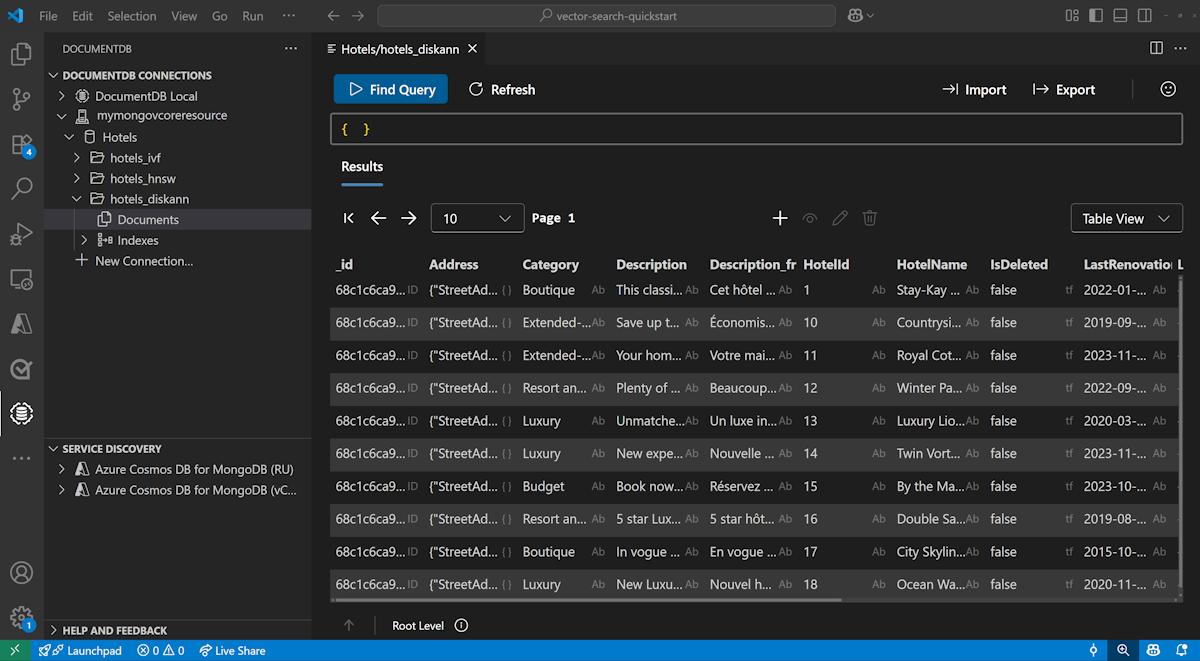
View and manage data in Visual Studio Code
Select the Azure DocumentDB extension in Visual Studio Code to connect to your Azure DocumentDB account.
View the data and indexes in the Hotels database.
Customize Azure OpenAI deployment (optional)
The infrastructure deploys Azure OpenAI with the default model and region settings defined in infra/main.bicepparam. Before running azd up, you can customize any of these parameters:
| Parameter | Default | Description |
|---|---|---|
AZURE_OPENAI_LOCATION |
Same as AZURE_LOCATION |
Region for OpenAI resource deployment |
AZURE_OPENAI_EMBEDDING_MODEL |
text-embedding-3-small |
Embedding model name |
AZURE_OPENAI_EMBEDDING_MODEL_VERSION |
1 |
Embedding model version |
AZURE_OPENAI_EMBEDDING_MODEL_TYPE |
Standard |
Deployment type (Standard or GlobalStandard) |
To override a default, use azd env set before running azd up:
# Deploy OpenAI to a different region than your other resources
azd env set AZURE_OPENAI_LOCATION swedencentral

# Switch deployment type from Standard (default) to GlobalStandard
azd env set AZURE_OPENAI_EMBEDDING_MODEL_TYPE GlobalStandard

# Change the embedding model
azd env set AZURE_OPENAI_EMBEDDING_MODEL text-embedding-3-small
azd env set AZURE_OPENAI_EMBEDDING_MODEL_VERSION 1
Note
Not all models are available in all regions or with all deployment types. Check Azure OpenAI model availability by region for supported combinations.
Troubleshoot Azure OpenAI provisioning failures
If azd up fails when you create the Azure OpenAI resource or model deployments, most likely it's due to one of the following problems:
Region availability: The model isn't available in your chosen region. Try
azd env set AZURE_OPENAI_LOCATION <different-region>(for example,eastus2orswedencentral).Deployment type mismatch: The model doesn't support the selected deployment type in your region. Switch between
StandardandGlobalStandardby usingazd env set AZURE_OPENAI_EMBEDDING_MODEL_TYPE GlobalStandard.Quota limits: Your subscription reached its quota for the selected model, region, or deployment type combination. Check your quota in the Azure portal, under Azure OpenAI > Quotas. You can request a quota increase or try a different region where you have available capacity.
Model retired or unavailable: Azure OpenAI periodically retires older model versions. If deployment fails because a model version is no longer available, update to a supported version by using
azd env set AZURE_OPENAI_EMBEDDING_MODEL_VERSION <new-version>. Check Azure OpenAI model retirements for current model lifecycle status.
After changing any parameters, run azd up again to retry the deployment.
Clean up resources
When you no longer need them, delete the resource group, Azure DocumentDB cluster, and Azure OpenAI resource to avoid unnecessary costs.