Note
Access to this page requires authorization. You can try signing in or changing directories.
Access to this page requires authorization. You can try changing directories.
Important
Disaster recovery for Durable Task Scheduler is in public preview. Preview features are subject to the Supplemental Terms of Use for Microsoft Azure Previews, and some details might change before general availability.
Disaster recovery helps you recover Durable Task Scheduler workloads after a regional outage or during planned maintenance. It pairs a primary scheduler with a secondary scheduler in another Azure region and replicates orchestration and entity state to the secondary. You initiate failover and then update clients and workers to use the promoted scheduler's endpoint. Forced failover can lose changes that aren't replicated.
This article describes:
- How the failover relationship works.
- The role each scheduler plays.
- What happens during a planned or forced failover.
- What you're responsible for before, during, and after a failover.
How the failover relationship works
Disaster recovery pairs two Durable Task Scheduler resources - a primary and a secondary - that must run in two different Azure regions. The pairing is one-to-one: a scheduler can be paired with only one partner at a time, and a secondary can't be the partner of more than one primary.
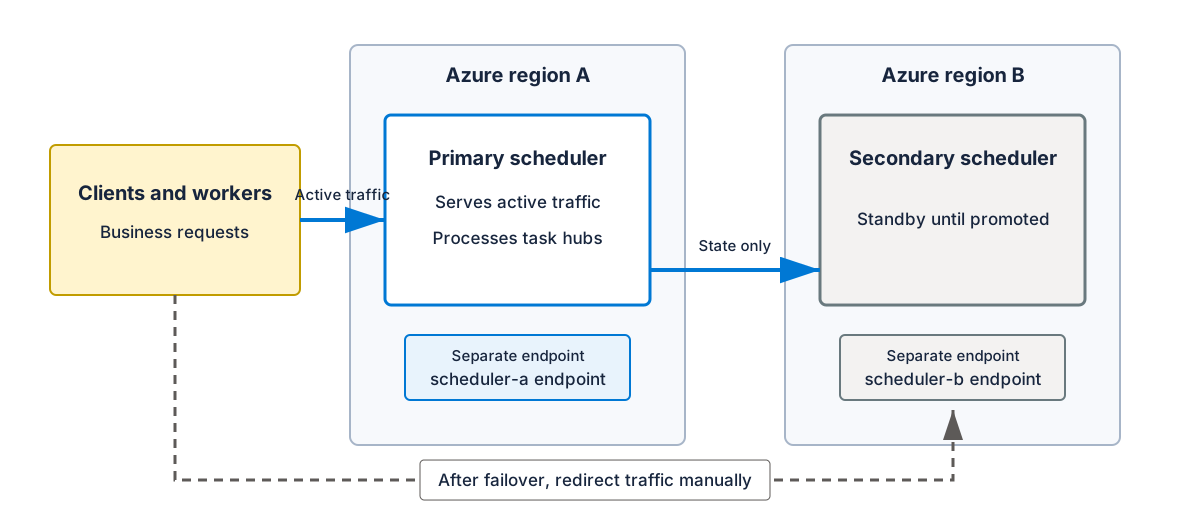
- Primary scheduler: Serves all active data-plane traffic (clients, workers, and the Durable Task SDKs connect here) and processes task hub work.
- Secondary scheduler: Receives replicated orchestration and entity state from the primary. The secondary doesn't serve read-only queries or process business requests before promotion. Every data-plane business call to it - including orchestration, entity, and task hub operations - returns
HTTP 503 Service Unavailable. Validate the full workload through a planned failover.
Each scheduler keeps its own endpoint. Disaster recovery doesn't provide a shared or floating endpoint, so you're responsible for redirecting your clients and workers to the new primary's endpoint after a failover. Update the endpoint used by both your clients and your workers, and ensure those client and worker identities have the role assignments and network access they need on the partner scheduler before you rely on it. See Configure managed identity for Durable Task Scheduler for the supported authentication and RBAC patterns.
Requirements
Both schedulers must meet the following requirements before you can enable disaster recovery:
- Both the primary and the secondary scheduler must use the Dedicated SKU.
- The two schedulers must be in different Azure regions.
- The scheduler you plan to use as the secondary must not have any task hubs on it yet.
- Your user or deployment identity needs the Contributor role, or another Azure RBAC role with the required permissions, on both the primary and secondary schedulers. Use role assignments scoped to the schedulers or inherited from a resource group or subscription.
- Your client and worker identities need a Durable Task Scheduler data role that covers the task hubs they use on both schedulers. Most applications need Durable Task Data Contributor. Use Durable Task Worker for applications that only process orchestrations, activities, and entities, or Durable Task Data Reader for read-only applications. The Contributor role doesn't grant access to orchestration data or permission to create role assignments. See Configure managed identity for Durable Task Scheduler.
- Disaster recovery is available in Azure public cloud regions where Durable Task Scheduler is available, except: Austria East, Belgium Central, Central US EUAP, Chile Central, East US 2 EUAP, France South, Italy North, Jio India West, Northeast US 5, and Southeast US 5.
Consider keeping the primary and secondary schedulers' capacity (sku.capacity) aligned so that the secondary can absorb the full workload after a failover. Matching capacity isn't enforced when you enable disaster recovery, but mismatched capacity can lead to throttling if you fail over to a secondary that's sized smaller than the primary.
Costs
Disaster recovery requires two Dedicated SKU schedulers. You're billed for both the primary and secondary schedulers at the same time, even while the secondary is on standby and isn't processing application requests. Each scheduler is billed for its provisioned capacity units (CUs) at the price for its Azure region. See Durable Task Scheduler billing.
Task hubs
Create the task hubs you need on the primary scheduler before you enable disaster recovery. When you enable disaster recovery, the service copies your existing task hub records to the secondary scheduler as part of setting up the pairing. Task hub names stay the same after a failover; clients and workers still need to use the new primary's endpoint.
Planned failover
A planned failover is one you trigger intentionally, for example, to validate your runbook or to move traffic ahead of scheduled maintenance in the primary region.
During a planned failover:
- The current primary stops accepting new data-plane traffic.
- The service performs a planned transition of the underlying database from the primary to the secondary.
- The secondary is promoted to primary, and the former primary becomes the new secondary.
A planned failover doesn't drain or wait for orchestrations that are already running. Replicated orchestration and entity state can resume on the newly promoted primary once your clients and workers target its endpoint.
Forced failover
Use a forced failover only when you can't reach the primary scheduler and a planned failover isn't possible.
During a forced failover, the secondary is promoted to primary. This operation is asynchronous. Because the primary is unreachable, any data that didn't already replicate to the secondary before the outage isn't available after the failover. Updates to the former primary are best-effort while its region is unavailable. Before failing back, verify that it's healthy and its replicationRole is Secondary.
Failback
After a region recovers, you can perform another failover (planned, if both schedulers are healthy) to move traffic back to your original primary region. Disaster recovery doesn't automatically fail back - you decide when and whether to do so.
Stop disaster recovery
To stop replication while keeping both schedulers, disable disaster recovery on the current primary scheduler. This operation cleans up the failover relationship on both schedulers. If the partner region is unavailable, you might need to complete cleanup on the partner after the region recovers.