Note
Access to this page requires authorization. You can try signing in or changing directories.
Access to this page requires authorization. You can try changing directories.
Tags are key-value pairs that you can attach to orchestrations and activities to add custom metadata. Use tags to categorize, correlate, and query your work as it runs.
You can add tags to:
- Orchestration instances — when you start a new orchestration from the client.
- Activities — when an orchestrator schedules an activity.
- Sub-orchestrations — when an orchestrator schedules a child orchestration.
SDK and extension support
| SDK/Extension | Orchestration tags | Activity/suborchestration tags | Read tags back |
|---|---|---|---|
Durable Task .NET SDK (durabletask-dotnet) |
✅ | ✅ | ✅ |
Durable Task JavaScript SDK (durabletask-js) |
✅ | ✅ | ✅ |
Durable Task Python SDK (durabletask-python) |
✅ | ✅ | ❌ (not surfaced in OrchestrationState) |
Durable Task Java SDK (durabletask-java) |
✅ (v1.6.0+) | ❌ (TaskOptions is retry-only) |
✅ |
| Durable Functions: .NET isolated | ✅ | ✅ | ✅ |
| Durable Functions: .NET in-process | ❌ | ❌ | ❌ |
| Durable Functions: JavaScript | ❌ | ❌ | ❌ |
| Durable Functions: Python | ❌ | ❌ | ❌ |
| Durable Functions: Java | ✅ | ❌ | ✅ |
How tags work
When you schedule an orchestration or activity, you can supply a dictionary of string key-value pairs as tags. The Durable Task Scheduler stores these tags as part of the instance metadata, where they can be used to:
- Categorize work — Group related orchestrations and activities by attributes meaningful to your application (environment, tenant, workflow type).
- Correlate and trace — Attach identifiers (request ID, customer ID) to follow a unit of work across instances.
- Filter and query — Retrieve orchestrations that match a specific set of tags.
Tags are set when the instance is scheduled and don't change after creation.
Add tags to an orchestration instance
var options = new StartOrchestrationOptions
{
    InstanceId = "order-12345",
    Tags = new Dictionary<string, string>
    {
        { "environment", "production" },
        { "tenant", "contoso" },
    },
};

string instanceId = await client.ScheduleNewOrchestrationInstanceAsync(
    "ProcessOrderOrchestration", input: order, options: options);
Add tags to an activity
var options = new TaskOptions(tags: new Dictionary<string, string>
{
    { "scheduleId", scheduleId },
});

await context.CallActivityAsync(nameof(CacheClearingActivity), options);
Add tags to a sub-orchestration
var options = new TaskOptions(tags: new Dictionary<string, string>
{
    { "workflowType", "order-processing" },
});

await context.CallSubOrchestratorAsync(
    "ValidateOrderOrchestration", input: order, options: options);
Read tags
OrchestrationMetadata? instance = await client.GetInstanceAsync(instanceId);

if (instance is not null)
{
    foreach (KeyValuePair<string, string> tag in instance.Tags)
    {
        Console.WriteLine($"{tag.Key} = {tag.Value}");
    }
}
Query tags
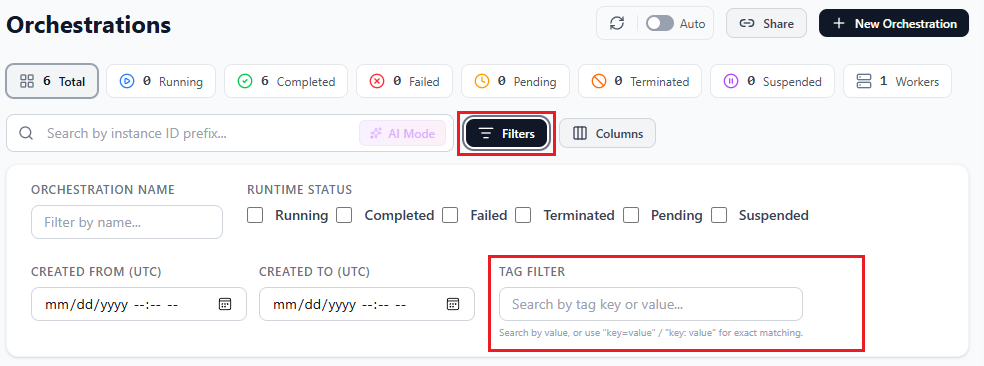
You can filter orchestrations by tag in the Durable Task Scheduler dashboard using the Tag filter, which matches on tag key or value; tags also appear as a column in the orchestration list.
Tag guidelines
- Use consistent keys — Follow a naming convention so you can reliably filter and query.
- Keep tags meaningful — Use values that provide context.
- Use string values — Keys and values are strings.
- Mind tag size — Each tag value can be up to 1,000 bytes. Multi-byte UTF-8 characters count as more than one byte each. There's no fixed limit on the number of tags, but they're bounded by the per-value size and the overall instance metadata payload.
Limitations
- Tags are set when an instance is scheduled and are immutable afterward.
- Tag keys and values are strings.