Note
Access to this page requires authorization. You can try signing in or changing directories.
Access to this page requires authorization. You can try changing directories.
Use the ExpressRoute connection template to connect a transit hub ExpressRoute gateway to a customer-owned ExpressRoute circuit. This template creates the connection object that links the service catalog deployment to your existing circuit.
In this article, you:
- Deploy the ExpressRoute connection service catalog template into an existing workload from the Azure portal.
Note
This article covers the service catalog deployment flow only. You still need a provisioned ExpressRoute circuit with AzurePrivatePeering configured before the connection can become active.
Before you begin
- This article assumes a basic understanding of Azure Enclave and network connectivity concepts. For more information, see Best practices of Azure Enclave.
- You need an Azure account with an active subscription. If you don't have one, create an account for free.
- You need a community, enclave, workload, and permissions to create resources inside the workload resource group.
Prerequisites
- An active ExpressRoute circuit provisioned through a carrier.
AzurePrivatePeeringconfigured on the circuit.- If the circuit is in another subscription, an authorization key from the circuit owner.
- The circuit SKU supports the transit hub region:
Standardis the minimum recommended SKU.Localonly works when the transit hub is in the same metro.Premiumis required for cross-geo connectivity.
Use these Azure PowerShell commands to confirm the circuit is ready:
$circuit = Get-AzExpressRouteCircuit -ResourceGroupName "<circuit-rg>" -Name "<circuit-name>"
$circuit | Select-Object Name, SkuTier, CircuitProvisioningState, ServiceProviderProvisioningState, PeeringLocation | Format-Table
$circuit.Peerings | Select-Object Name, State, PeeringType | Format-Table
If AzurePrivatePeering is missing, your network team must add it before deployment.
Deploy the template
Go to the workload for the intended deployment.
Select
+ Add an Azure Service.Select
ExpressRoute Connectionfrom the service catalog list, confirm the version you need (default:latest), and then selectNext.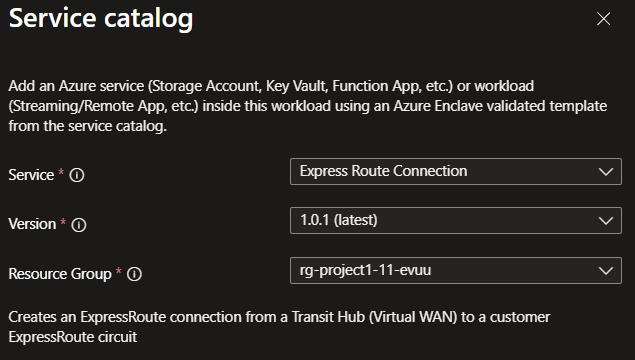
Enter the required values on each tab.
Review any prepopulated values and adjust them as needed.
Select
Review + Create. If validation passes, selectCreate.
Validate the deployment
Go to the target resource group and confirm that the ExpressRoute connection is created.
You can also verify the connection by using Azure PowerShell.
Get-AzResource -ResourceGroupName "<hosted-resources-rg>" -ResourceType "Microsoft.Network/expressRouteGateways/expressRouteConnections" -Name "<connection-name>" | Select-Object Name, ResourceId, Location | Format-Table
Delete the deployment
If you don't plan to keep the connection, remove it from the workload to avoid unnecessary Azure charges.
Recommendations
- Keep the circuit and gateway configuration aligned with the same peering and authorization details.
- Add tags to service catalog deployments to track ownership, purpose, and version.
- Review the Azure ExpressRoute documentation for circuit and peering guidance: