Note
Access to this page requires authorization. You can try signing in or changing directories.
Access to this page requires authorization. You can try changing directories.
The Analytics Consumption Zone (ACZ) exports selected entity data from Azure Data Manager for Energy to your Azure Data Lake Storage (ADLS) Gen2 account. ACZ writes Azure Data Manager for Energy data in open Delta Parquet format. Services like Microsoft Fabric and Azure Databricks can read this format directly.
Important
Analytics Consumption Zone is currently in preview. See the Supplemental Terms of Use for Microsoft Azure Previews for legal terms that apply to Azure features that are in beta, preview, or otherwise not yet released into general availability.
Note
During the preview, ACZ is only available on Developer Tier instances and requires allowlisting. Follow the guidance in How to enable the Analytics Consumption Zone (ACZ) and contact your Microsoft representative.
What is ACZ?
ACZ is a managed sync layer. It exports entity data from your Azure Data Manager for Energy instance to an ADLS Gen2 storage account that you own. You can then connect that data to analytics, reporting, and machine learning tools.
Key characteristics of ACZ:
- Customer-owned storage: Data goes to an ADLS Gen2 storage account that you create and manage. You're responsible for selecting an in-geo destination storage account if you have data residency requirements.
- Open format: Data exports in Delta Parquet format. Analytics engines widely support this format.
- Selective sync: You choose which entity types to sync. Options include catalog kinds and Wellbore Domain Data Management Service (DDMS) kinds.
- Historical and incremental sync: ACZ takes an initial snapshot of existing data, then synchronizes changes as they occur.
- API-driven: You configure and manage ACZ entirely through REST APIs.
Architecture
This diagram shows the ACZ data flow:
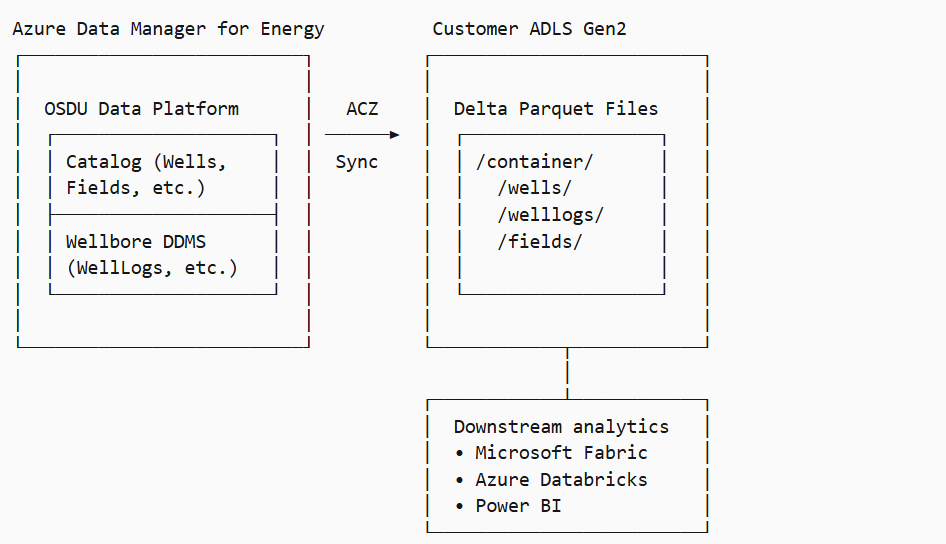
How ACZ works
Supported entity types
ACZ synchronizes two categories of Azure Data Manager for Energy entity types:
| Category | Description | Example kinds |
|---|---|---|
| Catalog kinds | Primary data and reference data from the Storage service | osdu:wks:master-data--Well:*, osdu:wks:reference-data--UnitOfMeasure:* |
| Wellbore DDMS kinds | Entities from the Wellbore Domain Data Management Service | osdu:wks:work-product-component--WellLog:* |
When you create an ACZ, you specify which entity types to synchronize by providing:
- catalogKinds: A list of catalog kind patterns (for example,
osdu:wks:master-data--Well:*) - wellboreDDMSKinds: A list of Wellbore DDMS kind patterns (for example,
osdu:wks:work-product-component--WellLog:*)
These kind patterns act as filters that determine which Azure Data Manager for Energy records ACZ exports and keeps synchronized.
Version types
When you create an ACZ, you choose how to handle entity versions:
| Type | Description |
|---|---|
| LATEST_VERSION | Exports only the latest version of each entity. Default and recommended. |
| ALL_VERSIONS | Exports all versions of each entity. Keeps the full version history. |
Lifecycle states
Each ACZ goes through these states:
| Status | Description |
|---|---|
| ACTIVE | Operational. ACZ synchronizes changes incrementally. |
| FAILED | An error stopped setup or sync. |
| ACCESS_DENIED | ACZ can't reach the destination ADLS storage account. |
Historical snapshot
When you create a new ACZ, the service takes a historical snapshot. This snapshot exports all existing records that match the configured entity types (catalogKinds and wellboreDDMSKinds). The snapshot progresses through these states:
| Status | Description |
|---|---|
| PROCESSING | Actively exporting data. |
| COMPLETED | All historical data exported. |
| FAILED | An error occurred. |
After the snapshot finishes, ACZ switches to incremental mode. It captures new and updated records in near real-time.
How ACZ handles data changes
ACZ propagates created, updated, and deleted records from Azure Data Manager for Energy to the Delta tables.
- Creations and updates: When you create a record or change its data block, Azure Data Manager for Energy creates a new version. ACZ detects the change and writes a new row to the Delta table.
- Metadata-only updates: A PATCH operation can change the access control list (ACL), Legal, or Tags without creating a new version. ACZ detects this change and runs a merge-upsert on the existing row.
- Soft deletes: When you soft-delete a record in Azure Data Manager for Energy, ACZ sets the
isActivefield toFalseon the row instead of removing it. Soft deletes preserve history for auditing and time-travel queries. - Purges: When you purge a record in Azure Data Manager for Energy, ACZ permanently removes the record from the Delta table. The row is deleted and can't be recovered from the ACZ data.
Warning
ACZ is a one-way, read-only sync from Azure Data Manager for Energy to ADLS Gen2.
- Data flows only from Azure Data Manager for Energy to ADLS Gen2
- Do not modify, delete, or add files directly in the ACZ folders in ADLS Gen2
- Manual changes to ACZ data corrupt the sync and cause data inconsistencies
- ACZ manages all Delta Lake operations (transaction logs, checkpoints, compaction)
For analytics and reporting, treat the exported data as read-only. All data modifications must occur in Azure Data Manager for Energy.
Data output format
ACZ writes data in Delta Lake format with Parquet-encoded files (DELTA_PARQUET). Delta Lake supports ACID transactions, time travel, and efficient incremental reads.
ADLS Gen2 folder structure
ACZ organizes data in your ADLS Gen2 storage account by folder. Each ACZ gets its own folder under the container or under the base path if you specified one. ACZ partitions catalog Delta Lake tables by kind. One folder per DDMS entity type and record ID.
Folder layout
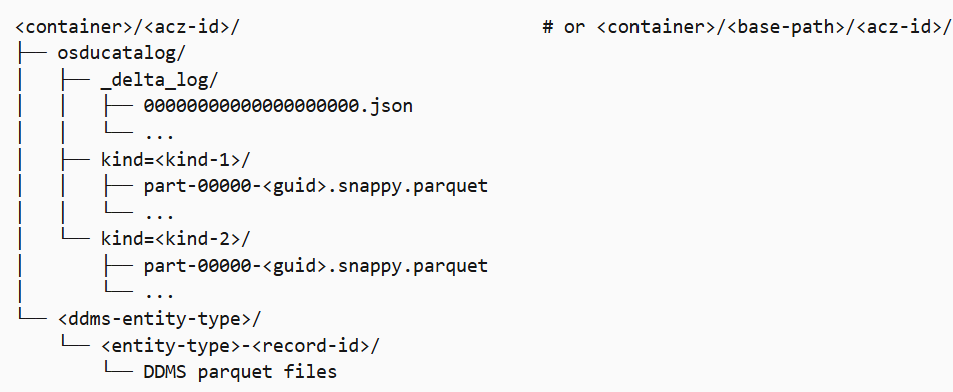
Key details
| Element | Description |
|---|---|
| Top-level folder | Named <acz-id> under the container, or under <base-path> if specified. One folder per ACZ. |
osducatalog/ |
One Delta table for all catalog kinds. Partitioned by kind (for example, kind=osdu:wks:master-data--Well:1.0.0). |
_delta_log/ |
The Delta Lake transaction log. Tracks all table changes for ACID transactions and time travel. |
| DDMS entity folders | One folder per DDMS entity type (for example, work-product-component--WellLog). Holds DDMS-specific parquet files by entity type and record ID. |
| Parquet files | Snappy-compressed data files. Updates create new files. ACZ runs VACUUM and OPTIMIZE to compact small files and remove old ones. |
Delta table schema
The Delta table has these fields:
| Field | Type | Description |
|---|---|---|
id |
String | OSDU® record ID. |
version |
String | Version number. |
kind |
String | Fully qualified OSDU® kind. |
data |
String | Data block (JSON). |
meta |
String | Metadata (JSON). |
acl |
String | Access control list. |
legal |
String | Legal tags. |
tags |
String | User-defined tags. |
createUser |
String | User who created the record. |
createTime |
Timestamp | When the record was created |
ingestTime |
Timestamp | When ACZ ingested the record |
isActive |
Boolean | True if active. False if soft-deleted. |
Note
Wellbore DDMS entities also have fileDownloadTime, fileDownloadState, and fileDownloadFolder fields for file tracking.
Limits and access
Preview limits
| Constraint | Limit |
|---|---|
| Maximum ACZs per data partition | Three |
| ACZ name uniqueness | Must be unique within a data partition |
| Target format | Delta Parquet only |
| Storage type | ADLS Gen2 only |
| Instance tier support | Developer Tier only during preview |
Authentication and authorization
ACZ requires:
- API access: You must belong to the
users@{data-partition-id}.dataservices.energygroup to call ACZ APIs. - Storage access: The managed identity needs the Storage Blob Data Contributor role (or equivalent) on the ADLS Gen2 container. During preview, share the identity details with Microsoft to add the identity to the allow list.
- Azure Data Manager for Energy access: The managed identity needs to be assigned to the Azure Data Manager for Energy resource.