Note
Access to this page requires authorization. You can try signing in or changing directories.
Access to this page requires authorization. You can try changing directories.
Azure Event Grid namespaces support IPv4 and IPv6 dual-stack connectivity during preview. After you enable dual stack, supported clients can use IPv4 or IPv6 to connect to supported namespace public endpoints.
Important
IPv6 dual-stack support for Azure Event Grid namespaces is currently in preview. This preview is provided without a service-level agreement and isn't recommended for production workloads. Certain features might not be supported or might have constrained capabilities. For more information, see Supplemental Terms of Use for Microsoft Azure Previews.
Supported scenarios
During preview, IPv6 dual-stack support applies to Event Grid namespaces. It supports the following scenarios:
- Create a new Event Grid namespace with dual stack enabled.
- Convert an existing IPv4 Event Grid namespace to dual stack.
- Configure IPv4 and IPv6 firewall rules.
- Publish events to namespace topics over IPv4 or IPv6.
- Receive events by using pull delivery over IPv4 or IPv6.
- Connect supported MQTT clients to the public MQTT broker endpoint over IPv4 or IPv6.
- Continue using existing IPv4 clients after dual stack is enabled.
How dual-stack connectivity works during preview
The available network protocol preferences are:
- IPv4: The default for a namespace that isn't enabled for dual stack.
- Dual stack: Enables supported public endpoints to accept IPv4 and IPv6 connections.
Enabling dual stack doesn't require existing IPv4 clients to migrate to IPv6. Whether a client uses IPv4 or IPv6 depends on the client's capabilities and networking environment.
Prerequisites
Before you begin, you need:
- An Azure subscription.
- Permission to create or update an Event Grid namespace.
- An IPv6-capable client and network environment if you plan to validate IPv6 connectivity.
- An Event Grid namespace without a private endpoint if you plan to convert an existing namespace to dual stack.
Supported public endpoints
During preview, IPv6 dual-stack support applies to the following public endpoints:
- Namespace topic publish endpoints.
- Pull delivery endpoints.
- MQTT broker endpoints.
Using IPv6 doesn't change the application-layer authentication, authorization, or Transport Layer Security (TLS) requirements for these endpoints.
Warning
During preview, IPv6 dual-stack support is available only for public endpoints. Private endpoints aren't supported with dual-stack-enabled Event Grid namespaces. You can't enable dual stack on a namespace that has a private endpoint, and you can't create a private endpoint for a dual-stack-enabled namespace. If you require private endpoint connectivity, keep the namespace Network protocol preference set to IPv4.
Create a dual-stack Event Grid namespace (preview)
To create an Event Grid namespace with dual stack enabled:
Sign in to the Azure portal.
In the search box, enter Event Grid Namespaces, and then select Event Grid Namespaces from the results.
On the Event Grid Namespaces page, select Create.
On the Basics page, configure the required namespace settings.
Select Next: Networking.
On the Networking page, locate Network protocol preference.
Select Dual stack.
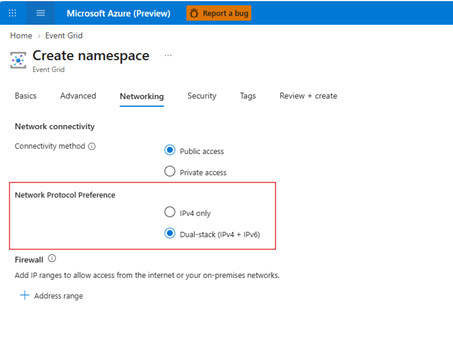
Configure public network access.
Configure IPv4 and IPv6 firewall rules if you need to restrict public access.
Continue through the remaining namespace configuration, and then select Review + create.
Review the configuration, and then select Create.
Create-flow example
Suppose a manufacturing solution uses the namespace contoso-manufacturing-ns. Existing applications use IPv4, while newer clients and devices can use IPv6. The administrator creates the namespace with Dual stack selected. Existing applications continue to connect over IPv4, and IPv6-capable clients can connect over IPv6 to supported namespace public endpoints.
Convert an existing namespace to dual stack (preview)
The namespace can't have a private endpoint before you enable dual stack.
In the Azure portal, open your existing Event Grid namespace.
On the namespace menu, select Networking.
Locate Network protocol preference.
Change the setting from IPv4 to Dual stack.
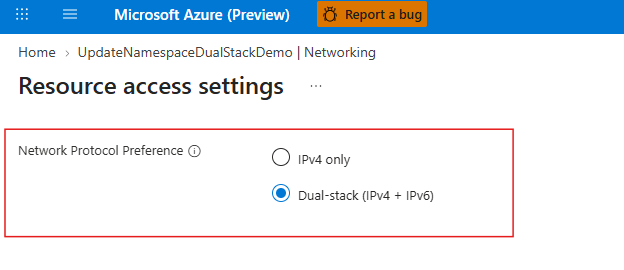
Review the public network access settings.
Add IPv6 firewall rules for clients that require IPv6 access.
Select Save.
Confirm that the update finishes successfully.
Update-flow example
Suppose an organization has an IPv4 namespace named contoso-events-ns. The administrator opens Networking, changes Network protocol preference to Dual stack, adds the required IPv6 firewall rules, and saves the configuration. Existing IPv4 clients continue to connect, while approved IPv6 clients can connect through supported namespace public endpoints. This scenario assumes that the namespace doesn't have a private endpoint.
Configure dual stack programmatically (preview)
The 2026-06-15-preview management API adds the properties.ipAddressType property for Event Grid namespaces. Set the property to:
IPv4to support only IPv4 addresses.DualStackto support both IPv4 and IPv6 addresses.
Important
Before you set ipAddressType to DualStack, ensure that the namespace doesn't have a private endpoint. During preview, you can't use private endpoints and dual-stack connectivity together.
Note
The current az eventgrid namespace commands and Az.EventGrid cmdlets don't expose a dedicated parameter for ipAddressType. The following Azure CLI and Azure PowerShell examples call the management REST API. SDK-specific examples aren't included because the currently published Event Grid management SDK models don't expose this preview property.
Create a namespace by using Bicep or an ARM template
The following examples create a Standard namespace with dual stack enabled.
param namespaceName string
param location string = resourceGroup().location

resource eventGridNamespace 'Microsoft.EventGrid/namespaces@2026-06-15-preview' = {
  name: namespaceName
  location: location
  sku: {
    name: 'Standard'
    capacity: 1
  }
  properties: {
    ipAddressType: 'DualStack'
    isZoneRedundant: false
    publicNetworkAccess: 'Enabled'
  }
}
If you deploy either example over an existing namespace, include the complete desired configuration for that namespace so that you don't unintentionally change other settings.
Create a namespace by using the REST API
Use a PUT request to create a namespace with dual stack enabled:
PUT https://management.azure.com/subscriptions/{subscriptionId}/resourceGroups/{resourceGroupName}/providers/Microsoft.EventGrid/namespaces/{namespaceName}?api-version=2026-06-15-preview
Request body:
{
  "location": "eastus",
  "sku": {
    "name": "Standard",
    "capacity": 1
  },
  "properties": {
    "ipAddressType": "DualStack",
    "isZoneRedundant": false,
    "publicNetworkAccess": "Enabled"
  }
}
Update an existing namespace
Use a PATCH request to change an existing namespace from IPv4 to dual stack. Replace the placeholders before you run an example.
PATCH https://management.azure.com/subscriptions/{subscriptionId}/resourceGroups/{resourceGroupName}/providers/Microsoft.EventGrid/namespaces/{namespaceName}?api-version=2026-06-15-preview
Content-Type: application/json

{
  "properties": {
    "ipAddressType": "DualStack"
  }
}
The update can return an asynchronous operation. Wait for the operation to finish before you validate connectivity or make another networking change.
Verify the configuration
Retrieve the namespace by using the same preview API version:
GET https://management.azure.com/subscriptions/{subscriptionId}/resourceGroups/{resourceGroupName}/providers/Microsoft.EventGrid/namespaces/{namespaceName}?api-version=2026-06-15-preview
Confirm that the response contains the following values:
{
  "properties": {
    "provisioningState": "Succeeded",
    "ipAddressType": "DualStack"
  }
}
Configure IPv4 and IPv6 firewall rules during preview
During preview, a dual-stack Event Grid namespace supports IPv4 and IPv6 firewall rules. Configure the address ranges independently:
- An IPv4 firewall rule doesn't authorize an IPv6 client address.
- An IPv6 firewall rule doesn't authorize an IPv4 client address.
- Configure a rule for each client protocol that you intend to permit.
For configuration steps, see Configure IP firewall for Azure Event Grid namespaces.
Firewall example
Suppose an existing IPv4 client is allowed by an IPv4 firewall rule. A new IPv6 client requires a separate IPv6 firewall rule. The IPv4 rule doesn't grant access to the IPv6 client, and the IPv6 rule doesn't grant access to the IPv4 client.
Publish and receive events
After you enable dual stack, supported clients can use IPv4 or IPv6 to:
The network protocol doesn't change the normal authentication, authorization, TLS, event format, or operation requirements.
Connect MQTT clients
During preview, supported MQTT clients can connect to the public MQTT broker endpoint of a dual-stack-enabled Event Grid namespace over IPv4 or IPv6. Existing IPv4 MQTT clients can continue to operate after you enable dual stack.
Using IPv6 doesn't change:
- MQTT protocol and TLS requirements.
- MQTT client authentication.
- MQTT access control.
- Client groups, topic spaces, or permission bindings.
For more information, see Overview of the MQTT broker feature in Azure Event Grid.
Validate IPv6 connectivity
Use the following checklist to validate connectivity from the intended client environment:
- Confirm that the namespace is configured for Dual stack.
- Confirm that the namespace doesn't have a private endpoint.
- Confirm that the client environment supports IPv6.
- Confirm that the namespace endpoint is reachable over IPv6.
- Confirm that an applicable IPv6 firewall rule allows the client.
- Confirm that the client can establish a TLS connection.
- Confirm that the client can authenticate.
- Confirm that the intended Event Grid operation succeeds.
For MQTT, validation can include connecting, publishing, and subscribing. For namespace topics and pull delivery, validation can include publishing and receiving events.
Considerations and limitations
- The feature is in preview.
- The preview applies to supported public endpoints.
- Private endpoints aren't supported with dual-stack-enabled namespaces during preview.
- IPv4 remains available after you enable dual stack.
- IPv4 and IPv6 firewall rules are configured independently.
- The client networking environment must support IPv6 to use IPv6 connectivity.
- Existing authentication, authorization, and TLS requirements continue to apply.
- Push delivery over IPv6 isn't included in this preview documentation.
- IPv6-only mode isn't part of this preview documentation.
Related content
- Create, view, and manage Event Grid namespaces
- Configure IP firewall for Event Grid namespaces
- Configure private endpoints for Event Grid namespaces
- Publish events to namespace topics
- Pull delivery with HTTP
- Overview of the MQTT broker feature
- MQTT features supported by the MQTT broker
- MQTT client authentication
- Access control for MQTT clients