Note
Access to this page requires authorization. You can try signing in or changing directories.
Access to this page requires authorization. You can try changing directories.
Firmware analysis identifies potentially unsafe function calls in supported executable files extracted from firmware images. These results can help you find implementation patterns that require additional security review and prioritize binaries based on their potential exposure.
This article explains the unsafe function call signals you might see in firmware analysis results. It describes supported files, coverage limitations, and how to evaluate findings in the context of the executable and device.
Note
The presence of an unsafe function call doesn't necessarily mean that an executable or device is vulnerable. The actual risk depends on how the function is used, whether untrusted input can reach it, and how the executable is exposed and protected.
Unsafe function call signals in firmware analysis
Unsafe Function Calls analysis performs static analysis of supported Executable and Linkable Format (ELF) executables. It identifies references to functions that can contribute to security issues when they're used without appropriate input validation, bounds checking, buffer-size validation, or other secure coding controls.
Some memory-handling functions can contribute to buffer-overflow or other memory-corruption conditions when used incorrectly. Depending on the affected code path and available mitigations, an attacker might use these conditions to disrupt the device or execute unauthorized code.
Each result represents a signal rather than a vulnerability determination. Evaluate the signals together and in the context of the executable's role in the firmware.
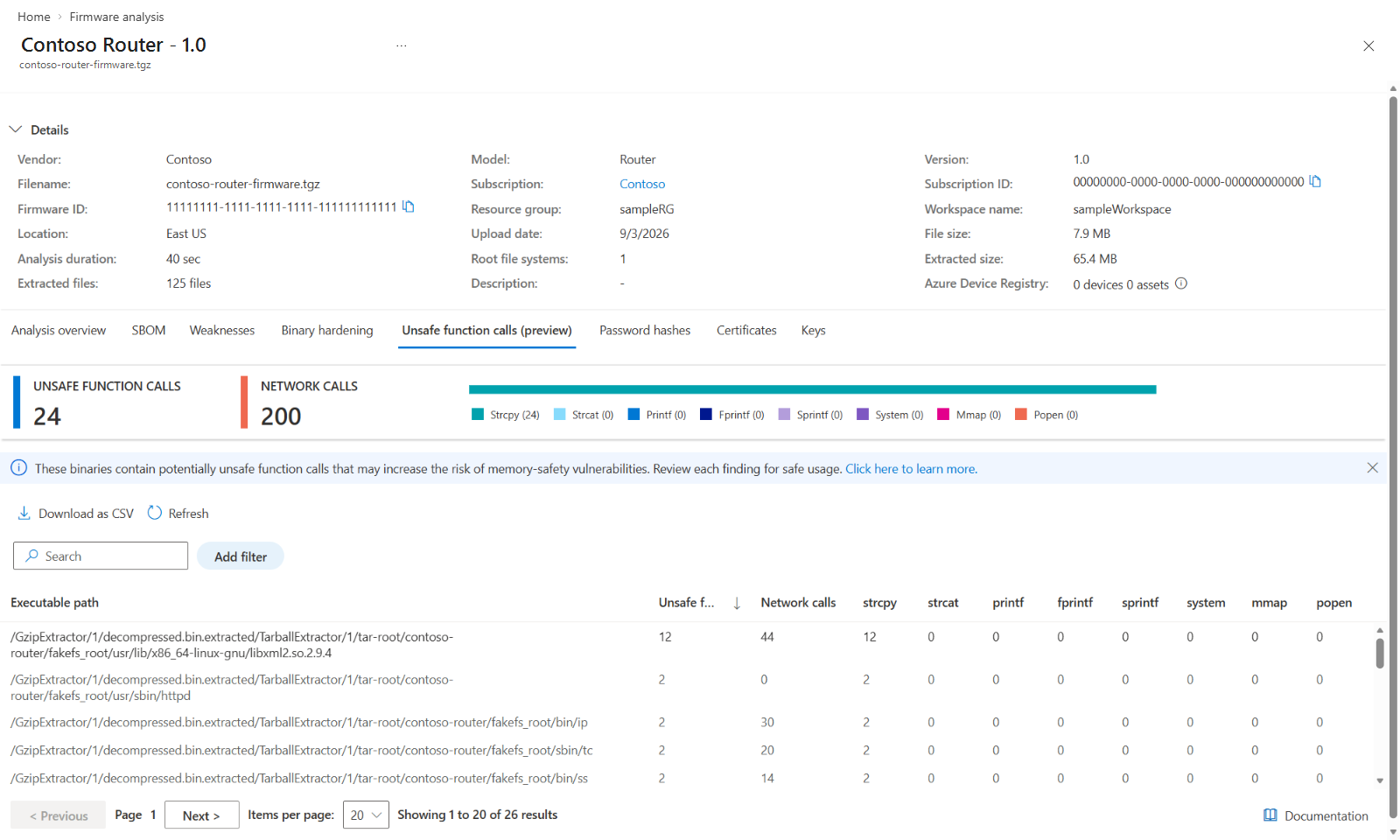
Potentially unsafe functions
Some library functions can be risky because they don't inherently enforce the size or trustworthiness of the data they process. For example, functions such as strcpy and strcat can contribute to buffer-overflow conditions if a program copies oversized or untrusted input into a destination buffer.
A reported reference indicates that firmware analysis identified a tracked function in the executable. It doesn't establish that the function is used incorrectly. The function might be used with safeguards, such as checking the input length, providing enough destination space, or limiting input to trusted data.
When modifying source code, use string-handling functions that accept the destination buffer's size, and validate input lengths before copying or concatenating data. Ensure that the result is null-terminated and handle truncation or errors. Bounded functions such as strncpy and strncat can reduce risk compared with unbounded alternatives, but they must still be used with correct buffer-size calculations.
The set of tracked functions can change as this feature evolves. Interpret the function name and count as a starting point for code review rather than as a complete inventory of all memory-safety or command-execution risks.
Networking-call information
Firmware analysis also indicates when network-related function calls are identified in an analyzed executable. Use this signal to help prioritize executables for further review. It doesn't determine whether the executable accepts remote connections, communicates outside the device, or is reachable in the deployed environment.
When prioritizing findings, consider reviewing executables that contain both unsafe function calls and network-related calls first. These executables might process data received from a network and can warrant earlier investigation.
Executable path and call counts
Results are associated with the executable path extracted from the firmware image. Function-call counts indicate how many references to a tracked function were identified for that executable. A higher count can indicate more locations to review, but it doesn't by itself indicate greater severity or exploitability.
The same executable can appear in multiple extracted locations, and different executables can contain references to the same function. Use the extractor path and firmware version to identify the correct source component or supplier artifact.
Supported files and coverage
Unsafe Function Calls analysis is available in preview and applies to supported ELF user-space executables extracted from Linux-based firmware images.
Linux kernel module (.ko) files aren't included because the preview is scoped to user-space executable analysis.
The preview supports the following processor architectures:
- AMD64 or x86-64
- ARM64 or AArch64
- ARM32
Binary requirements
The executable must retain information that allows firmware analysis to identify the functions it uses. A statically linked or stripped binary might not produce results when function names or other required information aren't available.
A firmware image can complete other analysis activities successfully while producing no Unsafe Function Calls results. Each firmware analyzer has its own file, architecture, and metadata requirements.
Using unsafe function call data together
Each signal provides a different perspective on potential risk:
| Signal | What it helps you understand |
|---|---|
| Executable path | Which extracted executable contains the identified calls. |
| Number of unsafe function calls | The total number of unsafe function calls identified in the executable. |
| Number of network calls | Whether network-related behavior might warrant prioritizing the executable for further review. The count doesn't establish remote reachability. |
Number of <function name> calls |
How many references to the named function were identified in the executable. Use the function-specific count to focus further review on the applicable security controls, such as buffer sizing, input validation, format-string handling, memory permissions, or command-input validation. |
Function-specific counts are provided for the following functions:
strcpystrcatprintffprintfsprintfsystemmmappopen
Rather than relying on one field, evaluate these signals together to understand which executables require the most immediate review.
Important considerations
Interpreting zero and empty results
Results can show a zero count for an executable or omit an executable entirely. A zero count means that the executable was analyzed, but no tracked calls were identified for that field.
If an executable doesn't appear in the results, don't assume that it contains no unsafe function calls. Firmware analysis might not have been able to analyze it because the executable uses an unsupported architecture or doesn't contain the information required to identify function references.
An empty results list means that no Unsafe Function Calls results are available for the firmware image. It doesn't mean that the firmware contains no unsafe function calls.
No results can appear when:
- No ELF user-space executables were extracted.
- The extracted executables use unsupported architectures.
- A static or stripped binary doesn't contain enough identifying information.
- The extracted file is an excluded Linux kernel module.
- The firmware image was analyzed before Unsafe Function Calls analysis became available.
- Extraction or analysis didn't complete successfully.
Note
An empty result doesn't confirm that the firmware contains no unsafe function calls. To receive current analysis for an image that was processed before the Unsafe Function Calls preview became available, upload the firmware image again.
To learn how to upload an image and view its results, see Analyze a firmware image with the firmware analysis service. To evaluate related compiler and linker protections, review the Binary Hardening tab for the same executable.