Note
Access to this page requires authorization. You can try signing in or changing directories.
Access to this page requires authorization. You can try changing directories.
This guide provides instructions for migrating your code from the legacy version of the Foundry Local SDK to the current version. The new SDK removes the dependency on the Foundry Local CLI and therefore allows you to ship your applications without requiring your users to install the CLI or set up a local Foundry environment. The new SDK also includes improvements to the API for better usability and performance.
C# SDK Migration Guide
To improve your ability to ship applications using on-device AI, there are substantial changes to the architecture of the C# SDK in version 0.8.0 and later. In this section, we outline the key changes to help you migrate your applications to the latest version of the SDK.
Note
In the SDK version 0.8.0 and later, there are breaking changes in the API from previous versions (<=0.3.0).
The following diagram shows how the previous architecture - for versions earlier than 0.8.0 - relied heavily on using a REST webserver to manage models and inference like chat completions:
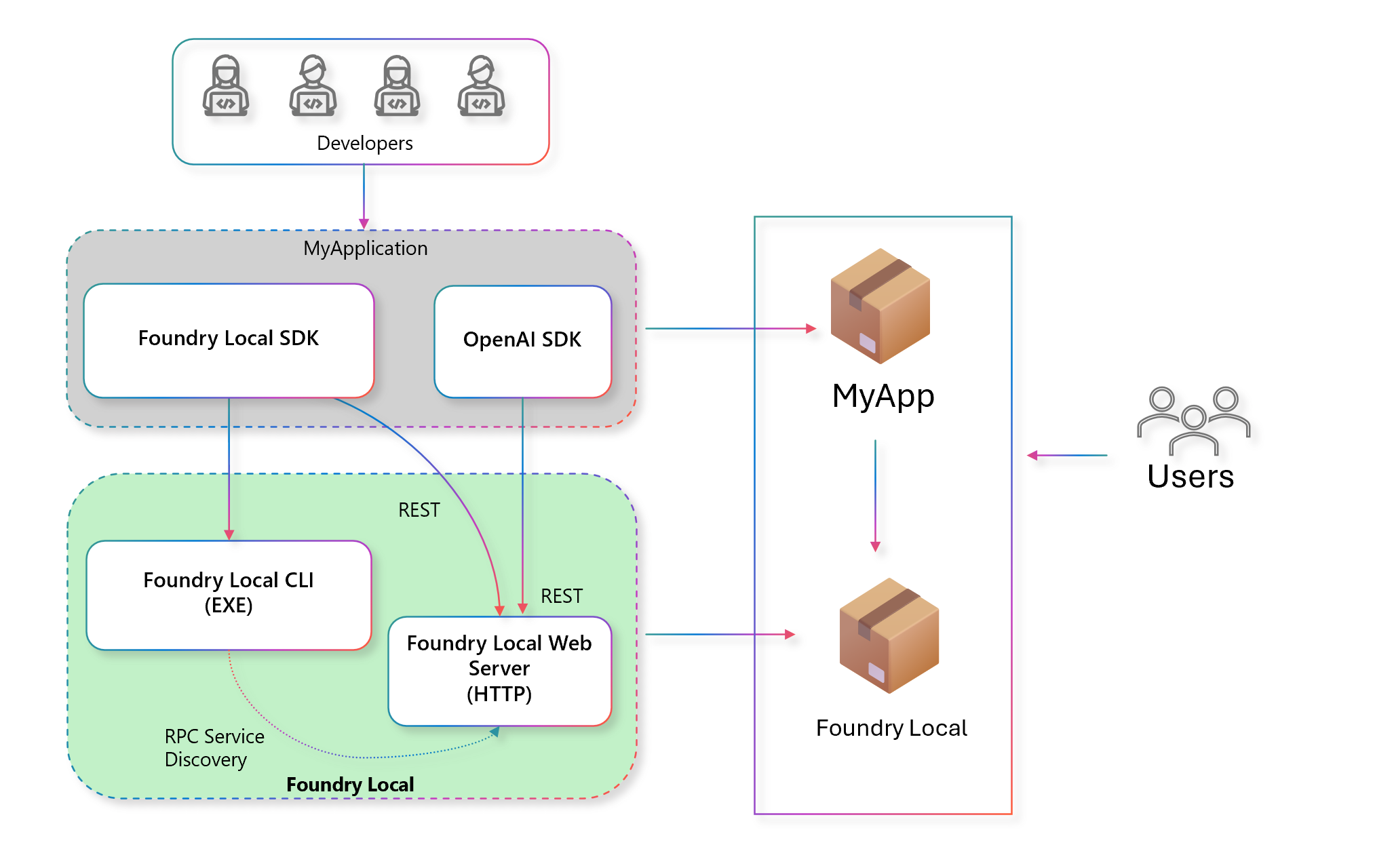
The SDK would use a Remote Procedural Call (RPC) to find Foundry Local CLI executable on the machine, start the webserver, and then communicate with it over HTTP. This architecture had several limitations, including:
- Complexity in managing the webserver lifecycle.
- Challenging deployment: End users needed to have the Foundry Local CLI installed on their machines and your application.
- Version management of the CLI and SDK could lead to compatibility issues.
To address these issues, the redesigned architecture in version 0.8.0 and later uses a more streamlined approach. The new architecture is as follows:
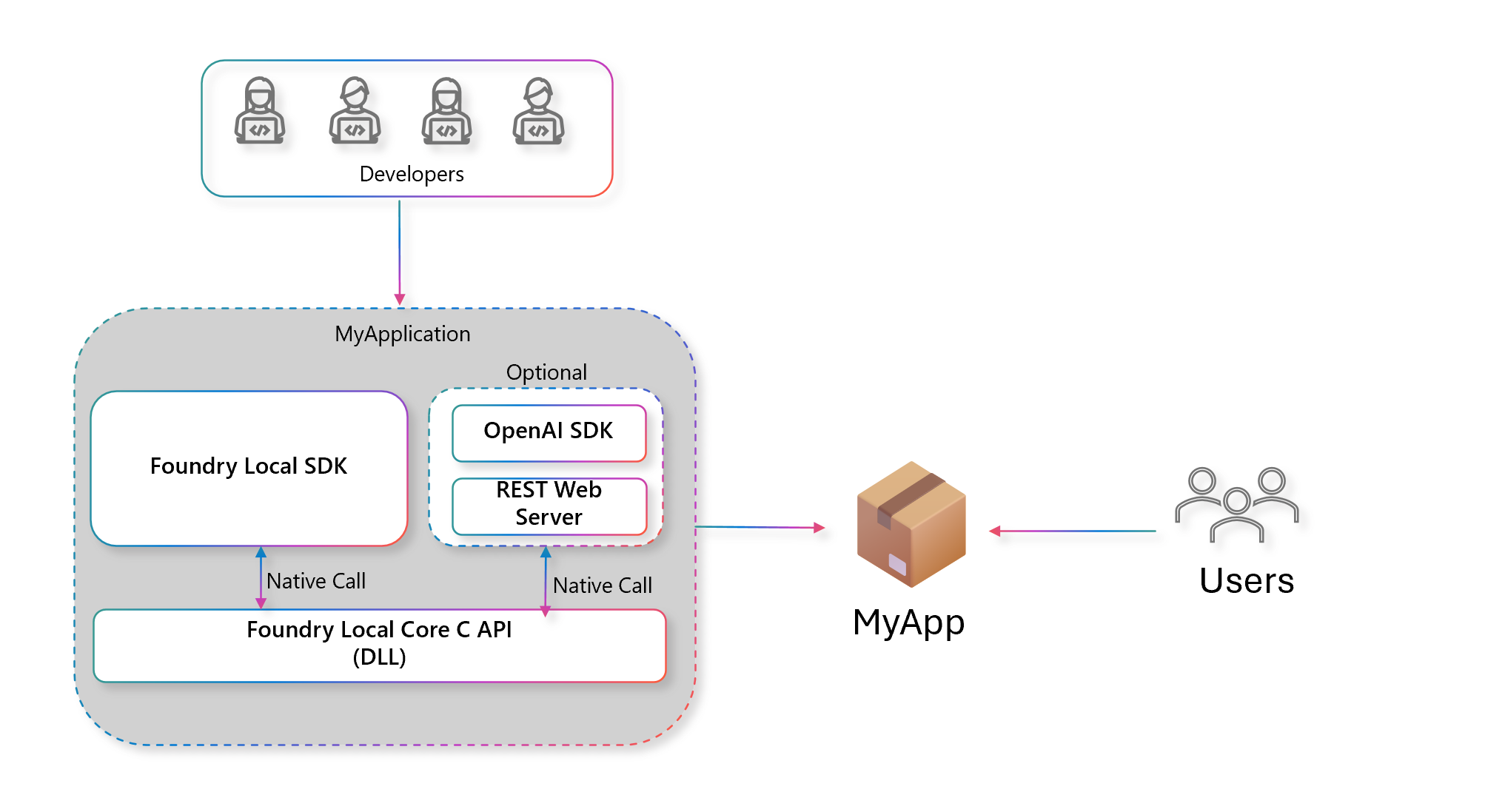
In this new architecture:
- Your application is self-contained. It doesn't require the Foundry Local CLI to be installed separately on the end user's machine making it easier for you to deploy applications.
- The REST web server is optional. You can still use the web server if you want to integrate with other tools that communicate over HTTP. Read Use chat completions via REST server with Foundry Local for details on how to use this feature.
- The SDK has native support for chat completions and audio transcriptions, allowing you to build conversational AI applications with fewer dependencies. Read Use Foundry Local native chat completions API for details on how to use this feature.
- On Windows devices, you can use a Windows ML build that handles hardware acceleration for models on the device by pulling in the right runtime and drivers.
API changes
Version 0.8.0 and later provides a more object-orientated and composable API. The main entry point continues to be the FoundryLocalManager class, but instead of being a flat set of methods that operate via static calls to a stateless HTTP API, the SDK now exposes methods on the FoundryLocalManager instance that maintain state about the service and models.
| Primitive | Versions < 0.8.0 | Versions >= 0.8.0 |
|---|---|---|
| Configuration | N/A | config = Configuration(...) |
| Get Manager | mgr = FoundryLocalManager(); |
await FoundryLocalManager.CreateAsync(config, logger);var mgr = FoundryLocalManager.Instance; |
| Get Catalog | N/A | catalog = await mgr.GetCatalogAsync(); |
| List Models | mgr.ListCatalogModelsAsync(); |
catalog.ListModelsAsync(); |
| Get Model | mgr.GetModelInfoAsync("aliasOrModelId"); |
catalog.GetModelAsync(alias: "alias"); |
| Get Variant | N/A | model.SelectedVariant; |
| Set Variant | N/A | model.SelectVariant(); |
| Download a model | mgr.DownloadModelAsync("aliasOrModelId"); |
model.DownloadAsync() |
| Load a model | mgr.LoadModelAsync("aliasOrModelId"); |
model.LoadAsync() |
| Unload a model | mgr.UnloadModelAsync("aliasOrModelId"); |
model.UnloadAsync() |
| List loaded models | mgr.ListLoadedModelsAsync(); |
catalog.GetLoadedModelsAsync(); |
| Get model path | N/A | model.GetPathAsync() |
| Start service | mgr.StartServiceAsync(); |
mgr.StartWebServerAsync(); |
| Stop service | mgr.StopServiceAsync(); |
mgr.StopWebServerAsync(); |
| Cache location | mgr.GetCacheLocationAsync(); |
config.ModelCacheDir |
| List cached models | mgr.ListCachedModelsAsync(); |
catalog.GetCachedModelsAsync(); |
The API allows Foundry Local to be more configurable over the web server, logging, cache location, and model variant selection. For example, the Configuration class allows you to set up the application name, logging level, web server URLs, and directories for application data, model cache, and logs:
var config = new Configuration
{
    AppName = "app-name",
    LogLevel = Microsoft.AI.Foundry.Local.LogLevel.Information,
    Web = new Configuration.WebService
    {
        Urls = "http://127.0.0.1:55588"
    },
    AppDataDir = "./foundry_local_data",
    ModelCacheDir = "{AppDataDir}/model_cache",
    LogsDir = "{AppDataDir}/logs"
};
API reference
- For more details on the Foundry Local C# SDK read Foundry Local C# SDK API Reference.
JavaScript SDK Migration Guide
To improve your ability to ship applications using on-device AI, there are substantial changes to the architecture of the JavaScript SDK. In this section, we outline the key changes to help you migrate your applications to the latest version of the SDK.
Note
In the JavaScript SDK version 0.9.0 and later, there are breaking changes in the API from previous versions (<=0.5.0).
The following diagram shows how the previous architecture relied heavily on using a REST webserver to manage models and inference like chat completions:
The SDK would use a Remote Procedural Call (RPC) to find Foundry Local CLI executable on the machine, start the webserver, and then communicate with it over HTTP. This architecture had several limitations, including:
- Complexity in managing the webserver lifecycle.
- Challenging deployment: End users needed to have the Foundry Local CLI installed on their machines and your application.
- Version management of the CLI and SDK could lead to compatibility issues.
To address these issues, the redesigned architecture uses a more streamlined approach. The new architecture is as follows:
In this new architecture:
- Your application is self-contained. It doesn't require the Foundry Local CLI to be installed separately on the end user's machine making it easier for you to deploy applications.
- The REST web server is optional. You can still use the web server if you want to integrate with other tools that communicate over HTTP.
- The SDK has native support for chat completions and audio transcriptions, allowing you to build conversational AI applications with fewer dependencies.
API changes
The latest version provides a more object-oriented and composable API. The main entry point continues to be the FoundryLocalManager class, but instead of being a flat set of methods that operate via static calls to a stateless HTTP API, the SDK now exposes methods on the FoundryLocalManager instance that maintain state about the service and models.
| Primitive | Previous Version | Current Version |
|---|---|---|
| Configuration | N/A | config = { appName: "app-name", ... } |
| Get Manager | mgr = new FoundryLocalManager(); |
mgr = FoundryLocalManager.create(config); |
| Get Catalog | N/A | catalog = mgr.catalog; |
| List Models | mgr.listCatalogModels(); |
catalog.getModels(); |
| Get Model | mgr.getModelInfo("aliasOrModelId"); |
catalog.getModel(alias); |
| Get Variant | N/A | model.id; |
| Set Variant | N/A | model.selectVariant(modelId); |
| Download a model | mgr.downloadModel("aliasOrModelId"); |
model.download(); |
| Load a model | mgr.loadModel("aliasOrModelId"); |
model.load(); |
| Unload a model | mgr.unloadModel("aliasOrModelId"); |
model.unload(); |
| List loaded models | mgr.listLoadedModels(); |
catalog.getLoadedModels(); |
| Get model path | N/A | model.path; |
| Start service | mgr.startService(); |
mgr.startWebService(); |
| Stop service | N/A | mgr.stopWebService(); |
| Cache location | mgr.getCacheLocation(); |
config.modelCacheDir |
| List cached models | mgr.listCachedModels(); |
catalog.getCachedModels(); |
The API allows Foundry Local to be more configurable over the web server, logging, cache location, and model variant selection. For example, the config allows you to set up the application name, logging level, web server URLs, and directories for application data, model cache, and logs:
const config = {
  appName: "app-name",
  logLevel: "info",
  webServiceUrls: "http://127.0.0.1:55588",
  appDataDir: "./foundry_local_data",
  modelCacheDir: "{appDataDir}/model_cache",
  logsDir: "{appDataDir}/logs",
};
In the previous version of the Foundry Local JavaScript SDK, you couldn't configure these settings directly through the SDK, which limited your ability to customize the behavior of the service.
References
Python SDK Migration Guide
To improve your ability to ship applications using on-device AI, there are substantial changes to the architecture of the Python SDK. In this section, we outline the key changes to help you migrate your applications to the latest version of the SDK.
Note
In the latest Python SDK version (1.0.0), there are breaking changes in the API from previous versions (<=0.5.1).
The following diagram shows how the previous architecture relied heavily on using a REST webserver to manage models and inference like chat completions:
The SDK would use a Remote Procedural Call (RPC) to find Foundry Local CLI executable on the machine, start the webserver, and then communicate with it over HTTP. This architecture had several limitations, including:
- Complexity in managing the webserver lifecycle.
- Challenging deployment: End users needed to have the Foundry Local CLI installed on their machines and your application.
- Version management of the CLI and SDK could lead to compatibility issues.
To address these issues, the redesigned architecture uses a more streamlined approach. The new architecture is as follows:
In this new architecture:
- Your application is self-contained. It doesn't require the Foundry Local CLI to be installed separately on the end user's machine making it easier for you to deploy applications.
- The REST web server is optional. You can still use the web server if you want to integrate with other tools that communicate over HTTP.
- The SDK has native support for chat completions and audio transcriptions, allowing you to build conversational AI applications with fewer dependencies.
API changes
The latest version provides a more object-oriented and composable API. The main entry point continues to be the FoundryLocalManager class, but the initialization pattern, model management, and inference have all changed significantly.
| Primitive | Previous Version (foundry-local) |
Current Version (foundry-local-sdk) |
|---|---|---|
| Package | pip install foundry-local |
pip install foundry-local-sdk |
| Import | from foundry_local import FoundryLocalManager |
from foundry_local_sdk import Configuration, FoundryLocalManager |
| Configuration | N/A | config = Configuration(app_name="app-name") |
| Get Manager | manager = FoundryLocalManager(alias) |
FoundryLocalManager.initialize(config)manager = FoundryLocalManager.instance |
| Get Catalog | N/A | catalog = manager.catalog |
| List Models | manager.list_catalog_models() |
catalog.list_models() |
| Get Model | manager.get_model_info(alias) |
catalog.get_model(alias) |
| Download a model | manager.download_model(alias) |
model.download(progress_callback) |
| Load a model | manager.load_model(alias) |
model.load() |
| Unload a model | manager.unload_model(alias) |
model.unload() |
| List loaded models | manager.list_loaded_models() |
catalog.get_loaded_models() |
| List cached models | manager.list_cached_models() |
catalog.get_cached_models() |
| Cache location | manager.get_cache_location() |
config.model_cache_dir |
| Start service | manager.start_service() |
manager.start_web_service() |
| Service endpoint | manager.endpoint |
manager.urls |
The API allows Foundry Local to be more configurable over the web server, logging, cache location, and model variant selection. For example, the Configuration class allows you to set up the application name, logging level, web server URLs, and directories for application data, model cache, and logs:
from foundry_local_sdk import Configuration

config = Configuration(
    app_name="app-name",
    log_level="info",
    web={"urls": "http://127.0.0.1:55588"},
    model_cache_dir="./foundry_local_data/model_cache",
)
References
Rust SDK Migration Guide
To improve your ability to ship applications using on-device AI, there are substantial changes to the architecture of the Rust SDK. In this section, we outline the key changes to help you migrate your applications to the latest version of the SDK.
Note
In the latest Rust SDK version (1.0.0), there are breaking changes in the API from the previous version. The crate name has changed from foundry-local to foundry-local-sdk.
The following diagram shows how the previous architecture relied heavily on using a REST webserver to manage models and inference like chat completions:
The SDK would use a Remote Procedural Call (RPC) to find the Foundry Local CLI executable on the machine, start the webserver, and then communicate with it over HTTP. This architecture had several limitations, including:
- Complexity in managing the webserver lifecycle.
- Challenging deployment: End users needed to have the Foundry Local CLI installed on their machines and your application.
- Version management of the CLI and SDK could lead to compatibility issues.
To address these issues, the redesigned architecture uses a more streamlined approach. The new architecture is as follows:
In this new architecture:
- Your application is self-contained. It doesn't require the Foundry Local CLI to be installed separately on the end user's machine making it easier for you to deploy applications.
- The REST web server is optional. You can still use the web server if you want to integrate with other tools that communicate over HTTP.
- The SDK has native support for chat completions and audio transcriptions, allowing you to build conversational AI applications with fewer dependencies.
API changes
The latest version provides a more object-oriented and composable API. The builder pattern has been replaced with a configuration-based approach, and model management now uses dedicated Model objects.
| Primitive | Previous Version (foundry-local) |
Current Version (foundry-local-sdk) |
|---|---|---|
| Crate | foundry-local |
foundry-local-sdk |
| Configuration | N/A | FoundryLocalConfig::new("app-name") |
| Get Manager | FoundryLocalManager::builder().build().await? |
FoundryLocalManager::create(config)? |
| Get Catalog | N/A | manager.catalog() |
| List Models | manager.list_catalog_models().await? |
manager.catalog().get_models().await? |
| Get Model | manager.get_model_info(alias).await? |
manager.catalog().get_model(alias).await? |
| Download a model | manager.download_model(alias).await? |
model.download(callback).await? |
| Load a model | manager.load_model(alias).await? |
model.load().await? |
| Unload a model | manager.unload_model(alias).await? |
model.unload().await? |
| List loaded models | manager.list_loaded_models().await? |
manager.catalog().get_loaded_models().await? |
| List cached models | manager.list_cached_models().await? |
manager.catalog().get_cached_models().await? |
| Start service | manager.start_service()? |
manager.start_web_service().await? |
| Endpoint | manager.endpoint()? |
manager.urls() |
| HTTP calls | reqwest::Client (manual REST) |
Native SDK: model.create_chat_client() |
The new SDK provides native chat and audio clients, eliminating the need for manual HTTP requests in most cases:
use foundry_local_sdk::{FoundryLocalConfig, FoundryLocalManager};

let config = FoundryLocalConfig::new("app-name");
let manager = FoundryLocalManager::create(config)?;

let model = manager.catalog().get_model("qwen2.5-0.5b").await?;
model.download(None).await?;
model.load().await?;

// Native chat client - no HTTP server needed
let client = model.create_chat_client().temperature(0.7).max_tokens(256);