Note
Access to this page requires authorization. You can try signing in or changing directories.
Access to this page requires authorization. You can try changing directories.
When you run Microsoft Foundry Agent Service with a bring-your-own virtual network (VNet), you're responsible for sizing the delegated subnet, planning IP allocation, and understanding how agent traffic flows through the platform. This article explains the network architecture behind hosted and prompt agents, the IP-allocation model, and the signals that indicate capacity issues. It's intended for cloud and network architects who already chose bring-your-own VNet for Foundry Agent Service. To configure the network, see Set up private networking for Foundry Agent Service.
Network architecture overview
The following diagram shows the two zones involved in any Foundry Agent Service request: the Microsoft-managed Foundry platform network on the left, and your customer VNet on the right.
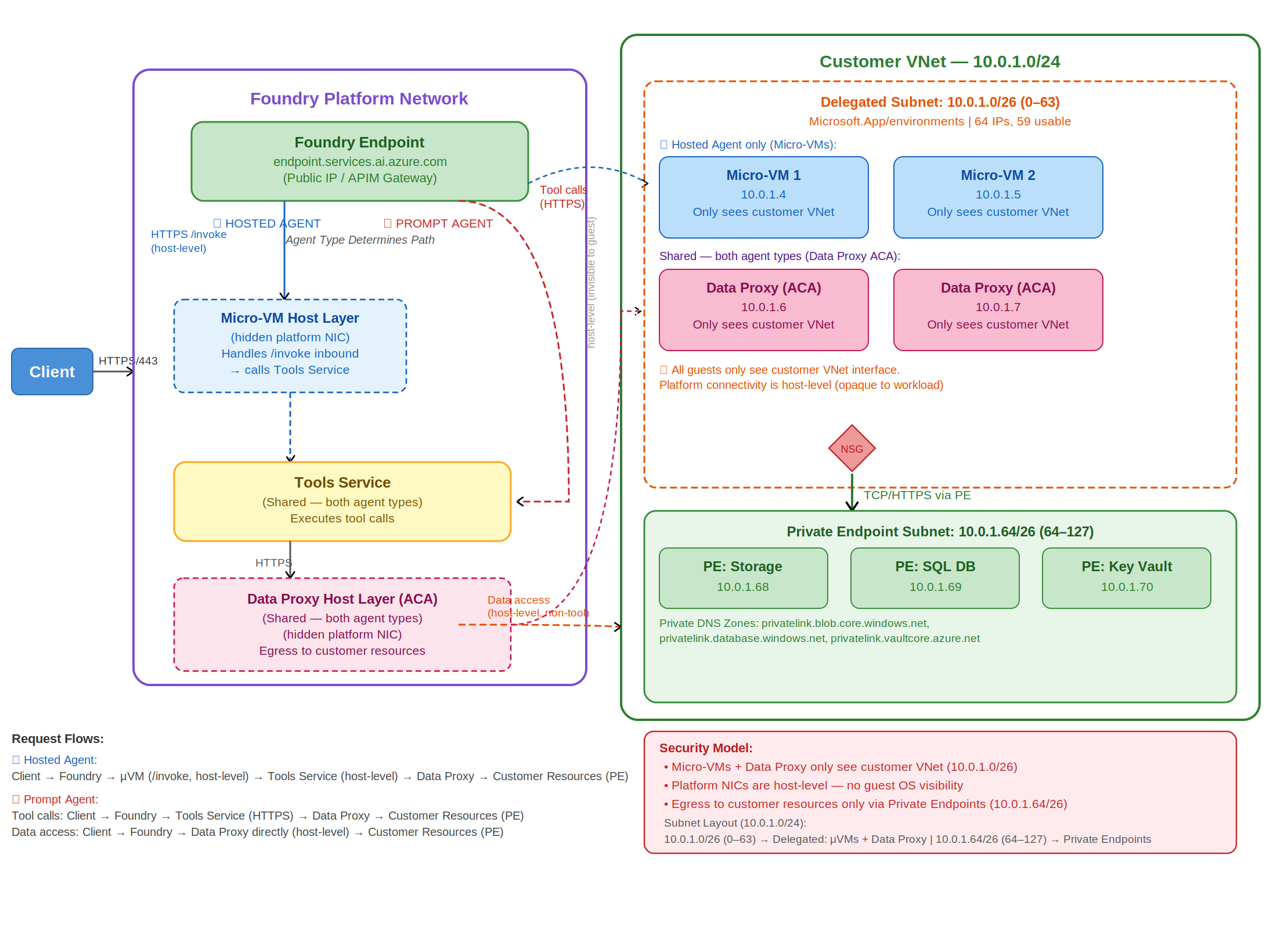
The platform network hosts the Foundry endpoint, the Micro VM host layer that runs Hosted agents, the Tools Service, and the Data Proxy host layer. Your customer VNet contains a delegated subnet (where Micro VMs and the Data Proxy consume IPs) and a private endpoint subnet that connects to your storage, databases, and Key Vault.
Two request flows traverse this architecture:
- Hosted agent: Client to Foundry endpoint to Micro VM (
/invoke) to Tools Service to Data Proxy to customer resources through private endpoints. - Prompt agent: Client to Foundry endpoint to Tools Service to Data Proxy to customer resources through private endpoints. There's no Micro VM on this path.
Key concepts
| Term | What it means |
|---|---|
| Foundry instance | Your Microsoft Foundry resource. The top-level container that holds your projects, agents, and networking configuration. |
| Hosted agent | An agent you build and deploy yourself by using your own container image through Azure Container Registry. You control CPU, memory, and code. Runs on Azure Container Apps. |
| Prompt agent | An agent where compute and scaling are fully managed by Microsoft. You define behavior through configuration. No container image or infrastructure management is required. |
| Single-tenant data proxy | A platform-managed networking component dedicated to your Foundry project that handles outbound connectivity for your agents. Each project gets its own isolated data proxy instance. All tool calls route through the data proxy. |
| Tool server | A backend service registered at the project level that your agents can call to perform actions, such as querying a database or invoking an external API. In bring-your-own VNet configurations, tool server traffic routes through the single-tenant data proxy. |
| Delegated subnet | The subnet in your VNet that you delegate to Foundry Agent Service. All agent infrastructure (data proxies and Micro VMs) deploys into this subnet and consumes IPs from it. |
| Micro VM | The lightweight virtual machine that runs a Hosted agent. |
| Version | A change that affects how your agent runs, such as new code, a new container image, or a configuration update. Only runtime-affecting changes create a new version. |
| Revision | The deployment unit for your agent. A revision can be versioned (tied to a runtime change) or non-versioned (metadata-only changes like tags or scaling settings). |
How traffic flows
Every Foundry Agent Service request enters at the Foundry endpoint and exits to your customer resources through private endpoints. The agent type determines what happens in between.
Inbound to the Foundry endpoint
Clients send HTTPS requests to your Foundry endpoint (for example, <your-resource>.services.ai.azure.com). The platform's API gateway authenticates the request and routes it based on the target agent type.
Hosted agent path
For a Hosted agent, the platform forwards the request to a Micro VM in your delegated subnet over the /invoke protocol. The Micro VM has two network interfaces:
| Traffic type | Route |
|---|---|
| Agent's own outbound traffic | Direct, through the Micro VM's dedicated NIC in the delegated subnet. |
| Tool server calls | Through the single-tenant data proxy, regardless of agent type. |
Even though the Micro VM has its own NIC, any tool invocation is routed through the data proxy.
Prompt agent path
For a prompt agent, the agent runs in Microsoft-managed compute. The Foundry endpoint forwards the request directly to the Tools Service, which calls the single-tenant data proxy. IPs are allocated at the project level, so all prompt agents within a project share the same data proxy infrastructure.
Egress to customer resources
Outbound traffic from the data proxy reaches your storage accounts, databases, and Key Vault through private endpoints in your private endpoint subnet. Configure the corresponding Private DNS zones (for example, privatelink.blob.core.windows.net, privatelink.database.windows.net, and privatelink.vaultcore.azure.net) so name resolution stays inside the VNet.
Subnet sizing and IP allocation
Subnet configuration applies at the Foundry account level. All projects in the account share the same subnet configuration, and hosted and prompt agents share the same delegated subnet. The recommended size has to cover combined IP usage from agents across every project, platform upgrades, and scaling events.
Recommended subnet size
Use a /24 CIDR range for production workloads. A /27 subnet can work for smaller deployments, but it leaves very little headroom. Platform upgrades, rollouts, and scaling events all need temporary additional IPs, and a small subnet can become exhausted during these operations.
Supported IP ranges
Your subnet must use RFC 1918 private IPv4 ranges only:
10.0.0.0/8172.16.0.0/12(covers172.16.x.xthrough172.31.x.x)192.168.0.0/16
Public IP ranges and CGNAT ranges (for example, 100.64.0.0/10) aren't supported and cause routing failures.
How IPs are consumed
IPs are reserved at approximately a 1 IP per 10 pods ratio. Each Foundry project gets one data proxy that starts at 1 pod (1 replica) and scales out with traffic.
| Scenario | Example | IP impact |
|---|---|---|
| Low traffic | 10 projects, each at 1 replica | ~1 IP shared across 10 pods |
| High traffic | 10 projects, each scaled to 10 replicas | 100 pods, ~10 IPs |
Project capacity is dynamic because more traffic per project consumes more IPs.
Subnet size and concurrent sessions
The platform supports a maximum of 50 concurrent agent sessions per subscription per region. Your subnet size determines whether you can reach that maximum.
| Subnet | Total IPs | Usable IPs | Approximate concurrent sessions |
|---|---|---|---|
| /27 | 32 | ~27 | ~17 |
| /26 | 64 | ~59 | ~50 (maximum supported) |
To support the full 50 concurrent sessions, use a /26 subnet or larger.
Project capacity
A Foundry instance supports approximately 250 projects at low traffic. Under heavy traffic, when agents scale to many replicas, the effective limit can drop to as few as ~25 projects. When IPs are exhausted, new project provisioning fails.
Important
Don't plan to run at theoretical maximum capacity. Target a maximum of 80% subnet utilization to absorb spikes from upgrades and scaling.
Behavior during platform maintenance
Platform upgrades run old and new infrastructure in parallel, which temporarily increases IP consumption. A /24 subnet provides enough buffer to handle these temporary spikes alongside your normal workloads. Infrastructure upgrades are fully Microsoft-managed, including their timing.
Hosted agents networking behavior
Hosted agents run on Azure Container Apps and give you control over CPU and memory configuration. You deploy them through your own Azure Container Registry.
Revisions and IP usage
When you deploy an update (new image, configuration, or code), the platform creates a new revision. During rollout, old and new revisions run in parallel as traffic shifts to the new version, and both consume IPs from your subnet.
Revision limits per Hosted agent:
- 100 active revisions per agent.
- 1,000 total revisions per agent name. Oldest inactive revisions are automatically purged when the active limit is reached.
- Approximately 200 Hosted agents per Foundry instance (preview).
The 200 hosted-agent limit is separate from the ~250 project cap, which applies instance-wide across all agent types.
Outbound connectivity
Each Hosted agent runs in a Micro VM attached to your delegated subnet with a dedicated network interface and uses its own IP for outbound communication. Tool calls always route through the single-tenant data proxy.
Performance and scaling
Scaling Hosted agents doesn't introduce latency or performance degradation. The only scenario where performance is affected is when IP exhaustion prevents the platform from scaling, which is avoidable with proper subnet sizing. Hosted agents support custom CPU and memory configurations. You select from available CPU and memory pairs when you create an agent version.
Prompt agents networking behavior
Prompt agents also run on Azure Container Apps, but compute and scaling are fully managed by Microsoft. You don't configure CPU or memory.
Revisions and IP usage
Unlike Hosted agents, prompt agent revisions don't consume IPs. The data proxy runs in single-revision mode, so inactive revisions have no impact on IP availability.
Outbound connectivity
Prompt agents use the single-tenant data proxy for all outbound connectivity. IPs are allocated at the project level, so all prompt agents within a project share the same data proxy infrastructure.
Limits and performance
There's no hard limit on the number of prompt agents you can deploy per Foundry instance. Because compute and scaling are fully managed, there are no expected latency or performance issues tied to the number of prompt agents deployed.
VNet peering and IP overlap
Overlapping IP ranges cause routing failures, so all peered VNets must use unique, non-overlapping IP ranges. This rule applies to bidirectional peering configurations as well. Only RFC 1918 private IPv4 ranges are supported. CGNAT addresses (for example, 100.x.x.x) aren't.
If you can't avoid IP overlap, use Managed virtual network instead of bring-your-own VNet. Managed VNet automates the network setup and eliminates IP overlap concerns.
Monitor IP usage and detect exhaustion
The Azure portal doesn't currently expose IP utilization for delegated subnets, so you can't monitor it directly. The primary indicators of IP exhaustion are HTTP 5xx errors from the data proxy and, for Hosted agents, session creation failures (4xx errors). When IPs are exhausted, data proxy scaling and new project provisioning fail, and Hosted agents can't allocate a Micro VM for new sessions. Monitor data proxy health and Hosted agent session-creation success as leading indicators of capacity issues.
Consider deploying a new Foundry instance with a fresh subnet when you observe:
- The data proxy returning 5xx errors.
- Hosted agent session creation failing with 4xx errors.
- New project provisioning failures.
Important
The platform doesn't proactively warn you when IP capacity is running low. Monitor the signals listed earlier to avoid unexpected provisioning failures.
Quick reference
| Topic | Recommendation |
|---|---|
| Subnet size | /24 for production. /27 is the minimum but risky. /26 is needed for 50 concurrent sessions. |
| Utilization target | Stay below 80% subnet utilization to absorb upgrade and scaling spikes. |
| Supported IP ranges | RFC 1918 only: 10.x, 172.16 through 172.31.x, and 192.168.x. No public or CGNAT ranges. |
| Project capacity | ~250 projects at low traffic, as few as ~25 at full scale. Driven by IP availability. |
| Hosted agent limits | 100 active revisions and 1,000 total revisions per agent. ~200 Hosted agents per instance. |
| IP consumption | Hosted agent revisions consume IPs. Prompt agent revisions don't. |
| Outbound connectivity | Hosted agents use a dedicated NIC. All tool calls route through the single-tenant data proxy. |
| Hosted compared to prompt | Hosted: custom CPU and memory, your ACR, dedicated NIC. Prompt: fully managed scaling. |
| VNet peering | Peered VNets must have non-overlapping IP ranges. Use Managed VNet if overlap exists. |
| Monitoring | No direct IP monitoring in the portal. Watch for data proxy 500 errors. |
| Performance | No degradation from scaling either agent type, with proper subnet sizing. |