Note
Access to this page requires authorization. You can try signing in or changing directories.
Access to this page requires authorization. You can try changing directories.
Important
Interactive training requires explicit access approval. Request access through the preview sign-up form and wait for approval before creating a training session.
Use this cheatsheet to map your training loop to the Python SDK's functions and parameters in Microsoft Foundry. The examples focus on the synchronous FineTuningSession convenience API. Asynchronous clients and cookbook wrappers use different interfaces and completion patterns.
Prerequisites
- Complete installation, authentication, and access setup.
- Use
azure-ai-finetuningsessions==1.0.0b1, the public preview version installed by the cookbook. - The Foundry User role for training, or the Foundry Owner role if you also deploy the fine-tuned model. See Role-based access control for Microsoft Foundry.
- Select an eligible model and supported adapter configuration. Prepare tokens with its matching tokenizer and chat template.
- Set
AZURE_AI_PROJECT_ENDPOINTand confirm an approved training budget. Creating a session and running training or sampling operations can incur charges.
The training, sampling, and checkpoint convenience methods wait for operation results. Raw operations and asynchronous helpers have different return types and completion behavior; use the full SDK reference for those interfaces.
The examples use the synchronous SDK unless labeled otherwise. Prepare the helper functions once, then run operations inside with open_session() as session:. Use real tokenized data; the snippets don't supply a dataset or implement a complete training algorithm.
Supervised fine-tuning
Supervised fine-tuning (SFT) trains on prompts and desired responses.

The sequence is create > prepare supervised data > forward/backward > optimizer step > evaluate > checkpoint. Sampling isn't required for every supervised batch.
Reinforcement learning
Reinforcement learning (RL) trains from scored model responses.
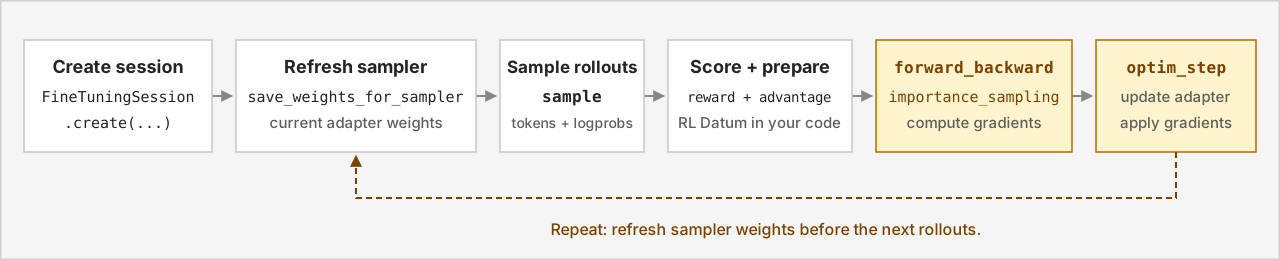
The sequence is create > refresh sampler > collect rollouts > compute rewards and advantages > forward/backward > optimizer step. Repeat from sampler refresh to collect responses from the updated policy.
Grouping, grading, and advantage computation belong in your driver, not an automatic SDK training algorithm. For complete training examples, explore the fine-tuning samples repository.
Create a session
FineTuningSessionClient connects to your project using an endpoint and credential. FineTuningSession.create initializes a model and adapter and starts the session heartbeat.
This helper authenticates with DefaultAzureCredential, creates a session, and unloads it when its context exits. Use your approved model and LoRA rank. The explicit credential scope is for Microsoft Entra authentication.
import os
from collections.abc import Iterator
from contextlib import contextmanager

from azure.ai.finetuningsessions import (
    FineTuningSession,
    FineTuningSessionClient,
)
from azure.ai.finetuningsessions.models import LoRAConfig
from azure.identity import DefaultAzureCredential


@contextmanager
def open_session() -> Iterator[FineTuningSession]:
    with DefaultAzureCredential() as credential:
        with FineTuningSessionClient(
            endpoint=os.environ["AZURE_AI_PROJECT_ENDPOINT"],
            credential=credential,
            credential_scopes=["https://ai.azure.com/.default"],
        ) as client:
            session = FineTuningSession.create(
                client,
                base_model="Qwen/Qwen3.8-27B",
                lora_config=LoRAConfig(rank=32),
                type="training",
                timeout_sec=600.0,
            )
            try:
                print("Session:", session.session_id)
                yield session
            finally:
                session.close()
Reference: FineTuningSession.create, FineTuningSessionClient, and DefaultAzureCredential.
Expect a session identifier after model loading completes. Keep the session open for the operations below; closing its context stops the heartbeat and submits an unload request.
| Parameter | Meaning |
|---|---|
base_model |
Exact supported training-model identifier. |
lora_config |
Explicit LoRAConfig with a supported rank. |
type |
Session type; use training. Sampling happens through the training session, not a separate inference session type. |
timeout_sec |
Maximum time to wait for model loading. A timeout doesn't confirm remote cleanup. |
from_checkpoint |
Optional FromCheckpoint with the source source_session_id and checkpoint_id. Use compatible saved training state. |
user_metadata |
Optional dictionary of run metadata to associate with the session. |
training_type |
Optional tier selector; known values are GlobalStandard, DatazoneStandard, and DeveloperTier. Eligibility still depends on the model and project. |
Record session.session_id when you use the SDK directly. To run an end-to-end training recipe, see Get started.
Prepare supervised data
Datum groups model_input and loss_fn_inputs for one example.
| Type or field | Meaning |
|---|---|
ModelInput |
Ordered model-input chunks. |
ModelInputChunk.tokens |
Text token IDs from the model's tokenizer. |
LossFnInputs.target_tokens |
Next-token targets aligned with the input positions. |
LossFnInputs.weights |
Explicit per-token weights; zero excludes a target from cross-entropy training. |
TensorData.data |
Integer targets or floating-point learning signals. |
Shift inputs and targets by one token and align weights with the targets. Train on the intended assistant tokens, not prompts or observations. See Loss functions and token weights.
Pass prompt and completion tokens from the same model-specific chat renderer to this helper. It creates a single-turn SFT example and masks prompt targets.
from azure.ai.finetuningsessions.models import (
    Datum,
    LossFnInputs,
    ModelInput,
    ModelInputChunk,
    TensorData,
)


def supervised_datum(
    prompt_tokens: list[int], completion_tokens: list[int]
) -> Datum:
    if not prompt_tokens or not completion_tokens:
        raise ValueError("Provide prompt and completion tokens.")
    tokens = prompt_tokens + completion_tokens
    weights = [0.0] * len(prompt_tokens) + [1.0] * len(completion_tokens)
    return Datum(
        model_input=ModelInput(
            chunks=[ModelInputChunk(tokens=tokens[:-1])]
        ),
        loss_fn_inputs=LossFnInputs(
            target_tokens=TensorData(data=tokens[1:]),
            weights=TensorData(data=weights[1:]),
        ),
    )
Reference: Datum, LossFnInputs, and ModelInput.
Build batch as a list of these Datum values. The input, target, and weight arrays have the same length. For multi-turn data, preserve the renderer's masks rather than treating every token after the first prompt as an assistant token.
Prepare RL data
For RL, use sampled responses and reward-derived learning signals:
| Field | Meaning |
|---|---|
SampledSequence.tokens |
Generated token IDs. |
SampledSequence.logprobs |
Token log probabilities from the policy that generated the response, when provided. |
LossFnInputs.logprobs |
Rollout log probabilities aligned with training targets. |
LossFnInputs.advantages |
Per-token advantages; zero excludes prompt and observation positions from the RL signal. |
Preserve alignment among targets, log probabilities, and advantages. Don't replace rollout probabilities with those from a newly updated model. Python's LossFnInputs constructor also requires explicit weights; RL masking uses the advantages.
For a single-turn rollout, pass a sampled sequence and an advantage computed by your driver. This helper puts zero advantages and log probabilities at prompt-target positions.
from azure.ai.finetuningsessions.models import (
    Datum,
    LossFnInputs,
    ModelInput,
    ModelInputChunk,
    SampledSequence,
    TensorData,
)


def rollout_datum(
    prompt_tokens: list[int],
    sequence: SampledSequence,
    advantage: float,
) -> Datum:
    if not prompt_tokens or not sequence.tokens:
        raise ValueError("Provide prompt and sampled response tokens.")
    if sequence.logprobs is None:
        raise ValueError("The rollout needs token log probabilities.")
    if len(sequence.logprobs) != len(sequence.tokens):
        raise ValueError("Align log probabilities with sampled tokens.")
    tokens = prompt_tokens + sequence.tokens
    prefix = len(prompt_tokens) - 1
    count = len(sequence.tokens)
    return Datum(
        model_input=ModelInput(
            chunks=[ModelInputChunk(tokens=tokens[:-1])]
        ),
        loss_fn_inputs=LossFnInputs(
            target_tokens=TensorData(data=tokens[1:]),
            weights=TensorData(data=[1.0] * (prefix + count)),
            logprobs=TensorData(
                data=[0.0] * prefix + sequence.logprobs
            ),
            advantages=TensorData(
                data=[0.0] * prefix + [advantage] * count
            ),
        ),
    )
Reference: SampledSequence and LossFnInputs.
For tool calls or multi-turn rollouts, use the recipe's renderer to distinguish sampled action tokens from environment observations.
Compute gradients
session.forward_backward(batch, loss_fn=...) computes the objective and accumulates gradients. It doesn't update adapter weights.
batch contains Datum values. loss_fn selects cross_entropy, importance_sampling, ppo, cispo, or sapo. Optional loss_fn_config uses the SDK's LossFnConfig model; don't infer accepted configuration keys from an algorithm paper.
Complete gradient computation before its optimizer update. Keep loss reduction consistent when accumulating several calls.
With a live session and a nonempty SFT batch, compute gradients and inspect the per-example outputs:
from azure.ai.finetuningsessions.models import LossFn

result = session.forward_backward(batch, loss_fn=LossFn.CROSS_ENTROPY)
print(result.loss_fn_outputs)
Reference: FineTuningSession.forward_backward and LossFn.
For a prepared RL batch, use LossFn.IMPORTANCE_SAMPLING or another supported policy loss. LossFn enum members and their string values select the same loss.
Apply an optimizer step
session.optim_step(adam_params) applies accumulated gradients. Python's AdamParams requires all five fields:
| Field | Meaning |
|---|---|
learning_rate |
Optimizer update size. |
beta1 |
First-moment decay factor. |
beta2 |
Second-moment decay factor. |
eps |
Numerical-stability term. |
weight_decay |
Weight-decay setting. |
Choose values for your experiment rather than assuming universal defaults.
This helper supplies every required field and waits for the update. The values are example settings, not model-independent recommendations.
from azure.ai.finetuningsessions import FineTuningSession
from azure.ai.finetuningsessions.models import AdamParams


def apply_optimizer_step(session: FineTuningSession) -> None:
    session.optim_step(
        AdamParams(
            learning_rate=2e-5,
            beta1=0.9,
            beta2=0.95,
            eps=1e-8,
            weight_decay=0.0,
        )
    )
Reference: FineTuningSession.optim_step and AdamParams.
Recompute learning_rate when your driver uses a schedule; don't assume one optimizer configuration applies throughout the run.
Sample text
session.save_weights_for_sampler(seq_id, ...) prepares weights and returns a sampler checkpoint identifier. Refresh sampler weights after updates before generating from the updated adapter.
session.sample(prompt_tokens, sampling_params, checkpoint_id=..., ...) generates responses from the selected sampler weights.
| Parameter or result | Meaning |
|---|---|
prompt_tokens |
Tokenized prompt, or supported ModelInput. |
checkpoint_id |
Completed sampler checkpoint identifier for this session, not a checkpoint path or deployment name. |
num_samples |
Number of responses for the prompt. |
SamplingParams.max_tokens |
Completion-token budget. |
temperature, top_p, top_k |
Sampling-distribution settings. |
stop_criteria |
A list of stop strings or a list of token IDs, not both. |
response_format |
Optional response-format request; support depends on the model and sampling provider. |
result.sequences |
Generated SampledSequence values. |
Python's SamplingParams requires max_tokens, temperature, top_p, and top_k. Set the same seq_id for sampler refresh and sampling. Supply either path or sampling_session_seq_id when saving sampler weights.
After one optimizer update, refresh the sampler and generate a response. Use the model's tokenized prompt_tokens and matching tokenizer from your driver.
from azure.ai.finetuningsessions.models import SamplingParams

step = 1
sampler = session.save_weights_for_sampler(
    seq_id=step, sampling_session_seq_id=0
)
result = session.sample(
    prompt_tokens,
    SamplingParams(
        max_tokens=128,
        temperature=0.7,
        top_p=1.0,
        top_k=-1,
    ),
    checkpoint_id=sampler.checkpoint_id,
    seq_id=step,
    num_samples=1,
)
for sequence in result.sequences:
    print(tokenizer.decode(sequence.tokens, skip_special_tokens=True))
Reference: FineTuningSession.save_weights_for_sampler, FineTuningSession.sample, and SamplingParams.
The result contains one sampled sequence. Increment the step identifier with your updates and refresh sampler weights before sampling the updated policy.
Preparing sampler weights isn't the same as saving resumable training state.
Persist or refresh sampler weights
The synchronous method uses sampling_session_seq_id to distinguish an in-memory refresh from a persisted sampler checkpoint.
| Purpose | Synchronous call |
|---|---|
| Refresh sampler weights without persistence | session.save_weights_for_sampler(seq_id=step, sampling_session_seq_id=0) |
| Persist a sampler checkpoint | session.save_weights_for_sampler(seq_id=step, path="sampler-final"), without sampling_session_seq_id. |
Both calls return a sampler checkpoint identifier. Keep it with its owning session ID. A durable sampler save doesn't establish indefinite retention or make the checkpoint usable in another session.
Run a forward-only pass
session.forward(batch, loss_fn=...) returns loss-function outputs without accumulating gradients. Use it to inspect a prepared batch or calculate evaluation metrics.
Its result doesn't populate the training-only total_loss. Inspect loss_fn_outputs; don't treat a missing aggregate as zero loss.
With a live session and a prepared batch, inspect the per-example outputs without changing accumulated gradients:
from azure.ai.finetuningsessions.models import LossFn

result = session.forward(batch, loss_fn=LossFn.CROSS_ENTROPY)
print(result.loss_fn_outputs)
Reference: FineTuningSession.forward.
Save and resume training
session.save_weights(path) saves adapter weights and optimizer state. Record the checkpoint reference with its source session and driver state.
After a completed update, save training state and record its source-session/checkpoint reference:
saved = session.save_weights("example-final")
checkpoint_path = f"{session.session_id}/{saved.checkpoint_id}"
print("Training checkpoint:", checkpoint_path)
Reference: FineTuningSession.save_weights.
The method returns only after the save completes. Store checkpoint_path with the dataset position and other driver state before closing the session.
FineTuningSession.create_from_checkpoint restores training state in a new session:
| Parameter | Meaning |
|---|---|
checkpoint_path |
Saved training-checkpoint reference in <source-session-id>/<checkpoint-name> form. |
base_model |
Base model compatible with the original checkpoint. |
lora_config |
Compatible adapter configuration with an explicit rank. |
A sampler checkpoint isn't a full-state training checkpoint. Restore dataset position and scheduling separately in your driver. See Checkpoints.
This helper restores the saved training state through an authenticated client. Pass the recorded training checkpoint_path, and keep the base model and LoRA rank compatible with the source session.
from azure.ai.finetuningsessions import (
    FineTuningSession,
    FineTuningSessionClient,
)
from azure.ai.finetuningsessions.models import LoRAConfig


def restore_session(
    client: FineTuningSessionClient, checkpoint_path: str
) -> FineTuningSession:
    return FineTuningSession.create_from_checkpoint(
        client,
        checkpoint_path=checkpoint_path,
        base_model="Qwen/Qwen3.8-27B",
        lora_config=LoRAConfig(rank=32),
        timeout_sec=600.0,
    )
Reference: FineTuningSession.create_from_checkpoint.
The returned session has a new session ID and starts its own heartbeat. Close the resumed session when its loop exits, just as you close a newly created session.
Use asynchronous operations
The SDK's async client and cookbook wrappers aren't interchangeable. Import the async client from azure.ai.finetuningsessions.aio; model types still come from azure.ai.finetuningsessions.models.
| Interface | Completion pattern |
|---|---|
Synchronous FineTuningSession |
The method returns a completed operation result. |
Raw async SDK convenience methods such as save_weights_for_sampler_async |
Await submission, then await the returned asyncio.Task for completion. |
Cookbook training-wrapper methods such as save_state_async |
Await submission, then await the future's result_async(). |
For a live session owned by an async client, this helper persists sampler weights and returns the completed checkpoint identifier:
from azure.ai.finetuningsessions.aio import (
    FineTuningSessionClient as AsyncSessionClient,
)


async def persist_sampler_checkpoint(
    client: AsyncSessionClient, session_id: str, name: str
) -> str:
    task = await client.save_weights_for_sampler_async(session_id, name)
    saved = await task
    return saved.checkpoint_id
Reference: Async FineTuningSessionClient.save_weights_for_sampler_async.
Use save_weights_and_get_sampling_client_async instead for an ephemeral sampler refresh. On the raw SDK client, that method still returns a task with an operation result, not a cookbook sampling client.
Await required saves before unloading a session. The cookbook's compatibility ttl_seconds argument isn't forwarded to these SDK saves; don't treat it as an enforced retention setting.
For custom objectives, cookbook forward_backward_custom_async composes service forward outputs with client-side differentiable loss computation. It isn't a method on FineTuningSession, and the SDK's loss_fn parameter doesn't accept an arbitrary Python callable.
Close resources
session.close() stops its heartbeat and submits an unload request. Call it when the loop exits, including on failure; then close the HTTP client and credential.
Closing doesn't confirm remote cleanup completion or delete checkpoints. session.delete() can cascade to saved resources. See Inspect and unload sessions.
Use the open_session context manager to run a single SFT update and save training state. Define open_session and apply_optimizer_step from the earlier examples, and pass a nonempty rendered SFT batch.
from azure.ai.finetuningsessions.models import Datum


def train_one_batch(batch: list[Datum]) -> str:
    if not batch:
        raise ValueError("Provide at least one rendered training datum.")
    with open_session() as session:
        session.forward_backward(batch, loss_fn="cross_entropy")
        apply_optimizer_step(session)
        saved = session.save_weights("example-final")
        return f"{session.session_id}/{saved.checkpoint_id}"
Reference: FineTuningSession.close and FineTuningSession.save_weights.
The helper returns a training-checkpoint reference. Its context submits an unload request even if a training operation raises an exception, then closes the client and credential.
SDK reference
Use the full reference for executable examples, method signatures, asynchronous APIs, result types, and errors: