Note
Access to this page requires authorization. You can try signing in or changing directories.
Access to this page requires authorization. You can try changing directories.
This article describes a six-phase process for migrating an LLM-powered workload from one base model to another: what to consider at each phase, which Microsoft Foundry features apply, and how the work changes for different kinds of teams.
What model migration means
Every model you run in production has a retirement date. When a model you depend on is replaced, or when a newer model would serve your workload better, you migrate. Swapping a model isn't a one-line change: a different model can quietly shift tone, formatting, JSON shape, latency, cost, or tool-calling behavior, and break downstream code that depends on the old behavior.
A successful migration preserves the application's behavior or improves it in measurable ways. Success requires a repeatable process to detect drift, adapt safely, and prove quality before broad rollout.
When to migrate
A migration usually starts for one of four reasons:
- A model is retiring. On Foundry, every generally available model ships with a retirement date, and older families are replaced over time. For retirement policy and dates, see the Foundry Models lifecycle and support policy and Model retirement schedule.
- A better model is available. A newer model offers higher quality, lower cost, better latency, or a capability (such as structured output or improved tool calling) that your workload needs.
- A cost or latency problem forces a change. The current model's latency or unit cost no longer meets your needs.
- A capability gap blocks the product. The current model can't do something your product now requires.
What happens on the retirement date
What Azure does when a model retires depends on how you buy capacity, and Foundry uses different terminology for each path:
- Standard, Global Standard, and Data Zone Standard (pay-as-you-go) deployments are auto-upgraded on a rolling, region-by-region schedule. You control the timing with
versionUpgradeOptionset to one of:OnceNewDefaultVersionAvailable,OnceCurrentVersionExpired, orNoAutoUpgrade(which means the deployment stops working at retirement). Priority Processing follows the same path. - Provisioned (PTU) deployments are not auto-upgraded. You migrate them yourself, either in-place (traffic moves over a 20–30 minute window with no downtime) or side-by-side (stand up the new deployment, test, shift traffic, delete the old one).
- Batch deployments follow the side-by-side path: deploy the new model, resubmit jobs, retire the old deployment.
No matter which path applies, the developer challenge is the same: on a set date, your traffic starts hitting a different model. An endpoint that still responds doesn't mean your app still behaves correctly, so both auto-upgraded and manually migrated workloads benefit from the assessment and validation this article describes.
Migrate before the retirement date
Auto-upgrade is only a safety net for pay-as-you-go deployments, not a migration plan. Provisioned deployments have no safety net. Either way, it's not a substitute for a migration plan. Two policy commitments give you room to migrate on your own schedule instead of waiting for the deadline:
- The replacement model becomes available about 90 days before retirement in Global Standard, and about 30 days before retirement in provisioned regions where the predecessor is retiring. Use this window to evaluate the new model and migrate manually.
- Retirement dates are not extendable. There's no exception process, so a date you didn't plan for still applies to you.
You don't need a deprecation notice to start. If a newer model is cheaper, faster, or more capable, run it through the process now. Migrating deliberately turns the retirement date into a formality. Because migrations recur, it's worth making the process repeatable.
Who should use the migration process
The migration process fits best when your team builds an LLM-powered feature inside a larger product or platform, migrates on a roughly quarterly cadence, and has a clear owner (such as a central platform team or the app team) running each migration deliberately.
This process also fits AI-native teams, where the model is the product. The phases are the same, but they run faster and often in parallel rather than in strict sequence.
The process assumes you're moving between base models, that is, models you deploy as published in the model catalog, without weight-level customization. Fine-tuned workloads are out of scope. They can't be auto-upgraded, as they carry their own training and deployment retirement clock. Adapting fine-tuned workloads means distillation or re-training rather than prompt and schema changes. If you run fine-tuned deployments, plan to re-tune against the replacement base model early.
Migration phases
A migration moves through six phases. Each phase produces an output that the next phase uses. The migration phases are:
Discover → Assess → Adapt → Validate → Roll out → Retire
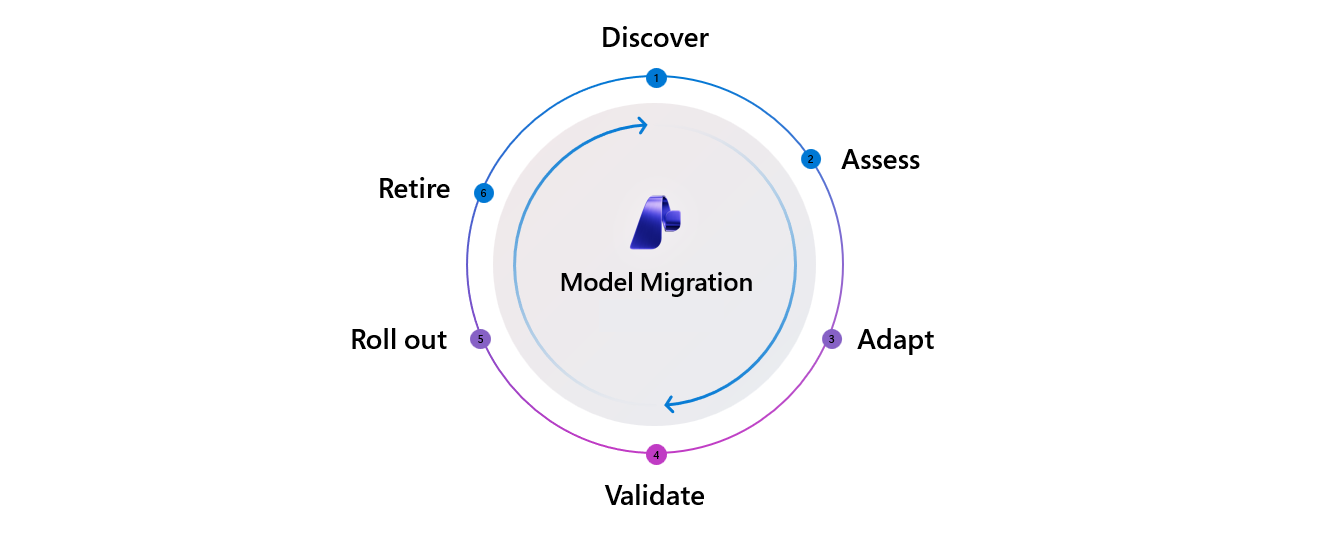
The following table describes each phase and the Foundry features and tools that support it. Features are available in both Microsoft Foundry and Azure OpenAI unless marked Foundry only, which means Azure OpenAI has no equivalent.
The per-phase sections later in this article explain why each phase exists, what a successful outcome looks like, what to consider, when to use each feature, and where the phase commonly breaks.
| Phase | Description | Features and tools |
|---|---|---|
| Discover | Learn that a model change is coming or needed, and decide whether to act. |
|
| Assess | Choose the target model and confirm it's operationally available. |
|
| Adapt | Replay the current workload on the new model, diagnose behavioral changes, and re-engineer prompts, parameters, tool definitions, output schemas, and the calling code around them. |
|
| Validate | Score the adapted workload against a quality rubric to decide whether it's safe to ship. |
|
| Roll out | Promote to production through staged exposure, monitor live behavior, and commit or roll back. |
|
| Retire | Decommission the old deployment, free capacity, archive evals, and update downstream documentation. |
|
Before you migrate: Prepare a test dataset
This preparation step assembles a set of representative inputs, expected outputs, and agreed-upon success criteria before any migration work begins. This set is a gating dependency for the middle of the process: you can't replay in the Adapt phase without inputs, and you can't score in the Validate phase without ground truth and criteria.
What to consider
- Build the dataset before you pick a target. The dataset describes your workload, not the candidate model, so you can assemble it in parallel with Discover.
- Gather inputs from real or synthetic sources. Use captured production traffic or curated domain examples as CSV or JSONL. When you don't have representative data yet, generate synthetic and adversarial inputs with the Simulator.
- Instrument capture before you need it. Production content capture is opt-in and never retroactive, so you can't evaluate traffic you didn't record. Start logging prompts, responses, latency, and token counts now.
- Freeze the dataset. Keep the inputs, ground truths, and success criteria fixed for the whole migration. If any of them change, you can no longer compare source and target results.
You also need an inventory of the model deployments your workload uses, including their deployment types (Standard, Provisioned, or Batch). For each source model, note its retirement date and suggested replacement from the Model retirement schedule.
Phase 1: Discover
The purpose of the Discover phase is to recognize that a model change is coming or worthwhile and to decide whether to act. The output is a go/no-go decision, and staying on the current model is a valid choice. A successful outcome is an early, structured signal that gives you the deprecation date, replacement model, and migration window, or a deliberate decision to stay on the current model.
What to consider
- What is the retirement date, and how much runway do you actually have? Treat the deprecation date minus your validation and rollout time as the real deadline.
- Is there a named suggested replacement, or do you need to shortlist candidates yourself?
- Does the change carry compliance or regional constraints (for regulated workloads, availability and certification often matter before quality does)?
Where it commonly breaks
Teams learn about retirements inconsistently, through an email, a portal banner, or an internal message, and they notice the signal late. That delay shortens an already-tight window. Solo developers and small teams often discover a retirement from a production error rather than an announcement.
What you bring
The retirement schedule and Models API expose the data on a stable contract. Mature organizations add a thin internal notification layer on top to route it to the right owners.
Phase 2: Assess
The purpose of the Assess phase is to pick the candidate target model and confirm that you can run it: the right region, the right deployment type, enough quota, and availability alongside the current model so that rollback stays possible. A successful outcome is a clear choice among candidate models, with region, SKU, quota, and cost confirmed before tuning starts.
What to consider
- Quality and positioning between candidates. When several models are in flight, decide which one fits your workload on quality, not just which scores highest on a public benchmark.
- Cost on your own traffic. Pricing structure shifts between model generations. Reasoning tokens, cached input, and structured-output overhead can swing unit economics by 2x or more, so project monthly cost on historical traffic rather than list price alone.
- Operational availability. Confirm region, SKU, and quota, and that the target can run side by side with the source so you keep a rollback path.
- Compliance gating. For regulated workloads, certification and regional availability can filter the candidate list before quality enters the conversation.
Where it commonly breaks
Choice paralysis sets in when several candidates have unclear positioning. Teams discover only mid-plan that the chosen model isn't available in their region or SKU. Or a cost projection reveals that the new model is materially more expensive on real traffic.
What you bring
Benchmarks are computed on public datasets, so treat the leaderboard as a filter rather than the finish line and confirm the shortlist against your own workload. Cost projection is the same story: the monthly view comes from your own token logs, which is straightforward once you have the traffic data.
Phase 3: Adapt
The purpose of the Adapt phase is to make the workload work well on the new model. Replay the existing workload unchanged first (to isolate model-driven behavior changes), diagnose what shifted, then iteratively re-engineer. A successful outcome is a side-by-side behavior comparison against real or representative traffic, with every change tracked.
Adapt is more than prompt editing
Prompts are the most visible surface, but a migration usually touches four others:
- Parameters.
temperature,top_p,max_tokens, and reasoning-effort controls don't map one-to-one across generations, and newer model families might not support some parameters. - Tool definitions. You might need to reword or tighten argument names, descriptions, and required fields that guided the old model reliably.
- Output schemas. Models differ in how they adhere to structured output. You might need to add explicit constraints to a schema that the old model satisfied loosely, or you might finally be able to enforce a schema.
- Calling code. API surface and SDK differences (Chat Completions versus Responses, streaming shape, and new or renamed request fields). You might also need to update downstream parsing that assumed the old response shape.
For agentic and workflow workloads, schema and tool-call work often outweighs prompt work.
What to consider
- Replay unchanged before you tune. Run your current configuration on the target model without any changes. This approach helps you separate the behavior that the model changed from the changes you introduce, and it gives you a baseline.
- Watch what actually shifts. Verbosity, reasoning depth, structured-output adherence, tool-call shape, refusal behavior, and latency variance all commonly change.
- Replay real traces to catch tool-call regressions. Extra fields, renamed arguments, and changed sequencing surface only in real traces, not in single-turn benchmarks.
- Track your changes. Prompt re-engineering is easy to do and easy to lose. Keep the original and record what changed and why.
Foundry features
Three Foundry features support this phase:
- Prompt Optimizer is the Optimize button directly below the system instructions field in the Agent playground. It restructures your instructions using prompt-engineering best practices, shows per-paragraph reasoning for each change, and supports an iterate loop: add a suggestion such as "keep the JSON schema exactly" and re-optimize. Available in Foundry only, not Azure OpenAI.
- Agent optimization tunes instructions, tools, and model selection together for agent workloads. Available in Foundry only, not Azure OpenAI.
- Simulator generates synthetic and adversarial inputs when you don't have production data to replay.
Where it commonly breaks
For embedded, product-facing workloads, this phase usually takes the most time because the diagnosis loop is manual: teams re-run prompts, compare the differences, and rarely record what they changed or why.
What you bring
- Start with the optimizers, then verify. They apply general best practices in a single pass rather than fitting to your dataset, and they tune instruction text rather than tool definitions or output schemas. Treat the output as a strong draft: copy your original prompt first (there's no version history), then re-evaluate against your frozen dataset before you trust the change.
- Plan extra hands-on work for cross-family moves. There's no "optimize for target model X" flow, so moving between model families involves deliberate prompt and schema translation.
- Record traffic before you need it. Replay is only as good as your capture, and content capture is opt-in and never retroactive.
Phase 4: Validate
The purpose of the Validate phase is to decide whether the adapted workload is safe to ship by scoring it against a quality rubric on a curated dataset. The rubric can be rule-based, reference-based, an LLM-as-judge, human review, or a domain-specific framework. A successful outcome is delivering a trusted evaluation suite, run on a frozen dataset, that both the app team and any reviewers believe.
Validate is one phase, but it has two touchpoints, so don't treat it as a single end-of-line event:
- Prepare early. Freeze the dataset and success criteria in Before you migrate, before you Adapt. The moment those change, your source and target stop being comparable.
- Gate late, in two passes. First run the current model on the frozen set to establish a source baseline, the number you have to beat. Then score the target on the same set and decide.
What to consider
- Keep the dataset and criteria frozen. This is the single most important discipline in the process for keeping results comparable.
- Measure the three dimensions that map to sign-off: quality (evaluator or reviewer scores), latency (time-to-first-token and throughput, isolated to the call you're migrating), and cost (input and output token cost per request).
- Match the rubric to the workload. A clinical summarization rubric, a tool-call sequencing assertion for agents, or pre-existing user-feedback signals might be more meaningful than a generic score.
- Treat the gate as a signal for AI-native teams. Rather than a one-time pass/fail, evaluation runs continuously, on every commit, and fuses with Roll out.
Foundry features
Two Foundry features support this phase:
- Azure AI Evaluation SDK includes more than 30 built-in evaluators, covering groundedness, relevance, retrieval, coherence, fluency, reference-based metrics (F1, BLEU, and ROUGE), safety, agent, and Azure OpenAI graders. It also includes a custom LLM-as-judge for task-specific rubrics.
- Portal evaluation runs the same evaluators over model, agent, dataset, and trace targets.
Run the identical set of evaluators against both source and target on the frozen dataset so the numbers are comparable.
| Dimension | What to measure | Where |
|---|---|---|
| Quality | Evaluator scores on source vs. target | Azure AI Evaluation SDK, portal evaluation |
| Latency | Time-to-first-token and throughput | Benchmark leaderboard, operational metrics |
| Cost | Input and output token cost per request | Evaluation outputs, model pricing |
Where it commonly breaks
Most teams don't have an evaluation suite, and the ones that do often built it themselves. For regulated workloads, a mandatory human or quality-management review sits on top and becomes the bottleneck. These migrations stall at Validate, not Adapt.
What you bring
The evaluators are ready to run, but curating a domain-relevant test set from your own production traffic is hands-on work for model (non-agent) workloads. This need is why the preparation step pays for itself.
Phase 5: Roll out
The purpose of this phase is to promote the validated configuration to production in stages: non-production first, then a canary or weighted percentage, then broader exposure. Throughout, watch live latency, errors, and, ideally, quality against the pre-migration baseline. Then commit or roll back. A successful outcome is a gradual exposure through canary, weighted, or shadow traffic, a live quality signal beyond latency and errors, and a preserved rollback path.
What to consider
- Know your deployment type. Your deployment type determines the mechanics: Standard-family deployments can auto-upgrade on a schedule you control. Provisioned, batch, and fine-tuned deployments migrate manually. The following table shows the mechanics by type.
- Preserve a rollback corridor. Keep the old deployment reachable until you're confident. Rollback decisions forced by a deprecation deadline instead of by evidence are a warning sign you started too late.
- When you can't canary, use shadow or mirror mode. Regulated flows (PHI, financial transactions) often can't expose a new model to real customer traffic. The equivalent is running the new model on production inputs offline and comparing outputs to the old model without affecting users.
- Watch for regressions offline eval missed. Real-user latency and edge-case behavior can surface only under production load.
Migration mechanics by deployment type
| Deployment type | Migration approach | Quota |
|---|---|---|
| Standard, Global Standard, Data Zone Standard | Automatic upgrade on a rolling schedule. Control timing with versionUpgradeOption (OnceNewDefaultVersionAvailable, OnceCurrentVersionExpired, or NoAutoUpgrade). Priority Processing follows the same path. |
Carries over automatically |
| Provisioned | Manual: in-place (traffic moves over a 20–30 minute window) or side-by-side (new deployment, shift traffic, delete the old one). | Ensure target-model quota first |
| Batch | Side-by-side: deploy the new model, resubmit jobs, then retire the old deployment. | Ensure target-model quota |
| Fine-tuned (out of scope for this article) | Not auto-upgraded; separate training and deployment retirement clock. Re-tune or distill onto the replacement base model. | Ensure target-model quota |
After traffic moves, wire up continuous evaluation to score a sampled percentage of production traffic on the Foundry Observability dashboard, connected to traces for root-cause analysis, plus Azure Monitor alerts when quality drops.
Where it commonly breaks
Quality regressions that offline evaluation missed appear under production load. Rollback decisions are often forced by a deprecation deadline rather than by evidence, which is a sign the migration started too late.
What you bring
Weighted routing between two deployments is implemented in your own gateway or application layer, and the rollback corridor is a deliberate choice to keep the old deployment warm for a window (embedded teams typically want about 30 days). Both are worth designing once and reusing every migration.
Phase 6: Retire
The purpose of the Retire phase is to decommission the old deployment, free capacity, archive evaluation artifacts, and communicate the change downstream to customer-facing documentation, marketing pages, support runbooks, and audit logs where retention is required. At the end, the old deployment is gone, the deployment count trends down, and lessons carry into the next cycle.
What to consider
- Treat retirement as governance, not just cleanup. For regulated workloads, retention obligations can require keeping artifacts for years.
- Confirm the source is actually gone. Verify the old version is retired, then delete the deployment so it stops consuming capacity.
- Feed learnings forward. Fold fresh production traces back into your golden dataset so the next migration starts cheaper.
Where it commonly breaks
Teams skip retirement, which leads to an accumulation of zombie deployments. Teams that don't actively retire carry far more live deployments than their peers, and most of that count is structural debris from prior migrations. A common missed sub-step is communication: marketing and product documentation still refer to the old model after the swap.
What you bring
The observability dashboard shows the deployment count trending down, but deciding which deployments are still load-bearing is a judgment call your team makes. Make retirement an explicit tracked task rather than a hope.
Migration is rarely binary
Real migrations are often split-state: part of a workload runs on the new model while a latency-sensitive or higher-risk path stays on the old one, sometimes for weeks. Plan for partial rollout and partial rollback rather than a single switch from the old model to the new one. Retire commonly lags Roll out by weeks or months, and those lingering old deployments are what show up as sprawl.
Related content
- Understand deprecation and support timelines in the Foundry Models lifecycle and support policy
- Check retirement dates and replacements in the Model retirement schedule
- See what's already retired in Retired Microsoft Foundry Models
- Compare candidate models with Model benchmarks and leaderboards
- Adapt prompts to a new model with Optimize prompts with Prompt Optimizer
- Validate quality before you switch by running evaluations from the Foundry portal
- Monitor the migrated workload with Observability in generative AI