Note
Access to this page requires authorization. You can try signing in or changing directories.
Access to this page requires authorization. You can try changing directories.
Important
Items marked preview in this article are currently in preview. This preview is provided without a service-level agreement, and Microsoft doesn't recommend it for production workloads. Certain features might not be supported or might have constrained capabilities. For more information, see Supplemental Terms of Use for Microsoft Azure Previews.
Human in the loop turns what your agent does in production, and what your experts think of it, into evaluation datasets you can trust. Reviewers annotate real traces with feedback and expected outputs. Foundry then builds test cases from those traces, with scoring criteria written for each case.
Use Human in the loop to:
- Build evaluation datasets from real behavior: Turn production traces into test cases with human-verified expected outputs, labels, and failure modes.
- Make evaluation results actionable: Compare evaluation results with human judgments to find where scoring criteria need work.
- Improve agent quality over time: Use trusted datasets to compare agent versions, catch regressions, and validate changes.
How it works
Human in the loop is a loop: each improvement goes back to production, produces new traces, and starts the next review.
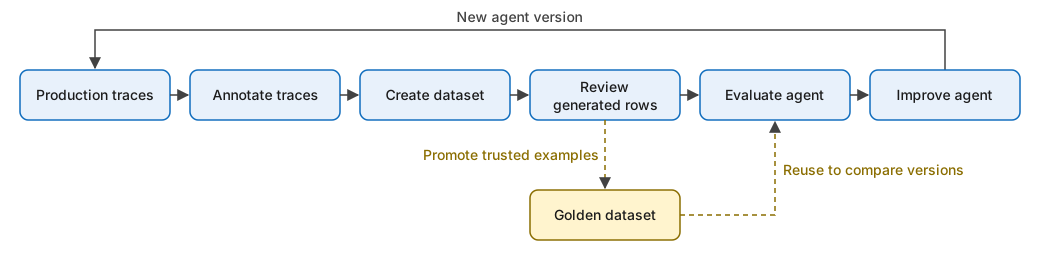
- Annotate traces: Reviewers find relevant traces and add ratings, tags, comments, and expected outputs. See Annotate traces for evaluation.
- Create a dataset: Add annotated traces to a dataset. Foundry copies the expected outputs and can generate a task-level rubric, which is scoring criteria for that one test case. See Create evaluation datasets from annotations.
- Review generated rows: Check the expected outputs and generated criteria before you evaluate.
- Evaluate the agent: Score each row against its own criteria and expected output with the task-level rubric evaluator. See Rubric evaluators.
- Improve the agent: Use the results to fix the agent, then evaluate the new version against the same dataset.
- Optionally, promote trusted examples: Curate a small set of reliable test cases into a golden dataset that your team reuses to compare versions. See Curate golden datasets.
Task-level rubrics
Shared rubric evaluators apply the same criteria to every row, such as "confirm reservation details." Task-level rubrics capture what success means for one specific case, usually from a reviewer's feedback.
For example, a reviewer marks a refund response as incomplete because it omitted a 30-day deadline. The generated criteria for that row check for the deadline. Another row in the same dataset might check that the agent asks for a missing order number.
Improve your agent with the results
Review individual failures as well as overall scores. Reviewer feedback often explains whether a failure came from instructions, policy knowledge, tool use, or the response itself.
- Identify: Find quality gaps and recurring failure patterns in evaluation results and traces.
- Understand: Use annotations, expected outputs, and task-level criteria to see why the agent failed.
- Improve: Update the agent's instructions, tools, or configuration.
- Validate: Evaluate the updated agent against the same dataset version to confirm the fix and catch regressions.
If a policy or business requirement changes, update the affected expected outputs and criteria before you compare scores across versions.