Note
Access to this page requires authorization. You can try signing in or changing directories.
Access to this page requires authorization. You can try changing directories.
Currently viewing:  New Foundry portal version - Switch to version for the classic Foundry portal
Provisioned throughput deployments in Microsoft Foundry support hourly billing for flexible, short-term usage, and Azure Reservations for sustained production workloads at a discounted rate. This article explains how PTU billing works, helps you choose between hourly billing and Azure Reservations, and covers how to monitor and manage reservation costs.
If you're new to provisioned throughput, start with What is provisioned throughput for Foundry Models?. To estimate the number of PTUs your workload needs, see Determine PTU sizing for a workload. When you're ready to create your first deployment, see Get started with provisioned deployments.
How PTU billing works
Provisioned throughput units (PTUs) are generic units of model processing capacity. When you create a provisioned deployment, you specify how many PTUs to allocate. Foundry reserves and holds that PTU capacity for the deployment, and you're charged for it hourly whether or not the deployment is handling requests. In other words, you're billed hourly based on the number of Provisioned Throughput Units (PTUs) you deploy, rather than the number of tokens consumed.
PTU billing has two important characteristics:
- Billed on deployed capacity, not token consumption: Unlike pay-per-token billing, you pay for reserved capacity. Requests that complete successfully consume that capacity, but you're billed for the full deployed PTU count regardless of actual utilization.
- Model-independent: Your PTU quota is shared across all supported models in a region and deployment type. The same PTU pool can be used to deploy any supported model. You don't buy PTUs for a specific model. PTU quota for each provisioned deployment type appears in the Foundry portal's Quota page.
Provisioned deployments support two billing modes: hourly billing for flexible, short-term usage, and Azure Reservations for sustained production workloads at a discounted rate.
Note
Foundry provisioned customers onboarded before the August 2024 self-service update use a purchase model called the Commitment model. These customers can continue to use the Commitment model alongside hourly/reservation billing. The Commitment model isn't available for new customers or certain models introduced after August 2024. For details on the Commitment purchase model and options for coexistence and migration, see Foundry Provisioned August Update.
Hourly billing
Provisioned deployments (Regional, Data Zone, and Global) are charged at an hourly rate ($/PTU/hr) based on the number of PTUs deployed. For example, a 300 PTU deployment is charged at: hourly rate × 300.
If a deployment exists for only part of an hour, it receives a prorated charge:
- A deployment that exists for 15 minutes is charged at 1/4 of the hourly rate.
- If you resize the deployment, billing adjusts to the new PTU count immediately.
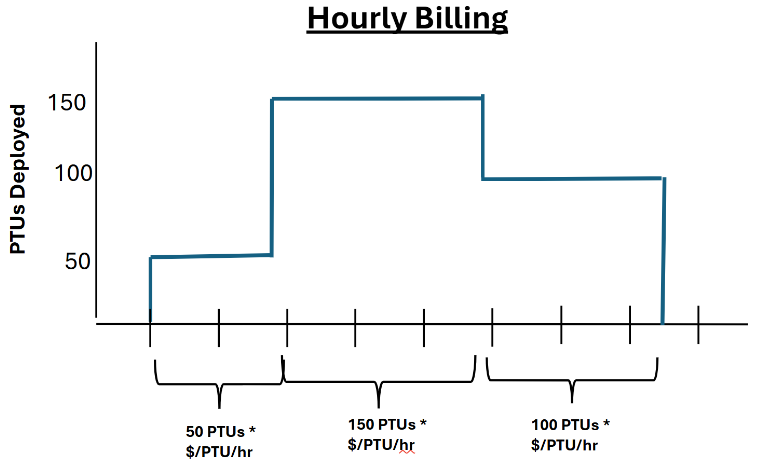
Provisioned deployments can't be paused. Billing stops only when the deployment is deleted.
For current PTU pricing by model family, see Azure OpenAI pricing, Llama model pricing, and DeepSeek model pricing.
When to use hourly billing
Hourly billing is appropriate for short-term scenarios such as:
- Benchmarking model quality or performance before committing to a reservation.
- Temporarily scaling PTU capacity for an event such as a hackathon.
Hourly billing isn't appropriate for deployments in production (use reservations instead). You shouldn't use hourly billing to scale production deployments up and down as traffic changes for these reasons:
- Cost: Azure Reservations provide significant discounts over hourly billing. Maintaining a deployment sized for full production volume under a reservation is typically less expensive than continuous hourly billing with the deployment scaled up or down for incoming traffic.
- Capacity risk: Unused quota doesn't guarantee that capacity is available when you want to scale back up your PTU deployment. Provisioned capacity is a finite, dynamically changing resource. A scale-down/scale-up strategy can leave you without capacity when you need it most.
Scale provisioned deployments
You can increase or decrease the PTU count of an existing provisioned deployment at any time in the Foundry portal or via the API. Billing adjusts immediately to the new PTU count.
Keep these constraints in mind when scaling:
- Scaling up requires available capacity: Additional PTUs are subject to capacity availability at the time of the resize. If PTU capacity in the region is insufficient for the new PTU count, the scale-up fails. Use the Foundry portal deployment experience or the model capacities API to verify capacity before planning a scale-up event.
- Scaling down releases capacity permanently: Reducing a deployment's PTU count releases the freed capacity back to the region pool. There's no guarantee the same capacity is available if you scale back up later.
- Billing adjusts immediately: Billing charges the new PTU count from the moment the resize completes, prorated to the minute.
- Reservations aren't affected by deployment resizing: If the deployment is covered by a reservation and you scale it down, the reservation continues at its original PTU quantity. Deployed PTUs that fall below the reservation quantity result in unused reservation coverage; deployed PTUs that exceed the quantity are billed at the hourly rate. See Reservation overage example.
Azure Reservations for provisioned throughput
An Azure Reservation is a term-discounting mechanism shared by many Azure products such as Azure Compute and Cosmos DB. Azure Reservations for provisioned throughput (Regional, Data Zone, and Global) are a financial discount applied to PTU billing meters, not to service interactions like deployment creation. With Reservations, you commit to payment for a fixed number of PTUs over a one-month or one-year term, and in return, you receive a discounted effective $/PTU/hr rate. The discount makes reservations significantly more cost-effective than long-term hourly billing for sustained workloads.
Reservations and deployments are loosely coupled: you create deployments and reservations independently. This flexibility lets you change resources, subscriptions, or deployments without changing your billing construct.
Important
Because capacity availability for model deployments is dynamic and changes frequently across regions and models, always create deployments first, then purchase the Azure Reservation to cover the PTUs you've deployed. This approach protects you from committing to a reservation for PTUs you can't deploy and ensures that you receive the full reservation discount.
Key reservation facts
| Topic | Details |
|---|---|
| Purchased in the Azure portal | Azure Reservations are purchased via the Reservations page in the Azure portal. |
| Purchased per deployment type | Global Provisioned, Data Zone Provisioned, and Regional Provisioned reservations are separate purchases. A Global Provisioned reservation doesn't cover a Regional Provisioned deployment. |
| Discounted rate for a term commitment | In exchange for a 1-month or 1-year term commitment, you receive a discounted effective $/PTU/hr rate compared to hourly billing. The discount varies by model family and term length. For current rates, see Save costs with Microsoft Foundry Provisioned Throughput reservations or use the Azure pricing calculator. |
| Flexibly scoped | A reservation can be scoped to cover an individual resource group or subscription, a group of subscriptions in a management group, or all subscriptions in a billing account. All matching deployments within the covered scope share the discount, up to the reservation's PTU quantity. See How reservation matching works. |
| Overlapping and updatable | New reservations can be purchased to cover the same scope as existing reservations, allowing you to discount new provisioned deployments. The scope of existing reservations can be updated at any time without penalty. For example, you can update the scope of your existing reservation to cover a new subscription. |
| Model-independent | The reservation discount applies to any supported model deployed within the matching scope. You don't purchase a reservation for a specific model. When you add a new model to your deployment portfolio, the existing reservation covers it automatically if it falls within scope. |
| Active immediately | The reservation discount applies to matching deployments as soon as the reservation enters the Active state after purchase. There's no delay between purchase and discount activation. |
| Excess is billed hourly | If deployed PTUs in scope exceed the reservation quantity, the excess PTUs are charged at the standard hourly rate. See Reservation overage example. |
| Reservations don't guarantee capacity | Purchasing a reservation doesn't reserve capacity on the service. Create deployments first to confirm that capacity is available, then purchase the reservation. |
| Cancelable, with limits | Reservations can be canceled or exchanged after purchase, but those actions might incur fees. See Adjust reservations as your workload changes for more information. |
To verify that your existing deployments are covered after purchasing a reservation, see Check that your deployments are covered.
How reservation matching works
The reservation discount applies automatically when all three conditions match between a running deployment and a reservation:
- Deployment type: The deployment type (Global, Data Zone, or Regional) must match.
- Region: The Azure region of the deployment must match.
- Scope: The reservation scope must include the deployment's subscription or resource group.
Matching isn't by model or deployment ID. Multiple deployments that satisfy all three conditions share the same reservation up to its PTU quantity.
Reservation overage example
Suppose you have a 500 PTU Global Provisioned reservation in East US 2 for a given subscription. Your existing deployments consume 300 PTUs across Azure OpenAI models. You then add a DeepSeek-R1 deployment:
| DeepSeek PTUs added | Covered by reservation | Hourly overage |
|---|---|---|
| 200 PTUs | All 200 (200 PTUs remaining in reservation) | None: total PTUs consumed = 500 |
| 300 PTUs | 200 (reservation exhausted at 500 total) | 100 PTUs billed hourly until deployment sizes are reduced to 500 PTUs, or a new reservation is created to cover the remaining 100. |
The discount is shared automatically across all models in scope. You don't reconfigure the reservation when you add a new model.
Important
The Azure role and tenant policy requirements to purchase a reservation differ from those needed to create a Foundry deployment or resource. Verify authorization to purchase reservations before you need to do so. See Foundry Provisioned Throughput reservations for role requirements and purchase steps.
To purchase or manage reservations, go to the Reservations page in the Azure portal.
For guidance on how many PTUs to include in a reservation, see Size your Foundry provisioned throughput reservation.
Size your Foundry provisioned throughput reservation
The PTU quantity in a reservation purchase is independent of your quota allocation and of the PTUs used in your current deployments. You can purchase a reservation for as little or as many PTUs as you want, but only deployed PTUs that fall within the reservation scope receive the discount. To protect against over-purchasing:
- Create deployments before purchasing a reservation: This confirms that capacity is available for the desired region and model. Purchasing a reservation before deploying risks committing to PTUs you can't use.
- Match reservation quantity to deployed PTUs: Align the reservation size to the PTUs currently deployed within the reservation's scope. Any PTUs in scope beyond the reservation quantity are charged at the hourly rate. See Reservation overage example.
- Purchase separate reservations per deployment type: Reservations for Global, Data Zone, and Regional deployments aren't interchangeable.
- Use scoping to cover multiple deployments: New reservations can be purchased to cover additional deployments within the same scope. You can also update the scope of an existing reservation at any time without penalty.
Purchase a reservation
After your deployments are in place and you've determined the PTU quantity you need, purchase the reservation from the Reservations page in the Azure portal.
For step-by-step guidance on purchasing and managing Foundry provisioned throughput reservations (including role requirements, scope selection, and term options), see Save costs with Microsoft Foundry Provisioned Throughput reservations.
Monitor your reservation and PTU usage
Monitoring reservation utilization helps you identify over-provisioning, catch unexpected billing, and plan for future capacity needs.
Track reservation utilization and costs
Use these Microsoft Cost Management resources to track and analyze your reservation usage:
| What you want to do | Article |
|---|---|
| See what percentage of your reserved PTUs are actively in use across your deployments | View Azure reservation utilization |
| Review purchase history and any refund activity | View Azure Reservation purchase and refund transactions |
| Understand the amortized cost impact of your reservations for clearer per-deployment billing visibility | View amortized benefit costs |
| Distribute reservation costs across teams or projects for internal cost attribution | Charge back Azure Reservation costs |
| Set up auto-renewal to prevent reservation expiry and maintain the discounted rate | Automatically renew Azure reservations |
Check that your deployments are covered
To verify that your provisioned deployments are fully covered by a reservation, use the Reservations page in the Azure portal:
Open the Reservations page and select a reservation to view its details.
Review the Utilization (%) value:
- 100%: The full reservation quantity is being consumed by matching deployments; no reserved PTUs are going unused.
- Below 100%: Some reserved PTUs aren't matched to a running deployment. This can mean over-purchasing or that a deployment was deleted without canceling the reservation.
Cross-reference with your deployed PTUs. The reservation covers all matching deployments in scope up to its PTU quantity. Any deployed PTUs beyond that quantity are billed at the hourly rate. See How reservation matching works and Reservation overage example.
For a per-deployment breakdown of coverage and utilization trends, see View Azure reservation utilization.
Adjust reservations as your workload changes
You manage all reservations from the Reservations page in the Azure portal. As your provisioned deployment footprint grows or shrinks, some ways to adjust your reservations include:
Add coverage: Purchase an additional reservation for the same scope to cover new deployments.
Cancel coverage: Cancel a reservation in the Azure portal. Cancellations might incur an early termination fee. See Exchanges and refunds for Azure Reservations for cancellation terms and any applicable fees.
Exchange coverage: Exchange a reservation in the Azure portal to change its term length or PTU quantity. Exchanges reset the reservation term. Because PTU reservations are scoped per deployment type, exchanges between deployment types (for example, Global Provisioned to Regional Provisioned) aren't supported. To move coverage to a different deployment type or region, cancel the existing reservation and purchase a new one for the target type and region. See Exchanges and refunds for Azure Reservations for eligibility and fee details.
Update scope: Change the scope of an existing reservation at any time without penalty. For example, to extend coverage to a new subscription. See Change the scope for a reservation.
Disable auto-renew: If you no longer need a reservation, turn off auto-renew to prevent it from renewing at the end of its term. See Automatically renew Azure reservations.