Note
Access to this page requires authorization. You can try signing in or changing directories.
Access to this page requires authorization. You can try changing directories.
Important
AI Model Management (AIMM) is currently available as a limited preview for Azure HorizonDB. Access is limited and requires approval. To request access, complete the AI Model Management limited preview participation form.
AI Model Management (AIMM) is a premium feature in Azure HorizonDB that provides a fully managed experience for provisioning, configuring, and using AI models directly within your database. Instead of navigating to multiple Azure services to deploy models, copy endpoints, and manage credentials, AIMM handles everything for you with a single toggle in the Azure portal.
When enabled, the feature:
- Automatically provisions a curated set of AI models for embedding, chat completion, and reranking.
- Installs and configures the
azure_aiextension with secure connections to the model endpoints. - Registers the provisioned models in the model registry with default aliases, ready for immediate use.
- Integrates AI model billing into your Azure HorizonDB bill.
- Provides monitoring and usage metrics within Azure HorizonDB.
Key features
Azure HorizonDB provides a curated selection of preconfigured AI models that it automatically deploys and maintains for you. The following sections describe the managed models, model registry, and bring-your-own-model capabilities available through AI Model Management.
Managed models
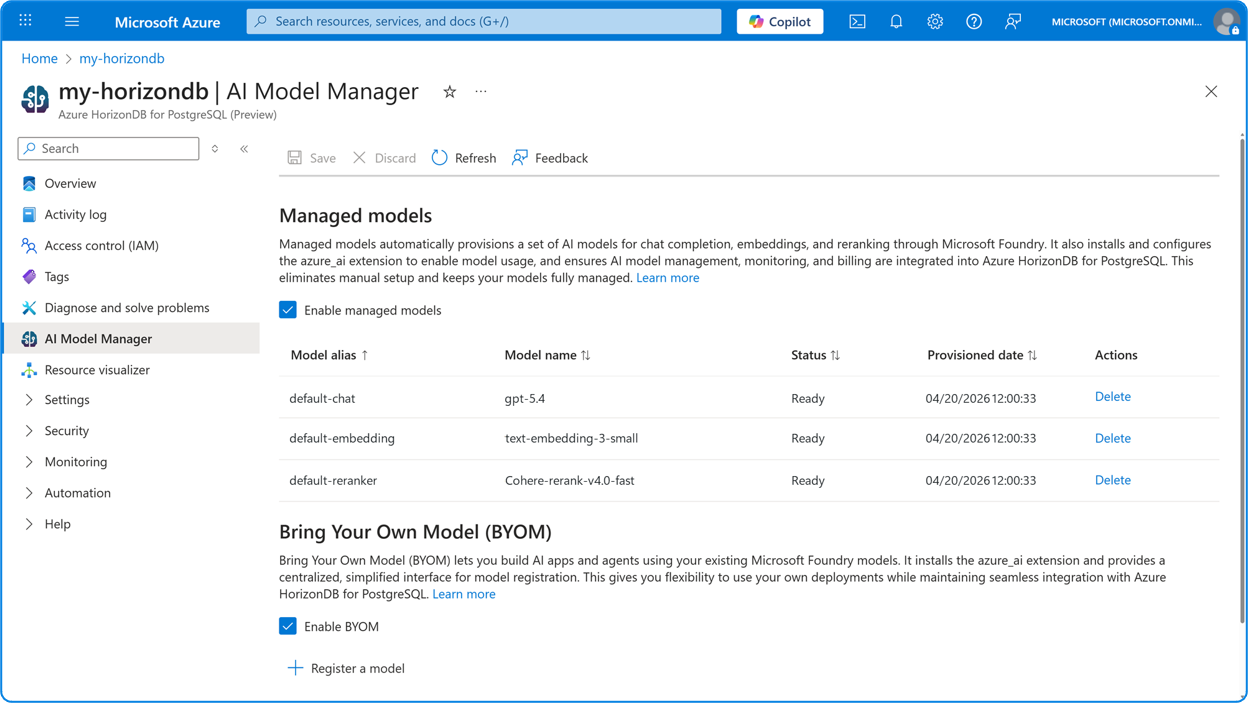
AI Model Management provisions three default AI models, one for each core AI task:
| Default alias | Model | Type | Description |
|---|---|---|---|
default-embedding |
text-embedding-3-small |
Embedding | An embedding model optimized for semantic search and RAG with strong multilingual support. |
default-chat |
gpt-5.4 |
Chat completion | A reasoning model with a large context window, ideal for complex, high-accuracy tasks. |
default-reranker |
Cohere-rerank-v4.0-fast |
Reranking | A cross-encoder reranker that improves search relevance by reordering retrieved documents based on semantic similarity. |
Azure HorizonDB automatically keeps these models up to date. The service automatically applies model updates, API version changes, and lifecycle policies from Microsoft Foundry, and reflects them in the model registry.
Model registry
The model registry is a central interface that maintains a list of all AI models registered in your Azure HorizonDB instance. It stores the model alias (the key identifier used in SQL queries), model name, type, endpoint URL, authentication type, and endpoint key.
For detailed information about model registry SQL functions, see AI functions in the azure_ai extension.
Bring your own model
In addition to Managed Models, you can register your own Microsoft Foundry models. This Bring Your Own Model (BYOM) capability lets you use existing model deployments alongside the Managed Models. For details on how to register your own models, see Manual setup with model registry.
Integrated billing
AI model usage is billed directly through your Azure HorizonDB resource with no extra markup over Microsoft Foundry pricing. For more information, see Pricing.
Prerequisites
Important
AI Model Management is in limited preview. Before you can enable this feature, you must request access through the participation form and receive approval.
Enable AI Model Management
To enable AI Model Management on your Azure HorizonDB instance:
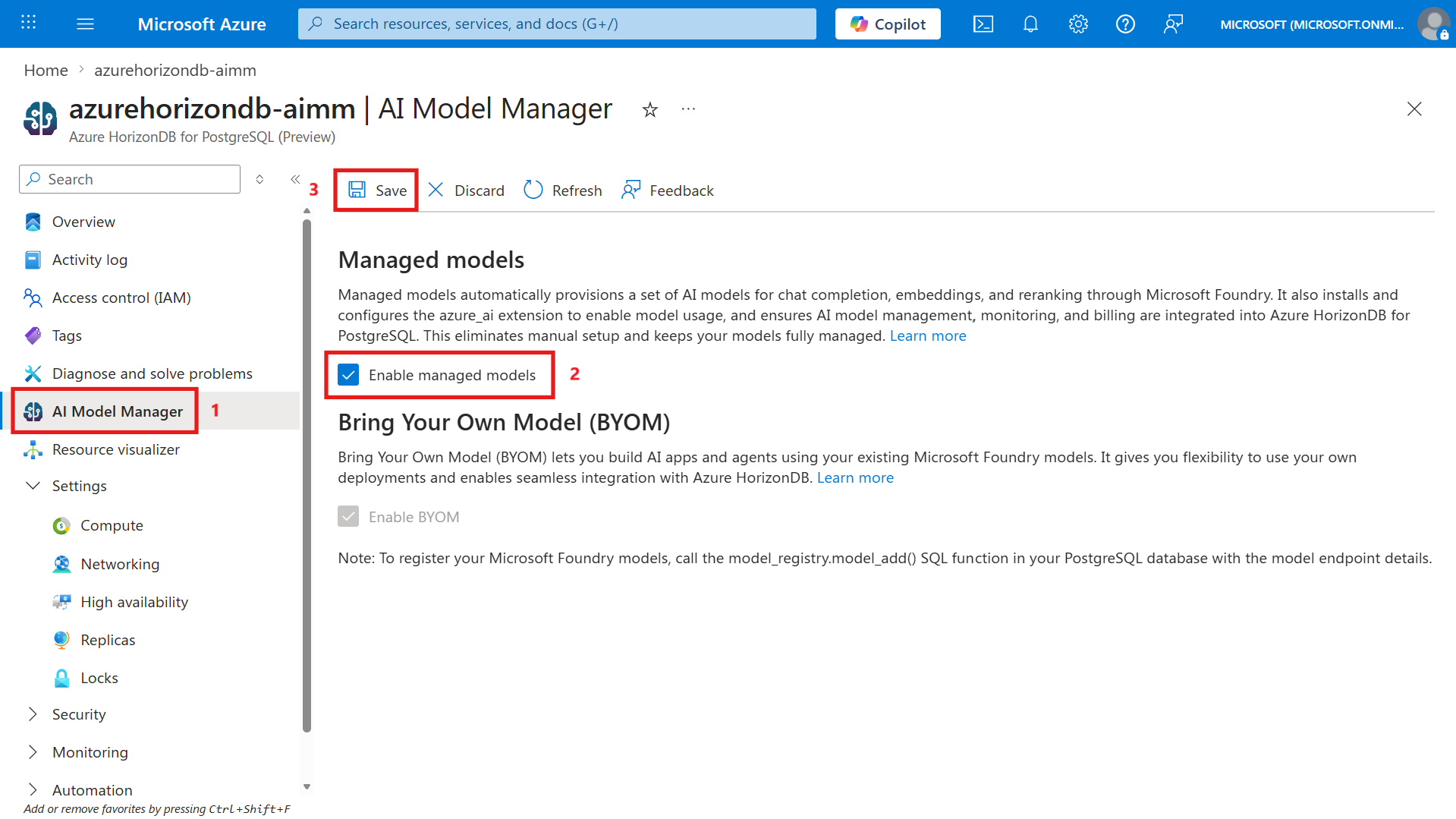
In the Azure portal, go to your Azure HorizonDB instance.
In the resource menu, select AI Model Manager.
Select the Enable managed models checkbox.
Select Save.
Review and agree to the terms of use.
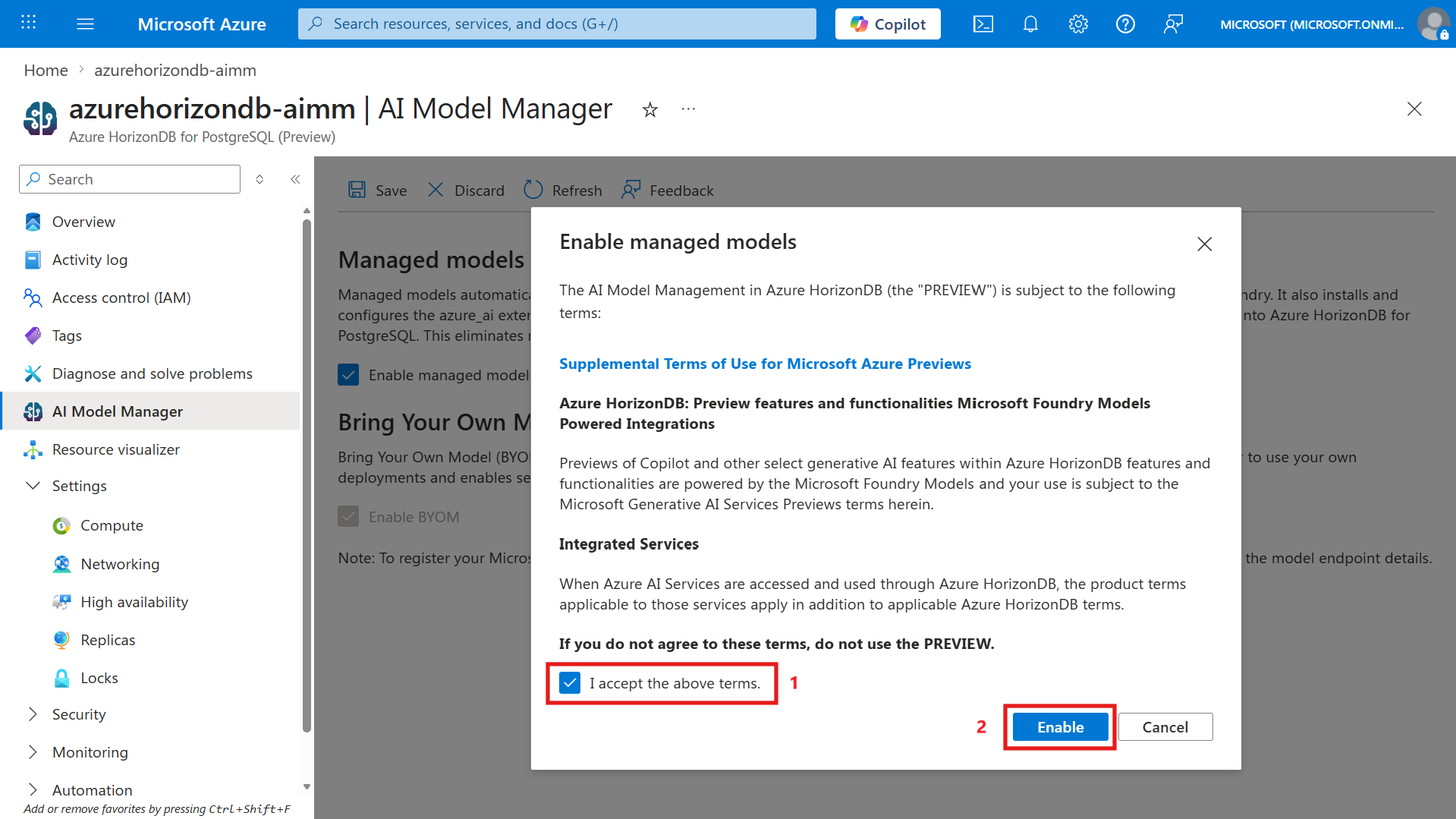
When you enable the feature, Azure HorizonDB automatically:
- Creates the required Microsoft Foundry resources and deploys the three Managed Models.
- Installs the
azure_aiextension on your database. - Registers the Managed Models in the model registry with their default aliases (
default-chat,default-embedding,default-reranker). - Establishes secure connections to the model endpoints.
Use AI functions with Managed Models
After you enable AI Model Management, you can immediately invoke AI functions in the azure_ai extension for Azure HorizonDB (Preview) by using the default model aliases or by omitting the model parameter entirely (the functions default to the corresponding Managed Model).
Generate text with the default chat model
-- The function uses the default-chat Managed Model when no model alias is specified
SELECT azure_ai.generate(
    'Rewrite the following comment to be more polite: This product is absolutely the worst. I hated it.'
);
Create embeddings with the default embedding model
-- The function uses the default-embedding Managed Model when no model alias is specified
SELECT azure_openai.create_embeddings(
    input => 'What are some good alternatives to Lego?'
) AS embedding_vector;
Rerank documents with the default reranker model
-- The function uses the default-reranker Managed Model when no model alias is specified
SELECT * FROM azure_ai.rank(
    'Best headphones for travel',
    ARRAY[
        'The headphones are lightweight and foldable, making them easy to carry.',
        'Bad battery life, not so great for long trips.',
        'The sound quality is excellent, with good noise isolation.'
    ]
);
Extract entities with the default chat model
SELECT azure_ai.extract(
    'The headphones are not great. They have a good design, but the sound quality is poor.',
    ARRAY['product', 'sentiment']
);
Evaluate statements with the default chat model
SELECT azure_ai.is_true(
    'The earth is flat'
);
For a complete reference of all AI functions, parameters, and advanced usage patterns, see AI functions in the azure_ai extension for Azure HorizonDB (Preview).
Bring your own models
You can register your own Microsoft Foundry models alongside the Managed Models to use them with AI functions. For detailed information about model registration and management, see Manual setup with model registry.
Register a model through SQL
For the full syntax and additional options, see Register a model.
SELECT model_registry.model_add(
    'my-gpt',                                       -- a unique alias
    'https://my-endpoint.openai.azure.com/',        -- endpoint URL
    'gpt-5-deployment',                             -- deployment name
    'gpt-5',                                        -- model name
    '2025-01-01-preview',                           -- API version (NULL for latest)
    'subscription-key',                              -- auth type
    '<your-endpoint-key>'                            -- endpoint key
);
View the model registry
To view all registered models (both managed and BYOM) in the model registry, run:
SELECT * FROM model_registry.model_list_all();
Use a registered model
After you register a model, invoke it in AI functions by using its alias. For more examples, see Use AI functions.
SELECT azure_ai.generate(
    'Summarize the key findings from this report: ' || report_text,
    'my-gpt'                            -- model alias
) AS summary
FROM reports;
Manage user access to models
You can restrict which database users can access specific models in the registry. For detailed information about user access management, including the model_registry_manager role and the model_user_add, model_user_set, and model_user_remove functions, see User access management.
Price details
AI Model Management pricing is based entirely on usage of the provisioned AI models. There's no extra charge for enabling the feature itself. Model usage is billed using the same meters and rates as Microsoft Foundry, with no additional markup.
Your AI model usage costs appear in your Azure invoice and the Microsoft Cost Management portal, tagged to your Azure HorizonDB resource. This integrated billing eliminates the need to track costs across separate Azure AI services.
For current model pricing, see the Microsoft Foundry pricing page.