Note
Access to this page requires authorization. You can try signing in or changing directories.
Access to this page requires authorization. You can try changing directories.
Match related values that arrive as separate messages. These examples use one MQTT source with multiple subscriptions and a custom stateful transform that holds records until it can match them.
Prerequisites
Complete the shared example prerequisites, including the existing default profile, factory-mqtt endpoint, and factory-artifacts registry endpoint for ghcr.io. These examples reference these shared resources without recreating them.
For Azure CLI and Bicep, follow the environment setup in Create a data flow graph. Set AIO_INSTANCE_NAME and RESOURCE_GROUP to your existing instance and resource group. For Bicep, also set CUSTOM_LOCATION_NAME to the instance's existing custom location name.
Choose the matching rule
- Timestamp and asset ID: match a speed reading with the temperature valid when it was sampled.
- Item and asset IDs: match a prediction with a delayed measurement of the same physical piece.
The custom transform manages pending records, expiration, and duplicate handling. Run each sample graph on one runtime instance: its state is in memory and is lost on restart. Recovery requires external durable input logs and downstream deduplication.
Match context by timestamp
A speed reading of 12 at 10:00:02 matches temperature 20 at 10:00:01, not temperature 22 at 10:00:03. The later temperature isn't valid at the speed reading's timestamp.
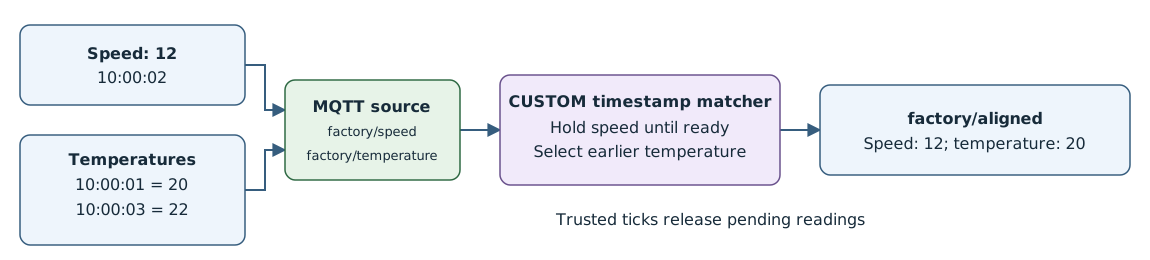
Select the latest context at or before the reading's timestamp. This selection requires custom stateful WASM or an external service, not a built-in window.
This wiring uses the custom graph-align-by-time sample in
the factory-artifacts registry endpoint for ghcr.io. The sample source and contracts
describe its bounded state and diagnostics. The contract
for this example is: buffer by asset; allow two seconds for out-of-order context;
select the newest temperature at or before the speed timestamp, at most five
seconds old; emit the reading when that decision is ready. If eligible context
is missing, emit a diagnostic and skip the reading.
The operations experience only supports creating and viewing graph artifacts from Azure Container Registry (ACR) and, for built-in transforms, mcr.microsoft.com. It can't select or display this sample's GHCR artifact through factory-artifacts. Use the Azure CLI or Bicep tab to deploy the exact sample.
For a separately republished ACR variant with a configured ACR registry endpoint:
- Create a data flow graph named
align-by-timewith the existingdefaultprofile. - Configure a source using
factory-mqttand topicsfactory/speedandfactory/temperature. - Select Add graph transform (optional). In Graph selection, select the republished
graph-align-by-time:1.0.0-rc.4artifact and select Apply. - Configure the destination using
factory-mqttand topicfactory/aligned, then select Save. The operations experience generates the artifact's node connections automatically.
This ACR variant uses a different registry endpoint; it isn't the exact GHCR configuration in the following deployment tabs. For supported actions and limitations, see Use WASM transforms.
Publish these synthetic messages in order, one JSON message per line (NDJSON):
{"kind":"temperature","assetId":"line-1","sampledAt":"2026-10-19T10:00:01Z","temperature":20}
{"kind":"temperature","assetId":"line-1","sampledAt":"2026-10-19T10:00:03Z","temperature":22}
{"kind":"speed","assetId":"line-1","sampledAt":"2026-10-19T10:00:02Z","speed":12}
{"kind":"tick","assetId":"line-1","sampledAt":"2026-10-19T10:00:04Z"}
The first two messages go to factory/temperature; the speed reading and final tick go to factory/speed. The transform retains the temperatures and holds the speed reading. The tick at 10:00:04 releases the speed reading at 10:00:02 after the two-second allowance, producing this result on factory/aligned:
{
  "assetId": "line-1",
  "sampledAt": "2026-10-19T10:00:02Z",
  "speed": 12,
  "temperature": 20,
  "temperatureSampledAt": "2026-10-19T10:00:01Z"
}
When one arrival releases several readings, the custom module emits
{"kind":"batch","records":[...]}. Downstream processing must handle that
batch envelope.
Keep these runtime constraints in mind:
- Send trusted periodic ticks for each active asset. There's no background timer, so idle graphs can't release pending readings or expire state without another arrival.
- Use RFC3339 timestamps, no earlier than the Unix epoch, with millisecond precision or coarser. The default maximum future clock skew is 30 seconds.
- Monitor diagnostics for late or duplicate inputs and missing context. To see the sample's limits and duplicate rules, check the
contracts.jsonfile. - Keep buffered timestamps and IDs in JSON. Output MQTT metadata comes from the arrival that releases the result, not necessarily the original reading.
Match predictions with delayed measurements by ID
Match prediction 203 with later measurement 200 for asset line-1, piece part-42. The residual is measurement minus prediction: 200 - 203 = -3.
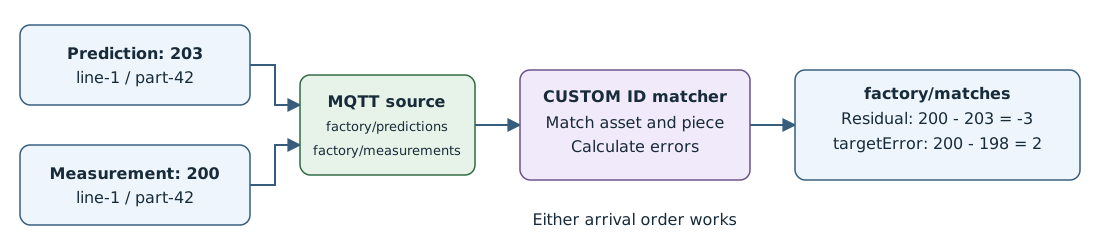
Match by asset and piece IDs. Include a run or batch ID if piece IDs repeat. Hold pending records for either arrival order, bound their age and count, and preserve the prediction's timestamps and model version.
The custom graph-correlate-by-id sample matches records and calculates residual and targetError. A residual measures prediction error; with a target of 198, the separate target error is 200 - 198 = 2.
Deploy the ID correlation example
The operations experience only supports creating and viewing graph artifacts from ACR and, for built-in transforms, mcr.microsoft.com. It can't select or display this sample's GHCR artifact through factory-artifacts. Use the Azure CLI or Bicep tab to deploy the exact sample.
For a separately republished ACR variant with a configured ACR registry endpoint:
- Create a data flow graph named
correlate-predictionswith the existingdefaultprofile. - Configure a source using
factory-mqttand topicsfactory/predictionsandfactory/measurements. - Select Add graph transform (optional). In Graph selection, select the republished
graph-correlate-by-id:1.0.0-rc.4artifact and select Apply. - Configure the destination using
factory-mqttand topicfactory/matches, then select Save. The operations experience generates the artifact's node connections automatically.
This ACR variant uses a different registry endpoint; it isn't the exact GHCR configuration in the following deployment tabs. For supported actions and limitations, see Use WASM transforms.
ID correlation requires predictions with kind: "prediction", assetId, pieceId, a positive integer modelVersion, and finite numeric predictedWeight. Measurements require kind: "measurement", the same asset and piece IDs, and finite numeric measuredWeight and targetWeight. Use distinct predictedAt and measuredAt fields for optional timestamps that describe different instants. Shared non-key fields must have equal values or the match fails.
The custom module manages pending matches, limits, duplicate handling, and completed-match output. The graph publishes matches to the distinct topic factory/matches.
Synthetic input messages (NDJSON): publish the first line to factory/predictions and the second line later to factory/measurements. The prediction includes the original feature values for retraining.
{"kind":"prediction","assetId":"line-1","pieceId":"part-42","modelVersion":8,"speed":10,"temperature":20,"predictedWeight":203}
{"kind":"measurement","assetId":"line-1","pieceId":"part-42","measuredWeight":200,"targetWeight":198}
The prediction alone produces no match. When the measurement arrives, expect this payload on factory/matches, including the original model version and feature values:
{"kind":"correlated","assetId":"line-1","pieceId":"part-42","modelVersion":8,"speed":10,"temperature":20,"predictedWeight":203,"measuredWeight":200,"targetWeight":198,"residual":-3,"targetError":2}
Either arrival order works. By default, pending entries expire 60 seconds after the first side arrives; retries don't extend that time. Valid arrivals or trusted {"kind":"tick","assetId":"line-1"} messages trigger cleanup; there is no background timer.
Completed matches are deduplicated for 60 seconds by default, not forever. A restart loses both pending and completed entries. For recovery, deduplicate in an external durable sink by asset, piece, and optional run ID. For retraining, preserve the original feature values used by each prediction.