Note
Access to this page requires authorization. You can try signing in or changing directories.
Access to this page requires authorization. You can try changing directories.
Azure IoT Operations provides built-in observability to help you understand the health, performance, and behavior of your edge workloads from the cloud. This article explains how unified health status and metrics work together to give you a clear operational view of your Azure IoT Operations deployment.
Note
Starting with version 1.3, every device, asset, inbound endpoint, MQTT broker, data flow, and Akri connector shows a health status in the operations experience web UI and in the Azure portal. If you upgraded from an earlier version and you now see devices and assets reporting a health status for the first time, this is expected behavior — health status is a new reporting feature, not an error indicator. Use the status value (Available, Degraded, Unavailable, or Unknown) together with the reason code on each resource to understand what's happening at runtime.
Why observability matters
Operators managing Azure IoT Operations clusters need fast, reliable answers to two core questions:
- Are my services and assets healthy right now? Azure IoT Operations now provides a unified health status reporting schema across all components (MQTT brokers, data flows, Akri connectors) and resources (devices, assets). Health status is reported through Azure Resource Manager (ARM) and visible in the operations experience web UI. You can see a simple, cloud-native view indicating whether the system is healthy (green), degraded (yellow), or unhealthy (red).
- Is my data flowing as expected? Data flow health is measured by metrics and logs from the cluster, providing a time-series representation of how the system is performing now and historically. This analysis helps predict issues before they impact workloads. For more information, see Deploy observability resources.
Azure IoT Operations addresses these needs with cloud-visible health status, metrics, and dashboards that work together to support day-to-day monitoring and troubleshooting.
Unified health status (current state)
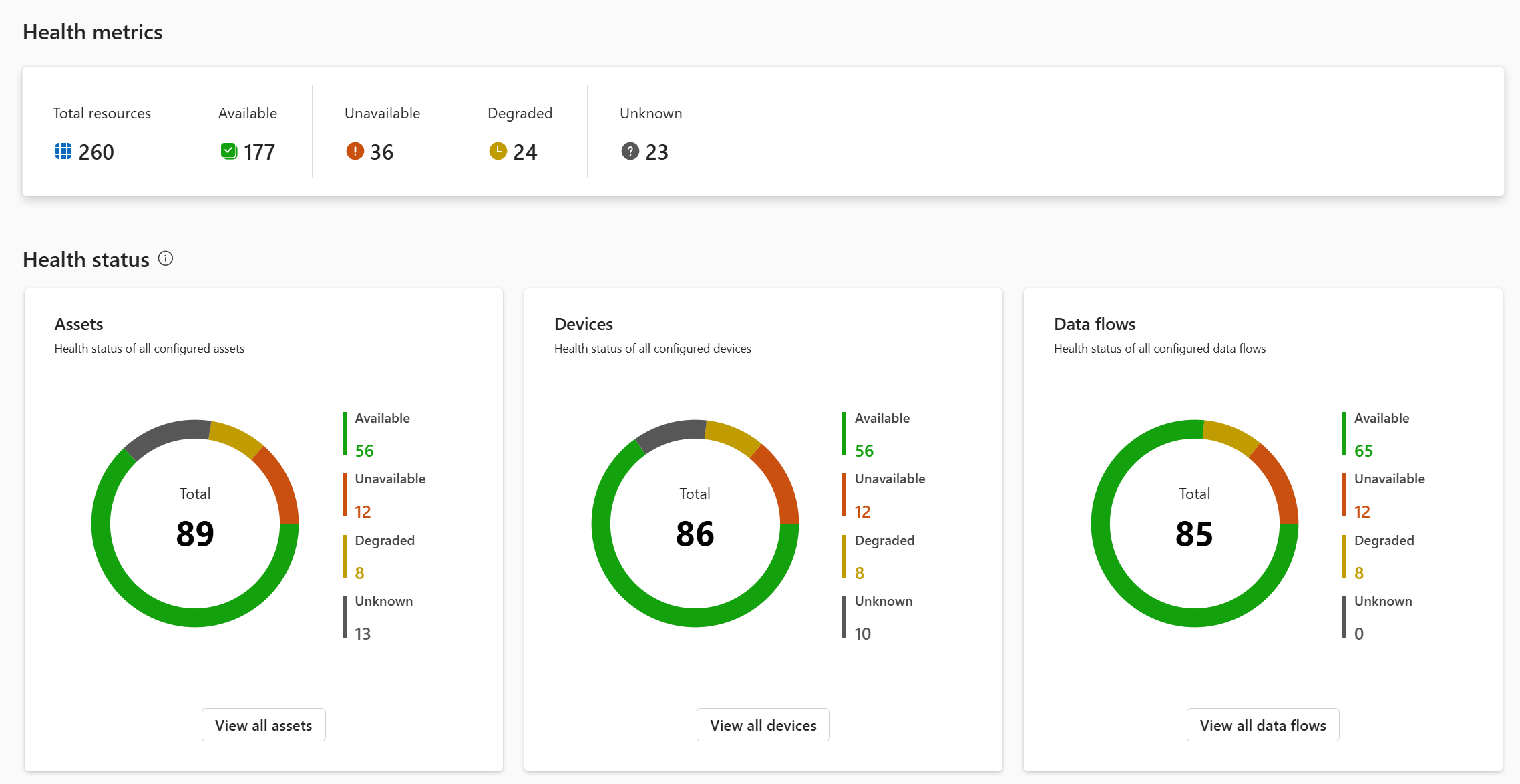
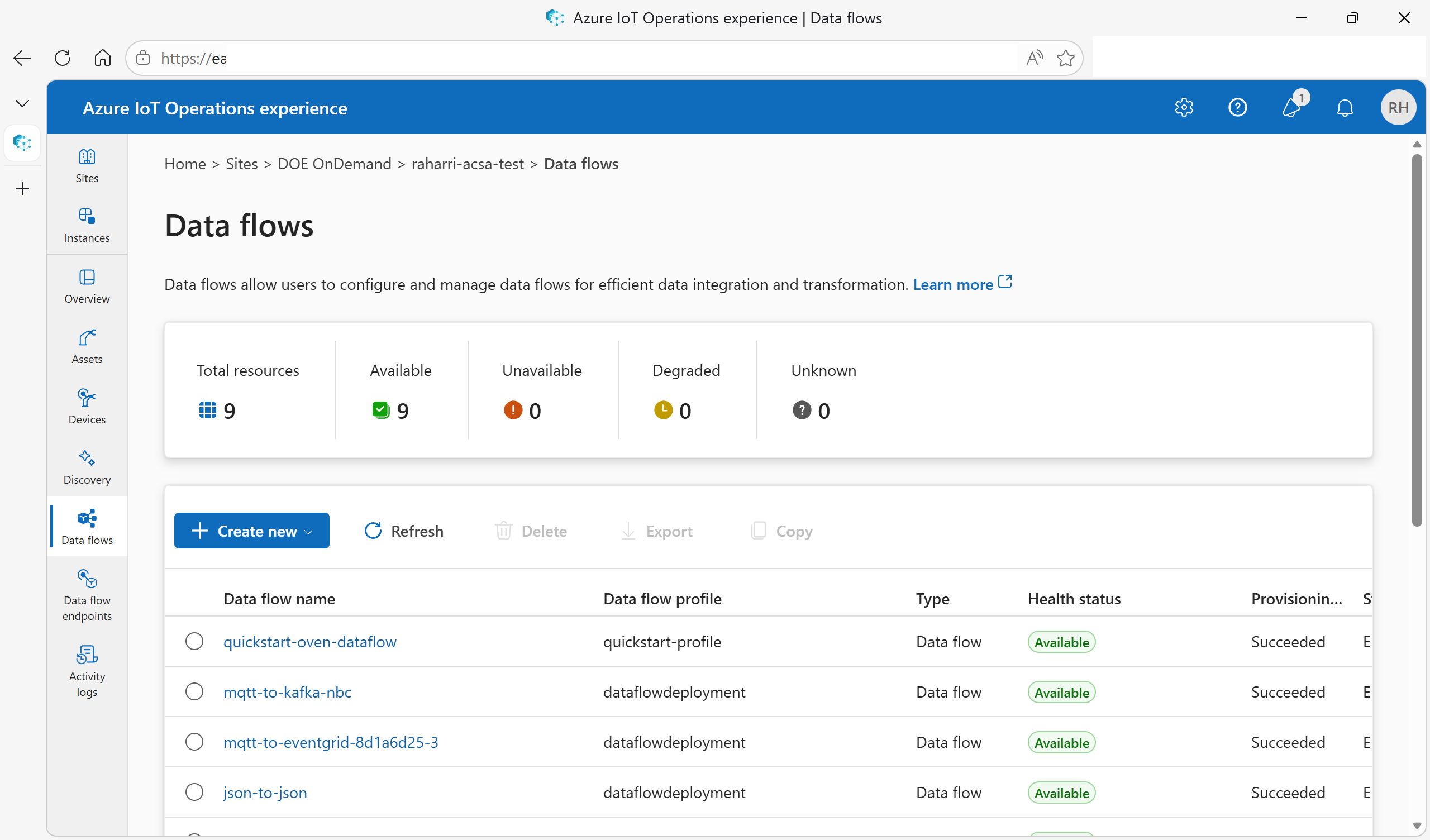
Unified health status provides a point-in-time snapshot of the current health of your Azure IoT Operations components and resources. The system surfaces this information in:
- Operations experience web UI
- Azure Resource Manager (ARM)
- Azure portal views
Health states
Each supported resource reports one of the following health states:
| Status | Description | Color |
|---|---|---|
| Available | Resource is healthy and functioning as expected. Data is flowing as expected. | 🟢 Green |
| Degraded | Resource is partially functional but might not operate optimally. It might still deliver data, but performance or reliability might be reduced. | 🟡 Yellow |
| Unavailable | Resource is offline or unreachable. No data is being collected or delivered. | 🔴 Red |
| Unknown | Health status can't be determined, such as when there are no recent reports, or right after deployment or a restart. | ⚪ Gray |
How health status is reported
Each health state includes:
- Last transition time: When the state last changed (for example, from Available to Unavailable).
- Last update time: When the health was last evaluated, even if the state did not change. Use this to verify that monitoring is still active.
- Message: A human-readable description of what happened.
- Reason code: A specific code identifying the cause (see Reason Codes).
Note the following characteristics of health status reporting:
- Components report health status periodically (every minute) to the Kubernetes Custom Resource status field.
- K8s Bridge is a tool that syncs status from Kubernetes to Azure Resource Manager, making it visible in the cloud through ARM or the operations experience.
- Each status update includes timestamps (
lastTransitionTime,lastUpdateTime) and optional diagnostic information, such as a message or reason code. - If a resource doesn't report its status within 15 minutes, it's considered stale and the status is set to Unknown.
What health status tells you
Health status answers the question: "Is this resource healthy right now?" It's designed to complement (not replace) provisioning and configuration status:
- Provisioning status shows whether you created and configured the resource successfully.
- Configuration status indicates whether the version of the resource was accepted or not.
- Health status reflects runtime behavior, such as pod failures, connectivity issues, or dependency problems.
Each Azure IoT Operations and Azure Device Registry resource reports runtime health using a common healthState structure.
For example, this structure describes the Kubernetes custom resource status:
status:
  healthState:
    status: Degraded
    lastTransitionTime: "2025-11-03T08:10:12Z"
    lastUpdateTime: "2025-11-03T08:15:00Z"
    message: "Unable to connect to the source endpoint at aio-broker:18883, error code: network unreachable."
    reasonCode: DataflowSourceDisconnected
Azure Resource Manager view:
{
  "status": {
    "healthState": {
      "status": "Available",
      "lastTransitionTime": "2026-02-05T20:56:20.078321032+00:00",
      "lastUpdateTime": "2026-02-05T20:56:20.078323363+00:00"
    }
  }
}
Supported resources
The following Azure IoT Operations resources report health status:
- Broker
- Data flows and data flow graphs
- Akri connectors
- Device inbound endpoints
- Assets
For distributed resources, such as data flows and assets, the system aggregates health from multiple instances or subcomponents to provide a single, meaningful status.
Staleness and freshness
To ensure health data remains trustworthy:
- Components periodically refresh their health status, even when no changes occur.
- If a resource doesn't report health within 15 minutes, its status automatically becomes Unknown.
This approach prevents stale information from being misinterpreted as healthy.
Diagnostic details
When a resource is Degraded or Unavailable, you can access additional information to help you troubleshoot:
- Reason code – a stable, documented identifier describing the failure type.
- Message – a human-readable explanation.
- Timestamps – when the issue started and when the status was last updated.
In the operations experience and the Azure portal, you can filter and group resources by health state and drill into the details for faster investigation.
Metrics (historical behavior)
Note
Before you can view metrics, you must deploy the observability stack. For setup instructions, see Deploy observability resources.
While health status shows the current state, metrics provide historical insight into how your system behaves over time.
Azure IoT Operations uses an open, standards-based observability pipeline built on:
- OpenTelemetry Collector - Deployed to the cluster to collect and export metrics from Azure IoT Operations components.
- Azure Monitor managed service for Prometheus - A fully managed Prometheus-compatible monitoring service that stores and queries metrics in the cloud.
- Azure Managed Grafana - A unified dashboard experience for visualizing health, metrics, and logs.
This pipeline collects and stores metrics emitted by Azure IoT Operations components and makes them available through dashboards.
What metrics are used for
Metrics help you answer questions like:
- How has throughput changed over the last hour?
- When did error rates start increasing?
- Did latency spike before a failure occurred?
Because metrics are retained over time, they're especially useful for:
- Trend analysis
- Root cause investigation
- Capacity planning
Unified Grafana dashboard experience
Azure IoT Operations provides a single, unified Grafana dashboard that brings health, metrics, and logs together.
Key characteristics of the dashboard include:
- A health overview, visible at the top.
- Component-specific sections that load only when expanded.
- Metrics and logs shown side-by-side for common troubleshooting workflows.
This design supports the majority of monitoring scenarios without requiring you to jump between tools. For information about available metrics, see the Available metrics section in the table of contents.
Metrics documentation and customization
In addition to built-in dashboards, Azure IoT Operations provides documentation for all exposed metrics. This documentation helps you:
- Understand what each metric represents.
- Build custom dashboards tailored to your environment.
- Extend monitoring to optional components and connectors as needed.
Onboard observability
Azure IoT Operations simplifies observability setup by using a single command to configure the required Azure and edge-side resources. For detailed instructions, see Deploy observability resources.
At a high level, enabling observability:
- Creates or validates Azure Monitor, Grafana, and Log Analytics resources.
- Configures the Arc-connected cluster without requiring direct Kubernetes access.
- Deploys and configures the OpenTelemetry collector.
- Wires Azure IoT Operations components to emit metrics automatically.
This approach reduces setup complexity and ensures consistent defaults.
How health status and metrics work together
Health status and metrics are complementary signals:
| Aspect | Health status | Metrics |
|---|---|---|
| Purpose | Current state snapshot | Historical trends and patterns |
| Visibility | Operations experience and Azure portal | Grafana dashboards |
| Use case | "Is my system healthy right now?" | "What happened over the last hour or day?" |
Example
If a data flow target becomes unreachable:
- Metrics show error counts increasing and throughput dropping.
- Health status changes to Degraded or Unavailable with a reason code.
After recovery:
- Health status returns to Available.
- Metrics preserve the historical record of the incident.
Together, these signals help you detect issues quickly and understand their impact.