Note
Access to this page requires authorization. You can try signing in or changing directories.
Access to this page requires authorization. You can try changing directories.
APPLIES TO:
 Azure CLI ml extension v2 (current)
Python SDK azure-ai-ml v2 (current)
Azure CLI ml extension v2 (current)
Python SDK azure-ai-ml v2 (current)
Automate efficient hyperparameter tuning using Azure Machine Learning SDK v2 and CLI v2 by way of the SweepJob type.
- Define the parameter search space for your trial
- Specify the sampling algorithm for your sweep job
- Specify the objective to optimize
- Specify early termination policy for low-performing jobs
- Define limits for the sweep job
- Launch an experiment with the defined configuration
- Visualize the training jobs
- Select the best configuration for your model
What is hyperparameter tuning?
Hyperparameters are adjustable parameters that let you control the model training process. For example, with neural networks, you decide the number of hidden layers and the number of nodes in each layer. Model performance depends heavily on hyperparameters.
Hyperparameter tuning, also called hyperparameter optimization, is the process of finding the configuration of hyperparameters that results in the best performance. The process is typically computationally expensive and manual.
Azure Machine Learning lets you automate hyperparameter tuning and run experiments in parallel to efficiently optimize hyperparameters.
Define the search space
Tune hyperparameters by exploring the range of values defined for each hyperparameter.
Hyperparameters can be discrete or continuous, and has a distribution of values described by a parameter expression.
Discrete hyperparameters
Discrete hyperparameters are specified as a Choice among discrete values. Choice can be:
- one or more comma-separated values
- a
rangeobject - any arbitrary
listobject
from azure.ai.ml.sweep import Choice

command_job_for_sweep = command_job(
    batch_size=Choice(values=[16, 32, 64, 128]),
    number_of_hidden_layers=Choice(values=range(1,5)),
)
In this case, batch_size one of the values [16, 32, 64, 128] and number_of_hidden_layers takes one of the values [1, 2, 3, 4].
The following advanced discrete hyperparameters can also be specified using a distribution:
QUniform(min_value, max_value, q)- Returns a value like round(Uniform(min_value, max_value) / q) * qQLogUniform(min_value, max_value, q)- Returns a value like round(exp(Uniform(min_value, max_value)) / q) * qQNormal(mu, sigma, q)- Returns a value like round(Normal(mu, sigma) / q) * qQLogNormal(mu, sigma, q)- Returns a value like round(exp(Normal(mu, sigma)) / q) * q
Continuous hyperparameters
The Continuous hyperparameters are specified as a distribution over a continuous range of values:
Uniform(min_value, max_value)- Returns a value uniformly distributed between min_value and max_valueLogUniform(min_value, max_value)- Returns a value drawn according to exp(Uniform(min_value, max_value)) so that the logarithm of the return value is uniformly distributedNormal(mu, sigma)- Returns a real value that's normally distributed with mean mu and standard deviation sigmaLogNormal(mu, sigma)- Returns a value drawn according to exp(Normal(mu, sigma)) so that the logarithm of the return value is normally distributed
An example of a parameter space definition:
from azure.ai.ml.sweep import Normal, Uniform

command_job_for_sweep = command_job(
    learning_rate=Normal(mu=10, sigma=3),
    keep_probability=Uniform(min_value=0.05, max_value=0.1),
)
This code defines a search space with two parameters - learning_rate and keep_probability. learning_rate has a normal distribution with mean value 10 and a standard deviation of 3. keep_probability has a uniform distribution with a minimum value of 0.05 and a maximum value of 0.1.
For the CLI, you can use the sweep job YAML schema, to define the search space in your YAML:
    search_space:
        conv_size:
            type: choice
            values: [2, 5, 7]
        dropout_rate:
            type: uniform
            min_value: 0.1
            max_value: 0.2
Sampling the hyperparameter space
Specify the parameter sampling method to use over the hyperparameter space. Azure Machine Learning supports the following methods:
- Random sampling
- Grid sampling
- Bayesian sampling
Random sampling
Random sampling supports discrete and continuous hyperparameters. It supports early termination of low-performance jobs. Some users do an initial search with random sampling and then refine the search space to improve results.
In random sampling, hyperparameter values are randomly selected from the defined search space. After creating your command job, you can use the sweep parameter to define the sampling algorithm.
from azure.ai.ml.sweep import Normal, Uniform, RandomParameterSampling

command_job_for_sweep = command_job(
    learning_rate=Normal(mu=10, sigma=3),
    keep_probability=Uniform(min_value=0.05, max_value=0.1),
    batch_size=Choice(values=[16, 32, 64, 128]),
)

sweep_job = command_job_for_sweep.sweep(
    compute="cpu-cluster",
    sampling_algorithm = "random",
    ...
)
Sobol
Sobol is a type of random sampling supported by sweep job types. You can use sobol to reproduce your results using seed and cover the search space distribution more evenly.
To use sobol, use the RandomParameterSampling class to add the seed and rule as shown in the example below.
from azure.ai.ml.sweep import RandomParameterSampling

sweep_job = command_job_for_sweep.sweep(
    compute="cpu-cluster",
    sampling_algorithm = RandomParameterSampling(seed=123, rule="sobol"),
    ...
)
Grid sampling
Grid sampling supports discrete hyperparameters. Use grid sampling if you can budget to exhaustively search over the search space. Supports early termination of low-performance jobs.
Grid sampling does a simple grid search over all possible values. Grid sampling can only be used with choice hyperparameters. For example, the following space has six samples:
from azure.ai.ml.sweep import Choice

command_job_for_sweep = command_job(
    batch_size=Choice(values=[16, 32]),
    number_of_hidden_layers=Choice(values=[1,2,3]),
)

sweep_job = command_job_for_sweep.sweep(
    compute="cpu-cluster",
    sampling_algorithm = "grid",
    ...
)
Bayesian sampling
Bayesian sampling is based on the Bayesian optimization algorithm. It picks samples based on how previous samples did, so that new samples improve the primary metric.
Bayesian sampling is recommended if you have enough budget to explore the hyperparameter space. For best results, we recommend a maximum number of jobs greater than or equal to 20 times the number of hyperparameters being tuned.
The number of concurrent jobs has an impact on the effectiveness of the tuning process. A smaller number of concurrent jobs may lead to better sampling convergence, since the smaller degree of parallelism increases the number of jobs that benefit from previously completed jobs.
Bayesian sampling only supports choice, uniform, and quniform distributions over the search space.
from azure.ai.ml.sweep import Uniform, Choice

command_job_for_sweep = command_job(
    learning_rate=Uniform(min_value=0.05, max_value=0.1),
    batch_size=Choice(values=[16, 32, 64, 128]),
)

sweep_job = command_job_for_sweep.sweep(
    compute="cpu-cluster",
    sampling_algorithm = "bayesian",
    ...
)
Specify the objective of the sweep
Define the objective of your sweep job by specifying the primary metric and goal you want hyperparameter tuning to optimize. Each training job is evaluated for the primary metric. The early termination policy uses the primary metric to identify low-performance jobs.
primary_metric: The name of the primary metric needs to exactly match the name of the metric logged by the training scriptgoal: It can be eitherMaximizeorMinimizeand determines whether the primary metric will be maximized or minimized when evaluating the jobs.
from azure.ai.ml.sweep import Uniform, Choice

command_job_for_sweep = command_job(
    learning_rate=Uniform(min_value=0.05, max_value=0.1),
    batch_size=Choice(values=[16, 32, 64, 128]),
)

sweep_job = command_job_for_sweep.sweep(
    compute="cpu-cluster",
    sampling_algorithm = "bayesian",
    primary_metric="accuracy",
    goal="Maximize",
)
This sample maximizes "accuracy".
Log metrics for hyperparameter tuning
The training script for your model must log the primary metric during model training using the same corresponding metric name so that the SweepJob can access it for hyperparameter tuning.
Log the primary metric in your training script with the following sample snippet:
import mlflow
mlflow.log_metric("accuracy", float(val_accuracy))
The training script calculates the val_accuracy and logs it as the primary metric "accuracy". Each time the metric is logged, it's received by the hyperparameter tuning service. It's up to you to determine the frequency of reporting.
For more information on logging values for training jobs, see Enable logging in Azure Machine Learning training jobs.
Specify early termination policy
Automatically end poorly performing jobs with an early termination policy. Early termination improves computational efficiency.
You can configure the following parameters that control when a policy is applied:
evaluation_interval: the frequency of applying the policy. Each time the training script logs the primary metric counts as one interval. Anevaluation_intervalof 1 will apply the policy every time the training script reports the primary metric. Anevaluation_intervalof 2 will apply the policy every other time. If not specified,evaluation_intervalis set to 0 by default.delay_evaluation: delays the first policy evaluation for a specified number of intervals. This is an optional parameter that avoids premature termination of training jobs by allowing all configurations to run for a minimum number of intervals. If specified, the policy applies every multiple of evaluation_interval that is greater than or equal to delay_evaluation. If not specified,delay_evaluationis set to 0 by default.
Azure Machine Learning supports the following early termination policies:
Bandit policy
Bandit policy is based on slack factor/slack amount and evaluation interval. Bandit policy ends a job when the primary metric isn't within the specified slack factor/slack amount of the most successful job.
Specify the following configuration parameters:
slack_factororslack_amount: the slack allowed with respect to the best performing training job.slack_factorspecifies the allowable slack as a ratio.slack_amountspecifies the allowable slack as an absolute amount, instead of a ratio.For example, consider a Bandit policy applied at interval 10. Assume that the best performing job at interval 10 reported a primary metric is 0.8 with a goal to maximize the primary metric. If the policy specifies a
slack_factorof 0.2, any training jobs whose best metric at interval 10 is less than 0.66 (0.8/(1+slack_factor)) will be terminated.evaluation_interval: (optional) the frequency for applying the policydelay_evaluation: (optional) delays the first policy evaluation for a specified number of intervals
from azure.ai.ml.sweep import BanditPolicy
sweep_job.early_termination = BanditPolicy(slack_factor = 0.1, delay_evaluation = 5, evaluation_interval = 1)
In this example, the early termination policy is applied at every interval when metrics are reported, starting at evaluation interval 5. Any jobs whose best metric is less than (1/(1+0.1) or 91% of the best performing jobs will be terminated.
Median stopping policy
Median stopping is an early termination policy based on running averages of primary metrics reported by the jobs. This policy computes running averages across all training jobs and stops jobs whose primary metric value is worse than the median of the averages.
This policy takes the following configuration parameters:
evaluation_interval: the frequency for applying the policy (optional parameter).delay_evaluation: delays the first policy evaluation for a specified number of intervals (optional parameter).
from azure.ai.ml.sweep import MedianStoppingPolicy
sweep_job.early_termination = MedianStoppingPolicy(delay_evaluation = 5, evaluation_interval = 1)
In this example, the early termination policy is applied at every interval starting at evaluation interval 5. A job is stopped at interval 5 if its best primary metric is worse than the median of the running averages over intervals 1:5 across all training jobs.
Truncation selection policy
Truncation selection cancels a percentage of lowest performing jobs at each evaluation interval. Jobs are compared using the primary metric.
This policy takes the following configuration parameters:
truncation_percentage: the percentage of lowest performing jobs to terminate at each evaluation interval. An integer value between 1 and 99.evaluation_interval: (optional) the frequency for applying the policydelay_evaluation: (optional) delays the first policy evaluation for a specified number of intervalsexclude_finished_jobs: specifies whether to exclude finished jobs when applying the policy
from azure.ai.ml.sweep import TruncationSelectionPolicy
sweep_job.early_termination = TruncationSelectionPolicy(evaluation_interval=1, truncation_percentage=20, delay_evaluation=5, exclude_finished_jobs=true)
In this example, the early termination policy is applied at every interval starting at evaluation interval 5. A job terminates at interval 5 if its performance at interval 5 is in the lowest 20% of performance of all jobs at interval 5 and will exclude finished jobs when applying the policy.
No termination policy (default)
If no policy is specified, the hyperparameter tuning service lets all training jobs execute to completion.
sweep_job.early_termination = None
Picking an early termination policy
- For a conservative policy that provides savings without terminating promising jobs, consider a Median Stopping Policy with
evaluation_interval1 anddelay_evaluation5. These are conservative settings that can provide approximately 25%-35% savings with no loss on primary metric (based on our evaluation data). - For more aggressive savings, use Bandit Policy with a smaller allowable slack or Truncation Selection Policy with a larger truncation percentage.
Set limits for your sweep job
Control your resource budget by setting limits for your sweep job.
max_total_trials: Maximum number of trial jobs. Must be an integer between 1 and 1000.max_concurrent_trials: (optional) Maximum number of trial jobs that can run concurrently. If not specified, max_total_trials number of jobs launch in parallel. If specified, must be an integer between 1 and 1000.timeout: Maximum time in seconds the entire sweep job is allowed to run. Once this limit is reached the system cancels the sweep job, including all its trials.trial_timeout: Maximum time in seconds each trial job is allowed to run. Once this limit is reached the system cancels the trial.
Note
If both max_total_trials and timeout are specified, the hyperparameter tuning experiment terminates when the first of these two thresholds is reached.
Note
The number of concurrent trial jobs is gated on the resources available in the specified compute target. Ensure that the compute target has the available resources for the desired concurrency.
sweep_job.set_limits(max_total_trials=20, max_concurrent_trials=4, timeout=1200)
This code configures the hyperparameter tuning experiment to use a maximum of 20 total trial jobs, running four trial jobs at a time with a timeout of 1,200 seconds for the entire sweep job.
Configure hyperparameter tuning experiment
To configure your hyperparameter tuning experiment, provide the following:
- The defined hyperparameter search space
- Your sampling algorithm
- Your early termination policy
- Your objective
- Resource limits
- CommandJob or CommandComponent
- SweepJob
SweepJob can run a hyperparameter sweep on the Command or Command Component.
Note
The compute target used in sweep_job must have enough resources to satisfy your concurrency level. For more information on compute targets, see Compute targets.
Configure your hyperparameter tuning experiment:
from azure.ai.ml import MLClient
from azure.ai.ml import command, Input
from azure.ai.ml.sweep import Choice, Uniform, MedianStoppingPolicy
from azure.identity import DefaultAzureCredential

# Create your base command job
command_job = command(
    code="./src",
    command="python main.py --iris-csv ${{inputs.iris_csv}} --learning-rate ${{inputs.learning_rate}} --boosting ${{inputs.boosting}}",
    environment="AzureML-lightgbm-3.2-ubuntu18.04-py37-cpu@latest",
    inputs={
        "iris_csv": Input(
            type="uri_file",
            path="https://azuremlexamples.blob.core.windows.net/datasets/iris.csv",
        ),
        "learning_rate": 0.9,
        "boosting": "gbdt",
    },
    compute="cpu-cluster",
)

# Override your inputs with parameter expressions
command_job_for_sweep = command_job(
    learning_rate=Uniform(min_value=0.01, max_value=0.9),
    boosting=Choice(values=["gbdt", "dart"]),
)

# Call sweep() on your command job to sweep over your parameter expressions
sweep_job = command_job_for_sweep.sweep(
    compute="cpu-cluster",
    sampling_algorithm="random",
    primary_metric="test-multi_logloss",
    goal="Minimize",
)

# Specify your experiment details
sweep_job.display_name = "lightgbm-iris-sweep-example"
sweep_job.experiment_name = "lightgbm-iris-sweep-example"
sweep_job.description = "Run a hyperparameter sweep job for LightGBM on Iris dataset."

# Define the limits for this sweep
sweep_job.set_limits(max_total_trials=20, max_concurrent_trials=10, timeout=7200)

# Set early stopping on this one
sweep_job.early_termination = MedianStoppingPolicy(
    delay_evaluation=5, evaluation_interval=2
)
The command_job is called as a function so we can apply the parameter expressions to the sweep inputs. The sweep function is then configured with trial, sampling-algorithm, objective, limits, and compute. The above code snippet is taken from the sample notebook Run hyperparameter sweep on a Command or CommandComponent. In this sample, the learning_rate and boosting parameters are tuned. Early stopping of jobs are determined by a MedianStoppingPolicy, which stops a job whose primary metric value is worse than the median of the averages across all training jobs.(see MedianStoppingPolicy class reference).
To see how the parameter values are received, parsed, and passed to the training script to be tuned, refer to this code sample
Important
Every hyperparameter sweep job restarts the training from scratch, including rebuilding the model and all the data loaders. You can minimize this cost by using an Azure Machine Learning pipeline or manual process to do as much data preparation as possible prior to your training jobs.
Submit hyperparameter tuning experiment
After you define your hyperparameter tuning configuration, submit the job:
# submit the sweep
returned_sweep_job = ml_client.create_or_update(sweep_job)
# get a URL for the status of the job
returned_sweep_job.services["Studio"].endpoint
Visualize hyperparameter tuning jobs
You can visualize all of your hyperparameter tuning jobs in the Azure Machine Learning studio. For more information on how to view an experiment in the portal, see View job records in the studio.
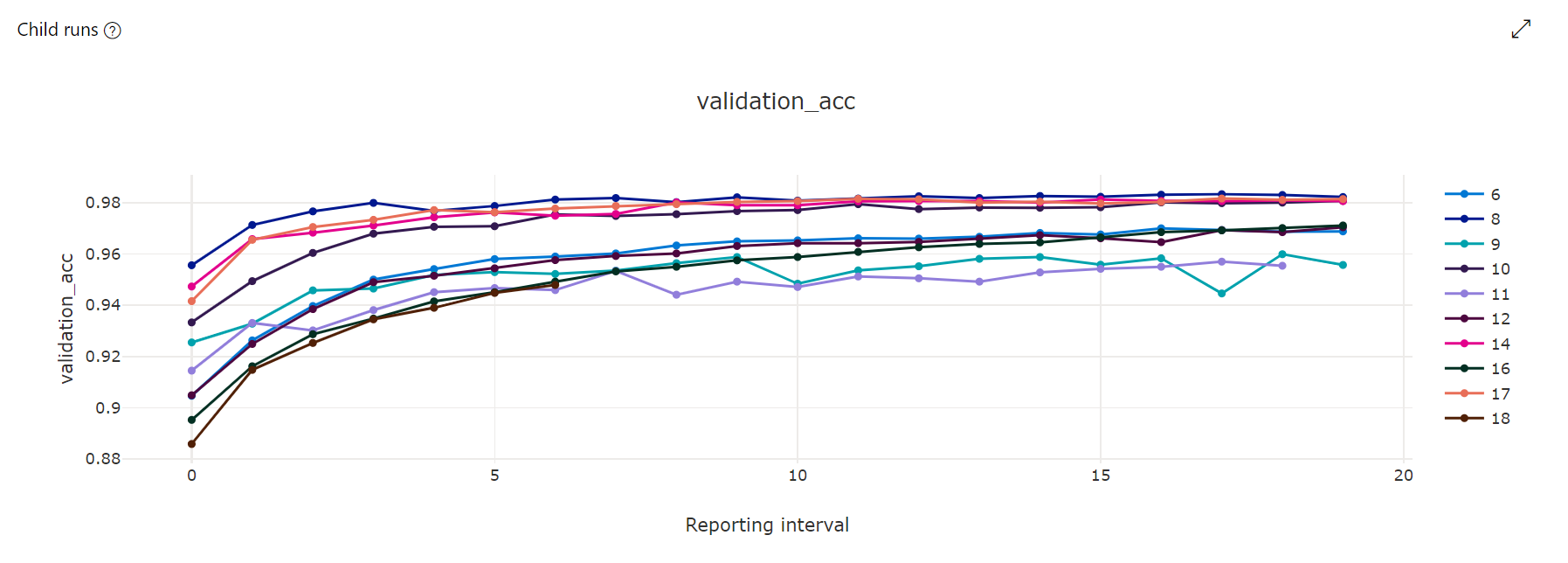
Metrics chart: This visualization tracks the metrics logged for each hyperdrive child job over the duration of hyperparameter tuning. Each line represents a child job, and each point measures the primary metric value at that iteration of runtime.
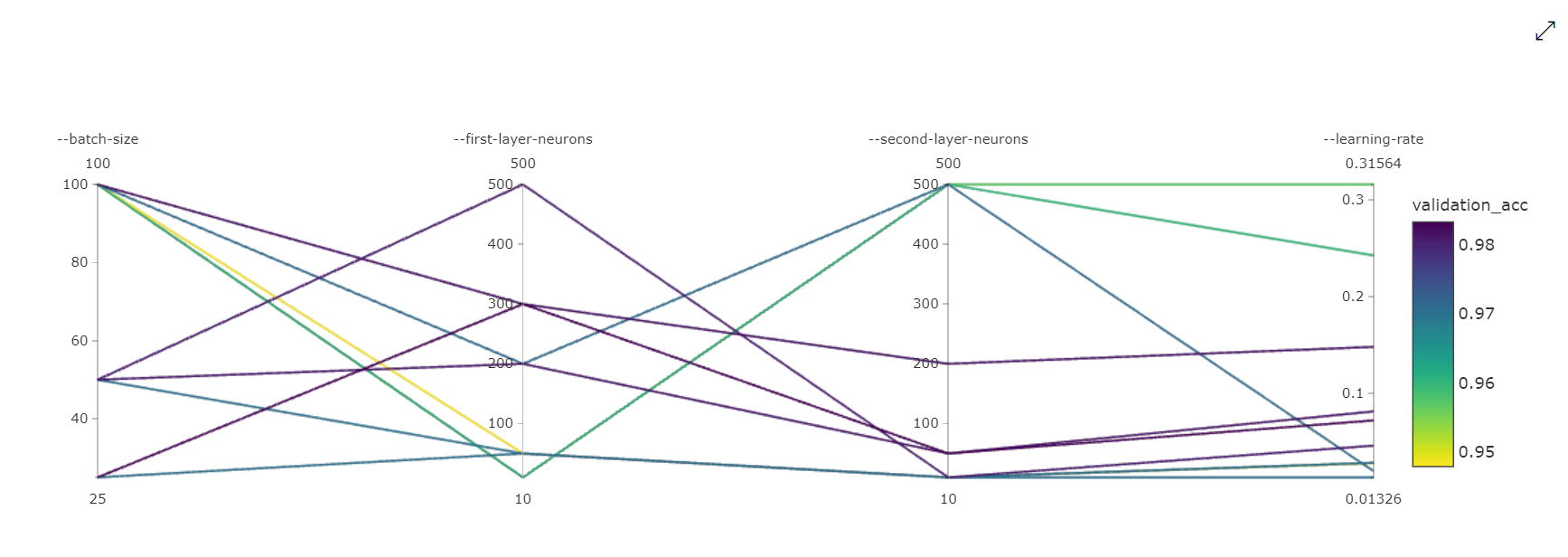
Parallel Coordinates Chart: This visualization shows the correlation between primary metric performance and individual hyperparameter values. The chart is interactive via movement of axes (select and drag by the axis label), and by highlighting values across a single axis (select and drag vertically along a single axis to highlight a range of desired values). The parallel coordinates chart includes an axis on the rightmost portion of the chart that plots the best metric value corresponding to the hyperparameters set for that job instance. This axis is provided in order to project the chart gradient legend onto the data in a more readable fashion.
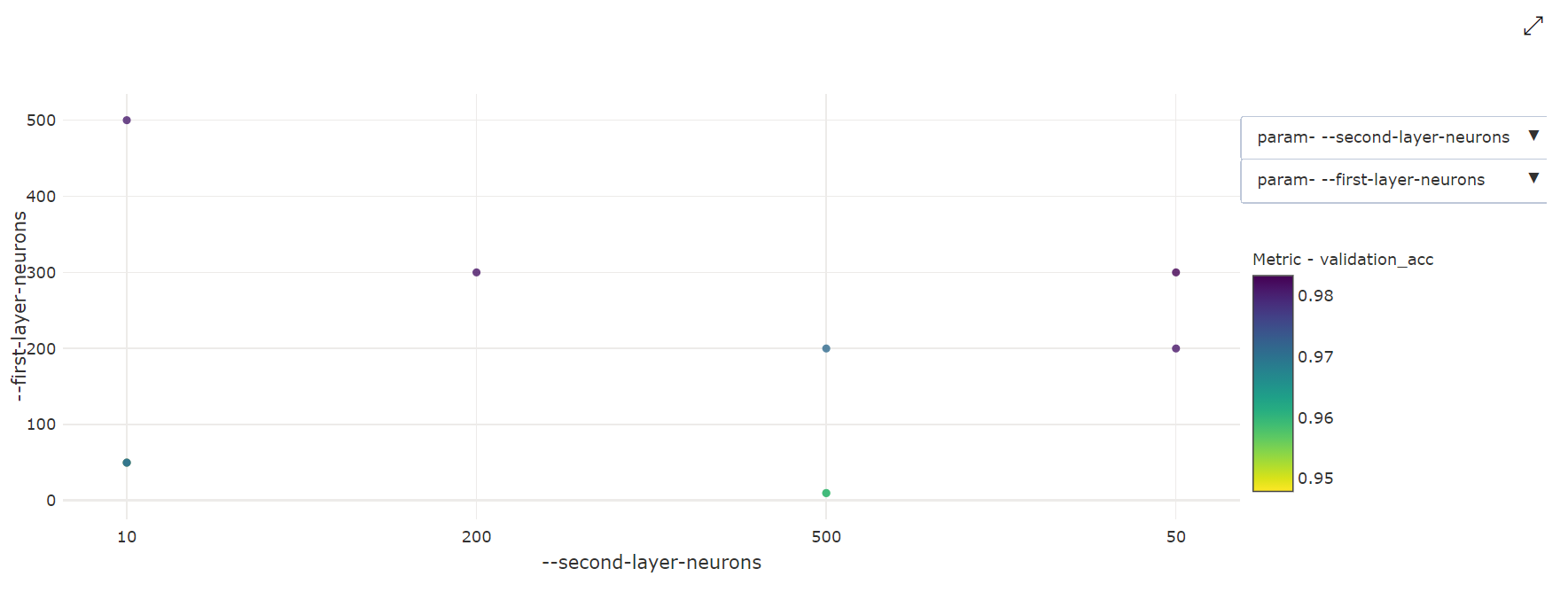
2-Dimensional Scatter Chart: This visualization shows the correlation between any two individual hyperparameters along with their associated primary metric value.
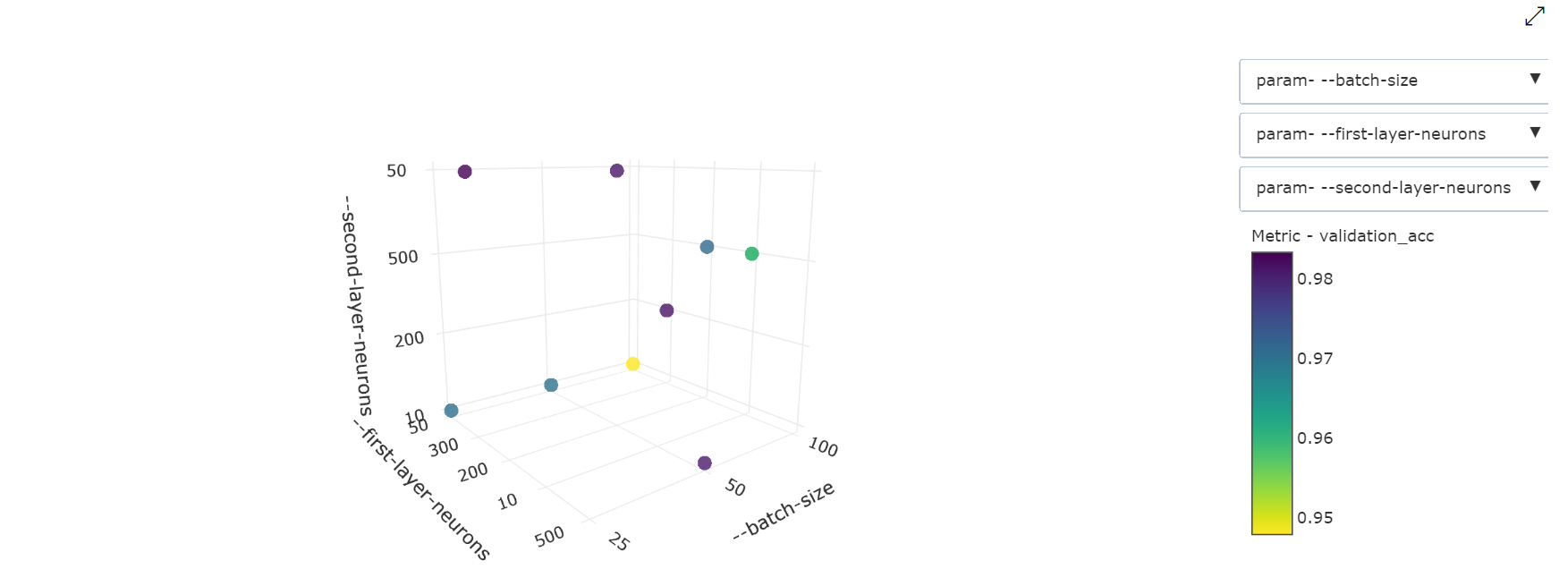
3-Dimensional Scatter Chart: This visualization is the same as 2D but allows for three hyperparameter dimensions of correlation with the primary metric value. You can also select and drag to reorient the chart to view different correlations in 3D space.
Find the best trial job
Once all of the hyperparameter tuning jobs have completed, retrieve your best trial outputs:
# Download best trial model output
ml_client.jobs.download(returned_sweep_job.name, output_name="model")
You can use the CLI to download all default and named outputs of the best trial job and logs of the sweep job.
az ml job download --name <sweep-job> --all
Optionally, to solely download the best trial output
az ml job download --name <sweep-job> --output-name model