Note
Access to this page requires authorization. You can try signing in or changing directories.
Access to this page requires authorization. You can try changing directories.
As the demand for LLM-infused applications soars, organizations need a cohesive and streamlined process to manage the end-to-end lifecycle of these apps. Generative Artificial Intelligence Operations (GenAIOps), sometimes called LLMOps, is a cornerstone of efficient prompt engineering and LLM-infused application development and deployment.
This article shows how Azure Machine Learning lets you integrate with GitHub to automate the LLM-infused application development lifecycle with prompt flow. Prompt flow provides a streamlined and structured approach to developing LLM-infused applications. Its well-defined process and lifecycle guide you through the process of building, testing, optimizing, and deploying flows, culminating in the creation of fully functional LLM-infused solutions.
GenAIOps prompt flow features
GenAIOps with prompt flow uses a GenAIOps template and guidance to help you build LLM-infused apps by using prompt flow. GenAIOps with prompt flow has capabilities for simple or complex LLM-infused apps, and is customizable to the needs of the application.
The GenAIOps with prompt flow platform provides the following features:
Centralized code hosting. The repository supports hosting code for multiple prompt flows, providing a single repository for all your flows. This repo is like a library for your flows, making it easy to find, access, and collaborate on different projects.
Lifecycle management. Each flow has its own lifecycle, providing a smooth transition from local experimentation to production deployment.
Variant and hyperparameter experimentation. Variants and hyperparameters are like ingredients in a recipe. The platform allows you to experiment with different combinations of variants across multiple nodes in a flow. You can experiment with multiple variants and hyperparameters to easily evaluate flow variants.
Multiple deployment targets. The platform generates Docker images infused with your flow and compute session for deployment to any target platform and operating system that supports Docker. You can deploy flows to Azure App Services, Kubernetes, and Azure Managed computes, and configure them to scale as needed.
A/B deployment. GenAIOps with prompt flow seamlessly implements A/B deployments, letting you easily compare different flow versions. This platform facilitates A/B deployment for prompt flow they same way as in traditional website A/B testing. You can easily compare different versions of a flow in a real-world setting to determine which version performs best.
Many-to-many dataset to flow relationships. GenAIOps with prompt flow accommodates multiple datasets for each standard and evaluation flow, enabling versatility in flow test and evaluation.
Conditional data and model registration. The platform registers a new dataset version for the Azure Machine Learning data asset and flows in the model registry only when there's a change in the dataset.
Comprehensive reporting. GenAIOps with prompt flow generates detailed reports for each variant configuration, allowing you to make informed decisions. The platform provides detailed metrics collection, experiments, and variant bulk runs for all runs and experiments, enabling data-driven decisions for both CSV and HTML files.
GenAIOps with prompt flow provides the following other features for customization:
- Bring-your-own-flows (BYOF) provides a complete platform for developing multiple use-cases related to LLM-infused applications.
- Configuration based development means there's no need to write extensive boilerplate code.
- Prompt experimentation and evaluation executes both locally and in the cloud.
- Notebooks for local prompt evaluation provide a library of functions for local experimentation.
- Endpoint testing within the pipeline after deployment checks endpoint availability and readiness.
- Optional human-in-loop validates prompt metrics before deployment.
GenAIOps stages
The GenAIOps lifecycle comprises four distinct stages:
Initialization. Clearly define the business objective, gather relevant data samples, establish a basic prompt structure, and craft a flow that enhances its capabilities.
Experimentation. Apply the flow to sample data, assess the prompt's performance, and refine the flow as needed. Continuously iterate until satisfied with the results.
Evaluation and refinement. Benchmark the flow's performance using a larger dataset, evaluate the prompt's effectiveness, and make refinements accordingly. Progress to the next stage if the results meet the desired standards.
Deployment. Optimize the flow for efficiency and effectiveness, deploy it in a production environment including A/B deployment, monitor its performance, gather user feedback, and use this information to further enhance the flow.
By adhering to this structured methodology, prompt flow empowers you to confidently develop, rigorously test, fine-tune, and deploy flows, leading to the creation of robust and sophisticated AI applications.
The GenAIOps prompt flow template formalizes this structured methodology by using a code-first approach, and helps you build LLM-infused apps using prompt flow tools and process and GenAIOps prompt flow features. This template is available at GenAIOps with prompt flow template.
GenAIOps process flow
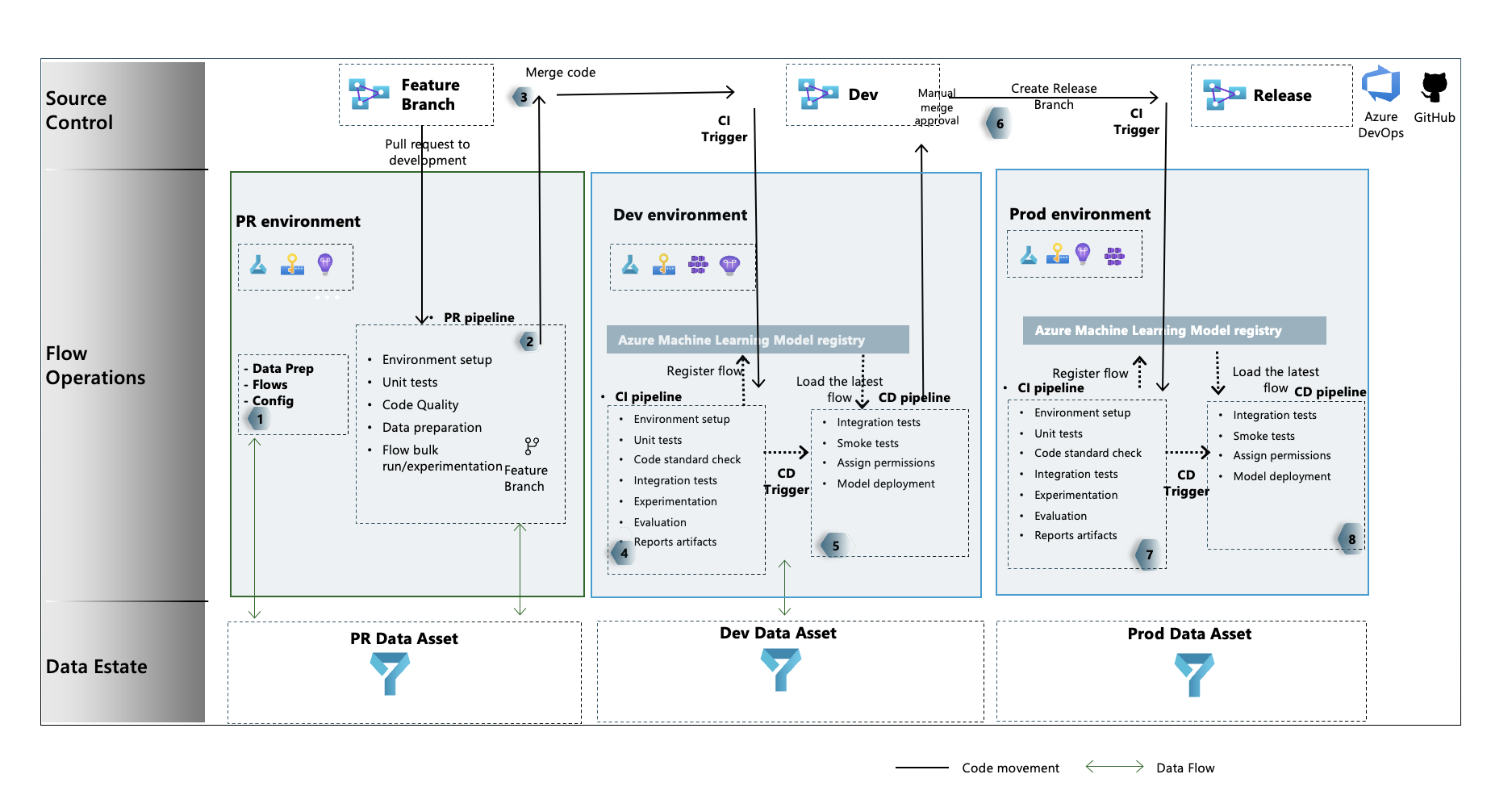
- In the initialization stage, you develop flows, prepare and curate data, and update GenAIOps related configuration files.
- After local development using Visual Studio Code with the Prompt Flow extension, you raise a pull request (PR) from the feature branch to the development branch, which executes the build validation pipeline and the experimentation flows.
- The PR is manually approved and code is merged to the development branch.
- After the PR merges to the development branch, the continuous integration (CI) pipeline for the dev environment executes. The CI pipeline executes both the experimentation and evaluation flows in sequence and registers the flows in the Azure Machine Learning Registry apart from other steps in the pipeline.
- After the CI pipeline execution completes, a continuous deployment (CD) trigger executes the CD pipeline, which deploys the standard flow from Azure Machine Learning Registry as an Azure Machine Learning online endpoint. The pipeline then runs integration and smoke tests on the deployed flow.
- A release branch is created from the development branch, or a PR is raised from the development branch to the release branch.
- The PR is manually approved and code is merged to the release branch. After the PR is merged to the release branch, the CI pipeline for the production environment executes. The pipeline executes both the experimentation and evaluation flows in sequence and registers the flows in Azure Machine Learning Registry apart from other steps in the pipeline.
- After the CI pipeline execution completes, a CD trigger executes the CD pipeline, which deploys the standard flow from Azure Machine Learning Registry as an Azure Machine Learning online endpoint. The pipeline then runs integration and smoke tests on the deployed flow.
Create a GenAIOps prompt flow
The rest of this article shows you how to use GenAIOps with prompt flow by following the end-to-end sample in the GenAIOps with prompt flow template repository, which help you build LLM-infused applications using prompt flow and GitHub. The primary objective is to provide assistance in the development of these applications by using the capabilities of prompt flow and GenAIOps.
Prerequisites
- An Azure subscription with the free or paid version of Azure Machine Learning.
- An Azure Machine Learning workspace.
- Git version 2.27 or newer running on your local machine, with the ability to create a GitHub source control repository.
- An understanding of how to integrate GenAIOps with prompt flow.
Set up a prompt flow connection
Prompt flow uses a connection resource to connect to Azure OpenAI, OpenAI, or Azure AI Search endpoints. You can create a connection through the prompt flow portal UI or by using the REST API. For more information, see Connections in prompt flow.
To create the connection, follow the instructions at Set up connections for prompt flow. The sample flows use a connection called aoai, so give your connection that name.
Set up a compute session
Prompt flow uses a compute session to execute the flow. Create and start the compute session before you execute the prompt flow.
Set up the GitHub repository
To create a forked repo in your GitHub organization, follow the instructions at Set up the GitHub repo. This repo uses two branches, main and development, for code promotions and pipeline execution.
To create a new local repository, follow the instructions at Clone the repo. This clone helps you create a new feature branch from the development branch and incorporate changes.
Set up authentication between GitHub and Azure
This process configures a GitHub secret that stores service principal information. To connect to Azure automatically, the workflows in the repository can read the connection information by using the secret name. For more information, see Use GitHub Actions to connect to Azure.
- Create a service principal by following the instructions at Create Azure service principal.
- Use the service principal to set up authentication between the GitHub repository and Azure services by following the instructions at Set up authentication with Azure and GitHub.
Test the pipeline
To test the pipelines, follow the instructions at Update test data. The complete process involves the following steps:
- You raise a PR from a feature branch to the development branch.
- The PR pipeline executes automatically due to the branch policy configuration.
- The PR is merged to the development branch.
- The associated
devpipeline executes, resulting in full CI and CD execution and provisioning or updating of the Azure Machine Learning endpoints.
The outputs should look similar to the examples at Example prompt run, evaluation, and deployment scenario.
Use local execution
To use local execution capabilities, follow these steps.
Clone the repository as follows:
git clone https://github.com/microsoft/genaiops-promptflow-template.gitCreate an .env file at the top folder level. Add lines for each connection, updating the values for the placeholders. The examples in the example repo use the AzureOpenAI connection named
aoaiand API version2024-02-01.aoai={ "api_key": "<api key>","api_base": "<api base or endpoint>","api_type": "azure","api_version": "2024-02-01"} <connection2>={ "api_key": "<api key>","api_base": "<api base or endpoint>","api_type": "<api type>","api_version": "<api_version>"}Prepare the local conda or virtual environment to install the dependencies.
python -m pip install promptflow promptflow-tools promptflow-sdk jinja2 promptflow[azure] openai promptflow-sdk[builtins] python-dotenvBring or write your flows into the template based on instructions at How to onboard new flows.
Write Python scripts in the local_execution folder similar to the provided examples.