Note
Access to this page requires authorization. You can try signing in or changing directories.
Access to this page requires authorization. You can try changing directories.
By default, supercomputer instances have unrestricted outbound internet access, so workloads can access the resources they need to operate. All supercomputer instances have outbound dependencies defined by FQDNs, such as to download container images from Microsoft Artifact Registry (MAR/MCR). Because of this dependency, Network Security Groups can't properly restrict egress traffic for supercomputer. This article explains how to set up secure networking for a Microsoft Discovery Supercomputer so that its nodepools and management plane run within your virtual network with controlled egress.
Prerequisites
To control egress traffic from a supercomputer instance, you need a virtual network with user defined routing configured, and an egress point that can allowlist IPs and FQDNs, such as Azure Firewall.
When user defined routing is enabled, traffic between the management plane and the workload nodepools must reside within your virtual network. To support this, you must create a subnet delegated to Microsoft.ContainerService/managedClusters, as well as the existing subnet for nodepools.
To enable IP allowlisting controls on the supercomputer management plane, the Microsoft.ContainerService/EnableServiceTagAuthorizedIPPreview feature flag must be enabled. When enabled, this feature automatically adds networking restrictions to isolate access to the supercomputer management plane to only the Microsoft Discovery service.
az feature register --namespace Microsoft.ContainerService --name EnableServiceTagAuthorizedIPPreview
Enable connectivity to platform services
After setting up your virtual network with user defined routing, you must configure certain allowlisting rules to ensure that your Microsoft Discovery Supercomputer instance continues to function. Configure these rules before you create the Supercomputer resource to ensure successful creation.
Core dependencies
Microsoft Discovery Supercomputer is built on top of Azure Kubernetes Service, which maintains its own list of dependent FQDNs and IPs. See this article for the full list. The core requirements for Microsoft Discovery are:
mcr.microsoft.com,*.data.mcr.microsoft.com, andmcr-0001.mcr-msedge.netprovide container images for core features of the Supercomputer.management.azure.comis required for Kubernetes operations against the Azure API.login.microsoftonline.comis required for identity management.packages.microsoft.comis required for OS package management.packages.aks.azure.comandacs-mirror.azureedge.netare required for managing core Kubernetes software.
Specialized nodepool SKUs
- If your supercomputer includes nodepools with GPU-enabled SKUs, follow the instructions in this article.
- If your supercomputer includes nodepools with Infiniband-enabled SKUs, no additional rules are currently required.
Auxiliary functionality
- Discovery uses Azure Monitor to set up supercomputer observability. Follow the instructions in this article to enable access.
*.pki.core.windows.netandcrl.microsoft.comare used for Microsoft-issued certificate management and revocation checks.- If your Azure subscription configuration automatically installs additional software like Microsoft Defender for Containers onto all compute resources, ensure that you enable access as defined in this article.
umsa*.blob.core.windows.netis used for Azure Linux VM Agent and Extensions manifests, as described in this article. This access isn't essential for Discovery functionality.md-*.blob.storage.azure.netis used for internal components of Azure Managed Disks. This access isn't essential for Discovery functionality.
Tool functionality
Certain tools that you use on Microsoft Discovery require network connectivity. This requirement includes any Azure resources for which you don't provision private IP connectivity to the virtual network of your nodepools (for example, by using Private Endpoint). You're responsible for understanding, verifying, and configuring network rules to allow any public outbound connectivity required for your tools. This requirement might include access to public container registries or FQDNs accessed during runtime.
Create a Microsoft Discovery supercomputer
When you create a supercomputer, the outboundType setting controls how outbound (egress) traffic leaves the nodepools. To route egress through your own virtual network and egress point, set outboundType to UserDefinedRouting.
outboundType: UserDefinedRouting
UserDefinedRouting directs the supercomputer to send all outbound traffic through the user defined routing configured on the nodepool subnet, rather than through a Microsoft-managed public load balancer. This routing option lets you direct egress through an appliance such as Azure Firewall, where you allowlist the required IPs and FQDNs.
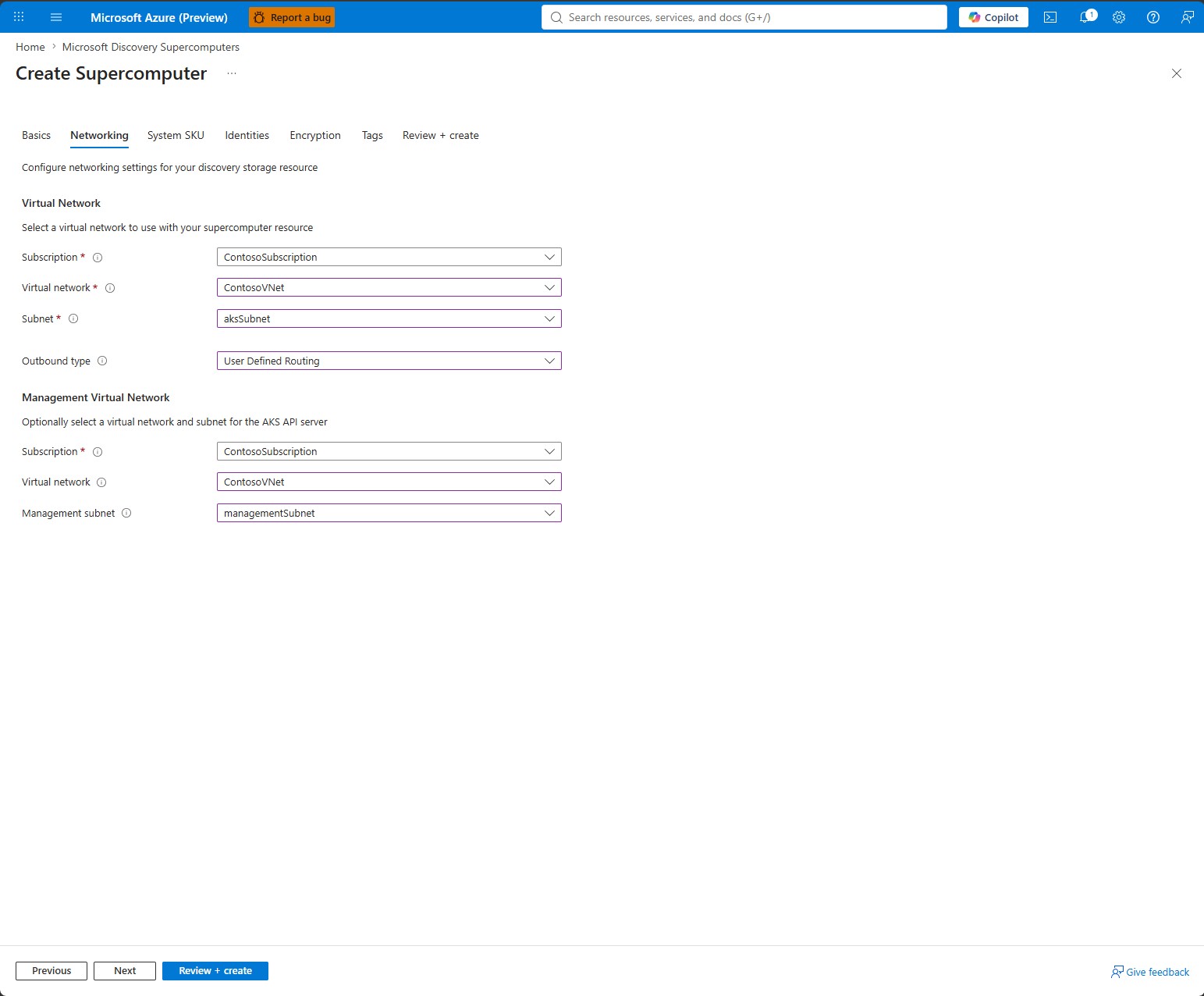
When you select UserDefinedRouting:
- You must configure the nodepool subnet with an appropriate route table.
- You must configure a management subnet (see managementSubnetId) so that traffic between the management plane and the nodepools stays inside your virtual network.
- The egress point must allow the supercomputer to reach outbound dependencies documented earlier in this article.
- No public IP or managed outbound load balancer is provisioned for egress; all traffic exits through your virtual network.
managementSubnetId (required)
When you set outboundType to UserDefinedRouting, you must configure a managementSubnetId. This setting places the cluster management plane within your virtual network so that traffic between the management plane and the workload nodepools stays inside your network. Set managementSubnetId to the resource ID of a subnet delegated to Microsoft.ContainerService/managedClusters (see Prerequisites).
- The management subnet must be separate from the nodepool subnet and delegated to
Microsoft.ContainerService/managedClusters. - Traffic between the Microsoft Discovery service and the management plane stays outside your virtual network regardless of this setting.