Note
Access to this page requires authorization. You can try signing in or changing directories.
Access to this page requires authorization. You can try changing directories.
In this article, you deploy Microsoft Discovery across two Azure regions. You create Discovery control-plane resources in a supported Discovery home region and deploy the associated compute, networking, and storage resources in a target region.
This configuration can help you use capacity and quota in another region, place compute closer to users or data, and help meet regional compliance or data residency requirements.
Prerequisites
Before you begin, ensure that you have:
- An Azure subscription with permissions to create Microsoft Discovery and supporting Azure resources.
- The prerequisites from Quickstart: Deploy Microsoft Discovery infrastructure, including registered resource providers, required roles, and sufficient quota.
Important
Discovery supports all regions where Foundry Projects are available as target regions. Ensure that the target region is supported by Foundry and is listed in the table at Feature availability across cloud regions - Microsoft Foundry | Microsoft Learn
Understand resource placement
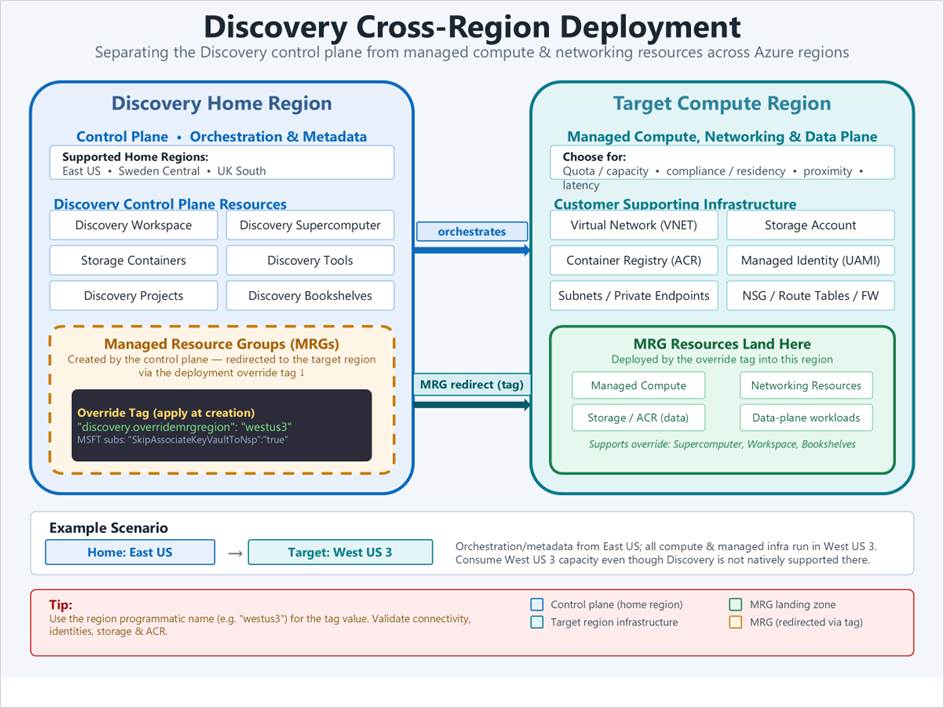
A cross-region deployment uses a home region for the Discovery control plane and a target region for workloads and supporting infrastructure.
| Resource | Deployment region |
|---|---|
| Discovery control-plane resources | Discovery home region |
| Managed resource groups | Discovery home region |
| Resources inside managed resource groups | Target region |
| Customer-managed compute, networking, storage, and security resources | Target region |
Discovery control-plane resources include:
- Discovery workspace
- Discovery supercomputer
- Discovery storage containers
- Discovery tools
- Discovery projects
- Discovery bookshelves
Resources in the target region can include:
- Managed compute resources
- Virtual networks and subnets
- Storage accounts
- Azure Container Registry
- User-assigned managed identities
- Private endpoints
- Network security groups
- Route tables
- Firewalls and other customer-managed security resources
The following diagram shows an example with the Discovery control plane in East US and the workload infrastructure in West US 3.
Deploy supporting infrastructure in the target region
Create the customer-managed resources that the Discovery deployment requires in your target region. The exact resources depend on your network and security configuration.
- Create a virtual network and the required subnets.
- Create the storage accounts and Azure Container Registry.
- Create the user-assigned managed identities.
- Create any required private endpoints, network security groups, route tables, and firewall rules.
- Confirm that the target region has sufficient model and compute quota.
For detailed infrastructure requirements, see Quickstart: Deploy Microsoft Discovery infrastructure.
Deploy Discovery resources in the home region
Create the Discovery resources in a supported home region. When you create a resource that supports a managed resource group region override, apply the discovery.overridemrgregion tag.
Use the following tag name and value:
discovery.overridemrgregion: <target-region-identifier>
To deploy managed resources in West US 3, apply:
discovery.overridemrgregion: westus3
Use the programmatic region identifier from the Azure regions list, such as westus3 instead of West US 3.
Apply the tag when you create each supported Discovery resource. The following resources support the managed resource group region override:
- Discovery workspace
- Discovery supercomputer
- Discovery bookshelf
The Discovery resource and its managed resource group remain in the home region. The resources inside the managed resource group are deployed in the target region.
Important
For Microsoft-owned subscriptions, also apply the following tag:
SkipAssociateKeyVaultToNsp: true
Verify the deployment
After the deployment finishes, verify the location and connectivity of the resources.
- In the Azure portal, confirm that the Discovery workspace, supercomputer, and bookshelves are in the selected home region.
- Confirm that each managed resource group is in the home region.
- Open each managed resource group and confirm that its managed compute, networking, storage, and Foundry resources are in the target region.
- Verify network connectivity between the Discovery-managed resources and your customer-managed resources.
- Confirm that managed identities have the required role assignments.
- Test access to the storage accounts and Azure Container Registry from the compute resources.
- Run a sample investigation to validate the deployment from end to end.
For example, a deployment that uses East US as the home region and West US 3 as the target region has the following resource placement:
| Resource | Region |
|---|---|
| Discovery workspace | East US |
| Discovery supercomputer | East US |
| Managed resource groups | East US |
| Resources inside managed resource groups | West US 3 |
| Customer-managed virtual network | West US 3 |
| Customer-managed storage account | West US 3 |
| Customer-managed Azure Container Registry | West US 3 |
Understand the data flow
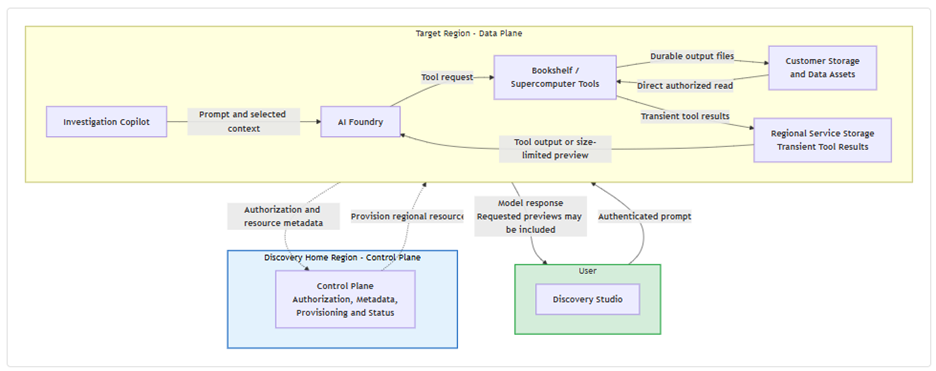
In a cross-region deployment, bulk customer data moves directly between authorized customer storage and compute resources in the target region.
- Investigations can access only storage resources that are linked to the project and authorized through managed identity.
- Authorized tools read customer data directly from linked storage accounts.
- Tools write generated output files back to customer storage.
- Discovery Studio receives summarized results and explicitly requested, size-limited data previews. It doesn't receive raw bulk customer data.
- The home-region control plane handles authorization context, resource metadata, provisioning, and operation status. It doesn't transport or persist bulk customer data payloads.
- Foundry and supporting workspace runtime resources run in the effective target region.
Troubleshoot cross-region deployments
Managed resources deploy to the wrong region
Confirm that:
- The
discovery.overridemrgregiontag is present on each supported Discovery resource. - The tag value is a valid Azure programmatic region identifier.
- The tag was applied when the Discovery resource was created.
- The selected target region supports Discovery cross-region deployment and all required Foundry features.
Deployment fails because of quota or capacity
- Check model and compute quota in the target region.
- Request additional quota if needed.
- If capacity isn't available, select another supported target region.
Resources can't communicate across the deployment
Confirm that:
- Network security groups, route tables, firewalls, and private endpoints allow the required traffic.
- DNS resolves private endpoints correctly.
- Managed identities have access to storage accounts, Azure Container Registry, and other dependencies.