Note
Access to this page requires authorization. You can try signing in or changing directories.
Access to this page requires authorization. You can try changing directories.
This article describes how to review the results of an Azure network assessment in Azure Migrate, including recommended Azure network resources, migration readiness, network costs, and emissions estimates.
Note
This feature currently supports lift-and-shift migration of VMware environments, with or without NSX, to Azure through Azure Migrate.
Review assessment results
After the assessment is generated, review the results to understand the recommended Azure network resources, migration readiness, and estimated costs.
To review a network assessment, follow these steps:
In your Azure Migrate project, select Assessments under Decide and plan.

Use the Workloads/Applications filter to find the assessment.
Select the assessment to review its details.

Review network assessment summary
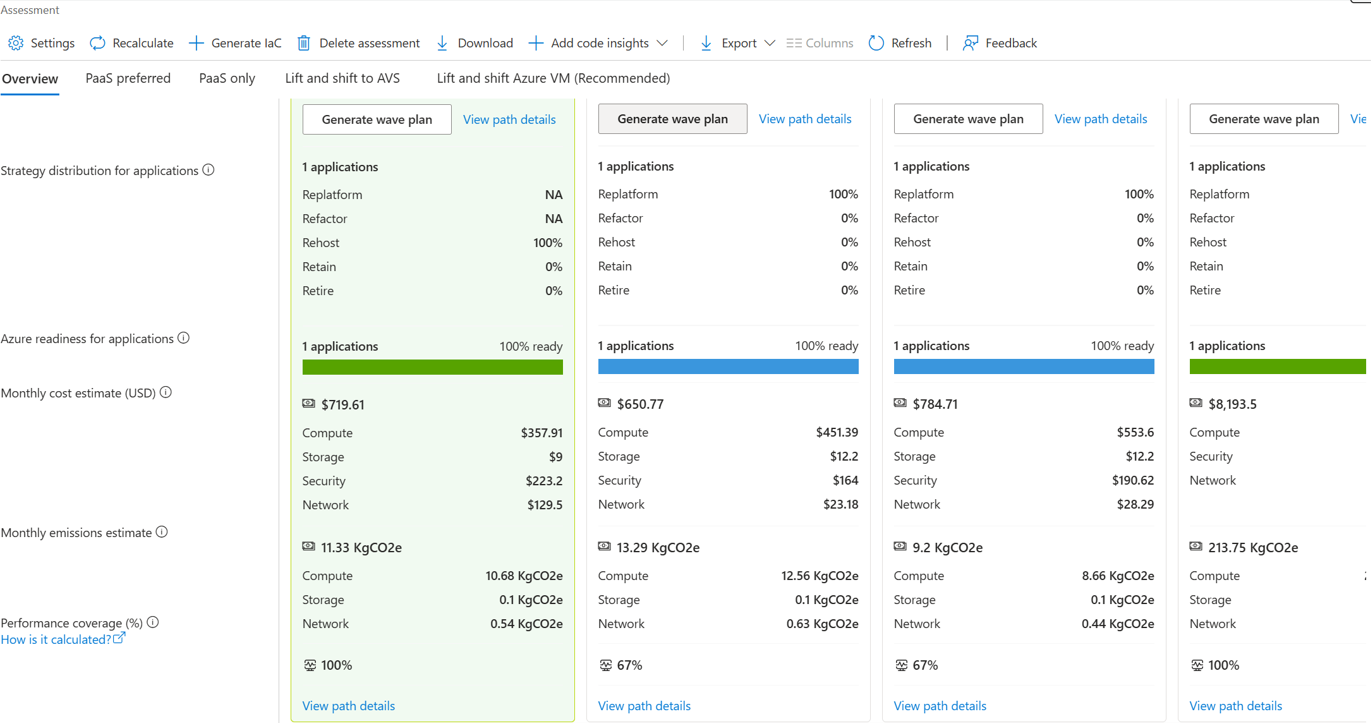
Review the summary of the assessed network resources and available migration paths. The assessment displays network cost and emissions information for the Lift and shift strategy.
For migration strategies other than Lift and shift, Azure Migrate currently estimates network cost as five percent of the combined compute and storage cost. Detailed network cost estimation isn't currently available.
View recommended network resources
The assessment overview page provides a summary of the recommended Azure network resources, estimated monthly network costs, and sustainability metrics for the assessed workloads.
- Network cost: Estimated monthly cost of Azure network resources for the Lift and shift strategy.
- Emissions information: Sustainability metrics for the recommended Azure network targets.
Review lift-and-shift network recommendations
In the Lift and shift tab, review the target count and application cost. The overall target count includes network targets, and the application cost includes network cost.
In your Azure Migrate project, select Assessments under Decide and plan.
For assessments that include multiple applications, the total assessment cost counts shared component costs only once. Individual application costs can still include their share of the shared component costs.

Review application summary
On the application summary page, review the following network-related information:
In your Azure Migrate project, select Assessments under Decide and plan.

- Network: Displays the Azure network targets recommended for the application.
- Cost donut: Shows the network cost as part of the overall application cost breakdown.
- Emissions information: Sustainability metrics added at the application level.
Network resources:
Open the Network tab or Network resources page to review the complete list of recommended Azure network targets. The page displays the following parent network resources:
| Azure network target | What to review |
|---|---|
| Virtual network and subnets | Summary page with resource count and price information. The design uses one VNet per Tier-1 gateway and one subnet per network segment, or one unified VNet with subnets grouped by workload category, depending on the network design setting. |
| Azure Virtual Network Manager (AVNM) | Gateway firewall rules translated to AVNM security configurations. Rules are attached to the source rule and sorted by priority. |
| Network Security Group (NSG) | Distributed firewall rules translated to NSG security rules. Rules maintain priority ordering from the source NSX-T configuration. |
| Azure Firewall | Includes Summary and Policy tabs. The Policy tab shows application and L7 rules. |
| Load balancer | Includes Summary and Rules tabs. The Rules tab shows routing rules mapped from the on-premises L4 load balancer configuration. |
| Network Watcher | Summary page with resource and price information for network monitoring capabilities. |
Migration issues
When you review the network assessment, you might see the following issues:
| Issue | Resolution |
|---|---|
| Firewall rules dropped | The tool can't translate NSX-T rules that use missing NS group information or unsupported L2 protocols. Review the dropped rules table and plan manual configuration in Azure Firewall after migration. |
| Assessment takes longer than expected to generate | Firewall rule conversion adds processing time. Larger environments with many firewall rules take longer. This behavior is expected. |
| No network targets shown | Verify that NSX-T discovery data is available and that the assessment scope includes workloads with associated network resources. Assessments created before network integration aren't in scope. |
| Network cost not visible in other strategies | Network recommendations currently scope to Lift and shift to Azure VM only. |
Next steps
- Create a network assessment.
- Review an Azure Files assessment.
- Learn about Azure Virtual Network Manager.
- Learn about Azure Firewall.