Note
Access to this page requires authorization. You can try signing in or changing directories.
Access to this page requires authorization. You can try changing directories.
Azure Multicloud Interconnect is a managed service that provides private connectivity between Azure and supported cloud service providers. It gives workloads that span more than one cloud a dedicated path that doesn't traverse the public internet.
Important
Azure Multicloud Interconnect is currently in PREVIEW. See the Supplemental Terms of Use for Microsoft Azure Previews for legal terms that apply to Azure features that are in beta, preview, or otherwise not yet released into general availability.
Note
Need support in additional regions? Submit your requirements through the Multicloud Interconnect Form.
During preview, Azure Multicloud Interconnect supports connectivity to Amazon Web Services (AWS). For current provider, region, and bandwidth support, see Availability and limits.
Preview scope
The initial preview includes:
- Connectivity between Azure and AWS
- 1-Gbps bandwidth
- Managed resilient connectivity
- No Azure Multicloud Interconnect service charge during preview
- No Azure egress charge during preview
Key benefits
Private cloud-to-cloud connectivity
Traffic between Azure and the connected cloud provider travels over private connectivity instead of the public internet.
Simplified provisioning
You provision connectivity by creating an Azure Multicloud Interconnect resource and exchanging an activation key with the provider. You don't coordinate provider circuits, physical or virtual routers, cross-connects, virtual LANs, point-to-point addressing, or Border Gateway Protocol (BGP) peering sessions.
Managed resiliency
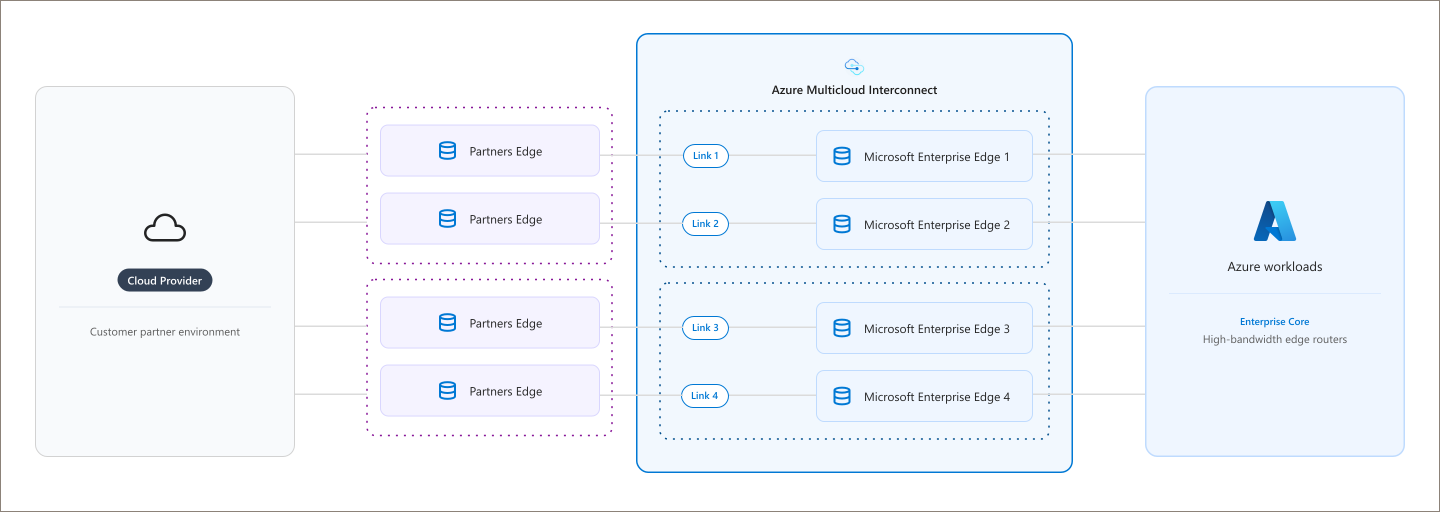
A single interconnect is backed by redundant infrastructure across physically separate locations and designed for high availability.
Link encryption
MAC Security (MACsec) is enabled by default on the physical links between Azure and the supported cloud provider.
How Azure Multicloud Interconnect works
Azure Multicloud Interconnect is provisioned on prebuilt connectivity infrastructure managed by Azure and the participating cloud provider.
Azure and the participating cloud provider coordinate:
- Connectivity provisioning
- Path diversity
- Physical-link health monitoring and failure recovery
Azure Multicloud Interconnect is represented in Azure as a resource you create in your subscription. That resource is paired with a matching connection in the provider's cloud. The two sides are joined by an activation key, which confirms that both ends belong to the same customer and configuration.
Azure ExpressRoute is the underlying connectivity technology, but the resource you create and manage is an Azure Multicloud Interconnect resource rather than a traditional ExpressRoute circuit. After the service is provisioned, you can connect Azure virtual networks (VNets) through an ExpressRoute gateway and connect workloads running in supported cloud-provider virtual networks, such as AWS Virtual Private Clouds (VPCs), through the multicloud connection.
After the pairing completes, traffic flows between your Azure virtual network and your workloads in the provider's cloud over the managed connection.
How you set up an interconnect
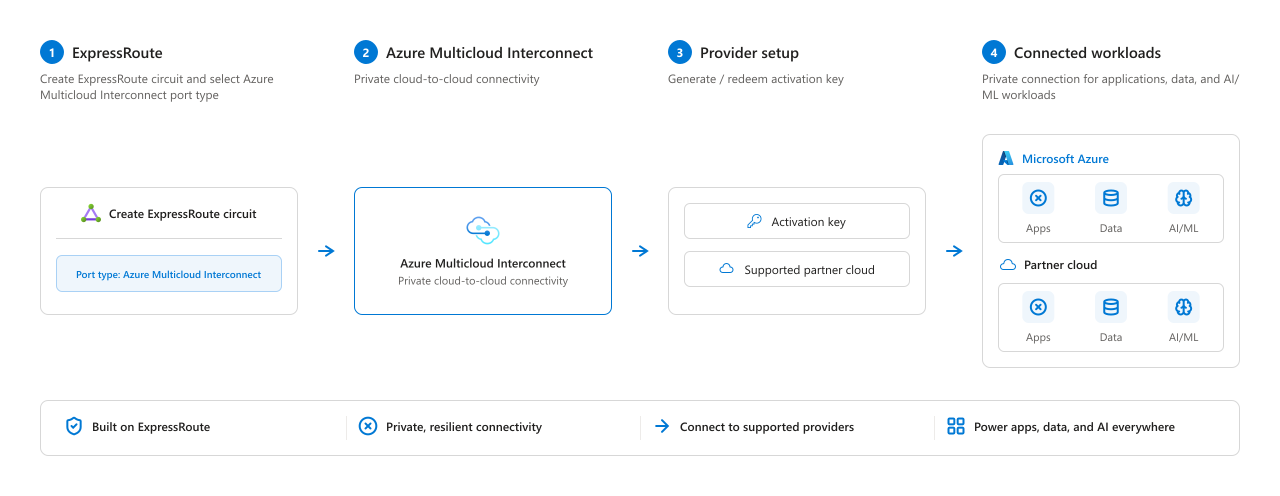
Setting up an interconnect moves through four stages, from creating the underlying circuit to running workloads across both clouds:
- ExpressRoute circuit. Create an ExpressRoute circuit and select the Azure Multicloud Interconnect port type.
- Interconnect resource. Create the Azure Multicloud Interconnect resource that provides the private cloud-to-cloud connection.
- Provider setup. Generate or redeem an activation key and select a supported cloud service provider. During preview, that provider is Amazon Web Services (AWS).
- Connected workloads. Connect your virtual networks so that applications, data, and AI workloads can communicate across both clouds.
For the full procedure, see Create an Azure Multicloud Interconnect Preview resource or Redeem an Azure Multicloud Interconnect Preview activation key.
Activation keys
An activation key ties the Azure side of the interconnect to the cloud service provider side. It authorizes the connection by confirming that the cloud service provider, Azure region, bandwidth, and provider account all match the request before provisioning begins. During preview, the supported provider is Amazon Web Services (AWS).
One side generates the key and the other redeems it, which means you can start the process from either Azure or the provider:
- Start in Azure and generate a key to redeem with the provider. See Create an Azure Multicloud Interconnect Preview resource.
- Start with the provider and redeem their key in Azure. See Redeem an Azure Multicloud Interconnect Preview activation key.
If validation fails, provisioning doesn't start. Correct the mismatched details and then restart activation.
Azure Multicloud Interconnect and ExpressRoute
Azure Multicloud Interconnect uses ExpressRoute as its connectivity foundation. While ExpressRoute provides secure private connectivity, Azure Multicloud Interconnect adds managed cloud-to-cloud connectivity, automated provisioning with supported cloud providers, and built-in resiliency management.
| Connectivity requirement | Recommended service |
|---|---|
| Azure to on-premises connectivity | ExpressRoute |
| Azure to a supported cloud service provider | Azure Multicloud Interconnect |
If you need connectivity from your own datacenter into Azure, see What is Azure ExpressRoute?.
Plan your deployment
Before you create an interconnect:
- Confirm the supported cloud service provider, Azure region, provider account, and available bandwidth. During preview, the supported provider is Amazon Web Services (AWS). See Availability and limits.
- Plan non-overlapping address spaces across your Azure and provider networks.
- Define the workload prefixes and route intent that should cross the interconnect.
- Plan an ExpressRoute virtual network gateway for traffic entering Azure.