Note
Access to this page requires authorization. You can try signing in or changing directories.
Access to this page requires authorization. You can try changing directories.
Microsoft Entra authentication is a mechanism for connecting to Azure Database for MySQL Flexible Server by using identities defined in Microsoft Entra ID. By using Microsoft Entra authentication, you can manage database user identities and other Microsoft services in a central location, which simplifies permission management.
Benefits of Entra authentication
- Authenticates users across Azure services in a consistent way.
- Manages password policies and password rotation in one place.
- Supports multiple forms of authentication through Microsoft Entra ID, which can eliminate the need to store passwords.
- Enables customers to manage database permissions by using external Microsoft Entra ID groups.
- Uses MySQL database users to authenticate identities at the database level.
- Supports token-based authentication for applications connecting to Azure Database for MySQL Flexible Server.
Configure and use Microsoft Entra authentication
Select your preferred authentication method for accessing the Flexible Server.
- By default, the authentication method is set to MySQL authentication only.
- To enable Microsoft Entra authentication, change the authentication method to:
Microsoft Entra authentication only- or
MySQL and Microsoft Entra authentication
Select the user assigned managed identity (UAMI) with the following privileges:
- User.Read.All: Allows access to Microsoft Entra user information.
- GroupMember.Read.All: Allows access to Microsoft Entra group information.
- Application.Read.ALL: Allows access to Microsoft Entra service principal (application) information.
Add Microsoft Entra Admin. It can be Microsoft Entra users or groups, which have access to a Flexible Server.
Create database users in your database mapped to Microsoft Entra identities.
Connect to your database by retrieving a token for a Microsoft Entra identity and signing in.
Note
For detailed, step-by-step instructions about how to configure Microsoft Entra authentication with Azure Database for MySQL Flexible Server, see Set up Microsoft Entra authentication for Azure Database for MySQL - Flexible Server.
Architecture
Microsoft Entra authentication requires user-managed identities. When you link a user-assigned identity to the Flexible Server, the Managed Identity Resource Provider (MSRP) internally issues a certificate to that identity. When you delete the managed identity, the corresponding service principal is automatically removed.
The service uses the managed identity to request access tokens for services that support Microsoft Entra authentication. Azure Database currently supports only a user-assigned managed identity (UMI) for Azure Database for MySQL Flexible Server. For more information, see Managed identity types in Azure.
The following high-level diagram summarizes how authentication works by using Microsoft Entra authentication with Azure Database for MySQL Flexible Server. The arrows indicate communication pathways.
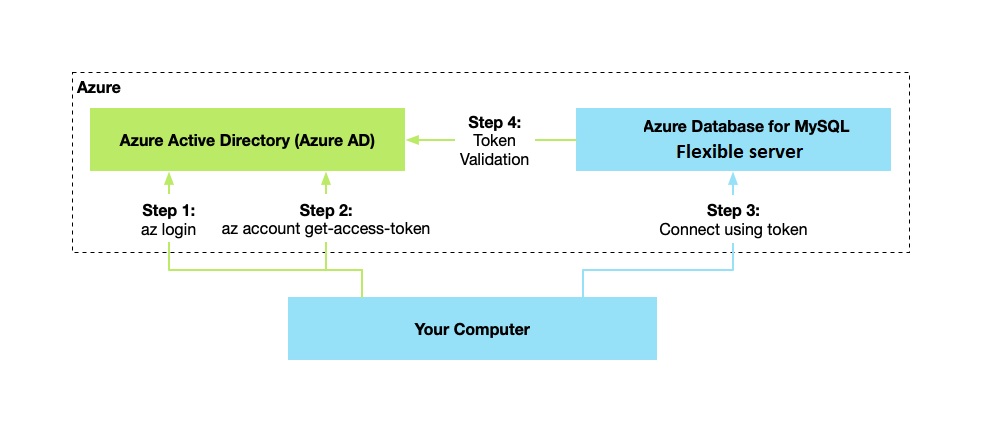
- Your application can request a token from the Azure Instance Metadata Service identity endpoint.
- When you use the client ID and certificate, a call is made to Microsoft Entra to request an access token.
- Microsoft Entra returns a JSON Web Token (JWT) access token. Your application sends the access token on calls to your server.
- The server validates the token with Microsoft Entra.
Administrator structure
When you use Microsoft Entra authentication with Azure Database for MySQL Flexible Server, you get two administrator accounts: the original MySQL administrator and the Microsoft Entra administrator.
Only the administrator based on a Microsoft Entra account can create the first Microsoft Entra ID contained database user in a user database. The Microsoft Entra administrator sign-in can be a Microsoft Entra user or a Microsoft Entra group. When the administrator is a group account, any group member is a database server administrator. Group account enhances manageability by centrally adding and removing group members in Microsoft Entra without changing the users or permissions in the database server.
Important
You can configure only one Microsoft Entra administrator (a user or group) at a time.
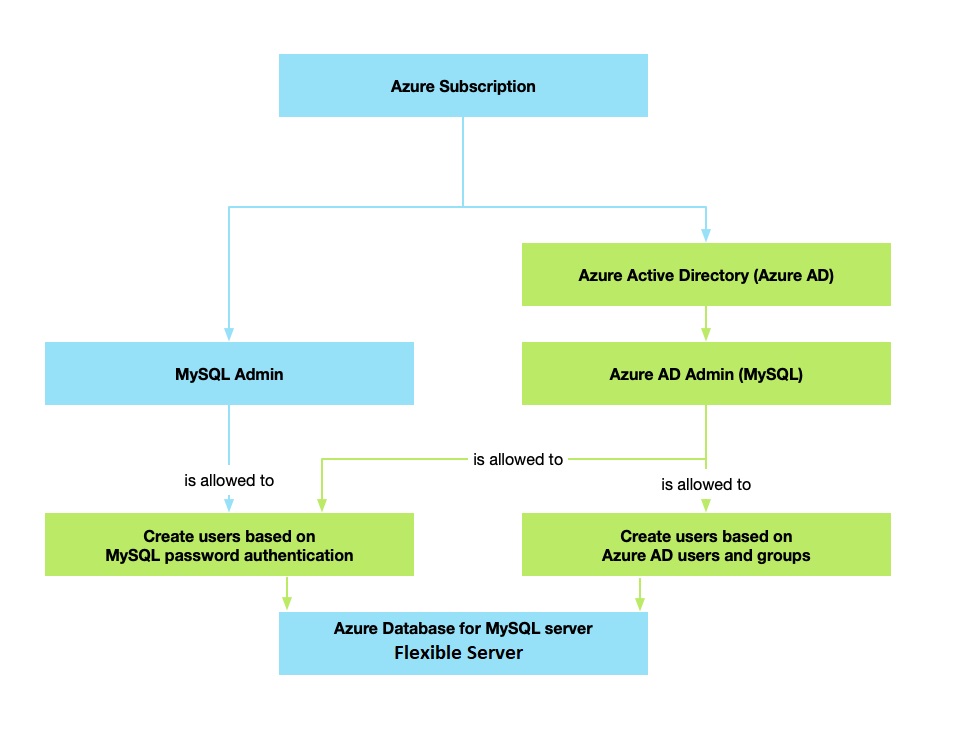
To access the Flexible Server, you can use the following authentication methods:
- MySQL authentication only - default option that uses native MySQL authentication with MySQL sign-in and password.
- Only Microsoft Entra authentication - disables MySQL native authentication, and users and applications must authenticate by using Microsoft Entra. To enable this mode, set the server parameter
aad_auth_onlytoON. - Authentication with MySQL and Microsoft Entra ID - both native MySQL and Microsoft Entra authentication are available. To enable this mode, set the server parameter
aad_auth_onlytoOFF.
Permissions
To allow the UMI to read from Microsoft Graph as the server identity, grant the following permissions. Alternatively, assign the Directory Readers role to the user-assigned managed identity.
Important
Only a user with at least the Privileged Role Administrator role can grant these permissions.
- User.Read.All: Allows access to Microsoft Entra user information.
- GroupMember.Read.All: Allows access to Microsoft Entra group information.
- Application.Read.ALL: Allows access to Microsoft Entra service principal (application) information.
For guidance about how to grant and use the permissions, see Overview of Microsoft Graph permissions.
When you grant the permissions to the UMI, they apply to all servers you create with the UMI assigned as a server identity.
Token validation
Microsoft Entra authentication in Azure Database for MySQL Flexible Server ensures that the user exists in the MySQL server and checks the token's validity by validating the token's contents. The service performs the following token validation steps:
- Token is signed by Microsoft Entra.
- Token is issued by Microsoft Entra for the tenant associated with the server.
- Token isn't expired.
- Token is for the Flexible Server instance (and not another Azure resource).
Connect by using Microsoft Entra identities
Microsoft Entra authentication supports the following methods of connecting to a database by using Microsoft Entra identities:
- Microsoft Entra Password
- Microsoft Entra integrated
- Microsoft Entra Universal with MFA
- Using Active Directory Application certificates or client secrets
- Managed Identity
When you authenticate against the Active Directory, you retrieve a token. This token is your password for logging in.
Note
Only Microsoft Entra user roles support management operations, such as adding new users.
Note
For more information about how to connect by using an Active Directory token, see Set up Microsoft Entra authentication for Azure Database for MySQL - Flexible Server.
Other considerations
You can configure only one Microsoft Entra administrator per Flexible Server at a time.
If you delete a user from Microsoft Entra, that user can't authenticate with Entra. Therefore, the user can't acquire an access token. Although the matching user is still in the database, connecting to the server with that user isn't possible.
Note
You can sign in by using the deleted Microsoft Entra user until the token expires (up to 60 minutes from token issuing). If you remove the user from Azure Database for MySQL Flexible Server, this access is revoked immediately.
If you remove the Microsoft Entra admin from the server, the server is no longer associated with a Microsoft Entra tenant, and therefore all Microsoft Entra logins are disabled for the server. Adding a new Microsoft Entra admin from the same tenant re-enables Microsoft Entra logins.
A Flexible Server matches access tokens to the user's unique Entra ID instead of the user name. Therefore, if you delete a user from Microsoft Entra and then add a new user with the same name, the new user doesn't inherit the previous permissions.
To enable Entra authentication on a replica server, you need to apply the same configuration steps used on the primary server across all replica partners.
Note
You can't transfer the subscriptions of a Flexible Server with Microsoft Entra authentication enabled to another tenant or directory.