Note
Access to this page requires authorization. You can try signing in or changing directories.
Access to this page requires authorization. You can try changing directories.
This article provides best practices and recommendations for the Oracle to Azure Database for PostgreSQL schema conversion feature in Visual Studio Code with Microsoft Foundry. Follow these guidelines to get reliable, high-quality results.
Plan the schema conversion
A successful conversion starts with planning. Decide what to convert, how to iterate, and which Azure Database for PostgreSQL target you align to before running the tool.
Scope the source schemas
Specify which Oracle application schemas you want to convert. The extraction workflow automatically excludes Oracle system and built-in schemas, such as SYS, SYSTEM, XDB, MDSYS, CTXSYS, and WMSYS.
Align the target PostgreSQL major version
Use the same PostgreSQL major version on the scratch database as on the production target Azure Database for PostgreSQL flexible server. The conversion tool emits DDL that targets a specific PostgreSQL major version. Converting against one major version and deploying to another can surface syntax or feature differences during deployment.
Scan for unsupported objects in advance
Review the Oracle to Azure Database for PostgreSQL schema conversion limitations before you start. For each unsupported object, decide in advance whether to recreate the functionality natively on PostgreSQL, replatform it to an appropriate Azure service, or drop it from the migration scope.
Plan remediation for unsupported objects
For each unsupported object identified in the previous step, record the chosen remediation path before you run the conversion. Track:
- The Oracle object name and type.
- The chosen path: recreate, replatform, or drop.
- The target Azure service or PostgreSQL pattern, if you're replatforming.
Prepare the source Oracle environment
Before you run a conversion, prepare the source Oracle environment. Grant the conversion tool the privileges it needs to read schema metadata, and verify that concurrent session capacity is sufficient so the tool can extract a complete and accurate schema.
Required Oracle privileges
The Oracle connection user that the conversion tool uses needs read access to the Oracle metadata catalog. The tool reads schema metadata from DBA_* catalog views.
Grant either SELECT_CATALOG_ROLE or SELECT ANY DICTIONARY so the user can read the required DBA_* views. Use least-privilege access according to organizational policy. The user doesn't need privileges on any application table or to read row-level data. The tool never queries application data; it only reads schema metadata.
Set the Oracle sessions parameter
Make sure the Oracle sessions parameter is greater than 10 so the tool can open enough concurrent metadata reads. Check the current value with:
SELECT name, value
FROM v$parameter
WHERE name = 'sessions';
Prepare the scratch database
The schema conversion tool uses a scratch database on Azure Database for PostgreSQL flexible server to validate converted objects. Provision and configure the server before you start a conversion so validation behavior matches the eventual production target.
Required PostgreSQL privileges
The PostgreSQL connection user that the conversion tool uses needs privileges to create and validate objects in the scratch database:
- Membership in the
azure_pg_adminrole, which is required to create the extensions the tool depends on. CREATEandUSAGEprivileges on the scratch schema, so the tool can create converted objects for validation.CONNECTprivilege on the scratch database.
Choose an appropriate scratch database size
The scratch database validates DDL only; it doesn't host application workload. Use a compute tier that provides stable connection capacity for conversion and validation activity. Size the scratch database separately from the production target, and downsize it after conversion is complete.
Allow list and install required extensions
The schema conversion tool depends on several PostgreSQL extensions. These extensions translate Oracle built-in packages, spatial types, partitioning, and full-text search. They also enable observability on the scratch database. Allow list and install the extensions that the converted schema needs before your first conversion run.
The following table lists commonly used extensions for Oracle to Azure Database for PostgreSQL conversions. Include the ones that apply to the source schema, and add any others the workload requires.
| Extension | Purpose |
|---|---|
orafce |
Oracle built-in package compatibility (DBMS_*, PLV*, UTL_FILE, and common functions) |
uuid-ossp |
UUID generation, equivalent to Oracle SYS_GUID |
pg_trgm |
Trigram indexes for LIKE/ILIKE and fuzzy text search |
postgis |
Spatial types and operators (replaces Oracle Spatial) |
postgis_topology |
Topology model for PostGIS |
postgis_tiger_geocoder |
Geocoder bundled with PostGIS |
pg_partman |
Time- and range-based partition management |
pg_stat_statements |
Per-query performance telemetry |
Step 1: Allow list the extensions
In the Azure portal, open the Azure Database for PostgreSQL flexible server that hosts your scratch database. Select Server parameters, search for azure.extensions, and select each extension from the list. Save your changes. Extensions such as pg_partman and pg_stat_statements also require entries in shared_preload_libraries. These entries need a server restart. For more information, see How to use PostgreSQL extensions.
Step 2: Install the extensions in the scratch database
Connect to the scratch database as a member of the azure_pg_admin role and create each extension:
CREATE EXTENSION IF NOT EXISTS orafce;
CREATE EXTENSION IF NOT EXISTS "uuid-ossp";
CREATE EXTENSION IF NOT EXISTS pg_trgm;
CREATE EXTENSION IF NOT EXISTS postgis;
CREATE EXTENSION IF NOT EXISTS postgis_topology;
CREATE EXTENSION IF NOT EXISTS postgis_tiger_geocoder;
CREATE EXTENSION IF NOT EXISTS pg_partman;
CREATE EXTENSION IF NOT EXISTS pg_stat_statements;
Step 3: Configure search_path for Oracle compatibility
orafce installs Oracle-compatible packages in dedicated schemas (oracle, dbms_*, plv*, utl_file). Add those schemas, along with the PostGIS (topology, tiger) and pg_cron (cron) schemas, to search_path so converted code can reference them without schema qualification.
SET search_path TO public, oracle, topology, tiger, cron,
    dbms_random, dbms_alert, dbms_assert, dbms_output, dbms_pipe,
    dbms_sql, dbms_utility, plvchr, plvdate, plvlex, plvstr,
    plvsubst, plunit, utl_file;
To persist the setting across sessions, set it at the database level by using ALTER DATABASE <db> SET search_path = ... or at the role level by using ALTER ROLE <role> SET search_path = ....
Configure Microsoft Foundry capacity
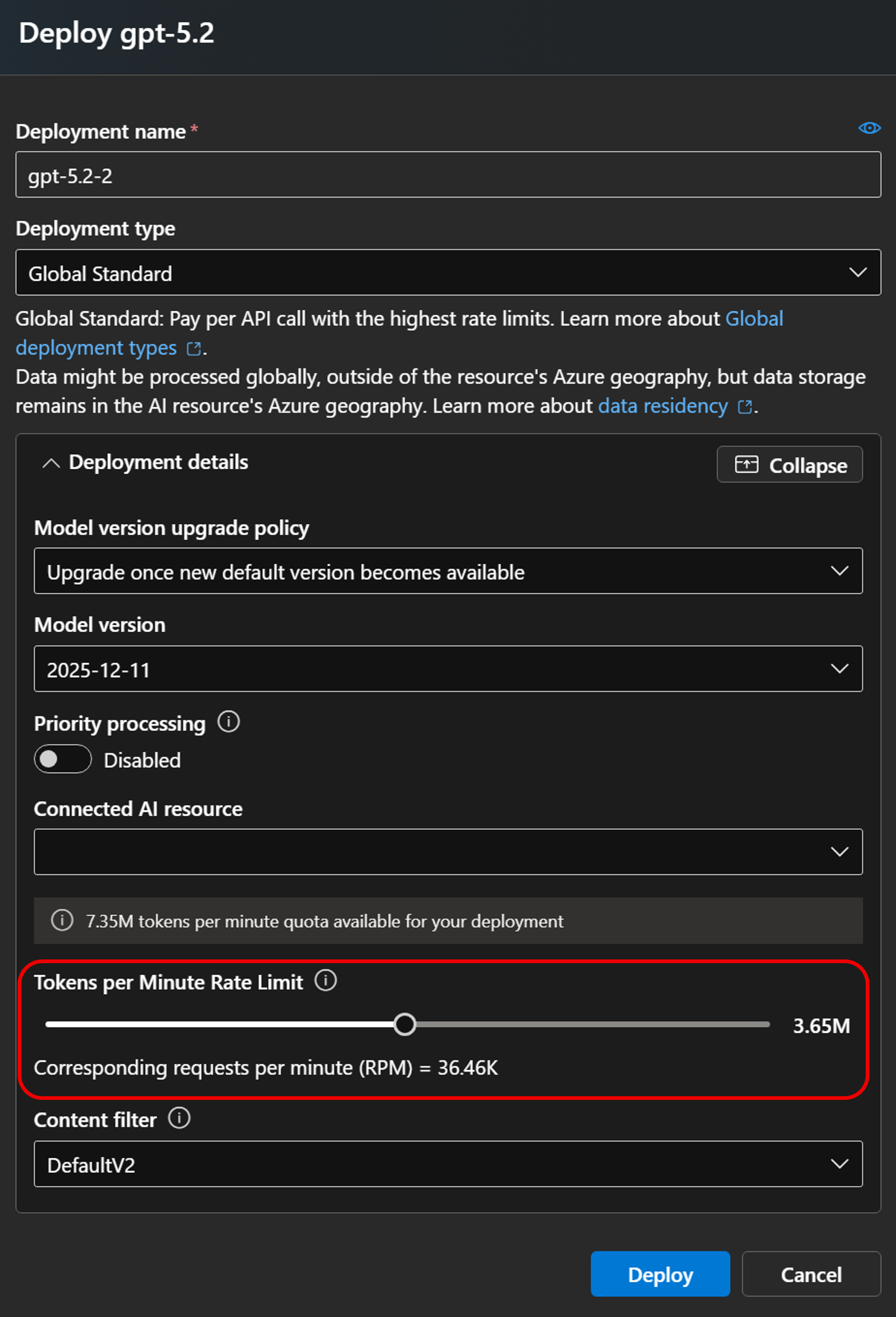
Microsoft Foundry capacity directly affects conversion reliability, especially for large or complex Oracle schemas. Provision sufficient tokens per minute (TPM) and monitor usage so conversions complete without interruption.
Provision sufficient tokens per minute
- Configure your Microsoft Foundry deployment with a quota of at least 500,000 tokens per minute (TPM) for optimal performance. Complex schema objects consume significant token capacity during conversion.
- Monitor consumption from the Microsoft Foundry portal and raise the limit if you observe throttling during a conversion run.
Run one project at a time
Run a single schema conversion project at a time. Concurrent projects compete for the same Microsoft Foundry quota and can cause throttling, partial conversions, and unexpected token costs. Process projects sequentially to keep behavior predictable and easier to debug.
Secure the conversion workflow
The conversion tool runs locally in Visual Studio Code and connects to three endpoints: the Microsoft Foundry deployment, the source Oracle database, and the target Azure Database for PostgreSQL flexible server. Before you start a conversion, confirm that Visual Studio Code can reach all three endpoints from your workstation, then apply standard enterprise security controls to each connection.
Confirm network connectivity from Visual Studio Code
Verify that the workstation running Visual Studio Code can reach the Microsoft Foundry endpoint, the Oracle source database, and the Azure Database for PostgreSQL flexible server. If any connection is blocked by a corporate firewall, VPN, or network security group, work with your network team to allow outbound access before you start a conversion.
Use private endpoints or firewall rules for the target
Restrict network access to the Azure Database for PostgreSQL flexible server. Use private endpoints for VNet-integrated workstations or configure firewall rules that allow only the IP ranges your team uses.
Use Microsoft Entra ID authentication
Connect to Azure Database for PostgreSQL flexible server with Microsoft Entra authentication instead of password authentication. Microsoft Entra authentication centralizes access control, supports conditional access policies, and produces auditable sign-in events.
Manage credentials safely
Don't embed Oracle or PostgreSQL credentials in plain text and don't commit them to source control. Store them in Azure Key Vault or your organization's secret manager, and reference them from the conversion tool's connection configuration in Visual Studio Code at connect time.
Validate the converted schema
Automated conversion accelerates migration, but manual validation is essential to catch semantic differences, platform-specific behaviors, and edge cases that AI or tooling might miss. The schema conversion report flags objects that the tool extracted but couldn't fully convert as review tasks. Work through these tasks first, and spot-check complex objects that converted cleanly.
For details about the artifacts the tool produces and the recommended review order, see Schema conversion reports for Oracle to Azure Database for PostgreSQL.
Validate complex code objects
Manually validate the following complex Oracle code objects after conversion:
- Stored procedures: Review the converted procedure logic, parameter handling, and exception management.
- Packages: Validate package structure and dependency resolution against PostgreSQL schemas.
- Functions: Verify return types, parameter mappings, and business logic accuracy.
Validation workflow
- Resolve all review tasks in the schema conversion report, optionally with GitHub Copilot agent mode assistance.
- Review every complex object converted by AI, even when no review task was created.
- Execute converted procedures and functions in the scratch database with representative test data.
- Confirm that business logic and result sets match the Oracle source before you promote the schema to production.
Rerun and iterate
A conversion run is repeatable. Rerun the conversion whenever the inputs change so that the report and the generated DDL reflect the current state.
When to rerun a conversion
Rerun the conversion when you:
- Adjust the target scratch database. For example, you allow list a missing extension, install a new extension, or correct
search_path. - Adjust the source Oracle side. For example, you bring an additional schema into scope, drop a problem object, or fix metadata corruption in a source object.
- Adjust Microsoft Foundry capacity. For example, you raise the TPM quota after observing throttling in the previous run.
Diff the new conversion report against the previous one to confirm that the change had the intended effect, and to spot any unintended side effects on objects that aren't part of the change.
Retain conversion artifacts
Save the generated PostgreSQL DDL folder along with all reports produced by the conversion tool as the audit artifact for the migration project. These artifacts are useful for:
- Compliance and audit reviews.
- Diff comparisons against future reconversions.
- Knowledge transfer to operations or application teams.
Store the artifacts in your team's source-control or document-management system.