Note
Access to this page requires authorization. You can try signing in or changing directories.
Access to this page requires authorization. You can try changing directories.
Important
Perimeter links are currently in preview. They're available across all network security perimeter supported Azure public and Azure Government cloud regions. During this preview, the following PaaS services support cross-perimeter connectivity:
- Azure SQL Database
- Azure Storage
- Azure Cosmos DB
- Azure Key Vault (AKV)
- Azure Monitoring
- Azure Service Bus
You can access the feature through the Azure portal, CLI, PowerShell, and API.
See the Supplemental Terms of Use for Microsoft Azure Previews for legal terms that apply to Azure features that are in beta, preview, or otherwise not yet released into general availability.
As a feature of Azure Network Security Perimeter, a perimeter link, also known as a cross-perimeter connection, creates a secure connection that lets resources in different network security perimeters communicate without extra access rules. This capability simplifies service-to-service communication across perimeters while maintaining Zero Trust principles.
Use perimeter links when you need resources in separate network security perimeters (NSPs) to communicate securely. For example, when a key vault in one perimeter needs to access a storage account in another. When you create a perimeter link, Azure automatically generates the required inbound and outbound rules on both perimeters, so you don't need to create manual access rules.
To configure a perimeter link, see Configure a perimeter link between network security perimeters.
How perimeter links work
A perimeter link joins two independent network security perimeters through a single connection. When you establish a perimeter link, it creates a trust relationship between the two perimeters. Resources associated with the linked profiles can communicate with each other without creating additional network security perimeter access rules, because the link automatically generates the required inbound and outbound rules on both sides.
Because a perimeter link is symmetric, the terms local and remote are relative to the perimeter you're working from: the perimeter you configure the link from is the local perimeter, and the perimeter you connect to is the remote perimeter.
When you establish a perimeter link:
- Resources associated with the linked NSP profiles can communicate seamlessly.
- The selected profiles automatically get extra inbound and outbound allow rules.
- The source type for the generated rules is Network security perimeter.
- You don't need to create extra manual NSP access rules.
Architecture of a perimeter link
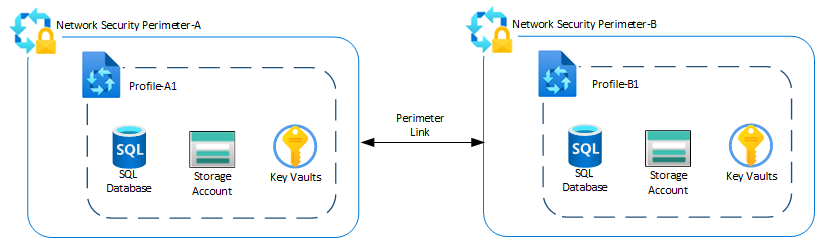
A perimeter link joins two independent network security perimeters through a single perimeter link. The following description outlines the components in an example configuration:
- Network security perimeter-A contains Profile-A1, which groups the resources that share the same access rules. In this example, Profile-A1 has a Storage Account, a Key Vault, and a SQL Database associated with it.
- Network security perimeter-B contains Profile-B1, which similarly groups its associated resources. In this example, Profile-B1 has a Storage Account, a Key Vault, and a SQL Database associated with it.
- A perimeter link connects Profile-A1 in Network security perimeter-A to Profile-B1 in Network security perimeter-B, establishing a trust relationship between the two perimeters.
The following diagram shows an example configuration where a perimeter link connects Profile-A1 in network security perimeter-A to Profile-B1 in network security perimeter-B.
Key benefits
- Simplifies cross-NSP service-to-service communication while maintaining Zero Trust principles.
- Enables seamless communication between resources protected by different Network security perimeters.
- Supports Managed Identity (MSI)-based authentication.
- Reduces operational complexity by automatically creating required Network security perimeter rules.
Supported PaaS services
During preview, the following PaaS services support cross-perimeter connectivity through perimeter links:
- Azure SQL Database
- Azure Storage
- Azure Cosmos DB
- Azure Key Vault (AKV)
- Azure Monitoring
- Azure Service Bus
Authentication
Perimeter links require Managed Identity (MSI) authentication. Other authentication methods aren't supported. Resources that communicate across a perimeter link must use managed identities to authenticate service-to-service traffic.
Behavior when you remove a perimeter link
When you remove a perimeter link, both participating network security perimeters experience the following changes:
- You terminate the trust relationship between the two network security perimeters.
- You remove derived inbound and outbound access rules that the link automatically created from the associated network security perimeter profiles.
- You deny any data-plane traffic that relied on the cross-perimeter trust (for example, service-to-service access using managed identities).
- Access enforcement reverts to standard NSP evaluation, where traffic is allowed only if it matches explicitly configured inbound and outbound access rules within the same perimeter.
Link removal doesn't require consent or approval from the remote NSP administrator, even if the original link was created through a mutual approval flow. Either participating network security perimeter administrator can initiate link removal.
For the steps to remove a perimeter link, see Remove perimeter links.
Limitations
- Auto approval for perimeter links only works for Network security perimeters in the same subscription.
- To connect Network security perimeters across different subscriptions, you need to meet one of the following requirements:
- The subscription owner who initiates the link has Contributor access to the remote NSP's subscription, or
- The initiating subscription owner has
Microsoft.Network/networkSecurityPerimeters/linkPerimeter/actiongranted in the remote Network security perimeter's subscription. - Without these permissions, you can't configure perimeter links between two NSPs in different subscriptions.
- To connect Network security perimeters across different subscriptions, you need to meet one of the following requirements:
- Supported PaaS Services for perimeter links during preview:
- Azure SQL Database
- Azure Storage
- Azure Cosmos DB
- Azure Key Vault (AKV)
- Azure Monitoring
- Azure Service Bus
- The maximum number of perimeter links per Network security perimeter is 10.
- Managed Identity (MSI) authentication is required for perimeter links. Other authentication methods aren't supported.