Note
Access to this page requires authorization. You can try signing in or changing directories.
Access to this page requires authorization. You can try changing directories.
The Microsoft Quantum Development Kit (QDK) extension for Visual Studio Code (VS Code) automatically runs Q# and OpenQASM programs on its local sparse simulator.
This article explains how to run programs on the local simulator and how to add Pauli noise to Q# simulations. To use the other QDK simulators from Python, see Run quantum simulations with the QDK Python package.
How the local simulator works
The sparse simulator stores only the nonzero amplitudes of a quantum state. When most computational basis amplitudes are zero, this representation uses less memory and can simulate some programs with more qubits than a full-state simulator, which stores every amplitude.
The performance benefit depends on whether the quantum state remains sparse in the computational basis. For more information, see Jaques and Häner (arXiv:2105.01533).
Run a quantum program in VS Code
- Install the QDK extension for VS Code.
- Open a Q# (
.qs) or OpenQASM (.qasm) file. - Select Run from the code lens at the start of the file or above the Q#
Mainoperation.
The simulation output appears in the VS Code terminal. For Q# programs, select Debug to inspect the program's quantum state as it runs.
Add Pauli noise to Q# simulations
The sparse simulator supports Pauli noise for Q# programs in the QDK extension. Use ConfigurePauliNoise to set the probabilities of Pauli $X$, $Y$, and $Z$ errors in a program. The QDK extension settings also support a global Pauli noise model.
Note
You can't add a noise model to an OpenQASM simulation in the QDK extension. To build operation-specific noise models for Q# or OpenQASM programs, use the QDK Python package and the NoiseConfig API.
Add Pauli noise in the VS Code settings
- In VS Code, set global Pauli noise for Q# programs in the Q# > Simulation:Pauli Noise user setting for the QDK extension.
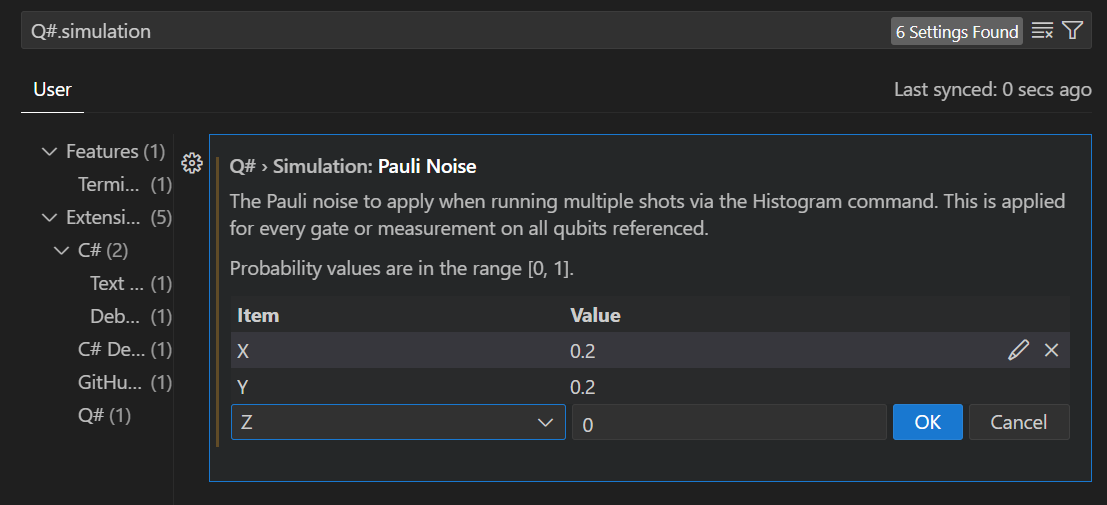
The noise settings apply to histogram results for all gates, measurements, and qubits in all Q# programs in VS Code.
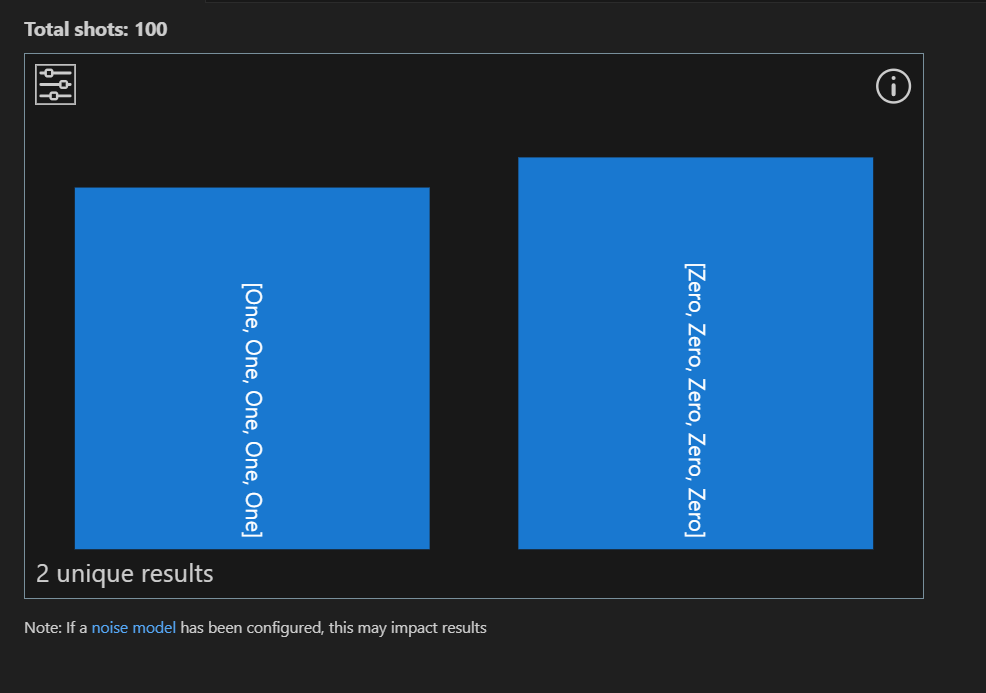
Without noise, a histogram for this GHZ sample program shows $\ket{00000}$ for about half the measurements and $\ket{11111}$ for the other half.
import Std.Diagnostics.*;
import Std.Measurement.*;

operation Main() : Result[] {
    let num = 5;
    return GHZSample(num);
}

operation GHZSample(n: Int) : Result[] {
    use qs = Qubit[n];
    H(qs[0]);
    ApplyCNOTChain(qs);
    let results = MeasureEachZ(qs);
    ResetAll(qs);
    return results;
}
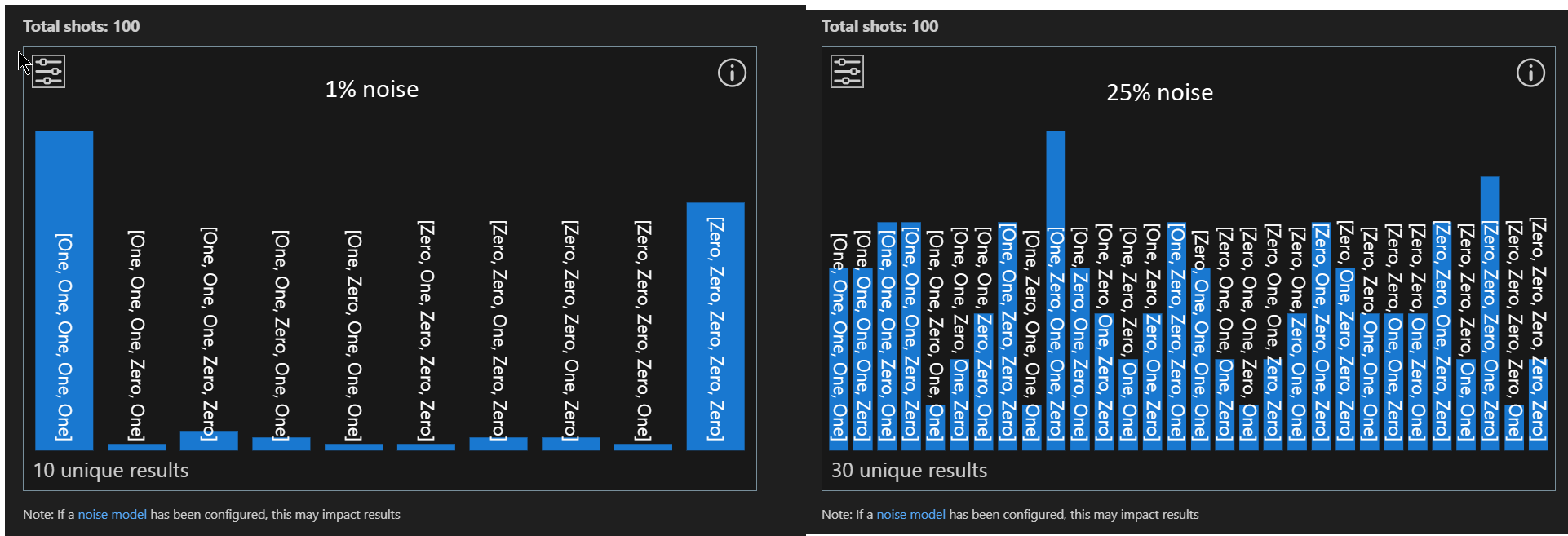
At a 1% bit-flip noise rate, the results start to spread. At 25%, the histogram is indistinguishable from pure noise.
Add Pauli noise to individual Q# programs
Use ConfigurePauliNoise to set or change a Q# program's noise model and control when and where noise occurs.
Note
The VS Code settings apply noise to all Q# programs, but ConfigurePauliNoise overrides those settings for the program that calls it.
In the previous program, add noise immediately after qubit allocation:
operation GHZSample(n: Int) : Result[] {
    use qs = Qubit[n];

    // 5% bit-flip noise applies to all subsequent operations.
    ConfigurePauliNoise(0.05, 0.0, 0.0);

    H(qs[0]);
    ApplyCNOTChain(qs);
    let results = MeasureEachZ(qs);
    ResetAll(qs);
    return results;
}
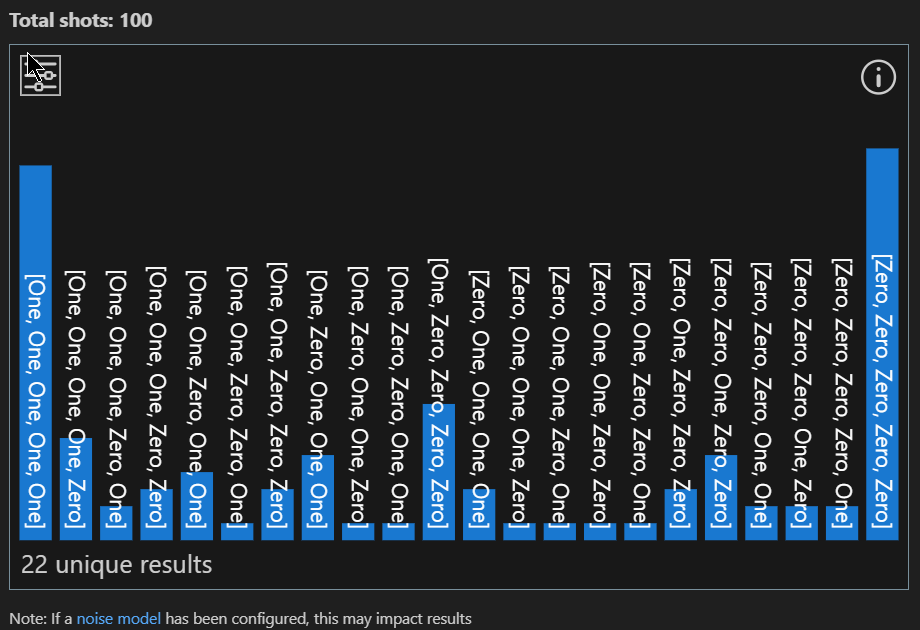
To apply noise only to the measurement operation, set the noise model immediately before measurement and clear it afterward:
operation GHZSample(n: Int) : Result[] {
    use qs = Qubit[n];
    H(qs[0]);
    ApplyCNOTChain(qs);

    // Noise applies only to the measurement operation.
    ConfigurePauliNoise(0.05, 0.0, 0.0);

    let results = MeasureEachZ(qs);
    ResetAll(qs);
    return results;
}
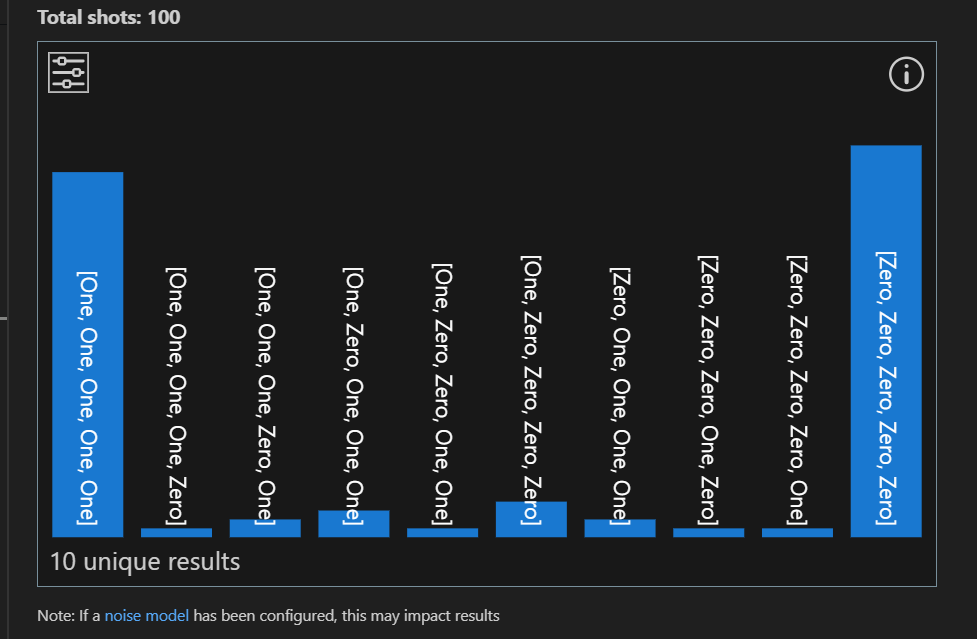
To change or clear the noise configuration at different points in your program, call ConfigurePauliNoise multiple times. For example, apply 5% bit-flip noise to the Hadamard gate and then clear the noise configuration for the rest of the program.
operation GHZSample(n: Int) : Result[] {
    use qs = Qubit[n];

    // Noise applies to the H operation.
    ConfigurePauliNoise(0.05, 0.0, 0.0);

    H(qs[0]);

    // Clear the noise settings.
    ConfigurePauliNoise(0.0, 0.0, 0.0);

    ApplyCNOTChain(qs);
    let results = MeasureEachZ(qs);
    ResetAll(qs);
    return results;
}
Other Q# noise functions
ConfigurePauliNoise supports any Pauli noise model. Use these functions and operations from the Std.Diagnostics namespace to configure or apply noise:
| Function | Description | Example |
|---|---|---|
ConfigurePauliNoise |
Sets Pauli noise for a simulation. Pass either the probabilities of Pauli $X$, $Y$, and $Z$ errors or a Pauli noise model. The configuration applies to all subsequent gates, measurements, and qubits in a Q# program and overrides the VS Code extension noise settings. Subsequent calls override earlier configurations. | ConfigurePauliNoise(0.1, 0.0, 0.5)or ConfigurePauliNoise(BitFlipNoise(0.1)) |
BitFlipNoise |
Returns a noise model with only Pauli $X$ errors at the specified probability. | 10% bit-flip noise:ConfigurePauliNoise(BitFlipNoise(0.1)) $\equiv$ ConfigurePauliNoise(0.1, 0.0, 0.0) |
PhaseFlipNoise |
Returns a noise model with only Pauli $Z$ errors at the specified probability. | 10% phase-flip noise:ConfigurePauliNoise(PhaseFlipNoise(0.1)) $\equiv$ ConfigurePauliNoise(0.0, 0.0, 0.1) |
DepolarizingNoise |
Returns a noise model with equal probabilities for Pauli $X$, $Y$, and $Z$ errors. | 6% depolarizing noise:ConfigurePauliNoise(DepolarizingNoise(0.06)) $\equiv$ ConfigurePauliNoise(0.02, 0.02, 0.02) |
NoNoise |
Returns a model with zero error probabilities. Pass it to ConfigurePauliNoise to clear the current noise configuration. |
ConfigurePauliNoise(NoNoise()) $\equiv$ ConfigurePauliNoise(0.0, 0.0, 0.0) |
ApplyIdleNoise |
Applies configured noise to a single qubit during simulation. | ...use q = Qubit[2];ConfigurePauliNoise(0.1, 0.0, 0.0);ApplyIdleNoise(q[0]);... |