Note
Access to this page requires authorization. You can try signing in or changing directories.
Access to this page requires authorization. You can try changing directories.
Semantic routing sends a natural-language request to the right handler, model, tool, prompt, or workflow by comparing the request with representative examples for each route. In this tutorial, you implement semantic routing as an application pattern with RedisVL and Azure Managed Redis. Semantic routing isn't a separate Azure Managed Redis managed feature. It uses Redis vector search and application code.
Vector search in Redis requires RediSearch and is available in Azure Managed Redis, as described in the Azure Managed Redis vector search overview. Redis modules, including RediSearch, must be enabled when you create the Azure Managed Redis instance. For supported tiers and policies, see Use Redis modules with Azure Managed Redis and RediSearch requirements.
RedisVL provides a SemanticRouter interface that uses Redis search to classify a request against a set of Route references. For the underlying vector model, Redis stores vectors and metadata in hashes or JSON objects and searches them with vector fields, distance metrics, and KNN or range queries. For more information, see the RedisVL SemanticRouter guide and Redis vector search concepts.
In this tutorial, you learn how to:
- Define named semantic routes with representative references.
- Create a RedisVL semantic router backed by Azure Managed Redis.
- Route requests to one or more matching routes.
- Handle misses and ambiguous matches.
- Tune thresholds and operate semantic routing in production.
- Apply semantic routing to common AI application patterns.
Prerequisites
- An Azure subscription. If you don't have an Azure subscription, create a free account.
- An Azure Managed Redis instance with RediSearch enabled at creation time. RediSearch is the Redis module that enables vector search in Azure Managed Redis, and modules must be selected when the instance is created. Review the supported module matrix and RediSearch policy requirements in Use Redis modules with Azure Managed Redis.
- A connection string or Redis URL for your Azure Managed Redis instance. Use TLS and your application's approved authentication method.
- A Python environment that can install RedisVL and the dependencies for your chosen embedding model.
- An embedding or vectorizer strategy. This tutorial uses the RedisVL
HFTextVectorizerfor a concise example. Use the same embedding model for every route reference and every incoming request in a router index so vector dimensions and distance metrics stay aligned. Redis vector indexes require a fixedDIMandDISTANCE_METRICfor the vector field. For more information, see Redis vector search concepts.
Install RedisVL:
pip install redisvl
Design your routes
A route represents an application decision, such as a prompt template, tool, model, or workflow. Each route includes:
- A stable
namethat your application maps to a handler. references, which are representative utterances for that route.- Optional
metadata, such as handler IDs, prompt versions, model preferences, or owner information. - A per-route
distance_threshold. In RedisVL, route thresholds use RedisCOSINEdistance units where lower values require stricter matching. Thresholds are model-specific and should be validated with your own requests.
For example, an AI assistant might use these routes:
| Route | Example destination | Representative references |
|---|---|---|
billing |
Billing workflow or prompt | "update my invoice", "why was I charged twice?" |
technical_support |
Support triage tool | "my cache is timing out", "help me debug connection errors" |
sales |
Sales workflow | "compare plans", "talk to sales about pricing" |
Choose references that cover the semantic surface area of the route without overlapping other routes. Use examples from real traffic, support tickets, or curated evaluation data. Avoid references that are too generic, such as "help" or "question", because they can match multiple routes.
Create a semantic router
Set your Redis URL in an environment variable. The exact URL format depends on your authentication method and client configuration. Use a rediss:// URL when connecting with TLS.
import os

from redisvl.extensions.router import Route, SemanticRouter
from redisvl.utils.vectorize import HFTextVectorizer

redis_url = os.environ["REDIS_URL"]  # Example: rediss://:<password>@<host>:10000

billing = Route(
    name="billing",
    references=[
        "I need a copy of my invoice",
        "why was my card charged twice",
        "change the billing email for my account",
    ],
    metadata={"handler": "billing_workflow", "prompt": "billing_v1"},
    distance_threshold=0.55,
)

technical_support = Route(
    name="technical_support",
    references=[
        "my cache is timing out",
        "help me debug Redis connection errors",
        "why am I seeing high server load",
    ],
    metadata={"handler": "support_triage_tool", "prompt": "support_v2"},
    distance_threshold=0.50,
)

sales = Route(
    name="sales",
    references=[
        "compare pricing plans",
        "I want to talk to sales",
        "which tier should I choose for production",
    ],
    metadata={"handler": "sales_workflow", "prompt": "sales_v1"},
    distance_threshold=0.60,
)

routes = [billing, technical_support, sales]
routes_by_name = {route.name: route for route in routes}

router = SemanticRouter(
    name="ai-request-router",
    vectorizer=HFTextVectorizer(),
    routes=routes,
    redis_url=redis_url,
    overwrite=False,
)
When initialized, RedisVL creates and populates a Redis search index for the route references. Redis uses vector fields and metadata fields in the index to perform similarity search over the embedded references. For details about router initialization and route fields, see the RedisVL SemanticRouter guide. For details about Redis vector indexes, see Redis vector search concepts.
Tip
Use a separate router name or Redis key prefix per environment. If different tenants need different route sets, isolate them with separate router indexes or strict tenant-specific key naming so one tenant's references don't affect another tenant's routing results.
Route a request
Calling the router returns the best route match. If no route is close enough to satisfy its threshold, RedisVL returns a miss similar to RouteMatch(name=None, distance=None).
request = "The cache keeps timing out when my app connects."
match = router(request)

if match.name is None:
    destination = "fallback_workflow"
else:
    route = routes_by_name[match.name]
    destination = route.metadata["handler"]

print(match.name, match.distance, destination)
Treat distance as a similarity distance, not a probability. With Redis COSINE distance, lower values are closer matches. Store the matched route, distance, threshold, and selected destination in your application telemetry.
Handle misses and ambiguous matches
Semantic routers need deterministic behavior when no route matches or several routes are plausible.
For misses:
- Route to a fallback workflow, such as a general assistant prompt, keyword router, form, or human handoff.
- Ask a clarifying question when the user intent is incomplete.
- Log the request for offline review. It might reveal a missing route or missing reference.
For possible multi-route matches, use route_many() to inspect candidate routes and distances:
request = "Can you help me choose a production tier and estimate the price?"
matches = router.route_many(request, max_k=3)

for candidate in matches:
    print(candidate.name, candidate.distance)
If two routes are both valid, choose a deterministic rule, such as lowest distance, explicit priority metadata, or a clarifying question. Avoid silently selecting a route when the top distances are close and the action has business or security impact.
Update and serialize router configuration
Manage route definitions as application configuration. RedisVL supports serializing a router configuration to a dictionary or YAML and restoring it later. Use this capability to review route changes, promote them across environments, and keep route definitions aligned with prompt and tool versions. For example, you can store route configuration with your application deployment artifacts and recreate the router during startup.
RedisVL also supports adding, listing, and deleting route references dynamically. Use dynamic updates carefully: validate new references, track who changed them, and test the routing impact before promoting them to production.
Tune thresholds with an evaluation set
Thresholds determine when a route matches. Because RedisVL route distance_threshold values use Redis COSINE distance units, lower thresholds are stricter. The right value depends on your embedding model, language, references, and request distribution.
Use this tuning process:
- Collect labeled examples for each route and negative examples that shouldn't match any route.
- Split examples into tuning and validation sets.
- Evaluate each route independently and measure false accepts, false rejects, and ambiguous matches.
- Start with stricter thresholds for high-impact actions and relax them only when validation data supports it.
- Reevaluate thresholds whenever you change the embedding model, references, or route taxonomy.
Don't compare distance values across routers that use different embedding models. Redis vector indexes require query vectors to match the vector field dimensions, and model changes usually require rebuilding or versioning the router index. For more information, see Redis vector search concepts.
Understand distance, thresholds, and priorities
Route distance is the similarity distance between the incoming request embedding and the route reference embeddings. With the RedisVL semantic router's COSINE distance metric, a smaller value means the request is closer to a route reference. The router only accepts a route when the resulting distance is within that route's distance_threshold.
Avoid treating route distance as a confidence percentage. A distance of 0.35 doesn't mean 35% confidence, and a threshold that works for one embedding model might not work for another. Use distances as ranking and acceptance signals that you calibrate with labeled examples.
RedisVL routes don't have a separate semantic weight setting. Use these routing levers instead:
| Lever | When to use it | Effect |
|---|---|---|
Lower distance_threshold |
The route triggers an expensive, sensitive, or irreversible action. | Fewer false accepts, but more fallback or clarification requests. |
Higher distance_threshold |
The route is low risk, broad, or can safely recover downstream. | More matches, but more risk of unrelated requests entering the route. |
| Better references | The route is too narrow, too broad, or confused with another route. | Moves the route boundary by changing what the route represents. |
| Aggregation method | A route has several references and one reference should be enough to match. | min can favor the closest reference; average-style aggregation favors routes whose references are consistently close. |
| Application priority metadata | Two semantically valid routes are close and your business logic needs a tie breaker. | Lets the app choose a deterministic winner without pretending the route is semantically closer. |
Choose stricter thresholds for routes that access account data, call tools, change state, or escalate to humans. Choose more permissive thresholds for low-risk routes such as FAQ selection, documentation search, or model selection when the downstream prompt can still ask a clarifying question. If the top two route distances are close, prefer a clarification step or a deterministic priority rule instead of silently choosing a high-impact action.
Use semantic routing in real-world AI patterns
Semantic routing is useful whenever an AI app needs a fast, explainable decision before it calls a model, prompt, tool, or workflow. Common patterns include:
| Pattern | How semantic routing helps |
|---|---|
| Model routing | Send simple requests to a smaller or lower-cost model, and reserve larger models for complex reasoning, coding, or safety-sensitive tasks. |
| Prompt routing | Select the right system prompt or prompt template for billing, support, sales, troubleshooting, or policy questions. |
| Tool routing | Choose whether the agent should call search, ticketing, diagnostics, billing, CRM, or no tool at all. |
| RAG routing | Pick the right retrieval index, knowledge base, tenant corpus, or product documentation set before running vector search. |
| Human handoff routing | Route requests to specialist queues, escalation paths, or human review when the semantic intent matches sensitive workflows. |
| Safety and policy routing | Detect requests that need a stricter guardrail, restricted prompt, audit trail, or refusal workflow before invoking the main assistant. |
Operate semantic routing in production
Use these practices for production workloads:
- Keep routes distinct. Split or rename overlapping routes. Merge routes that consistently produce ambiguous matches.
- Prefer curated references. Add representative utterances that map to one route. Remove references that attract unrelated traffic.
- Use fallback deliberately. Implement fallback in application logic. A broad fallback route can capture requests that should have been misses.
- Version route configuration. Include prompt, tool, model, and route version metadata. Roll back route changes like other application configuration changes.
- Observe routing quality. Track route hit rate, miss rate, top route, distance, threshold, ambiguous-match count, fallback rate, and downstream success metrics. Review distance and confidence-bucket distributions by route.
- Separate tenants when needed. Use isolated routers, key prefixes, or Redis instances when tenants have different route sets or strict data isolation requirements.
- Protect sensitive metadata. Don't store secrets in route metadata or references. Treat route examples as application data.
- Plan for capacity. Route references are embedded and indexed in Redis. Keep route sets compact and representative, and monitor memory, latency, and index size as references grow.
Clean up resources
If you want to continue to use the resources you created in this article, keep the resource group.
Otherwise, if you're finished with the resources, you can delete the Azure resource group that you created to avoid charges.
Important
Deleting a resource group is irreversible. When you delete a resource group, all the resources in it are permanently deleted. Make sure that you do not accidentally delete the wrong resource group or resources. If you created the resources inside an existing resource group that contains resources you want to keep, you can delete each resource individually instead of deleting the resource group.
To delete a resource group
Sign in to the Azure portal, and then select Resource groups.
Select the resource group you want to delete.
If there are many resource groups, use the Filter for any field... box, type the name of your resource group you created for this article. Select the resource group in the results list.
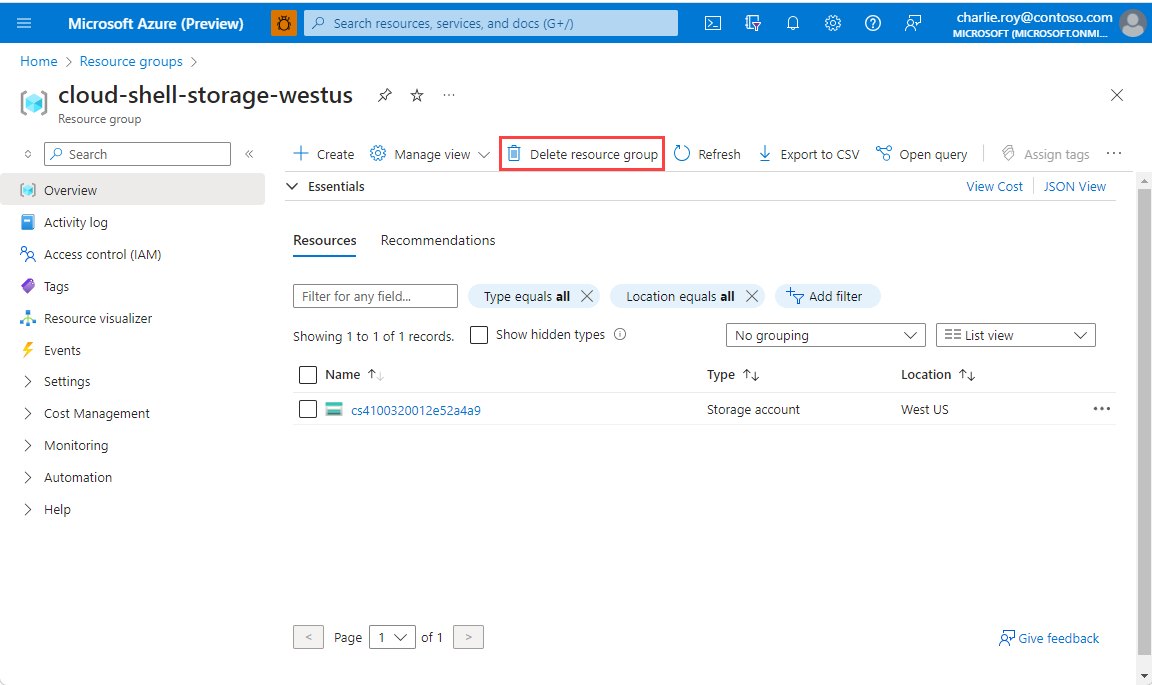
Select Delete resource group.
You're asked to confirm the deletion of the resource group. Type the name of your resource group to confirm, and then select Delete.
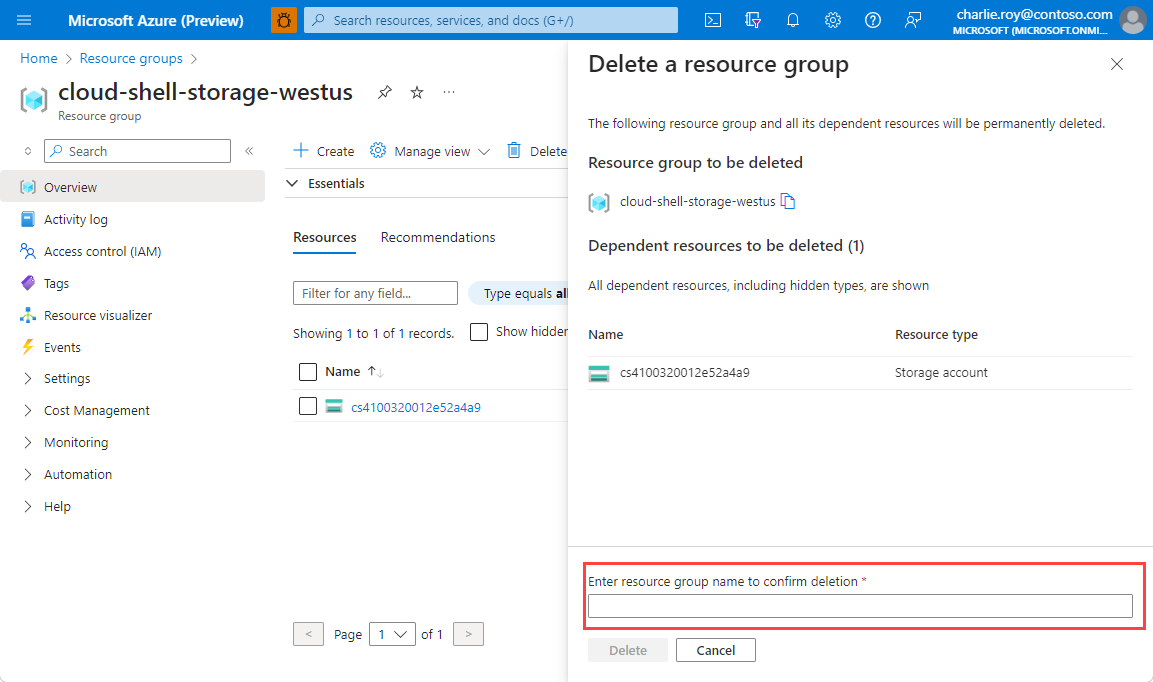
After a few moments, the resource group and all of its resources are deleted.