Note
Access to this page requires authorization. You can try signing in or changing directories.
Access to this page requires authorization. You can try changing directories.
Azure Disk Storage provides managed disks for Azure virtual machines (VMs). Built for business-critical workloads, it ensures enterprise-grade reliability and availability. Your data is automatically replicated to guard against hardware failures, with multiple redundancy options to meet your durability requirements.
When you use Azure, reliability is a shared responsibility. Microsoft provides a range of capabilities to support resiliency and recovery. You're responsible for understanding how those capabilities work within all of the services you use, and selecting the capabilities you need to meet your business objectives and uptime goals.
This article describes how to make Azure Disk Storage resilient to various potential outages and problems, including transient faults, availability zone failures, and region-wide failures. It also describes backup and recovery options, and highlights key information about the Azure Disk Storage service-level agreement (SLA).
Important
When you consider the reliability of a disk, you also need to consider the reliability of your VMs, network infrastructure, and applications that run on your VMs. Improving the resiliency of the disk alone might have limited impact if the other components aren't equally resilient. Depending on your resiliency requirements, you might need to make configuration changes across multiple areas.
Production deployment recommendations
The Azure Well-Architected Framework provides recommendations for reliability, performance, security, cost, and operations. To understand how these areas influence each other and contribute to a reliable Azure Disk Storage solution, see Architecture best practices for Azure Disk Storage.
Reliability architecture overview
Each VM uses disks for different purposes:
- OS disk: A single OS disk runs the operating system. By default, it's a managed disk that persists data. You can also use ephemeral OS disks, which aren't managed. Avoid using the OS disk to store applications or data.
- Data disks: Zero or more managed disks for storing applications and data.
- Temporary disk: A non-persistent, unmanaged disk that's included with every VM.
This guide specifically focuses on managed disks, which reliably persist data. To learn more about the different disk roles, see Disk roles.
Managed disks are designed for 99.999% VM availability and provide at least 99.999999999% (11 9s) of durability. When you use managed disks, your data is replicated three times. If one of the three copies becomes unavailable, Azure automatically creates a new copy of the data in the background. This process ensures the persistence of your data and high fault tolerance.
By default, managed disks use locally redundant storage (LRS). LRS keeps three copies of your disk data within a single datacenter, which protects against hardware failures such as drive or server rack problems.
Although LRS protects your disks against server rack and drive failures, it doesn't account for disasters such as fire or flooding within a datacenter. For higher levels of protection, use zone-redundant storage (ZRS), which replicates your disks across multiple availability zones.
For applications that run on multiple VMs, multiple VMs have the highest availability SLA when distributed across multiple availability zones. For VMs and disks that are distributed across multiple availability zones, the disks and their parent VMs are respectively collocated in the same zone, which prevents multiple VMs from going down even if an entire zone experiences an outage.
When zones aren't available or your workload is sensitive to inter-VM latency, deploy VMs and disks across multiple fault domains. Fault domains don't provide zone redundancy, but they reduce the impact of hardware failures, network outages, or power interruptions. This prevents multiple VMs from failing if one storage fault domain goes down.
Resilience to transient faults
Transient faults are short, intermittent failures in components. They occur frequently in a distributed environment like the cloud, and they're a normal part of operations. Transient faults correct themselves after a short period of time. It's important that your applications can handle transient faults, usually by retrying affected requests.
All cloud-hosted applications should follow the Azure transient fault handling guidance when they communicate with any cloud-hosted APIs, databases, and other components. For more information, see Recommendations for handling transient faults.
Managed disks automatically recover from transient faults in the Azure infrastructure.
Resilience to availability zone failures
Availability zones are physically separate groups of datacenters within an Azure region. When one zone fails, services can fail over to one of the remaining zones.
There are two ways to use availability zones with managed disks:
- You can deploy a ZRS disk, which is located in three availability zones in a region. For the best reliability, we recommend that you use ZRS disks because ZRS disks provide automatic zone resiliency.
- You can deploy a zonal LRS disk, which is located only in a single zone. When you use zonal LRS disks, you're responsible for configuring your workload to be resilient to zone outages. You accomplish this resiliency by deploying multiple VMs and disks and locating them across availability zones.
If you don't configure availability zone support, your disk is nonzonal or regional and might be placed in any availability zone in the region. These disks are considered LRS because they're replicated within the region.
Zone-redundant disks
ZRS synchronously replicates your data across three availability zones within a region. When you enable zone redundancy for a managed disk, Azure ensures that a failure in any single zone doesn't affect data availability.
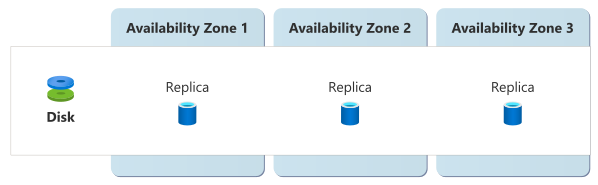
ZRS disks can be shared between VMs to improve availability for clustered or distributed applications such as SQL Server FCI, SAP ASCS/SCS, or GFS2. You can attach a shared ZRS disk to primary and secondary VMs in different zones, taking advantage of both ZRS disks and VMs distributed across multiple availability zones. If the primary zone fails, you can quickly fail over to the secondary VM by using SCSI persistent reservation.
If a ZRS disk is attached as a data disk to a single VM in a zone that goes down, you can force detach the disk from the failed VM and attach it to another VM.
Requirements
Region support: For a list of regions that support ZRS managed disks, see Redundancy options for managed disks.
Disk types: Zone-redundant disks are supported with Premium SSD and Standard SSD managed disks. ZRS isn't supported with Premium SSD v2, Ultra Disks, or Standard HDD managed disks.
Cost
ZRS incurs a higher cost than LRS because of the additional replication overhead and infrastructure that's required to maintain data across multiple zones. The exact cost difference varies by region and disk type. For detailed pricing information, see Azure managed disk pricing.
Configure availability zone support
Create a new ZRS disk: To create a new ZRS managed disk, see Tutorial - Manage Azure disks with the Azure CLI for Linux VMs, or Tutorial: Manage disks with Azure PowerShell for Windows VMs. Select a ZRS disk tier during disk creation.
You're responsible for attaching your disk to VMs, including configuring shared disks on multiple VMs in different zones if that's appropriate for your workload.
Change an existing disk to use ZRS: You can convert an existing nonzonal (regional) disk to ZRS.
Although you can't convert a zonal LRS disk to ZRS, you can create a new ZRS disk from a snapshot. See Convert a disk from LRS to ZRS for step-by-step migration procedures and requirements.
Disable availability zone support: You can't change the availability zone configuration of an existing ZRS disk. Instead, you need to create a new disk with the new configuration by using a snapshot from the previous disk, and then delete the old one.
Behavior when all zones are healthy
This section describes what to expect when you configure managed disks for ZRS, and all availability zones are operational.
Cross-zone operation: Azure automatically manages traffic routing between availability zones when you use a VM with a zone-redundant disk. During normal operations, requests are distributed across zones transparently.
Cross-zone data replication: ZRS disks replicate every write synchronously across multiple availability zones in the region. A write operation completes only after data is stored in clusters in multiple zones. This approach provides strong consistency and high availability, but it can introduce slightly higher write latency compared to LRS disks.
Behavior during a zone failure
This section describes what to expect when you configure a managed disk for ZRS, and there's an outage in one of the availability zones.
Detection and response: Zone outages might affect only disks, only VMs, or both. The behavior depends on whether the zone outage affects the VM attached to the disk.
If the VM remains healthy but the disk is affected by the outage, your VM continues to operate. Microsoft automatically redirects disk operations to work against the data in healthy availability zones, and there's nothing you need to do.
If the VM is down, you need to switch your workload to another VM in a different availability zone.
Shared disks: If you already created the secondary VM in a different zone and configured shared disks, the disk is available for the secondary VM to use. No configuration changes are required.
Disks that aren't shared: You can force detach the disk from the failed VM and then attach it to a VM in a healthy zone. To perform a force detach:
- Azure CLI: Use the az vm disk detach command with the
--force-detachargument. - Azure PowerShell: Use the Remove-AzVMDataDisk cmdlet with the
-ForceDetachargument.
- Azure CLI: Use the az vm disk detach command with the
- Notification: Microsoft doesn't automatically notify you when a zone is down. However, you can use Azure Resource Health to monitor the health of an individual resource, and you can set up Resource Health alerts to notify you of problems. You can also use Azure Service Health to understand the overall health of the service, including any zone failures, and you can set up Service Health alerts to notify you of problems.
Expected data loss: No data loss occurs during zone failures.
Expected downtime: When your disk is shared between multiple VMs, no downtime is expected.
Redistribution: Azure automatically reroutes traffic to another copy of your disk that's in a healthy zone.
Zone recovery
Azure automatically detects when the previously failed zone is healthy and restores data synchronization to the recovered zone.
Zonal LRS disks
Zonal LRS disks reside in a specific availability zone and attach only to VMs in that zone. All copies of the disk's data are in the same zone. A single zonal LRS disk and VM don't provide zone resiliency. If the zone that contains the disk experiences an outage, the disk might become unavailable.
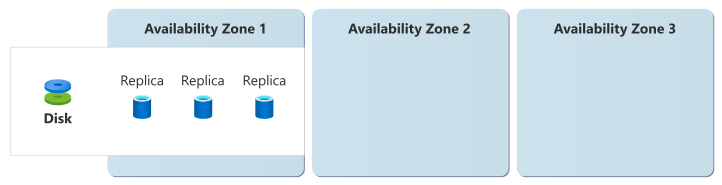
For multiple-VM workloads, you can achieve zone resiliency by deploying multiple VMs and their zonal LRS disks across different availability zones. This approach is the most common way to achieve high availability for workloads like web servers, application tiers, and database clusters. If a zone fails, you can configure your workload to continue to operate by using the VMs in healthy zones.
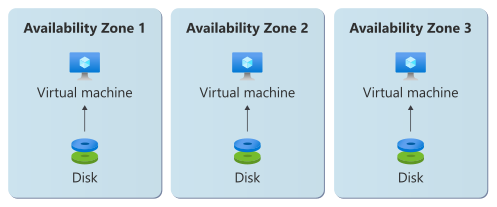
This multi-zone distribution pattern works with all disk types, including Premium SSD v2 and Ultra Disks, which only support LRS. For more information on this approach, see Distribute VMs and disks across availability zones.
Requirements
Region support: Zonal LRS managed disks are supported in all regions that have availability zones.
Disk types: All managed disk types support zonal LRS deployments.
Cost
Zonal LRS disks are charged at the same rate as nonzonal disks. For detailed pricing information, see Azure managed disk pricing.
Configure availability zone support
Create a new disk with availability zone support: To create a new managed disk with zonal LRS redundancy, see Tutorial - Manage Azure disks with the Azure CLI for Linux VMs, or Tutorial - Manage disks with Azure PowerShell for Windows VMs.
Select the availability zone during disk creation.
Important
Pinning to a single availability zone is only recommended when cross-zone latency is too high for your needs and after you verify that the latency doesn't meet your requirements. By itself, a zonal resource doesn't provide resiliency to an availability zone outage. To improve the resiliency of a zonal resource, you need to explicitly deploy separate resources into multiple availability zones and configure traffic routing and failover. For more information, see Zonal resources and zone resiliency.
Change the availability zone configuration of an existing disk: You can't change the availability zone configuration of an existing zonal LRS disk. Instead, you need to create a new disk that has the new configuration by using a snapshot from the previous disk, and then delete the old one.
Behavior when all zones are healthy
This section describes what to expect when you configure a managed disk for zonal LRS, and all availability zones are operational.
Cross-zone operation: Traffic between a zonal VM and a zonal LRS disk in the same zone remains within the availability zone.
When you deploy multiple VMs across zones, you're responsible for distributing incoming requests across the VMs. Each VM reads from and writes to its own zonal disk.
Cross-zone data replication: All write operations to zonal LRS disks are replicated synchronously within the availability zone.
When you deploy multiple VMs across zones, if your workload requires data consistency across VMs, you're responsible for synchronizing data. For example, you can use database replication or application-layer replication.
Behavior during a zone failure
This section describes what to expect when you configure a managed disk for zonal LRS, and there's an outage in one of the availability zones.
Detection and response: If you have a single VM with a zonal LRS disk, you're responsible for detecting a zone outage and triggering a failover or another response.
When you have VMs distributed across multiple zones, you're responsible for configuring your workload to detect zone failures and continue to run on the VMs that are in healthy zones.
- Notification: Microsoft doesn't automatically notify you when a zone is down. However, you can use Azure Resource Health to monitor the health of an individual resource, and you can set up Resource Health alerts to notify you of problems. You can also use Azure Service Health to understand the overall health of the service, including any zone failures, and you can set up Service Health alerts to notify you of problems.
Expected data loss: LRS replication provides at least 99.999999999% (11 9s) of durability, so your disk retains its data and the data can be recovered after the zone recovers.
When you have VMs distributed across zones, any data that was only on the disks in the failed zone is temporarily unavailable. If your application synchronizes data across VMs, the VMs in healthy zones continue to serve requests by using their own data.
Expected downtime: A single zonal LRS disk is unavailable until the availability zone recovers.
When you have VMs and disks distributed across zones, your workload can continue to operate on the VMs in healthy zones.
Redistribution: If you have a single VM with a zonal LRS disk, you're responsible for rerouting traffic to another VM, if you have one available.
When you have VMs distributed across zones, you can configure your workload to automatically redistribute traffic to VMs in healthy zones.
Zone recovery
When the failed availability zone recovers, managed disks recover automatically. If the VM attached to the disk was affected by the outage, it restarts. You're responsible for resyncing application data to other VMs and disks in other availability zones, if you use them.
Test for zone failures
You can't directly simulate zone failures at the disk level, but you can use the Azure Chaos Studio Workspaces Compute Zone Down Scenario to shut down the VMs and virtual machine scale set instances that use your disks in a target availability zone. To simulate the loss of an individual VM, you can use the built-in VM faults in Experiments (classic).
You should test your application's resilience to zone failures and managed disk behavior during outages. Monitor disk performance during simulated zone outages, and validate that your applications handle increased latency appropriately. Implement automated testing scenarios that verify your applications can handle temporary I/O delays and force detach operations for shared disks.
Resilience to region-wide failures
Azure Disk Storage is a single-region service that operates within the boundaries of a specific Azure region. The service doesn't provide native multiregion capabilities or automatic failover between regions. If a region becomes unavailable, managed disk resources in that region are also unavailable.
Custom multiregion solutions for resiliency
You can create a multiregion solution by deploying VMs and disks in each region, replicating or backing up data across regions, and failing over or restoring from backups when needed. You're responsible for managing resources in every region, coordinating and synchronizing data, and handling failover or restoration. Some common approaches include:
- Azure Site Recovery, which provides cross-region replication of your VMs and disks.
- Azure Backup, which provides managed backup services, including disk backup services. You can use cross-region restore to restore VMs in another region.
- Building your own snapshot-based solution by copying disk snapshots of your disks across regions.
- Using approaches provided by specific databases and applications. These approaches work across regions by replicating changes and managing clusters. For example, SQL Server Always On Availability Groups provides application-aware cross-region data protection with customizable consistency and failover behavior.
Backup and restore
Azure managed disks support multiple backup approaches to protect against data loss and corruption. Azure Disk Backup is a native, cloud-based solution that automates snapshot lifecycle management. It provides crash-consistent, incremental backups with configurable retention policies. This agentless approach supports multiple backups per day without affecting application performance and integrates with Azure Backup center for centralized management. You can use incremental snapshots to reduce storage costs and backup times.
For VM-level protection, Azure Backup provides application-consistent backups for the entire VM, including all attached disks. This approach is ideal when you need coordinated backup of multiple disks or application-aware backups. For database workloads, consider application-specific backup solutions that provide transaction-consistent protection and faster recovery options.
For critical workloads, implement a layered backup strategy that combines Azure Disk Backup, cross-region snapshot replication, and application-level backups for transaction consistency. Configure backup policies based on your recovery requirements, compliance needs, and cost considerations.
Service-level agreement
The service-level agreement (SLA) for Azure services describes the expected availability of each service and the conditions that your solution must meet to achieve that availability expectation. For more information, see SLAs for online services.
Azure Disk Storage doesn't provide its own availability SLA but is included in the SLA for VMs. The configuration of your disk can affect the availability SLA of your VM.