Note
Access to this page requires authorization. You can try signing in or changing directories.
Access to this page requires authorization. You can try changing directories.
Azure VMware Solution provides private clouds that contain VMware vSphere clusters built from dedicated bare-metal Azure infrastructure. You can migrate workloads from your on-premises environments, deploy new virtual machines (VMs), and consume Azure services from your private clouds. You can use a combination of VMware and Azure-native capabilities to enable high availability and resiliency of your workloads.
When you use Azure, reliability is a shared responsibility. Microsoft provides a range of capabilities to support resiliency and recovery. You're responsible for understanding how those capabilities work within all of the services you use, and selecting the capabilities you need to meet your business objectives and uptime goals.
This article describes how to make Azure VMware Solution resilient to potential outages and problems, including transient faults, availability zone outages, and region outages. It also describes how you can use backups to recover from other types of problems and highlights some key information about the Azure VMware Solution service-level agreement (SLA).
Production deployment recommendations
Azure VMware Solution deployments require careful planning across a range of areas and often require multiple Azure services. For more information, see Azure VMware Solution workloads in the Azure Well-Architected Framework.
Reliability architecture overview
Azure VMware Solution uses a hyperconverged infrastructure (HCI) with VMware vSphere clusters.
When you deploy Azure VMware Solution, you deploy a private cloud, which has one or more clusters. Each cluster contains ESXi hosts that provide compute, storage through virtual SAN (vSAN), and networking through VMware NSX. There are two generations of Azure VMware Solution:
Gen 1 uses specialized bare-metal hardware for nodes and uses dedicated networking approaches. For more information about the key concepts, see Azure VMware Solution private cloud and cluster concepts.
Gen 2 uses standard Azure VM types and Azure virtual networks. This architecture simplifies networking architecture, enhances data transfer speeds, reduces latency for workloads, and improves performance when you access other Azure services.
Fault tolerance
Azure VMware Solution provides several mechanisms to handle faults at both the infrastructure and application level:
vSphere High Availability (HA): vSphere HA monitors ESXi hosts and VMs. If a host fails, it automatically restarts affected VMs on healthy hosts. vSphere HA is turned on by default and reserves compute and memory capacity for a single node failure.
vSAN fault tolerance: vSAN storage policies protect against storage-level transient faults by maintaining multiple copies of data across hosts. If a storage path or disk experiences transient problems, vSAN automatically handles failover to healthy storage paths.
Network redundancy: Azure VMware Solution provides redundant network paths and multiple VMkernel network adapters to handle network-level transient faults.
Resilience to transient faults
Transient faults are short, intermittent failures in components. They occur frequently in a distributed environment like the cloud, and they're a normal part of operations. Transient faults correct themselves after a short period of time. It's important that your applications can handle transient faults, usually by retrying affected requests.
All cloud-hosted applications should follow the Azure transient fault handling guidance when they communicate with any cloud-hosted APIs, databases, and other components. For more information, see Recommendations for handling transient faults.
For applications that run on Azure VMware Solution VMs, implement standard practices to handle transient faults:
Set up appropriate retry policies with exponential backoff.
Use circuit breaker patterns for external service calls.
Monitor application health and implement graceful degradation.
Design stateless applications when possible to reduce the impact of VM restarts.
Resilience to availability zone failures
Availability zones are physically separate groups of datacenters within an Azure region. When one zone fails, services can fail over to one of the remaining zones.
Azure VMware Solution Gen 1 supports availability zones through stretched clusters, which distribute ESXi hosts across two availability zones within a region. Microsoft selects the zones to use. Your cluster runs in an active-active configuration across the two zones, and vSAN also spans multiple zones. You can designate whether each workload is deployed into one or two zones.
A witness node is automatically deployed into a third availability zone to provide quorum for split-brain scenarios. Microsoft manages the witness node automatically.
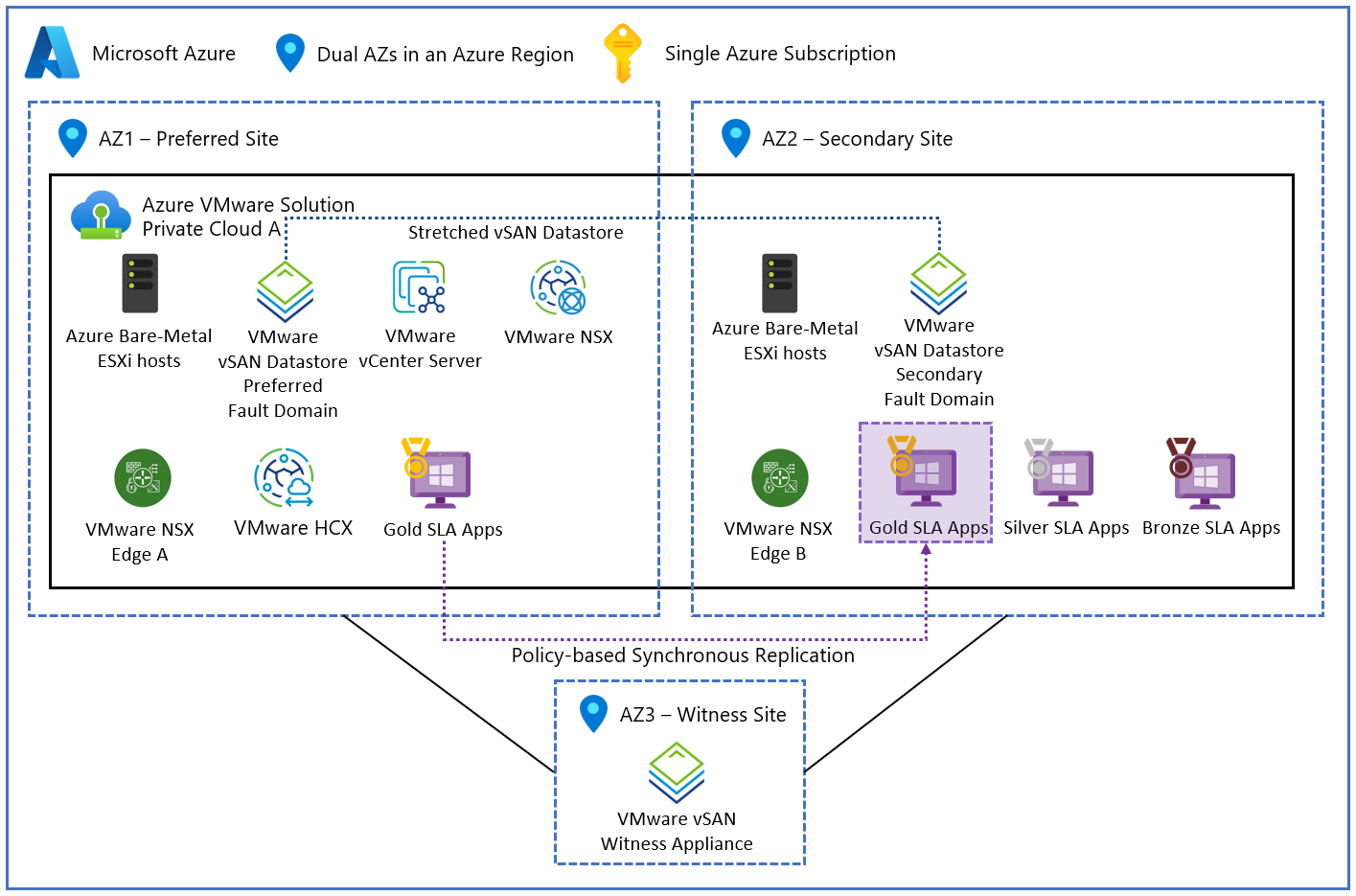
A standard cluster is a cluster that isn't stretched across zones. In a standard cluster, the cluster and all of its ESXi hosts are considered nonzonal or regional. Nonzonal clusters might be placed in any availability zone within the region, and Microsoft selects the zone. If an availability zone in the region experiences an outage, nonzonal clusters and hosts might be in the affected zone and might experience downtime.
Azure VMware Solution Gen 2 supports zonal deployments of private clouds. When you set up a zonal private cloud, each of its clusters and all of their ESXi hosts are deployed into a single availability zone that you select.
A zonal private cloud doesn't protect against availability zone failures. You can deploy multiple private clouds into separate availability zones for higher resiliency, but you're responsible for deploying and configuring each private cloud independently.
If you don't select an availability zone, your private cloud, its clusters, and all of their ESXi hosts are considered nonzonal or regional. Nonzonal clusters might be placed in any availability zone within the region, and Microsoft selects the zone. If an availability zone in the region experiences an outage, nonzonal clusters in the affected zone might experience downtime.
For more information about availability zone support for other generations, select the appropriate generation at the beginning of this article.
Requirements
Region support: Stretched clusters are available only in Azure regions that support the stretched-cluster configuration. Check the Azure region availability zone to host type mapping table for current region support.
Minimum hosts: Deploy a minimum of six hosts across two availability zones (three hosts for each zone) to enable stretched-cluster configuration. When you scale in or out, you must scale in pairs so that each zone has an equal number of hosts.
Host SKUs: AV36, AV36P, and AV52 host types support stretched clusters. The AV64 SKU doesn't support stretched clusters.
- Region support: You can deploy zonal private clouds in regions that support both Azure VMware Solution Gen 2 and availability zones.
Considerations
Each availability zone in a region can support specific host types. For a detailed list of the host types available in each zone, see Azure region availability zone to host type mapping table.
Cost
You incur costs for each node in the cluster, regardless of the cluster's availability zone configuration. For detailed pricing information, see Azure VMware Solution pricing.
Configure availability zone support
Deploy a new cluster: When you create a new Azure VMware Solution private cloud in a supported region, you can set it up as a stretched cluster during deployment. This configuration distributes hosts across two availability zones automatically. For more information, see Deploy vSAN stretched clusters.
Existing clusters: You can't convert a standard cluster to a stretched cluster, and you can't convert a stretched cluster to a standard cluster. Instead, you need to deploy a new cluster and migrate your workloads.
Deploy a new cluster: When you create a new Azure VMware Solution private cloud in a supported region, you can select its availability zone.
Existing clusters: You can't change the availability zone configuration of an existing cluster. Instead, you need to deploy a new cluster and migrate your workloads.
Behavior when all zones are healthy
This section describes what to expect when your cluster is stretched and all availability zones are operational.
Cross-zone operation: VMs can run on hosts in either availability zone. You can control VM placement by using vSphere Distributed Resource Scheduler (DRS) affinity and anti-affinity rules to optimize for performance or availability requirements.
Cross-zone data replication: vSAN replicates data synchronously across availability zones. Both zones confirm each write operation before it completes to ensure consistent data integrity.
This section describes what to expect when your cluster is deployed in a zonal private cloud, and all availability zones are operational.
Cross-zone operation: VMs run on hosts within the cluster's availability zone.
Cross-zone data replication: No data is replicated to another zone.
Behavior during a zone failure
This section describes what to expect when your cluster is stretched and an availability zone outage occurs.
- Detection and response: Azure VMware Solution manages the infrastructure-level response to zone failures. vSphere HA automatically detects zone failures and initiates VM restart procedures if necessary.
- Notification: Microsoft doesn't automatically notify you when a zone is down. However, you can use Azure Resource Health to monitor the health of an individual resource, and you can set up Resource Health alerts to notify you of problems. You can also use Azure Service Health to understand the overall health of the service, including any zone failures, and you can set up Service Health alerts to notify you of problems.
Active requests: Any VMs that run in the failed availability zone restart on hosts in the healthy availability zone. Active requests and connections to affected VMs terminate, and clients are responsible for retrying them.
Expected downtime: The time to restart failed VMs in the healthy zone is typically a few minutes, depending on the VM configuration and startup procedures. The stretched cluster remains operational with reduced capacity.
If the failed availability zone contains the witness node, the witness becomes unreachable. As long as sufficient data replicas remain available, the data hosts and running workloads continue to operate without immediate data loss. However, vSAN loses quorum awareness in this state. Quorum loss prevents it from safely making placement and recovery decisions. It also blocks certain operations, such as VM power-on after failures, rebalancing, and repairs.
Expected data loss: Because vSAN uses synchronous replication between zones, no data loss is expected during a zone failure.
Redistribution: vSphere DRS automatically redistributes VM workloads to the healthy availability zone. Network traffic routing through VMware NSX adapts to the new VM placement automatically.
This section describes what to expect when your cluster is deployed in a zonal private cloud, and an availability zone outage occurs.
- Detection and response: You need to detect the loss of an availability zone. If necessary, you can initiate a failover to a secondary cluster that you create earlier in another availability zone.
- Notification: Microsoft doesn't automatically notify you when a zone is down. However, you can use Azure Resource Health to monitor the health of an individual resource, and you can set up Resource Health alerts to notify you of problems. You can also use Azure Service Health to understand the overall health of the service, including any zone failures, and you can set up Service Health alerts to notify you of problems.
Active requests: Active requests and connections to affected VMs terminate, and clients are responsible for retrying them.
Expected downtime: When a zone is unavailable, your cluster and its workloads are unavailable until the availability zone recovers.
Expected data loss: Data in the affected zone is unavailable until the zone recovers.
Redistribution: You're responsible for switching traffic to other clusters in healthy zones, if necessary.
Zone recovery
When the availability zone recovers, vSphere DRS can optionally redistribute VMs back to the recovered zone based on your DRS configuration and affinity rules. You can also manually control VM placement by using vMotion operations.
When the availability zone recovers, clusters and hosts in the zone are available again. You're responsible for any zone recovery procedures and data synchronization that your workloads require.
Test for zone failures
To prepare for zone failures, test your application's resilience to VM restarts and network path changes, especially when you have stretched clusters or deploy applications across separate clusters in different zones.
Because Azure VMware Solution manages the infrastructure response to zone failures, you primarily need to test your application's response to VM restarts.
You're responsible for any infrastructure response to zone failures, such as failover to another cluster in a different zone or region. Ensure that you thoroughly test your response processes.
Resilience to region-wide failures
Each Azure VMware Solution cluster is deployed within a single Azure region. If the region becomes unavailable, your private cloud and all resources within it become unavailable.
However, you can also design custom multiregion solutions that combine different approaches or integrate with your existing infrastructure to meet your specific business requirements and recovery objectives.
Custom multiregion solutions for resiliency
To achieve multiregion resilience with Azure VMware Solution, you need to deploy separate private clouds in multiple regions and implement failover and other disaster recovery (DR) solutions.
A range of options support different resilience requirements. For more information, see Disaster recovery solutions for Azure VMware Solution virtual machines.
Backup and restore
Azure VMware Solution automatically backs up management components, such as vCenter Server, NSX Manager, and HCX Manager if enabled. To restore components from these management backups, create an Azure support request.
Management and workload backups provide recovery paths for accidental deletion or data corruption. They complement, rather than replace, the availability and disaster recovery measures for Azure VMware Solution. For more information about how replication and backup address different risks, see Redundancy, replication, and backup.
For your VM workloads, Azure VMware Solution supports multiple backup approaches. For more information, see Backup solutions for Azure VMware Solution VMs.
Resilience to service maintenance
Azure does automatic platform maintenance to apply security updates, deploy new features, and improve service reliability.
To learn how maintenance affects Azure VMware Solution components, and to understand the components that you're responsible for maintaining versus the components that Microsoft maintains, see Azure VMware Solution private cloud maintenance.
You can set up the maintenance windows for your cluster to reduce the likelihood that maintenance affects your production workloads. For more information, see Plan self-service maintenance for Azure VMware Solution.
Service-level agreement
The service-level agreement (SLA) for Azure services describes the expected availability of each service and the conditions that your solution must meet to achieve that availability expectation. For more information, see SLAs for online services.
Azure VMware Solution provides different availability SLAs for workload infrastructure and for management operations.
Clusters that you set up as stretched clusters have a higher workload infrastructure availability SLA.
However, to qualify for the availability SLAs, you must set up your cluster in specific ways. For more information, see the SLA text.