Note
Access to this page requires authorization. You can try signing in or changing directories.
Access to this page requires authorization. You can try changing directories.
Ransomware and extortion are a high profit, low-cost business, which has a debilitating impact on targeted organizations, national/regional security, economic security, and public health and safety. What started as simple, single-PC ransomware grew to include various extortion techniques directed at all types of corporate networks and cloud platforms.
To ensure customers running on Azure are protected against ransomware attacks, Microsoft invests heavily in the security of our cloud platforms, and provides security controls you need to protect your Azure cloud workloads.
By using Azure native ransomware protections and implementing the best practices recommended in this article, you're taking measures that position your organization to prevent, protect, and detect potential ransomware attacks on your Azure assets.
This article lays out key Azure native capabilities and defenses for ransomware attacks and guidance on how to proactively use these to protect your assets on Azure cloud.
Tip
For comprehensive ransomware protection guidance across all Microsoft platforms and services, see Protect your organization against ransomware and extortion. For information about what ransomware is and how it works, see What is ransomware?
How Azure cloud resources are targeted
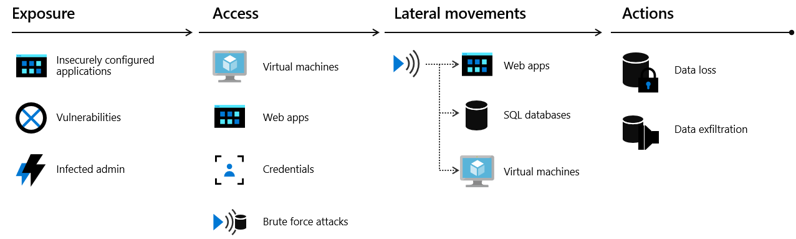
When attacking cloud infrastructure, adversaries often attack multiple resources to try to obtain access to customer data or company secrets. The cloud "kill chain" model explains how attackers attempt to gain access to any of your resources running in the public cloud through a four-step process: exposure, access, lateral movement, and actions.
- Exposure is where attackers look for opportunities to gain access to your infrastructure. For example, attackers know customer-facing applications must be open for legitimate users to access them. Those applications are exposed to the Internet and therefore susceptible to attacks.
- Attackers try to exploit an exposure to gain access to your public cloud infrastructure. This can be done through compromised user credentials, compromised instances, or misconfigured resources.
- During the lateral movement stage, attackers discover what resources they have access to and what the scope of that access is. Successful attacks on instances give attackers access to databases and other sensitive information. The attacker then searches for other credentials. Our Microsoft Defender for Cloud data shows that without a security tool to quickly notify you of the attack, it takes organizations on average 101 days to discover a breach. Meanwhile, in just 24-48 hours after a breach, the attacker usually have complete control of the network.
- The actions an attacker takes after lateral movement are largely dependent on the resources they were able to gain access to during the lateral movement phase. Attackers can take actions that cause data exfiltration, data loss or launch other attacks. For enterprises, the average financial impact of data loss is now reaching $1.23 million.
Azure-specific attack vectors
When targeting Azure environments, ransomware attackers often exploit:
- Misconfigured Azure resources: Publicly exposed storage accounts, databases, or virtual machines with weak access controls
- Compromised Azure credentials: Stolen Azure AD accounts, service principals, or managed identities that provide access to Azure resources
- Vulnerable Azure VMs: Unpatched virtual machines accessible via Remote Desktop Protocol (RDP) or SSH
- Weak network security: Improperly configured Network Security Groups (NSGs) or Azure Firewall rules
- Inadequate backup protection: Azure Backup configurations that lack immutability or MFA protection
- Poor identity security: Azure AD accounts without multifactor authentication or Conditional Access policies
Microsoft Defender for Cloud continuously monitors for these vulnerabilities in your Azure environment. For comprehensive guidance on attack techniques and defense strategies, see What is ransomware?.
Azure native protections against ransomware
Azure provides built-in capabilities to defend against ransomware attacks at every stage of the attack lifecycle. The best defense against paying ransom is implementing preventive measures using Azure's robust security tools and ensuring the ability to recover impacted assets to restore business operations quickly.
Key Azure-native protection capabilities include:
- Microsoft Defender for Cloud - Provides threat detection and response (XDR) for Azure workloads, with ransomware-specific detection capabilities
- Azure Backup - Offers immutable backups with soft delete and MFA protection to ensure recovery options
- Azure Firewall Premium - Includes IDPS to detect and block ransomware Command & Control (C&C) communications
- Microsoft Entra ID Protection - Detects credential theft and suspicious authentication patterns targeting Azure resources
- Azure Policy - Enforces security configurations and compliance across Azure resources
- Microsoft Sentinel - Provides SIEM/SOAR capabilities with ransomware-specific detection analytics
For detailed information about Azure features that help protect, detect, and respond to ransomware, see Azure features and resources that help you protect, detect, and respond.
Next steps
For comprehensive ransomware protection guidance across all Microsoft platforms, see Protect your organization against ransomware and extortion.
Azure-specific ransomware protection articles:
- Prepare for a ransomware attack
- Detect and respond to ransomware attack
- Azure features and resources that help you protect, detect, and respond
- Improve your security defenses for ransomware attacks with Azure Firewall Premium
Additional resources: