Note
Access to this page requires authorization. You can try signing in or changing directories.
Access to this page requires authorization. You can try changing directories.
Use GitHub Copilot skills to create, validate, deploy, and package Advanced Security Information Model (ASIM) parsers. These skills automate the parser workflow from source data collection and Kusto Query Language (KQL) parser generation to validation, Log Analytics deployment, and pull request packaging. By the end of this guide, you'll have a working ASIM parser in your workspace, ready for production use.
Prerequisites
Before you begin, make sure you have the following items in place:
An active Microsoft Sentinel workspace
-
- You should have query access to your Sentinel Log Analytics workspace.
A local clone of the Azure-Sentinel repository. Fork the repository so that you can submit pull requests with your parsers for Microsoft review.
Quick start
To run the ASIM parser creation workflow in Copilot CLI, follow these steps:
Open a terminal in PowerShell 7.
Navigate to the root directory of the Azure-Sentinel repository.
cd \Azure-SentinelRun
copilot. This command starts Copilot CLI. Runningcopilotin the Azure-Sentinel repository preloads existing skills in the repository.If the ASIM parser skills don't appear when you run
/skills list, load the skills manually with/skills add .github/skills/.Select Claude Sonnet 4.6+ or Claude Opus 4.6+ for best results by running
/model.Prompt Copilot in the session to create an ASIM parser with the following prompt:
Create an ASIM parser for me.
The asim-parser-creator-orchestrator skill orchestrates the ASIM parser creation workflow, which calls specialized skills at each step. The following sections describe each stage of the process.
Requirements gathering
The asim-parser-user-prompter skill gathers the information needed to create a parser. Provide the following information:
Source documentation link - A link to the documentation for the data source you want to normalize.
Source table name - The name of the table in Microsoft Sentinel where the data is stored.
Log Analytics workspace ID - The GUID of the workspace where the table exists. The skill validates the workspace and table by querying it.
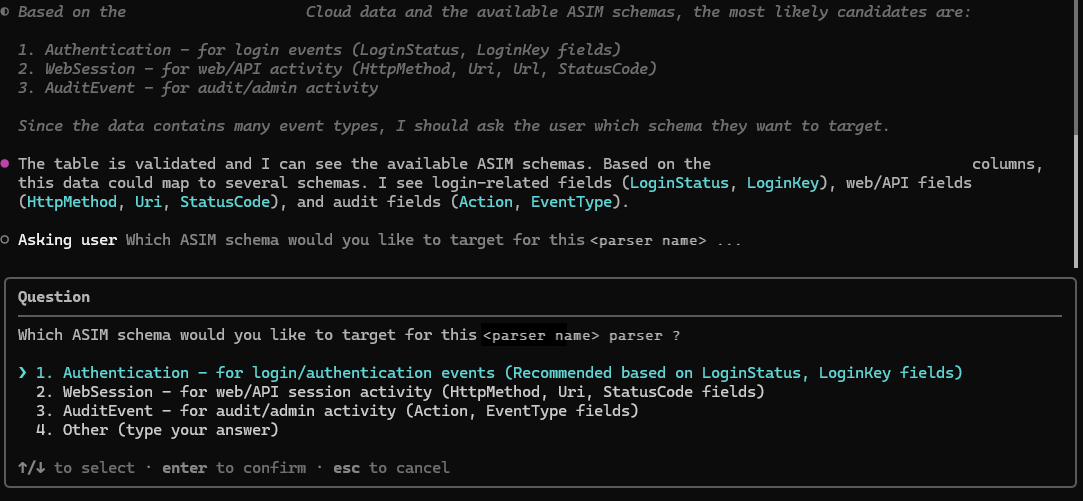
Target ASIM schema - Your table can contain a large range of logs. If necessary, you need to confirm which ASIM schema you want your data to normalize to. The skill evaluates what ASIM schema the data maps to based on the documentation and table name, using the available schemas listed in ASIM schemas.
Azure CLI authentication
The orchestrator verifies you're authenticated with Azure CLI by running az account show. If the check fails, you're prompted to run az login before continuing. This step prevents authentication failures during later querying and deployment stages.
Parser creation
The asim-parser-create-parser skill generates the initial parameter-less ASIM parser. During this step, Copilot performs the following actions:
- Samples your data - Queries the source table to get the schema (
getschema) and up to 2,000 sample rows to understand the data structure. - Builds the parser - Creates a KQL function that transforms source data into the target ASIM schema, mapping source columns to ASIM fields using high-performance parsing operators (
split,parse-kv,parse). - Saves the parser - Outputs a file named
ASim<Schema><Vendor><Product>.kqland verifies it runs without syntax errors.
Validation
The asim-parser-validator skill runs two validations against the parser:
- Schema validation (
ASimSchemaTester) - Checks that the parser output columns match the ASIM schema, including correct column names, data types, and aliases. - Data validation (
ASimDataTester) - Checks that column values are correctly mapped and formatted, including enumerations, data type formatting (for example, IP addresses), and value normalization.
Both validations run directly against your Log Analytics workspace using the log-analytics-workspace-queryer skill.
Refinement loop
The orchestrator iterates through a fix-and-revalidate cycle until the parser passes both validations. Each cycle performs the following steps:
- Fixes errors identified by the validator in the parser
.kqlfile. - Re-runs both schema and data validation.
- Checks the results.
This cycle continues until no errors remain. If errors persist after five refinement cycles, the remaining errors are presented for manual review.
Parameterized parser creation
The asim-parser-create-parameter-parser skill creates a second version of the parser that accepts filter parameters (for example, time range, hostname, IP address). These parameters improve query efficiency by allowing the parser to filter data early. The output is a file named vim<Schema><Vendor><Product>.kql.
After creation, the parameterized parser goes through the same validation and refinement loop described in the Validation and Refinement loop sections.
Deployment or packaging
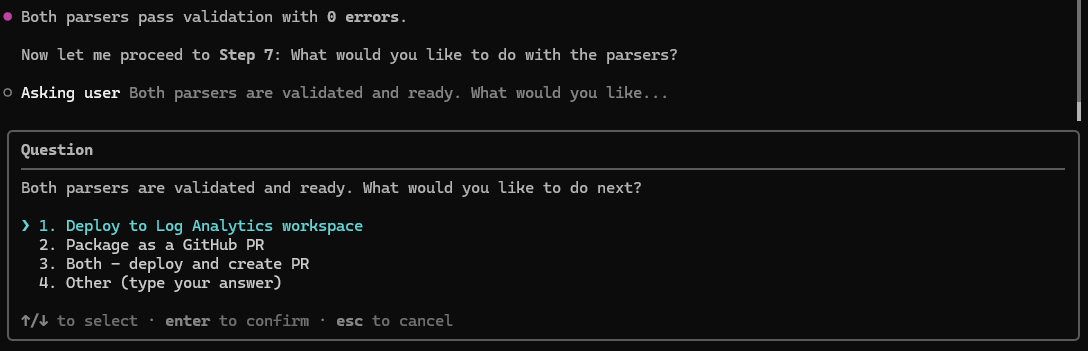
After both parsers are validated, you choose what to do next:
Option A: Deploy to Log Analytics workspace - The
asim-parser-la-deployerskill creates an ARM template with the escaped KQL queries and deploys both parsers to your workspace usingaz deployment group create. After deployment, the skill verifies the parsers work by running test queries.Option B: Package as a GitHub PR - The
asim-parser-github-pr-packagerskill packages the parsers into a pull request for the Azure-Sentinel repository. The steps include creating YAML parser definitions, changelogs, sample data files, updating unifying parsers, generating ARM templates, and committing the changes on a new branch.
You can choose one or both options.
Summary report
After the workflow completes, a summary report is presented that includes:
- Source column to ASIM field mappings.
- The target ASIM schema name and version.
- Event vendor and product names.
- File paths of the generated parser files.
- Any validation warnings that were reviewed and accepted.
- Deployment or PR creation status.
Submit your parsers as a pull request
We highly recommend submitting your parsers as a pull request to the Azure-Sentinel repository. By contributing your parsers to the open-source repository, Microsoft developers can review them for correctness and best practices, maintain them as part of the official ASIM parser library, and ensure ongoing compatibility with schema updates and platform changes. Community-contributed parsers also benefit other Microsoft Sentinel users who work with the same data sources.
References
- For more information about the skills, you can refer to the skills folder in the Azure-Sentinel repository.
- The ASIM parser agent README in the repository also provides troubleshooting guidance.
Getting Help
- For ISV partners building integrations, contact: azuresentinelpartner@microsoft.com
- For technical questions, use Microsoft Q&A with the tag 'azure-sentinel'