Note
Access to this page requires authorization. You can try signing in or changing directories.
Access to this page requires authorization. You can try changing directories.
Applies to:  Azure SQL Database
This article reviews the capabilities and details of elastic jobs for Azure SQL Database.
- For a tutorial on configuring elastic jobs, see the elastic jobs tutorial.
- Learn more about automation concepts in Azure database platforms.
Elastic jobs overview
You can create and schedule elastic jobs that periodically run against one or many Azure SQL databases. The jobs run Transact-SQL (T-SQL) queries and perform maintenance tasks.
You can define target databases or groups of databases where the job runs. You can also define schedules for running a job. All dates and times in elastic jobs are in the UTC time zone.
A job handles the task of authenticating to the target database. You also define, maintain, and persist Transact-SQL scripts to run across a group of databases.
Every job logs the status of execution and automatically retries the operations if any failure occurs.
When to use elastic jobs
Use elastic job automation in the following scenarios:
- Automate management tasks and schedule them to run every weekday or after hours, for example.
- Deploy schema changes and manage credentials.
- Collect performance data or tenant (customer) logs.
- Update reference data (information common across all databases).
- Load data from Azure Blob storage.
- Configure jobs to run across a collection of databases on a recurring basis, such as during off-peak hours.
- Collect query results from a set of databases into a central table on an ongoing basis.
- Queries can continually run and be configured to trigger additional tasks.
- Collect data for reporting
- Aggregate data from a collection of databases into a single destination table.
- Run data processing queries across a large set of databases, for example the collection of customer logs. Results are collected into a single destination table for further analysis.
- Data movement
- For custom developed solutions, business automation, or other task management.
- ETL processing to extract, transform, and load data between tables in a database.
Consider elastic jobs when you:
Have a task that needs to run regularly on a schedule, targeting one or more databases.
Have a task that needs to run once, but across multiple databases.
Need to run jobs against any combination of databases: one or more individual databases, all databases on a server, all databases in an elastic pool, with the added flexibility to include or exclude any specific database. Jobs can run across multiple servers, multiple pools, and can even run against databases in different subscriptions. Servers and pools are dynamically enumerated at runtime, so jobs run against all databases that exist in the target group at the time of execution.
- This capability is a significant differentiation from SQL Agent, which can't dynamically enumerate the target databases, especially in SaaS customer scenarios where databases are added or deleted dynamically.
Elastic job components
| Component | Description |
|---|---|
| Elastic job agent | The Azure resource you create to run and manage jobs. |
| Job database | A database in Azure SQL Database that the job agent uses to store job related data, job definitions, and more. |
| Job | A job is a unit of work that is composed of one or more job steps. Job steps specify the T-SQL script to run and other required details. |
| Target group | The set of servers, pools, and databases to run a job against. |
Elastic job agent
An elastic job agent is the Azure resource for creating, running, and managing jobs. You create the elastic job agent as an Azure resource in the portal (Create and manage elastic jobs by using PowerShell and REST API are also supported).
Creating an elastic job agent requires an existing database in Azure SQL Database. The agent configures this existing Azure SQL Database as the job database.
You can start, disable, or cancel a job through the Azure portal. The Azure portal also allows you to view job definitions and execution history.
Cost of the elastic job agent
The job database is billed at the same rate as any database in Azure SQL Database. The cost of the elastic job agent is based on fixed pricing of the service tier you select for the job agent. For more information, see the Azure SQL Database pricing page.
Elastic job database
Use the job database to define jobs and track the status and history of job executions. Jobs run in target databases. The job database also stores agent metadata, logs, results, and job definitions. It contains many useful stored procedures and other database objects for creating, running, and managing jobs using T-SQL.
You need an Azure SQL Database to create an elastic job agent. The job agent stores all its job-related metadata in the job database, which should be a new, empty Azure SQL Database.
The recommended service objective of the job database is DTU S1 or higher, but the optimal choice depends on the performance needs of your jobs: the number of job steps, the number of job targets, and how frequently jobs run.
If operations against the job database are slower than expected, monitor database performance and the resource utilization in the job database during periods of slowness using Azure portal or the sys.dm_db_resource_stats DMV. If utilization of a resource, such as CPU, Data IO, or Log Write approaches 100% and correlates with periods of slowness, consider incrementally scaling the database to higher service objectives (either in the DTU-based purchasing model or in the vCore purchasing model) until job database performance is sufficiently improved.
The job database itself can be the target of an elastic job. In this scenario, treat the job database just like any other target database. You must create the job user and grant sufficient permissions in the job database. The database-scoped credential for the job user must also exist in the job database, like it does for any other target database.
When the job database is a target of a job, make sure that your jobs don't modify or delete any job agent specific metadata stored in that database. Only use job stored procedures or job views for modifying or querying job related information.
Important
Don't modify the existing objects or create new objects in the job database, though you can read from the tables for reporting and analytics.
Elastic jobs and job steps
A job is a unit of work that runs on a schedule or as a one-time job. A job consists of one or more job steps.
Each job step specifies a T-SQL script to run, one or more target groups to run the T-SQL script against, and the credentials the job agent needs to connect to the target database. Each job step has customizable timeout and retry policies, and can optionally specify output parameters.
Elastic job targets
Elastic jobs can run one or more T-SQL scripts in parallel, across a large number of databases, on a schedule, or on demand. The target can be any tier of Azure SQL Database.
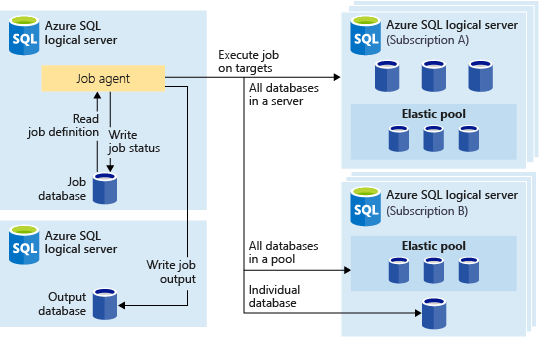
You can run scheduled jobs against any combination of databases: one or more individual databases, all databases on a server, or all databases in an elastic pool, with the added flexibility to include or exclude any specific database. Jobs can run across multiple servers and multiple pools, and can even run against databases in different subscriptions. Servers and pools are dynamically enumerated at runtime, so jobs run against all databases that exist in the target group at the time of execution.
The following image shows a job agent executing jobs across the different types of target groups:
Target group
A target group defines the set of databases where a job step runs. A target group can contain any number and combination of the following types:
Logical SQL server: if you specify a server, all databases that exist in the server at the time of the job execution are part of the group. You must provide the
masterdatabase credential so that the group can be enumerated and updated before job execution. For more information on logical servers, see What is a logical server in Azure SQL Database and Azure Synapse?Elastic pool: if you specify an elastic pool, all databases that are in the elastic pool at the time of the job execution are part of the group. As with a server, you must provide the
masterdatabase credential so that the group can be updated before the job execution.Single database: specify one or more individual databases to be part of the group.
Tip
At the moment of job execution, dynamic enumeration reevaluates the set of databases in target groups that include servers or pools. Dynamic enumeration ensures that jobs run across all databases that exist in the server or pool at the time of job execution. Reevaluating the list of databases at runtime is useful for scenarios where pool or server membership changes frequently.
Pools and single databases can be included or excluded from the group. You can create a target group with any combination of databases. For example, you can add a server to a target group, but exclude specific databases in an elastic pool (or exclude an entire pool).
A target group can include databases in multiple subscriptions and across multiple regions. Cross-region executions have higher latency than executions within the same region.
The following examples show how different target group definitions are dynamically enumerated at the moment of job execution to determine which databases to affect:

Example 1 shows a target group that consists of a list of individual databases. When a job step uses this target group, the job step's action executes in each of those databases.
Example 2 shows a target group that contains a server as a target. When a job step uses this target group, the server is dynamically enumerated to determine the list of databases that are currently in the server. The job step's action executes in each of those databases.
Example 3 shows a similar target group as Example 2, but an individual database is specifically excluded. The job step's action does not execute in the excluded database.
Example 4 shows a target group that contains an elastic pool as a target. Similar to Example 2, the pool is dynamically enumerated at job run time to determine the list of databases in the pool.

- Example 5 and Example 6 show advanced scenarios where servers, elastic pools, and databases can be combined using include and exclude rules.
Elastic job schedules
Elastic jobs are cloud-first products. They're designed to start even if a transient network or service availability issue occurs when they're scheduled. Elastic job schedules take into account the schedule start time and requested intervals. When you create an elastic job schedule, the job runs as soon as possible after each scheduled interval event.
Important
As a best practice, create job schedules that start in the future.
Job schedules detect missed events. If you create a new job schedule that begins in the past, the job executes immediately when enabled. If disabled or otherwise unavailable, the job runs immediately after becoming enabled or available.
For example, it's currently January 2, 9 AM UTC. You set up a new job to have scheduled start time of tonight, January 2 at 10:30 PM (UTC), to run daily. The job executes at 10:30 PM (UTC).
To prevent a job from accidentally starting, create schedules that start in the future. In an example that could lead to an accidental job start, you set up a new job to run daily at 10:30 PM UTC. You disable the job for a week. Then, if you enable the job at 8:30 AM UTC, the job executes immediately, catching up from the missed interval event that should have executed last night. After it executes, the job agent doesn't run again until the next scheduled execution at 10:30 PM UTC. To prevent executing at 8:30 AM UTC in this scenario, update the job schedule's start to January 8 at 10:30 PM UTC, then enable the job. Or, enable the job at a time when the job can run immediately.
Authentication
Choose one method for all targets for an elastic job agent. For example, for a single elastic job agent, you can't configure one target server to use database-scoped credentials and another to use Microsoft Entra ID authentication.
The elastic job agent can connect to the servers and databases specified by the target group using two authentication options:
- Use Microsoft Entra (formerly Azure Active Directory) authentication with a user-assigned managed identity (UMI).
- Use Database-scoped credentials.
Authentication via user-assigned managed identity (UMI)
Microsoft Entra authentication via user-assigned managed identity (UMI) is the recommended option for connecting elastic jobs to Azure SQL Database. With Microsoft Entra ID support, the job agent connects to target databases (databases, servers, elastic pools) and output database using the UMI.

Optionally, you can enable Microsoft Entra ID authentication on the logical server that contains the elastic job database, for accessing and querying that database via Microsoft Entra ID connections. However, the job agent uses internal certificate-based authentication to connect to its job database.
You can create one UMI, or use an existing UMI, and assign the same UMI to multiple job agents. Each job agent supports only one UMI. After you assign a UMI to a job agent, the job agent uses this identity to connect and run T-SQL jobs at the target databases. The job agent doesn't use SQL Authentication against the target server or databases.
The UMI name must begin with a letter or a number and have a length between 3 and 128 characters. It can contain hyphen (-) and underscore (_) characters.
For more information on UMI in Azure SQL Database, see Managed identities for Azure SQL, including the steps required and benefits of using a UMI as the Azure SQL Database logical server identity. For more information, see Microsoft Entra authentication for Azure SQL.
Important
When using Microsoft Entra ID authentication, create your jobuser user from that Microsoft Entra ID in every target database. Grant that user the permissions needed to execute your jobs in each target database.
Using a system-assigned managed identity (SMI) isn't supported.
Authentication via database-scoped credentials
While Microsoft Entra (formerly Azure Active Directory) authentication is the recommended option, you can configure jobs to use database-scoped credentials to connect to the databases specified by the target group upon execution. Before October 2023, database-scoped credentials were the only authentication option.
If a target group contains servers or pools, these database-scoped credentials connect to the master database to enumerate the available databases.
Create the database-scoped credentials in the job database.
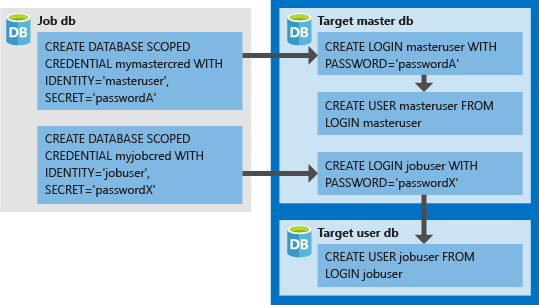
All target databases must have a login with sufficient permissions for the job to complete successfully (
jobuserin the following diagram).The credentials you create in target databases (
LOGINandPASSWORDformasteruserandjobuser, in the following diagram) should match theIDENTITYandSECRETin the credentials you create in the job database.You can reuse credentials across jobs. Credential passwords are encrypted and secured from users who have read-only access to job objects.
The following image helps you understand how to set up the proper job credentials, and how the elastic job agent connects using database credentials as authentication to logins and users in target servers and databases.
Note
When using database-scoped credentials, remember to create your jobuser user in every target database.
Elastic job private endpoints
The elastic job agent supports elastic job private endpoints. Creating an elastic jobs private endpoint establishes a private link between the elastic job and the target server. The elastic jobs private endpoints feature is different from the Azure Private Link.

The elastic job private endpoints feature supports private connections to target and output servers, so the job agent can reach them even when the Deny Public Access option is enabled. Using private endpoints is also one possible solution if you want to disable the Allow Azure services and resources to access that server option.
Elastic job private endpoints support all options of elastic job agent authentication.
The elastic job private endpoint feature allows you to choose a service-managed private endpoint to establish a secure connection between the job agent and its target and output servers. A service-managed private endpoint is a private IP address within a specific virtual network and subnet. When you choose to use private endpoints on one of your job agent's target and output servers, Azure creates a service-managed private endpoint. This private endpoint is then exclusively used by the job agent for connecting and executing jobs, or for writing the job output on that target and output databases.
You can create and allow elastic job private endpoints through the Azure portal. Target servers connected via the private link can be anywhere in Azure, even in different geographies and subscriptions. You must create a private endpoint for each desired target server and the job output server to enable this communication.
For a tutorial to configure a new service-managed private endpoint for elastic jobs, see Configure Azure SQL elastic jobs private endpoint.
Requirements for elastic job private endpoints
To use an elastic jobs private endpoint, both the job agent and target servers or databases must be hosted in Azure (same or different regions) and in the same cloud type (for example, both in public cloud or both in government cloud).
The
Microsoft.Networkresource provider must be registered for the host subscriptions of both the job agent and the target and output servers.Azure creates elastic job private endpoints per target and output server. You must approve them before the elastic job agent can use them. You can approve them through the Networking pane of that logical server or your preferred client. Then, the elastic job agent can reach any databases under that server using private connection.
The connection from the elastic job agent to the jobs database doesn't use private endpoint. The job agent itself uses internal certificate-based authentication to connect to its jobs database.
- If you add the jobs database as a target group member, it behaves as a regular target. You need to set up with private endpoint as needed.
Network security perimeter (preview)
A network security perimeter (preview) controls inbound and outbound network traffic for a logical server. An elastic job agent connects outbound to each target server to run job steps, so a perimeter evaluates those connections.
Supported configurations
Elastic jobs work in both transition and enforced mode, and with a target server that's in the same perimeter as the job agent, in a linked perimeter, or in no perimeter at all. In every case, the job agent's perimeter must allow outbound access to the target server.
Both authentication methods are supported. SQL authentication works in all these configurations. A user-assigned managed identity works when the job agent and the target are in the same perimeter or in linked perimeters, and you grant the identity the permissions it needs on the target database.
Configure access rules for elastic jobs
- Associate the logical server that hosts the job agent with the perimeter.
- On that server's profile, add an outbound access rule for each target server. Set Destination type to FQDN and use the target server's fully qualified domain name.
- If a target server is in the same perimeter or a linked perimeter and you use SQL authentication, add an inbound access rule on the target server's profile that allows the job agent's server.
- If you use a user-assigned managed identity, assign it to the job agent and grant it permissions on the target database.
- Target servers that aren't associated with a perimeter need no extra configuration.
Limitations and behavior differences
- The perimeter is checked at run time, when the job agent connects to a target. A job can be created successfully and then fail during execution because a rule is missing or was changed later.
- Changing perimeter rules or associations doesn't interrupt connections that are already in flight. The change applies to later job executions.
- Transition and enforced mode behave the same way except that enforced mode actually blocks a noncompliant connection, whereas transition mode logs it and allows it.
- A target server in a different perimeter that isn't linked to the job agent's perimeter isn't a supported configuration.
Errors when a perimeter blocks a job
The exact error strings vary by client and driver. Two failures are common:
- A message saying the connection was blocked by the network security perimeter means the outbound rule from the job agent's server to the target server is missing or wrong. Update the outbound rules.
- A login failure for a user or managed identity means the perimeter allowed the connection but the database-level permissions are missing. Grant the SQL user or the managed identity the permissions it needs on the target database.
Elastic job database permissions
During job agent creation, a schema, tables, and a role called jobs_reader are created in the job database. The role is created with the following permission and is designed to give administrators finer access control for job monitoring. Administrators can provide users the ability to monitor job execution by adding them to the jobs_reader role in the job database.
| Role name | jobs schema permissions |
jobs_internal schema permissions |
|---|---|---|
jobs_reader |
SELECT |
None |
Caution
Don't update internal catalog views in the job database, such as jobs.target_group_members. Manually changing these catalog views can corrupt the job database and cause failure. These views are for read-only querying only. You can use the stored procedures on your job database to add or delete target groups and members, such as jobs.sp_add_target_group_member.
Consider the security implications before granting any elevated access to the job database. A malicious user with permissions to create or edit jobs could create or edit a job that uses a stored credential to connect to a database under the malicious user's control. This vulnerability could allow the malicious user to determine the credential's password or execute malicious commands.
Monitor elastic jobs
The elastic job agent integrates with Azure Alerts for job status notifications, simplifying the solution for monitoring the status and history of job execution.
The Azure portal includes extra features for supporting elastic jobs and job monitoring. On the Overview page of the Elastic job agent, the most recent job executions are displayed, as shown in the following screenshot.

You can create Azure Monitor Alert rules with the Azure portal, Azure CLI, PowerShell, and REST API. The Failed Elastic jobs metric is a good starting point to monitor and receive alerts on elastic job execution. In addition, you can elect to be alerted through a configurable action like SMS or email by the Azure Alert facility. For more information, see Create alerts for Azure SQL Database in the Azure portal.
For a sample, see Create, configure, and manage elastic jobs.
Job output
The outcome of a job's steps on each target database is recorded in detail, and script output can be captured to a specified table. You can specify a database to save any data returned from a job.
Job history
You can view elastic job execution history in the job database by querying the table jobs.job_executions. A system cleanup job purges execution history that's older than 45 days. To remove history that's less than 45 days old manually, execute the sp_purge_jobhistory stored procedure in the job database.
Job status
You can monitor elastic job executions in the job database by querying the table jobs.job_executions.
Best practices
Consider the following best practices when working with elastic database jobs.
Security best practices
Limit usage of the APIs to trusted individuals.
Grant credentials the least privileges necessary to perform a job step. For more information, see Authorization and Permissions.
When using a server or pool target group member, create a separate credential with rights on the
masterdatabase to view and list databases. This credential expands the database lists of the servers and pools before the job execution.
Elastic job performance
Elastic jobs use minimal compute resources while waiting for long-running jobs to complete.
Depending on the size of the target group of databases and the desired execution time for a job (number of concurrent workers), the agent requires different amounts of compute and performance of the job database (the more targets and the higher number of jobs, the higher the amount of compute required).
Concurrent capacity tiers
Starting in October 2023, the elastic job agent has multiple tiers of performance to allow for increasing capacity.
Capacity increments indicate the total number of concurrent target databases the job agent can connect to and start a job. To get more concurrent target connections for job execution, upgrade a job agent's tier from the default JA100 tier, which has a limit of 100 concurrent target connections.
Most environments require less than 100 concurrent jobs at any time, so JA100 is the default.
| Elastic job agent tier | Maximum concurrent jobs |
|---|---|
JA100 |
100 |
JA200 |
200 |
JA400 |
400 |
JA800 |
800 |
Exceeding the job agent's concurrency capacity tier with job targets creates queuing delays for some target databases and servers. For example, if you start a job with 110 targets in the JA100 tier, 10 targets wait to start until others finish.
You can modify the tier or service objective of an elastic job agent through the Azure portal, PowerShell, or the Job Agents REST API. For an example, see Scale the job agent.
Limit job effect on elastic pools
To ensure resources aren't overburdened when running jobs against databases in an Azure SQL Database elastic pool, configure jobs to limit the number of databases a job runs against at the same time.
Set the number of concurrent databases a job runs on by setting the sp_add_jobstep stored procedure's @max_parallelism parameter in T-SQL.
Idempotent scripts
An elastic job's T-SQL scripts must be idempotent, that is, if the script succeeds and it runs again, the same result occurs. A script can fail due to transient network issues. In that case, the job automatically retries running the script a preset number of times before desisting. An idempotent script has the same result even if it was successfully run twice (or more).
A simple tactic is to test for the existence of an object before creating it. The following example is hypothetical:
IF NOT EXISTS (SELECT *
               FROM sys.objects
               WHERE [name] = N'some_object')
    PRINT 'Object does not exist'; -- Create the object
ELSE
    PRINT 'Object exists'; -- If it exists, drop the object before recreating it.
Similarly, a script must be able to execute successfully by logically testing for and countering any conditions it finds.
Limitations
These are the current limitations to the elastic jobs service. The product team is actively working to remove as many of these limitations as possible.
| Issue | Description |
|---|---|
| The elastic job agent needs to be recreated and started in the new region after a failover or move to a new Azure region. | The elastic jobs service stores all its job agent and job metadata in the jobs database. Any failover or move of Azure resources to a new Azure region also moves the jobs database, job agent, and job metadata to the new Azure region. However, the elastic job agent is a compute-only resource that needs to be explicitly recreated and started in the new region before jobs start executing again. Once started, the elastic job agent resumes executing jobs in the new region as per the previously defined job schedule. |
| Excessive SQL Audit logs from jobs database | The elastic job agent operates by constantly polling the job database to check for the arrival of new jobs and other CRUD operations. If auditing is enabled on the server that houses a jobs database, the jobs database can generate a large number of audit logs. You can mitigate this issue by filtering out these audit logs by using the Set-AzSqlServerAudit command with a predicate expression.For example: Set-AzSqlServerAudit -ResourceGroupName "ResourceGroup01" -ServerName "Server01" -BlobStorageTargetState Enabled -StorageAccountResourceId "/subscriptions/7fe3301d-31d3-4668-af5e-211a890ba6e3/resourceGroups/resourcegroup01/providers/Microsoft.Storage/storageAccounts/mystorage" -PredicateExpression "application_name <> 'Microsoft Azure SQL Database elastic jobs'"This command only filters out job agent to jobs database audit logs, not job agent to any target databases audit logs. |
| Use of a Hyperscale database as job database | Using a Hyperscale database as a job database isn't supported. However, elastic jobs can target Hyperscale databases in the same way as any other database in Azure SQL Database. |
| Serverless databases and auto-pausing with elastic jobs. | Auto-pause enabled serverless database isn't supported as a job database. Serverless databases targeted by elastic jobs do support auto-pausing, and job connections resume them. |
| Export a Job Database to a BACPAC file | Export of a job database to a BACPAC file isn't supported. If the SQL Server containing a job database needs to be exported, drop the job database first before exporting the server. |