Note
Access to this page requires authorization. You can try signing in or changing directories.
Access to this page requires authorization. You can try changing directories.
Your agent has a built-in documentation capability that answers questions about SRE Agent features, setup, and configuration directly in the conversation. The answers come from live official documentation, so they stay current as features evolve.
Tip
Quick summary
- Ask "How do I...", "Can I...", or "What is..." about SRE Agent features and get answers from official docs.
- No setup required. This capability is built in and available on every agent.
- Answers come from live documentation, so they stay current as features evolve.
The problem: learning a new tool while using it
When you're setting up an agent or exploring what it can do, questions naturally come up: "How do I connect PagerDuty?" "What are run modes?" "Can I schedule recurring tasks?"
Without a documentation specialist, you have two options, and both are disruptive. You can leave the conversation, open the documentation website, search for the right page, read through it, and return to the chat with the answer. Or you can ask the agent directly and hope it knows the answer from its training data. However, training data can be outdated or inaccurate for product-specific details like configuration steps, supported regions, or permission requirements.
Either way, you lose context. The investigation you were running, the setup you were configuring, and the question chain you were following all pause while you go find information.
How it works
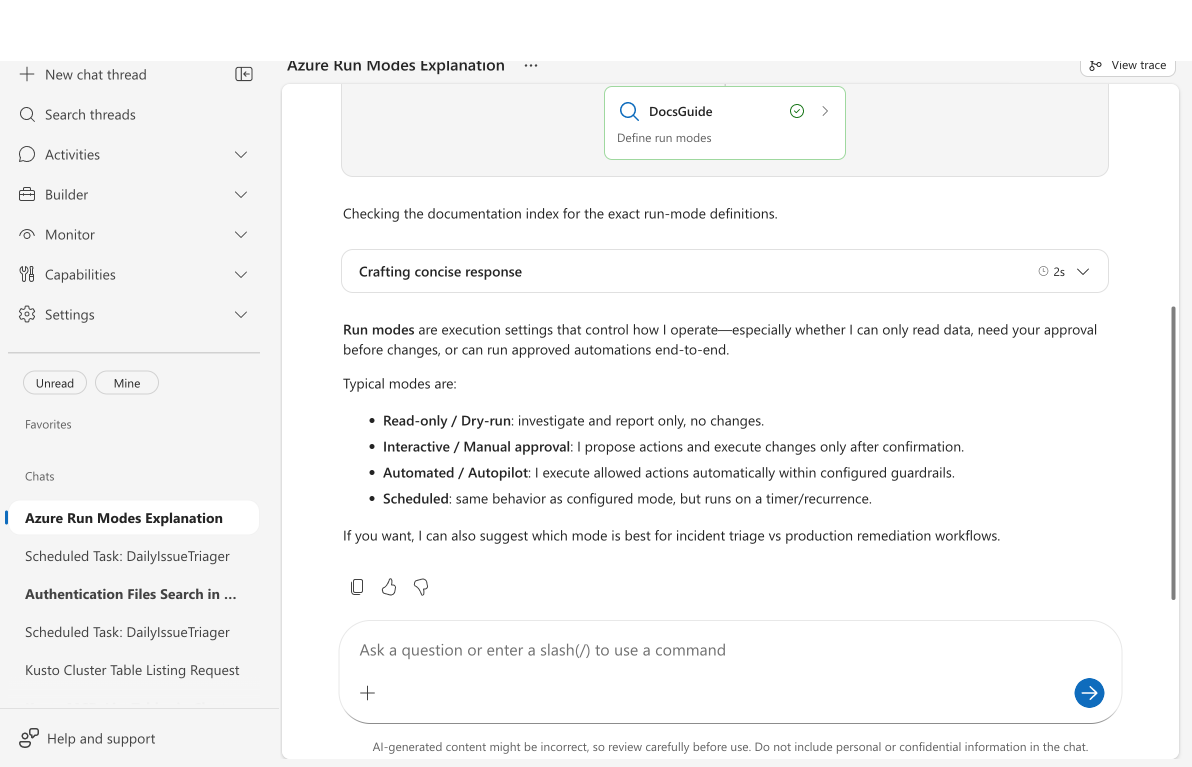
Your agent has a built-in capability that activates automatically when you ask documentation-related questions. It requires no configuration, setup, or opt in.
- You ask a question: Type something like "How do I set up scheduled tasks?" in the chat.
- Your agent recognizes the question type: Questions about SRE Agent features, setup, or concepts trigger the documentation lookup.
- It fetches the documentation index: Reads the docs map listing all available documentation pages.
- It reads relevant pages: Identifies and fetches the specific documentation pages that answer your question.
- You get an accurate answer: Synthesized from official documentation, right in the chat.
The capability handles three categories of questions.
| Category | Examples |
|---|---|
| Features | "How does incident response work?", "What connectors are available?", "How do scheduled tasks work?" |
| Setup | "How do I connect PagerDuty?", "How do I create an agent?", "How do I set up a Teams bot?" |
| Concepts | "What are run modes?", "What is agent reasoning?", "What permissions does the agent need?" |
What makes this approach different
The following characteristics distinguish built-in documentation answers from other approaches.
Answers come from official documentation, not training data. Your agent fetches documentation pages at runtime. When documentation is updated (new features added, steps changed, limits revised), your agent automatically picks up the changes.
No context switch. You stay in the conversation. The investigation thread keeps running. The configuration you were building stays open. The answer appears in the same chat window.
No setup required. This capability is built in and available on every agent from the moment it reaches the running state. No connectors to configure, no permissions to grant, no knowledge base to populate.
Before and after
The following table compares the experience of finding answers about SRE Agent features before and after using the built-in documentation capability.
| Area | Before | After |
|---|---|---|
| Finding setup steps | Leave chat, search docs, read page, return to chat | Ask in chat, get a cited answer in seconds |
| Answer accuracy | Agent answers from training data, which might be outdated | Agent reads current, official documentation |
| Context preservation | Lost: you closed the tab, switched focus, forgot where you were | Maintained: answer appears in the same conversation |
| Time to answer | 2–5 minutes (searching, reading, returning) | Under 10 seconds |
Related content
- Subagents: Learn how built-in and custom agents specialize your agent.
- Memory and knowledge: Learn how your agent remembers context from past conversations.
- Upload knowledge documents: Upload your own documentation for agent reference.
- Agent playground: Test this capability and others interactively.