Note
Access to this page requires authorization. You can try signing in or changing directories.
Access to this page requires authorization. You can try changing directories.
Tip
- Use hypothesis-driven investigation, not random log searching.
- Provide a full evidence chain showing why this is the cause.
- Recall similar past incidents and their fixes.
The problem: log searching isn't investigation
Most debugging starts with "show me the errors." You query logs, scroll through results, copy a timestamp, switch tools, and run another query. You're not investigating. You're manually correlating data and holding the reasoning in your head.
The real problem isn't finding logs. It's knowing what questions to ask, what tools to check, and how to connect the dots across logs, metrics, deployments, and past incidents. That mental model lives in the heads of your senior engineers, and they can't be on every call. New team members spend hours on problems that veterans solve in minutes, because the reasoning isn't documented anywhere.
How Azure SRE Agent solves this problem
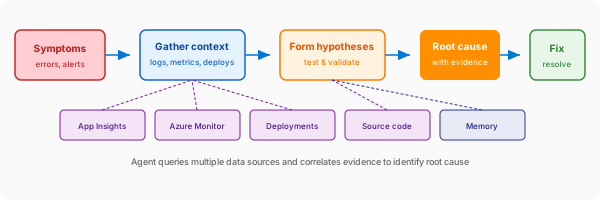
Your agent investigates like an expert SRE. It doesn't just search logs. It forms hypotheses about what went wrong and systematically validates each one using evidence.
- Gathers context: Queries Application Insights, Azure Monitor, deployment history, activity logs, and resource properties.
- Forms hypotheses: Generates theories based on the evidence pattern.
- Validates each one: Tests hypotheses systematically, ruling out false leads.
- Explains the conclusion: Shows the full reasoning trail with supporting evidence and citations.
What makes this approach different
Unlike log searching, your agent reasons about the problem. "Show me errors" gives you data to interpret. Your agent interprets the data for you by forming theories, testing them, and explaining conclusions.
Unlike static dashboards, your agent adapts to the specific incident. It doesn't just show you metrics. It decides which metrics matter, correlates them with other evidence, and tells you why.
Unlike scripts, your agent handles novel situations. A script runs the same steps every time. Your agent reasons about what's different this time and adjusts its investigation accordingly.
Before and after
| Category | Before | After |
|---|---|---|
| Investigation approach | Search logs and hope you find something | Agent forms and tests hypotheses |
| Tools opened | 4+ portals, manual correlation | 0 (agent queries all sources) |
| Reasoning | "I think it's the database..." | "Database DTU at 98%, validated" |
| Evidence trail | In your head | Full chain with explanation |
| Next time | Start from scratch | Memory recalls similar incidents |
Example: database timeout investigation
Symptom: "500 errors on /api/orders endpoint"
HYPOTHESIS 1: Recent deployment broke something
├─ Checked: Last deployment was 3 days ago
├─ Evidence: Error rate stable until 30 minutes ago
└─ Result: INVALIDATED

HYPOTHESIS 2: Database overloaded
├─ Checked: Azure SQL metrics (CPU, DTU, connections)
├─ Evidence: DTU at 98%, query duration 4x normal
├─ Traced: SELECT * FROM orders WHERE... taking 8.2s
└─ Result: VALIDATED

ROOT CAUSE: Orders table missing index on customer_id column.
Query plan shows full table scan on 2.1M rows.

RECOMMENDED ACTION: Add index on orders.customer_id
Similar fix applied in INC-2341 (3 weeks ago)
Get started
Root cause analysis works automatically with Azure's built-in tools. To enable deeper analysis, consider the following enhancements.
| Enhancement | What it enables | Setup |
|---|---|---|
| Source control | Error-to-code correlation, semantic code search | Connect source code |
| Knowledge base | Context for hypothesis generation | Upload knowledge |
| Custom telemetry | Business metrics in Kusto | Set up Kusto connector |