Note
Access to this page requires authorization. You can try signing in or changing directories.
Access to this page requires authorization. You can try changing directories.
Azure Blob Storage now supports the Network File System (NFS) 3.0 protocol. This support provides Linux file system compatibility at object storage scale and prices and enables Linux clients to mount a container in Blob Storage from an Azure virtual machine (VM) or a computer on-premises.
It's a challenge to run large-scale legacy workloads, such as high-performance computing (HPC), in the cloud. One reason is that applications often use traditional file protocols, such as NFS, to access data. Also, native cloud storage services focused on object storage have a flat namespace and extensive metadata instead of file systems that provide a hierarchical namespace and efficient metadata operations.
Blob Storage now supports a hierarchical namespace. When combined with NFS 3.0 protocol support, Azure makes it much easier to run legacy applications on top of large-scale cloud object storage.
Applications and workloads suited for using NFS 3.0 with Blob Storage
The NFS 3.0 protocol feature is optimized for high-throughput, large-scale, read-heavy workloads with sequential I/O. It's ideal for scenarios that involve multiple readers and numerous threads where throughput is more critical than low latency. Common examples include:
High-performance computing: HPC jobs often involve thousands of cores reading the same large datasets concurrently. The NFS 3.0 protocol feature uses object storage throughput to eliminate traditional file server bottlenecks. Here are some examples:
- Genomics sequencing: Processing massive DNA datasets.
- Financial risk modeling: Using Monte Carlo simulations on historical data.
- Seismic analysis: Analyzing geological data for oil and gas exploration.
- Weather forecasting: Modeling atmospheric data for climate and storm prediction.
Big data and analytics (data lakes): Many analytics tools require hierarchical directories. BlobNFS (via Azure Data Lake Storage Gen2) delivers this structure while supporting standard file protocols. Here are some examples:
- Machine learning: Feeding training data to GPU clusters by using standard file I/O.
- Log analytics: Aggregating logs from thousands of sources.
Advanced Driver Assistance Systems (ADAS): ADAS workflows produce petabytes of sequential sensor data, such as LiDAR point clouds and high-resolution camera feeds. The data must be ingested efficiently and analyzed at scale for simulation and model training. An example is storing raw LiDAR scans and multi-camera video streams from autonomous test vehicles by using NFS 3.0 and then running large-scale replay simulations across thousands of compute nodes to validate perception algorithms.
Media and entertainment: Rendering farms need efficient access to large asset libraries. NFS 3.0 over blob provides a file interface for legacy rendering tools that expect file paths. Here are some examples:
- Video rendering: Reading source assets with distributed nodes.
- Transcoding: Converting large raw video files into streaming formats.
Database backup: A cost-effective, high-throughput NFS 3.0 target without complex connectors or expensive snapshots. Oracle RMAN can write large backup pieces directly for long-term archival and enable direct restore from any NFS-mounted Linux VM.
When not to use NFS 3.0 with Blob Storage
Avoid use for general-purpose file shares or transactional workloads because of object storage characteristics:
| Workload type | Reason | Better alternative |
|---|---|---|
| Transactional databases | Requires granular locking, submillisecond latency, and frequent random writes. | Managed disks or Azure NetApp Files or Azure Files |
| In-place file editing | Editing files forces full blob rewrites, which make operations inefficient. | Azure Files |
NFS 3.0 and the hierarchical namespace
NFS 3.0 protocol support requires blobs to be organized into a hierarchical namespace. You can enable a hierarchical namespace when you create a storage account.
Azure Data Lake Storage introduced the ability to use a hierarchical namespace. It organizes objects (files) into a hierarchy of directories and subdirectories in the same way that the file system on your computer is organized. The hierarchical namespace scales linearly and doesn't degrade data capacity or performance. Different protocols extend from the hierarchical namespace. The NFS 3.0 protocol is one of the available protocols.
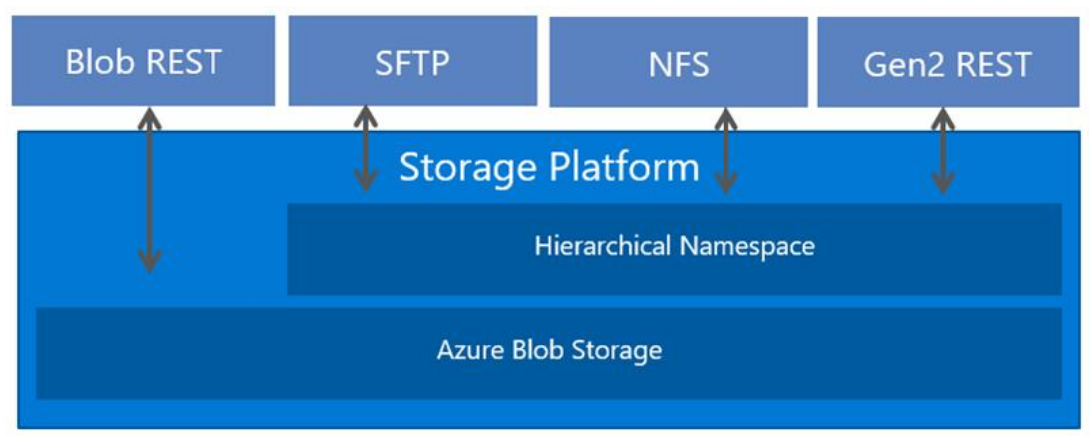
Data stored as block blobs
When your application makes a request by using the NFS 3.0 protocol, that request is translated into a combination of block blob operations. For example, NFS 3.0 read Remote Procedure Call (RPC) requests are translated into Get Blob operations. NFS 3.0 write RPC requests are translated into a combination of Get Block List, Put Block, and Put Block List.
Block blobs are optimized to efficiently process large amounts of read-heavy data. Block blobs are composed of blocks. A block ID identifies each block. A block blob can include up to 50,000 blocks. Each block in a block blob can be a different size, up to the maximum size permitted for the service version that your account uses.
| NFSv3 RPC | REST API operation |
|---|---|
| Metadata & attributes | |
Nfs3GetAttr |
Get Blob Properties |
Nfs3SetAttr |
Set Blob Properties (If file size is set, Nfs3Write is invoked.) |
Nfs3Lookup |
Get Blob Properties |
Nfs3Access |
Get Blob Properties |
Nfs3Readlink |
Get Blob Properties |
Nfs3FsStat |
Get Blob Properties |
Nfs3Fsinfo |
Get Blob Properties |
Nfs3Pathconf |
Get Blob Properties |
| Directory enumeration | |
Nfs3ReadDir |
List Blobs |
Nfs3ReadDirPlus |
List Blobs |
| Read operations | |
Nfs3Read |
Get Blob |
Nfs3ReadLink |
Get Blob Properties + Get Blob of underlying file. |
| Write operations | |
NFs3Write |
Get Block List (1) + Put Block (x) + Put Block List (1) |
Nfs3Commit |
No operation. |
| File lifecycle | |
Nfs3Create |
Put Blob + Get Blob Properties |
Nfs3Remove |
Delete Blob |
Nfs3Rename |
Not supported (no 1-1 mapping). |
Nfs3Link |
Not supported. |
| Directory management | |
Nfs3MkDir |
Put Blob + Get Blob Properties |
Nfs3RmDir |
Put Blob |
| Others | |
Nfs3SymLink |
Put Blob + Get Blob Properties |
Nfs3MkNod |
Not supported. |
Nfs3Null |
No operation. |
Cache hit or miss outcomes might trigger other Get Blob Properties requests to obtain pre-operation and post-operation attributes. Several variables influence Blob Storage transaction counts for end-to-end operations (for example, file reading or writing) and can differ across iterations. To estimate transaction counts for representative workloads, use the Blob Storage logs for sample scenarios.
General workflow: Mount a storage account container
Your Linux clients can mount a container in Blob Storage from an Azure VM or a computer on-premises. To mount a storage account container, perform these tasks:
- Create an Azure virtual network.
- Configure network security.
- Create and configure a storage account that accepts traffic only from the virtual network.
- Create a container in the storage account.
- Mount the container.
For step-by-step guidance, see Mount Blob Storage by using the Network File System (NFS) 3.0 protocol.
Network security
Traffic must originate from a virtual network. A virtual network enables clients to securely connect to your storage account. The only way to secure the data in your account is by using a virtual network and other network security settings. Any other tool used to secure data, including account key authorization, Microsoft Entra security, and access control lists (ACLs), can't be used to authorize an NFS 3.0 request.
To learn more, see Network security recommendations for Blob Storage.
Note
Public IP filtering to access your storage account isn't supported.
Supported network connections
Clients can connect via a public or private endpoint if the connection originates from any of the following network locations:
The virtual network that you configure for your storage account.
In this article, we refer to that virtual network as the primary virtual network. To learn more, see Grant access from a virtual network.
A peered virtual network that's in the same region as the primary virtual network.
You have to configure your storage account to allow access to this peered virtual network. To learn more, see Grant access from a virtual network.
An on-premises network that's connected to your primary virtual network by using Azure VPN Gateway or an Azure ExpressRoute gateway.
To learn more, see Configure access from on-premises networks.
An on-premises network that's connected to a peered network.
You can use a VPN gateway or an ExpressRoute gateway along with gateway transit.
Important
The NFS 3.0 protocol uses ports 111 and 2048. If you connect from an on-premises network, make sure that your client allows outgoing communication through those ports. If you granted access to specific virtual networks, make sure that any network security groups associated with those virtual networks don't contain security rules that block incoming communication through those ports.
Known issues and limitations
For a complete list of issues and limitations with the current release of NFS 3.0 support, see Known issues.
Pricing
For data storage and transaction costs, see the Azure Blob Storage pricing page.