Note
Access to this page requires authorization. You can try signing in or changing directories.
Access to this page requires authorization. You can try changing directories.
Azure Files change feed provides a durable, ordered, immutable, read-only log of changes to files and directories in an Azure file share. Applications can process the feed in streaming or batch mode to identify changes without repeatedly scanning the entire share.
Use Azure Files change feed to build solutions that:
- Perform incremental backup and disaster recovery.
- Maintain a search index, cache, or catalog.
- Synchronize data to another store or an on-premises file system.
- Audit and analyze file and directory changes.
- Drive pipelines that process changed content.
Note
Access to the preview is enabled per subscription. Complete the preview sign-up form: Sign up for Preview: Azure Files Change Feed.
The team enables the preview for approved subscriptions and contacts you when the feature is available. You can enable Azure Files change feed only after preview access is granted.
Important
This feature is currently in preview. See the Supplemental Terms of Use for Microsoft Azure Previews for legal terms that apply to Azure features that are in beta, preview, or otherwise not yet released into general availability.
How the change feed works
Enabling change feed is a two-step operation. First, enable the capability on the storage account. Then enable change feed on each file share that you want to track. This scope differs from Blob Storage change feed, which you enable once for an entire account.
Every supported data or metadata change to a tracked share is recorded as an event in an append-only Apache Avro log. The service stores each share's log in a system blob container in the same storage account.
Change feed has the following characteristics:
- Ordered and immutable: Events are grouped into time windows called segments. After a segment is finalized, it doesn't change, so reads are repeatable and a consumer can restart from a saved position.
- Asynchronous: Events become available shortly after the operation that produced them completes. Change feed isn't a synchronous notification mechanism.
- Resumable: Consumers can persist continuation tokens and resume after an interruption.
- Configurable retention: The service automatically removes events after the retention period configured on the share.
- Independent consumers: Each application reads and checkpoints the log independently.
Logging starts after you enable change feed. The service doesn't record changes made before you enable change feed or while the feed is disabled.
Feature support
| Item | Preview support |
|---|---|
| Billing models | Standard pay-as-you-go |
| Premium file shares | Not supported |
| Share protocols | SMB and File REST API |
| Tracked operations | Data and metadata changes made over SMB and the File REST API |
| Minimum File service version | 2026-02-06 |
| Minimum management API version | 2026-04-01 |
| Client library | .NET Azure.Storage.Files.Shares.ChangeFeed prerelease package |
Enable and configure change feed
Change feed configuration uses the management plane. You can't enable, disable, or reconfigure change feed through the File REST API, SMB, or NFS. The data plane reports the current settings and log location so that consumers can find the feed.
Enable change feed on the storage account
When you create a storage account, enable Files change feed on the Data protection tab. You can also enable the account capability when you configure change feed on an existing file share.
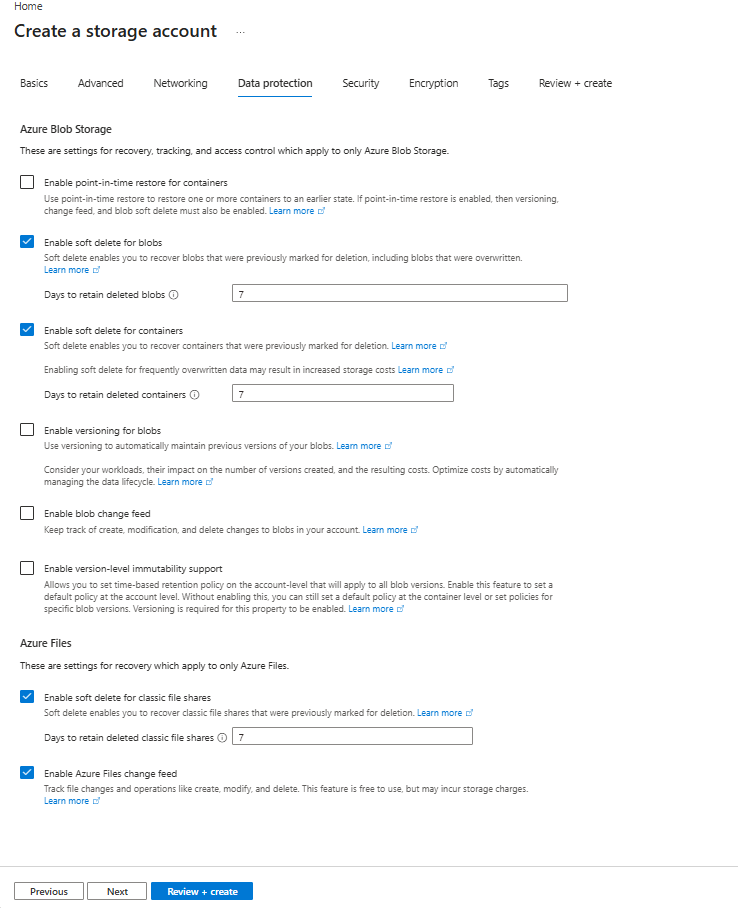
When you enable this property, the service provisions a Blob Storage endpoint on the account because it stores change feed logs as blobs.
Enable change feed on a file share
- In the Azure portal, open the storage account.
- Under Data storage, select File shares, and then select the file share.
- Under Properties, find Feature status, and select Change feed.
- Enable change feed and specify a retention period from 1 through 365 days.
- Select Save.
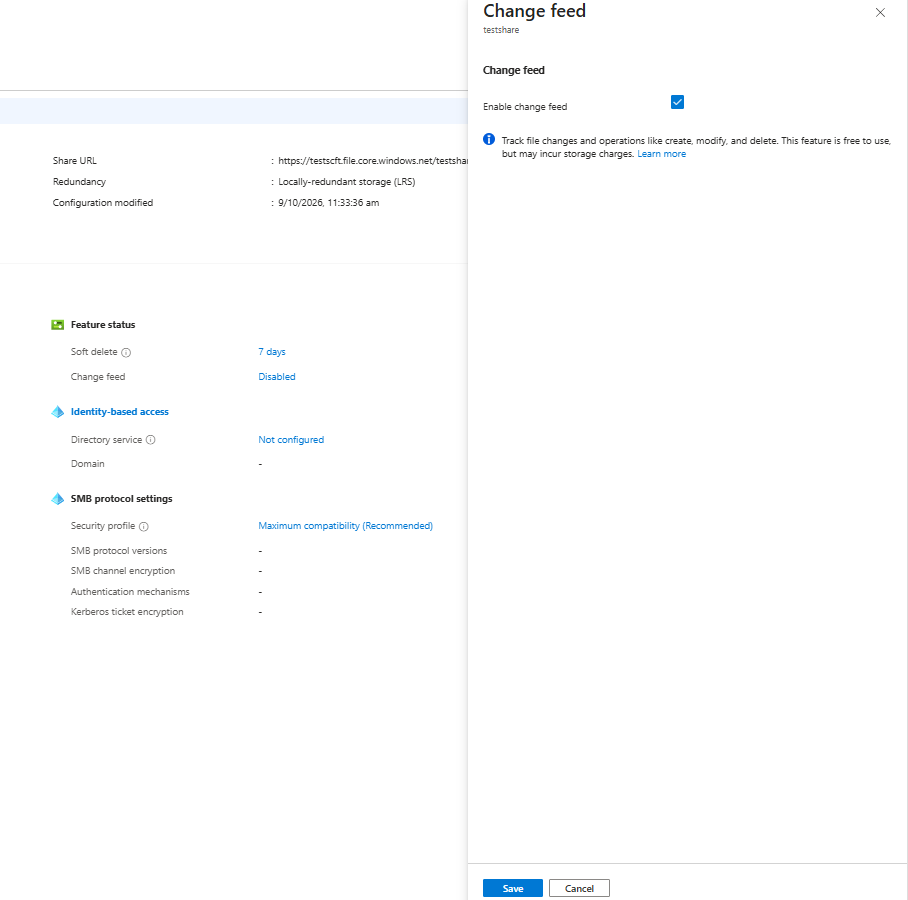
You can also enable change feed and set retention when you create a file share.
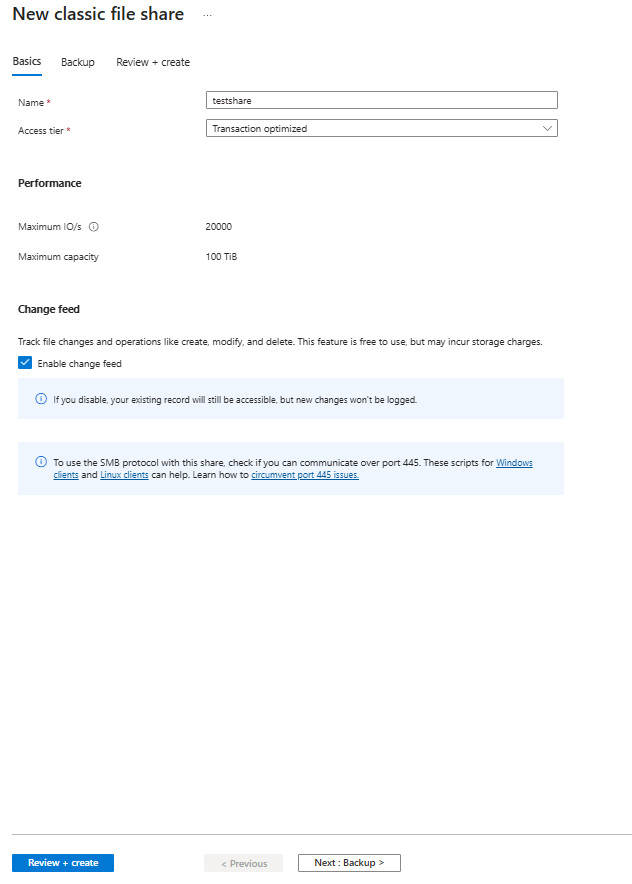
If you enable change feed without specifying retention, the default is seven days. Valid retention values are 1 through 365 days. Increasing retention doesn't recover records that the service already deleted.
Verify the configuration
A consumer can discover the log by calling Get Share Properties with File service version 2026-02-06 or later:
GET https://<storage-account>.file.core.windows.net/<file-share>?restype=share
x-ms-version: 2026-02-06
Authorization: Bearer <access-token>
The response includes the following headers:
x-ms-file-enable-change-feed: True
x-ms-file-change-feed-retention-in-days: 7
x-ms-file-blob-container-for-xfiles-change-feed: $fileschangefeed-<GUID>
These values aren't returned for share snapshots. A share that has never had change feed configured reports false and 0.
Disable change feed
- In the Azure portal, open the storage account.
- Under Data storage, select File shares, and then select the file share.
- On the Overview page, under Properties > Feature status, select the status next to Change feed.
- Clear Enable change feed.
- Select Save.
When you disable change feed, the system stops recording new events. Existing records remain accessible until their retention period expires.
To turn off the account capability, set enableFilesChangeFeed to false. You can't disable the account capability while any share in the account still has change feed data. The request fails with FilesChangeFeedContainersExist. Disable change feed on every share and wait for retained log data to expire.
Consume the change feed
The recommended way to read change feed is the .NET client library. The client handles log discovery, segment ordering, the last consumable watermark, Avro deserialization, reset detection, and resumable reads.
Install the prerelease package:
dotnet add package Azure.Storage.Files.Shares.ChangeFeed --prerelease
Create a client from an existing ShareClient, and enumerate the available events:
using Azure.Identity;
using Azure.Storage.Files.Shares;
using Azure.Storage.Files.Shares.ChangeFeed;

var serviceUri = new Uri("https://<storage-account>.file.core.windows.net");
var shareClient = new ShareServiceClient(serviceUri, new DefaultAzureCredential())
    .GetShareClient("<file-share>");

ShareChangeFeedClient changeFeedClient =
    shareClient.GetShareChangeFeedClient();

await foreach (ShareChangeFeedEvent change in changeFeedClient.GetChangesAsync())
{
    Console.WriteLine(
        $"{change.EventTime:o} {change.Reason} {change.EventData.FullFilePath}");
}
The client provides methods to:
- Enumerate all available events up to the last consumable watermark.
- Read a bounded time range.
- Resume from a continuation token.
- Enumerate changes between two share snapshots.
- Get the latest complete and safe point in the log.
- Check whether snapshot metadata is finalized.
Resume with a continuation token
For a long-running consumer, enumerate by page and persist the continuation token only after successfully processing the entire page:
string? continuationToken = LoadCheckpoint();

await foreach (Page<ShareChangeFeedEvent> page in
    changeFeedClient.GetChangesAsync(continuationToken).AsPages())
{
    foreach (ShareChangeFeedEvent change in page.Values)
    {
        Process(change);
    }

    SaveCheckpoint(page.ContinuationToken);
}
A continuation token is bound to the storage account that issued it. Pass a saved token to GetChanges or GetChangesBetweenSnapshots, not to AsPages.
Read the log directly
For languages without a change feed client library, you can read the system container with a Blob Storage client library:
- Call Get Share Properties and read the container name from
x-ms-file-blob-container-for-xfiles-change-feed. - Read
meta/reset-latest.jsonand check for a new reset identifier. - Read
meta/segments.jsonand note thelastConsumablewatermark. - For each segment up to the watermark, read its
meta.jsonfile and confirm that its status isFinalized. - Read the Avro blobs listed by
chunkFilePaths. - Process the records and advance your checkpoint to the end of the window.
Warning
System containers are managed by the service. Treat their contents as read-only. Don't write, modify, or delete objects in these containers. Read segment duration and log locations from segment metadata instead of constructing paths or hard-coding a window length.
Each share uses a container named $fileschangefeed-<GUID>. An account-level $fileschangefeedsys container is reserved for service use and isn't accessible with customer credentials.
Change event records
Each Avro record describes one change. The current schema version is 0.
| Field | Description |
|---|---|
SchemaVersion |
Version of the record schema. Read fields by name and ignore unrecognized fields. |
Reason |
Code that describes the change. |
Protocol |
Protocol that produced the change: Smb, Rest, or Unknown. |
EventTime |
UTC time at which the change occurred. |
Id |
Correlation identifier for the operation. |
Cvnt |
Container version number of the share at the time of the change. |
Data.FileId |
Stable identifier of the file or directory. |
Data.ParentFileId |
File ID of the parent directory. |
Data.NewParentFileId |
Destination parent ID for a rename or move. |
Data.Etag |
Entity tag after the change. |
Data.FileName |
Item name without its directory path. |
Data.FullFilePath |
Path relative to the share root at the time of the change. |
Data.NewFullFilePath |
Destination path for a rename or move. |
Data.IsDirectory |
Indicates whether the item is a directory. |
Data.Identity |
Reserved identity fields. These fields aren't populated in the current preview. |
Data.Initiator |
Reserved initiator field. This field isn't populated in the current preview. |
Unavailable string values are emitted as N/A. NewParentFileId and NewFullFilePath are empty when the event isn't a rename or move. Treat both forms as no value.
Change reason codes
Reason codes include the following values:
| Protocol | Reason codes |
|---|---|
| SMB | SmbCreate, SmbRename, SmbDelete, SmbWrite, SmbExtend, SmbCreateTruncate, SetInfo, SetSecurityInfo |
| REST | RestCreate, RestRename, RestDelete, RestWrite, RestCreateTruncate, RestSetInfo, RestSetSecurityInfo, SyncCopyFile, AsyncCopyFile |
| Service | RESET, ControlEvent, UnknownEventType |
The list can grow over time. Design consumers to ignore reason codes they don't recognize. Ignore ControlEvent and UnknownEventType records.
Handle reset events
A reset marks a boundary where the log is no longer continuous with its earlier history. Records before the boundary might be missing or might describe changes that are no longer reflected in the share. Records after the boundary are complete and consistent with the share.
Resets can occur after a customer-managed unplanned failover or when the service restarts change tracking for the account. The service reports a reset both as an in-band RESET record and as marker blobs under meta/resets/.
The meta/reset-latest.json pointer identifies the newest reset marker:
{
    "schemaVersion": 1,
    "latestResetId": "9f2c1c6e-4c0a-4d1e-9d6b-2b7a4c1e83f0",
    "latestResetFileTime": 134288352000000000,
    "latestResetTimeUtc": "2026-07-18T08:00:00.000Z",
    "accountName": "mystorageaccount",
    "containerName": "myshare",
    "reason": "CustomerManagedUnplannedFailover",
    "latestMarkerPath": "meta/resets/00134288352000000000.json"
}
The pointer doesn't exist for a share that has never been reset. Treat a 404 response as no reset. Use latestResetId to detect a new boundary and latestMarkerPath to read its immutable marker.
When a consumer detects a new reset identifier:
- Stop incremental processing and discard checkpoints issued before the reset.
- Record the reset identifier and reset time.
- Rebaseline by enumerating the entire share or a new share snapshot.
- Resume incremental processing from the reset boundary.
Important
Never treat records from before and after a reset as a complete history. Backup and replication workloads must perform a full enumeration after a reset.
The client library can either throw ShareChangeFeedResetException or return a ShareChangeFeedResetEvent, depending on the configured ShareChangeFeedResetPolicy. Bounded reads fail on reset by default. Open-ended reads return reset events in order by default.
Work with share snapshots
Every event includes a container version number. When a share snapshot is taken, the feed writes metadata that maps the snapshot to a container version and its bounding log windows.
Use GetSnapshotStatus to confirm that the ending snapshot is finalized, and then use GetChangesBetweenSnapshots to enumerate events between two snapshots. Snapshot-scoped queries support continuation tokens.
Differences from Blob Storage change feed
Azure Files change feed uses the container layout, Avro encoding, segment model, and last consumable watermark from Blob Storage change feed. The following table describes the key differences:
| Aspect | Blob Storage change feed | Azure Files change feed |
|---|---|---|
| Scope | Enable once for an account and covers all containers. | Enable on the account and then on each share. |
| Log location | One $blobchangefeed container per account. |
One $fileschangefeed-<GUID> container per share. |
| Log discovery | Uses a well-known container name. | Uses the container name returned by Get Share Properties. |
| Item identity | Uses the blob name. A rename is a copy followed by a delete. | Uses stable file and parent IDs. Renames and moves preserve the file ID. |
| Hierarchy | Blob names can contain /, but directories aren't distinct resources. |
Includes directory resources and directory events. |
| Snapshot integration | Doesn't expose snapshot-scoped change enumeration. | Uses container version numbers and snapshot metadata for snapshot-scoped queries. |
| Protocol attribution | Not applicable. | Identifies whether a change occurred over SMB or REST. |
| Discontinuities | Doesn't expose reset markers. | Uses reset markers to identify failover and tracking reset boundaries. |
Pricing and billing
The service stores change feed data as blobs in the same storage account. The billing system charges you for stored log data and requests to read it at the applicable Blob Storage rates. Retention duration and change volume directly affect storage and transaction costs. For more information about Azure Files billing models, see Understand Azure Files billing.
Preview limitations
- Change feed is available only to subscriptions approved for the preview.
- Premium file shares and NFS operations aren't supported.
- Configuration uses the management plane and isn't available through the File REST API, SMB, or NFS.
- Configuration isn't returned for share snapshots and can't be set on a snapshot or a soft-deleted share.
- Events are asynchronous and only changes made while the feed is enabled are recorded.
- Identity and initiator fields aren't populated.
- Consumers must tolerate unknown fields and reason codes and must handle resets.
- An asynchronous copy emits an event when the copy starts, but not when it completes.
- A rename that replaces an existing file doesn't identify the replaced file.