Note
Access to this page requires authorization. You can try signing in or changing directories.
Access to this page requires authorization. You can try changing directories.
A release channel controls which updates your Spark pool receives within a supported runtime version. Use a stable channel for production and a matching Early Access channel to test upcoming changes before they reach production.
This article covers release channels for Synapse Runtime 3.5. Choosing a channel doesn't change whether your runtime version is supported. For support dates and policies, see Synapse runtime lifecycle and supportability.
Note
The release channel feature is in preview, but the Synapse Runtime 3.5 it uses is already generally available (GA). If you don't configure a release channel, your pool uses default, which runs the GA runtime. You don't need to change your configuration to continue using this channel.
Choose a release channel
Choose a channel based on whether you want to run production workloads or test upcoming changes.
| Your goal | Choose | What to do |
|---|---|---|
| Stable production workloads with fewer routine package changes | default |
For production workloads that prioritize stability and predictability. Test upcoming regular updates separately in earlyAccess. |
| Test upcoming regular updates | earlyAccess |
Run representative workloads in a test environment and report regressions before promotion to default. |
| Stable production workloads with periodic package security fixes | compliance |
Validate changes in advance using complianceEarlyAccess. After the six-month promotion to compliance, republish production libraries and verify workloads before enforcement. |
| Test upcoming package security fixes | complianceEarlyAccess |
Test package compatibility and republish test libraries against updated packages before promotion to compliance. |
Both production channels receive the same regular code updates every month. Both test channels receive the same upcoming product code. Routine package security fixes are added to complianceEarlyAccess every month and promoted together to compliance every six months.
The standard channels (default and earlyAccess) don't receive routine fixes for non-exploitable security issues. The default channel receives security fixes only when the issue is exploitable. These high-priority fixes go to all affected channels without waiting for the regular schedule.
Note
Early Access means earlier in the release timeline, not a lower quality standard. Use a separate development or test environment to check your workloads before updates reach your production channel.
Configure a release channel
Use an Apache Spark pool running Synapse Runtime 3.5. The following example selects earlyAccess for a test pool:
spark.computeConf.runtime.releaseChannel=earlyAccess
Include this property only once in each configuration. You can change its value later. The changed value takes effect when you start a new Spark session. Accepted values are default, earlyAccess, compliance, and complianceEarlyAccess. If you don't set the property, default is used.
- In Synapse Studio, select Manage > Apache Spark configurations and create or edit a configuration.
- Under Configuration properties, add
spark.computeConf.runtime.releaseChannelwith your chosen value. Create and publish the configuration. - Open the intended pool's Apache Spark configuration settings, select the configuration, and select Apply. Check that the selected configuration contains the intended channel value.
- Start a new Spark session to use the updated configuration. A running session keeps the channel selected when it started.
- Check the channel in the new session by using the command in Track release updates and VHD information.
For the full steps, see Manage Apache Spark configuration.
Keep test and production configurations separate. For example, use complianceEarlyAccess on your test pool and compliance on your production pool. Don't copy the test channel setting into production as part of deploying validated application changes.
Track release updates and VHD information
Use the running session to identify its release channel and runtime image when comparing test results or reporting an issue.
To check the release channel, run the following command in a PySpark notebook cell:
spark.conf.get("spark.computeConf.runtime.releaseChannel", "")
To identify the runtime's virtual hard disk (VHD) image, run:
spark.conf.get("spark.synapse.vhd.name", "")
If you don't configure a channel, the pool uses default. If you explicitly select a channel but don't see the expected value, check the configuration applied to the pool and start a new session. You can also look for the VHD image name in the session's Spark UI or cluster logs.
Review the Spark runtime release notes for Azure Synapse Analytics. The repository also covers Microsoft Fabric, so select the notes for your product, runtime version, and channel. Use them to compare package versions, component changes, and improvements between releases.
Include the channel name and VHD image name, along with your runtime version and error details, when contacting Microsoft support. The image name helps identify the runtime build used by the session.
Understand update timing
Updates follow three paths. Moving an update from a test channel to its matching production channel is called promotion.
Monthly code updates
Microsoft releases upcoming code to earlyAccess and complianceEarlyAccess for testing. After validation, Microsoft promotes it to default and compliance on a monthly basis. Both production channels receive the same regular code update. This monthly schedule is separate from the six-month security-fix bundle for compliance.
Routine package security updates
Some fixes address security issues in underlying packages that aren't exploitable in the Azure Synapse service context. In this article, these issues are called non-exploitable. Fixing these issues can still require package upgrades that break compatibility with customer-managed libraries.
These fixes are added to complianceEarlyAccess every month throughout a shared six-month cycle. At the end of the cycle, the accumulated fixes move together to compliance. They aren't promoted to default or earlyAccess. The six months describe the collection cycle, not a separate six-month wait for each fix.
Grouping the changes reduces how often customers using compliance need to validate package upgrades and republish libraries. Test upcoming package changes in complianceEarlyAccess, then republish production libraries after the fixes are promoted to compliance every six months. For the steps, see Prepare libraries for a compliance update.
Urgent security fixes
If Microsoft identifies a security issue that can be exploited in Azure Synapse, the issue is treated as high priority. Microsoft releases the fix to all affected supported runtimes and channels as soon as possible, without waiting for the monthly code update or six-month package-update cycle. This process can happen at any time.
Example timeline
Month 1 in the following diagram can be any calendar month. The diagram illustrates the update sequence, not a committed schedule or service-level agreement.
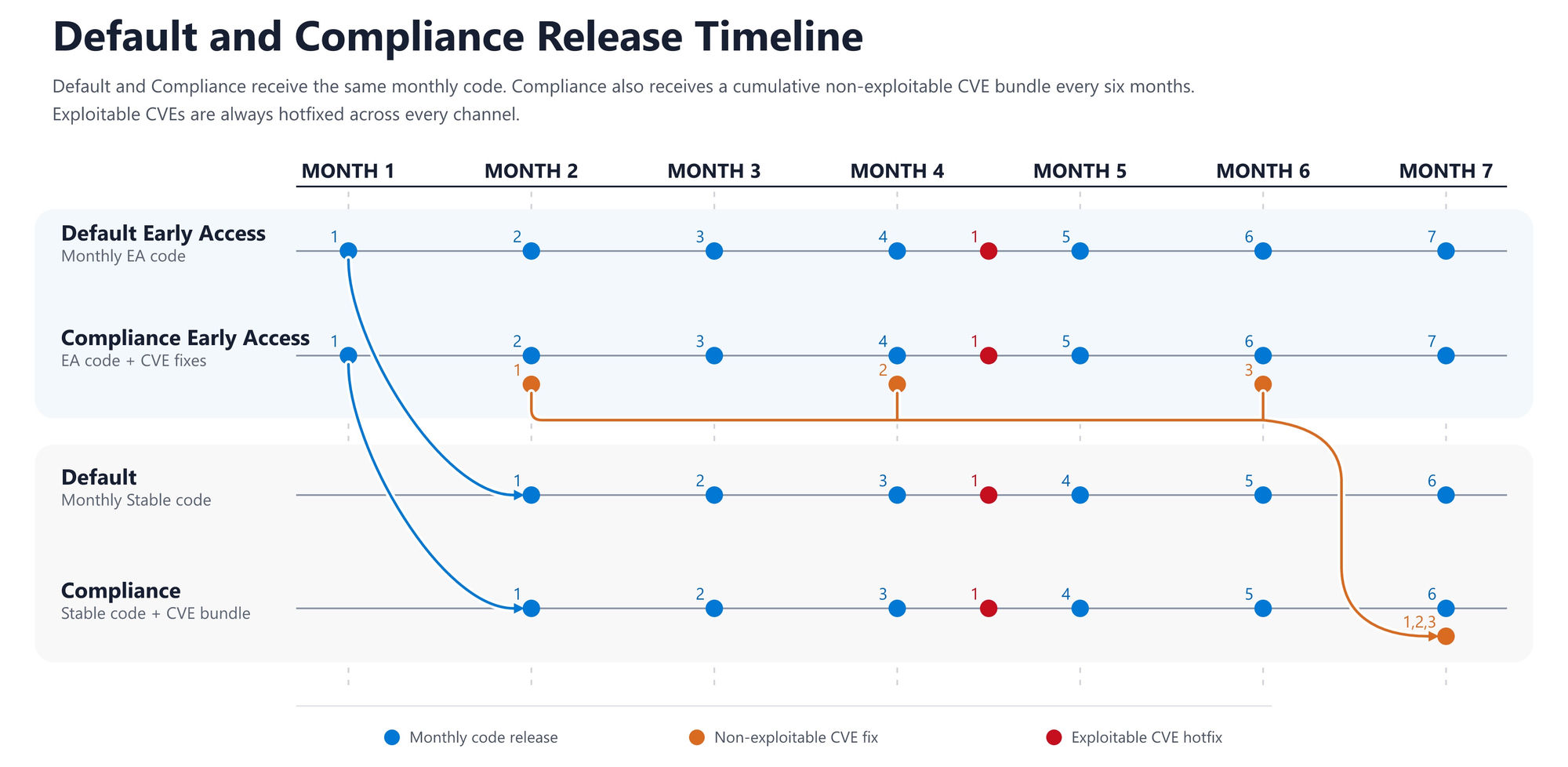
The diagram shows three types of updates:
- Monthly code updates (blue): Release 1 enters both Early Access channels in Month 1 and reaches both production channels in Month 2. Later releases follow the same pattern.
- Routine package fixes (orange): Fixes 1, 2, and 3 are added to
complianceEarlyAccessduring the collection cycle. They move together tocompliancein Month 7. - Urgent security fixes (red): An urgent fix reaches all four channels between months 4 and 5 in this example. The same process applies whenever an exploitable issue is identified; it isn't limited to this point in the cycle.
Check the Spark runtime release notes for release details. For actual availability dates, required actions, and deadlines, follow the applicable release or security notice.
Test upcoming updates
Use a development or test environment that represents your production pool, libraries, data access, and workload configuration.
- Select the matching test channel:
earlyAccessfor production ondefault, orcomplianceEarlyAccessfor production oncompliance. - Review the Spark runtime release notes for code, package, and security changes that affect your runtime version and channel.
- Run representative notebooks, Spark jobs, pipelines, and library installation and import tests.
- Compare results, performance, session startup, and library behavior with the production channel.
- Resolve compatibility issues and retest. For compliance package updates, follow the library preparation checklist in the next section.
- Deploy validated application and library changes through your normal change-management process. For compliance package updates, republish production libraries after promotion to
compliance, as described in the next section. Keep the production pool on its chosen production channel, not the test channel.
Microsoft promotes runtime updates between channels. Your responsibility is to validate workloads and prepare any application or library changes needed for that update.
Prepare libraries for a compliance update
Security-related package upgrades can break libraries that depend on older package versions. Republishing libraries with Library Manager creates a new snapshot based on the latest versions of the packages included in the selected channel. The snapshot captures the library environment built against those package versions.
Republish for complianceEarlyAccess in your test environment to build a snapshot against upcoming packages and validate your workloads. After the six-month bundle is promoted to compliance, republish production libraries on compliance to create snapshots against the newly promoted packages. Republishing on compliance before promotion still uses the older packages and doesn't prepare a snapshot against the upcoming bundle.
For each six-month compliance update:
- Review the affected packages, compatibility guidance, promotion date, and enforcement date in the update notice. The enforcement date is the deadline for completing the required actions.
- Before promotion: Republish test libraries on
complianceEarlyAccessand test representative workloads with the resulting snapshots. - Update library code or dependencies where package changes cause compatibility problems, and retest.
- After promotion to
compliance: Keep the production channel set tocomplianceand republish production libraries through Library Manager. This creates new snapshots based on the newly promoted package versions. - Verify your workloads with the new production snapshots and complete the required actions by the announced enforcement date.
For library management guidance, see Manage libraries for Apache Spark in Azure Synapse Analytics.
Important
If an update requires republishing and you don't complete it by the enforcement date, affected configurations or libraries might prevent new sessions from starting. Follow the update notice for the actions needed to resume workloads. Urgent security fixes can require action outside the regular six-month cycle.
Troubleshooting and frequently asked questions
What should I do if a workload fails in an Early Access channel?
Compare the same workload with its matching production channel. Record the runtime version, channel, VHD image name, libraries, error messages, and steps to reproduce the issue. Use Track release updates and VHD information to collect the session details. If it succeeds on the production channel but fails on the test channel, open a Microsoft support request with those details.
Can I switch back to a stable channel if validation fails?
Yes. Change earlyAccess to default, or complianceEarlyAccess to compliance, in the pool's Spark configuration and start a new session. This action selects the current stable channel; it doesn't pin an older runtime build or undo library changes you made during testing.
Are Early Access channels optional or lower quality?
Early Access is optional, and releases pass the standard validation gates. The channels let you test updates earlier. If you use compliance, prepare for its six-month package security updates even if you don't use Early Access. Urgent fixes for exploitable issues can affect any channel.
Does selecting a channel change a running Spark session?
No. The channel is selected when a session starts. Apply the updated configuration and start a new session to use a different channel.