Note
Access to this page requires authorization. You can try signing in or changing directories.
Access to this page requires authorization. You can try changing directories.
IBM Spectrum Symphony integrates with Azure Compute Fleet to extend enterprise high-performance computing (HPC) workload orchestration environments to Azure. The integration dynamically provisions Azure compute capacity as workload demand changes while maintaining your existing Symphony workload policies, queues, service-level objectives, and operational processes.
How the integration works
The IBM Spectrum Symphony Provider Plugin for Microsoft Azure Compute Fleet connects IBM Symphony Host Factory to Azure Compute Fleet. The plugin translates Symphony resource requirements into Azure Compute Fleet requests. Symphony schedules and orchestrates workloads, while Azure Compute Fleet provides access to eligible compute capacity.
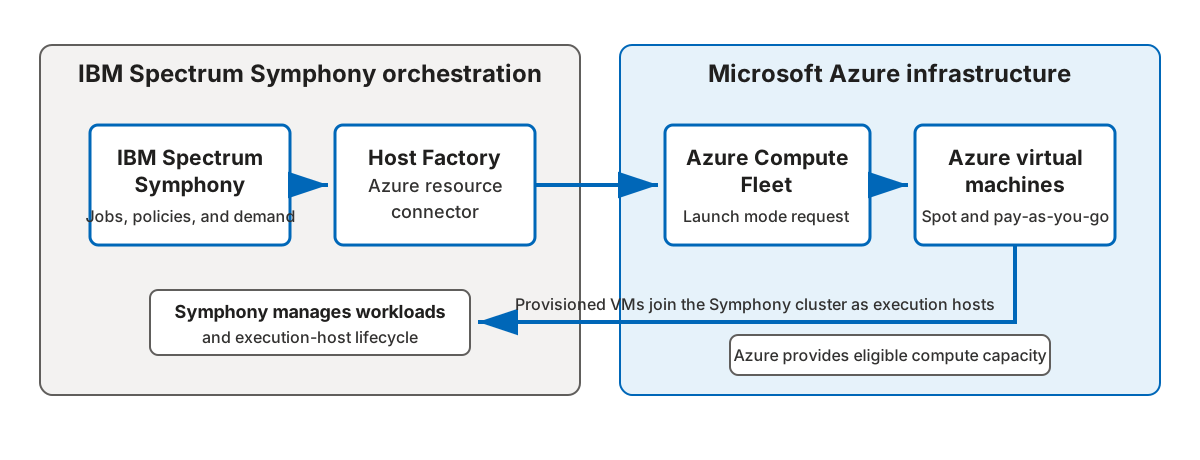
IBM Spectrum Symphony sends job, policy, and resource-demand information to Host Factory. The Azure resource connector translates the demand into an Azure Compute Fleet Launch mode request. Azure Compute Fleet selects eligible Spot and pay-as-you-go VMs. The provisioned VMs join the Symphony cluster as execution hosts. Symphony manages the workloads and execution-host lifecycle, while Azure provides the compute capacity.
The integration uses the following flow:
- IBM Spectrum Symphony evaluates queued jobs, workload priorities, policies, and resource demand.
- Host Factory sends the resource requirements to the Azure resource connector.
- The resource connector translates the requirements into an Azure Compute Fleet API request.
- Azure Compute Fleet selects eligible virtual machine (VM) types and a mix of Spot and pay-as-you-go capacity.
- The provisioned VMs join the Symphony cluster as execution hosts and run queued jobs.
- As demand decreases, Symphony can release the Azure resources.
Symphony manages the workload and its policies. Azure Compute Fleet manages access to the underlying compute capacity.
The provider uses Azure Compute Fleet Launch mode. Launch mode provisions VMs in a single request and then hands off their lifecycle to Symphony. The fleet resource is deleted automatically after provisioning, but the VMs continue to run until Symphony releases them.
Key capabilities
The integration provides the following capabilities:
- Dynamic scaling: Provision and scale Azure compute capacity as workload demand changes.
- Policy-driven elasticity: Maintain existing workload priorities and service-level objectives when you extend workloads to Azure.
- Flexible VM selection: Provision across eligible Azure VM families based on workload requirements.
- Flexible purchasing: Combine Azure Spot Virtual Machines and pay-as-you-go VMs.
- Hybrid orchestration: Extend an existing Symphony environment to Azure without replacing your workload orchestration processes.
- Workload-based provisioning: Select capacity based on attributes such as virtual CPU (vCPU), memory, and storage.
Azure Compute Fleet can use multiple VM types and allocation strategies to optimize for cost, capacity, or both. This flexibility increases the range of eligible capacity compared to requesting a single VM size.
Workload scenarios
Use the integration for compute-intensive and data-intensive distributed applications that benefit from elastic batch capacity. Example scenarios include:
- Electronic design automation.
- Engineering analysis.
- Financial risk calculations.
- Scientific computing.
Considerations
Before you use the integration, consider the following factors:
- Subscription, region, and VM family determine the standard Azure VM and vCPU quotas that apply. Azure Compute Fleet doesn't increase these quotas.
- Spot VMs can be evicted when Azure needs the capacity or when the price exceeds the maximum price you set. Design workloads to tolerate interruptions.
- Available VM types and capacity vary by Azure region.
- Your IBM Spectrum Symphony licensing and support terms apply to the Symphony environment and provider plugin.
Next steps
- Review the IBM Spectrum Symphony Provider Plugin for Microsoft Azure Compute Fleet.
- Learn more about IBM Spectrum Symphony.
- Learn what Azure Compute Fleet is.
- Review allocation strategies for Azure Compute Fleet.