Note
Access to this page requires authorization. You can try signing in or changing directories.
Access to this page requires authorization. You can try changing directories.
Applies to: ✔️ Linux VMs ✔️ Windows VMs
Use a controlled, wave-based approach: confirm prerequisites, deploy from an updated image, validate, and repeat. Start with a small pilot, prove the pattern once, then scale. For greenfield, skip to the quickstart.
The execution model is straighforward when compared with a re-platform/modernization migration. In most cases, a wave is "deploy v6/v7 instances from the new image, install/move the workload, validate the platform, and retire the old instances."
Tip
The in-place conversion that switches an existing VM's controller from SCSI to NVMe has its own page, including setup, parameters, and how to revert. This approach is not recommended for Production workloads, and it has very specific requirements, use with caution, and make sure to backup VMs. See Convert a VM from SCSI to NVMe in place.
Migration decision flow
Workloads arrive from different starting points: Generation 1 v2/v3 sizes, Generation 2 v4/v5 sizes, some already on NVMe, and some greenfield. Some VMs might also be hibernated, which you have to resume first. The following decision flow maps those starting points to a common journey and shows where the branches matter, including the backup-and-clone safety net for workloads that keep data on the OS disk.
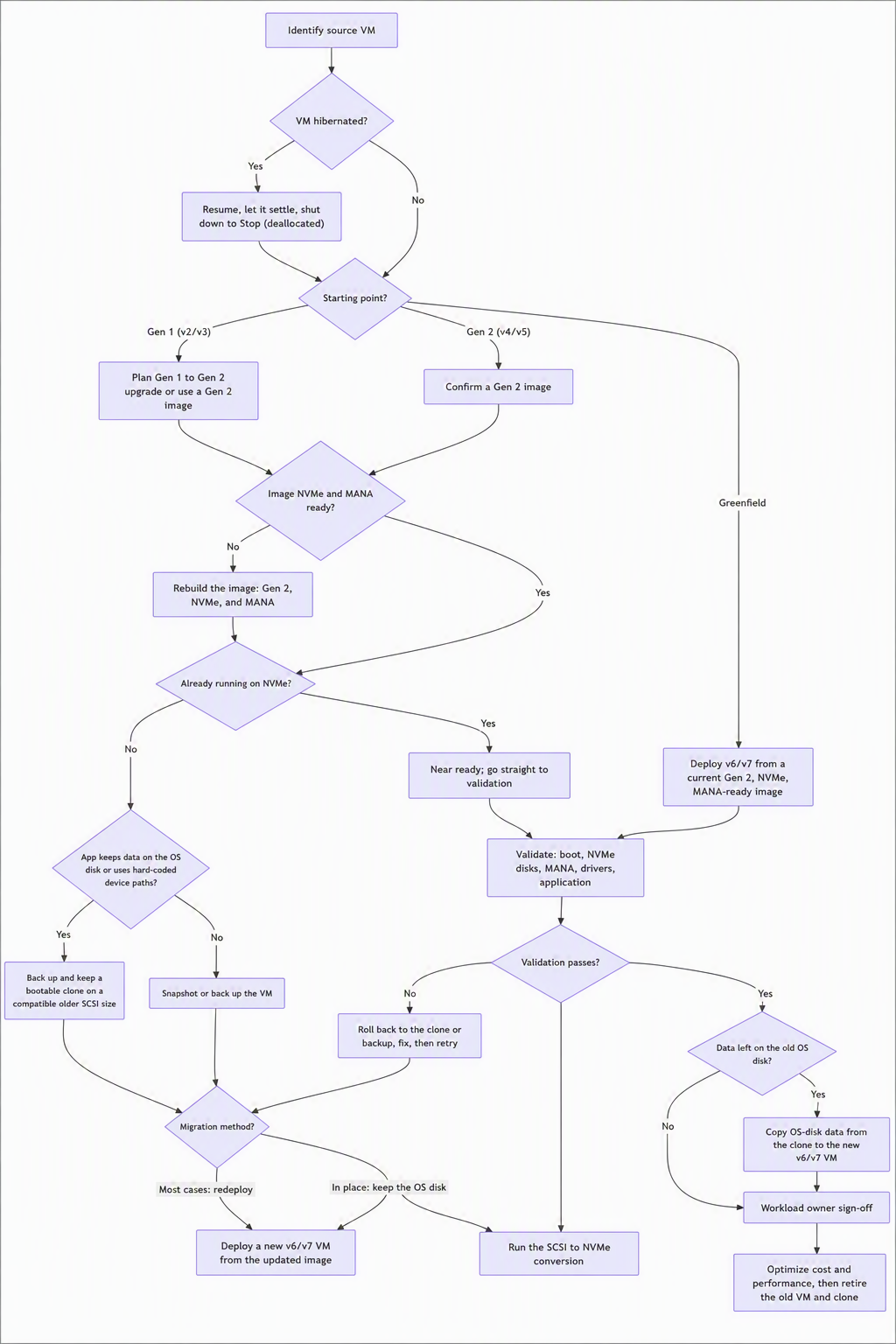
A few notes on the flow:
- Keep a clone, not just a snapshot, when the OS disk holds data. Cross-generation moves deploy from an updated image, so the new VM starts on a fresh OS disk (see Persistent application data on the OS disk). The in-place conversion keeps the existing OS disk but changes the device paths the OS sees. Either way, a bootable clone on a compatible older (SCSI) size gives you a clean rollback and a running copy you can read the OS-disk data from.
- Copy persistent data after the new VM validates. Bring across anything the application wrote to the old OS disk (configuration, license or activation files, local state) once boot, NVMe disks, and MANA networking check out.
- Two migration methods, one validation gate. Most moves redeploy from a current Generation 2, NVMe, and MANA-ready image; the in-place conversion is the option when you want to keep the existing OS disk. Both land in the same validation step before sign-off.
- Resume a hibernated VM before you migrate. A hibernated VM holds a saved memory image that doesn't move to the new family. Resume it, let it settle, and shut it down to Stop (deallocated) before you convert or redeploy (see Resume hibernated VMs before you migrate).
Greenfield quickstart
- Choose the target v6/v7 family and size (use a
d-suffixed size if you need local NVMe scratch). - Select a current Generation 2, NVMe, and MANA-ready marketplace or Azure Compute Gallery image; keep Trusted Launch on.
- Confirm region and zone availability, and quota.
- Deploy with Bicep or Terraform.
- Validate boot, disk discovery, and connectivity (see Validate and optimize).
Migration principles
- Move by workload dependency.
- Confirm the short prerequisite list before scheduling.
- Deploy from an updated image; treat cross-generation moves as a redeploy, not an in-place resize.
- Use small waves first; keep a tested rollback.
- Prefer platform-native rollout (new pool, new image, or parallel scale set) for Azure Virtual Desktop, AKS, Azure Databricks, and Virtual Machine Scale Sets.
Roles and responsibilities
| Role | Responsibility |
|---|---|
| Sponsor | Business priority and approval. |
| Architecture team | Family selection and design decisions. |
| Migration lead | Planning, readiness tracking, and wave coordination. |
| Workload owner | Approves windows and confirms the workload is healthy after the move. |
| Operations | Runs runbooks, backups, and rollback. |
Phase 1: Discover and qualify
- Inventory VMs, generation, OS, image source, disks, and region/zone (see the query that follows).
- Identify the source family (v2/v3/v4/v5) and flag Generation 1, custom-image, temp-disk, and SCSI-path items.
- Confirm the target region, zone, capacity, and quota.
- Score workloads (ready now, small refresh, or plan the region or family) and pick a pilot. See Assess readiness.
Inventory query (Azure Resource Graph)
Run this query in the portal's Resource Graph Explorer or via az graph query:
Resources
| where type =~ 'microsoft.compute/virtualmachines'
| extend sku = tostring(properties.hardwareProfile.vmSize),
         gen = tostring(properties.extended.instanceView.hyperVGeneration),
         os  = tostring(properties.storageProfile.osDisk.osType),
         imagePublisher = tostring(properties.storageProfile.imageReference.publisher),
         diskController = tostring(properties.storageProfile.diskControllerType)
| project name, resourceGroup, location, sku, gen, os, imagePublisher, diskController, zones
| order by sku asc
This surfaces the items that gate a clean move: size, generation, OS, image source, and disk controller type. More starter queries are in the docs.
Phase 2: Plan
- Select the target v6/v7 size; confirm region/zone and consider creating capacity reservation).
- Confirm the Generation 2 path (or the in-place Generation 1 to Generation 2 upgrade).
- Confirm NVMe and MANA readiness in the image.
- Update custom images once via Azure Image Builder and Azure Compute Gallery.
- Remediate any hard-coded SCSI disk paths.
- Decide the local-disk (
d-size) need and relocate the page file,tempdb, or scratch if required. - Confirm backup/snapshot and Azure Backup support for Generation 2 and Trusted Launch.
- Replan family-scoped reservations or savings plans.
- Set the maintenance window and rollback decision points.
For the full set of design considerations, see Plan a workload migration.
Phase 3: Pilot
- Run the pre-flight checks.
- Take a backup or snapshot.
- Deploy the v6/v7 instance from the updated image.
- Validate the platform: boot, disk discovery and mounts, NVMe/MANA drivers healthy, and network connectivity.
- Confirm the workload comes up and the owner signs off.
- Capture any findings and lock the repeatable pattern for later waves.
Pilot success criteria
- The VM boots cleanly (no boot-diagnostics errors).
- OS and data disks are present and mounted as planned.
- NVMe and MANA drivers are loaded and healthy.
- Network connectivity passes.
- The workload owner confirms the application is up.
Phase 4: Migrate in waves
- Group VMs by application dependency; sequence non-production before production.
- Keep waves small enough to validate within the window.
- For platform fleets, add a new pool or model and shift after validation; keep the old one until confirmed.
- Reconfirm capacity in the target region and zone at the start of each wave.
Per-wave steps
- Confirm wave readiness and capacity.
- Back up or snapshot.
- Run the pre-flight checks.
- Deploy from the image, add a new pool, or roll the scale-set model.
- Validate platform health and confirm the workload is up.
- Record results; proceed only after the exit criteria are met.
Wave exit criteria
- Platform validation passes (boot, disk, network).
- The workload owner confirms the application is healthy.
- The rollback window closes with approval, and the migration record is updated.
Phase 5: Close and expand
- Capture the migrated count and scope; document any one-time remediations.
- Review cost and performance, and rightsize where headroom exists. See Validate and optimize.
- Identify the next waves or additional v6/v7 candidates.
Workload-specific execution patterns
| Pattern | Preferred execution | Platform validation |
|---|---|---|
| Azure Virtual Desktop host pools | Build a v6/v7 image, deploy canary hosts, drain old hosts, and expand by ring. | Image boots, sign-in works, profiles attach, and agents are healthy. |
| AKS node pools | Add a new v6/v7 node pool, then cordon and drain old nodes. | Nodes provision, boot, and join; pods schedule; node drivers are healthy. |
| Azure Databricks | Point cluster policies and pools at a supported v6/v7 size. | Clusters launch; local NVMe scratch behaves as expected; capacity is available. |
| Virtual Machine Scale Sets | Deploy a new image or model via a canary or parallel scale set, then roll forward. | Instances boot from the new image; the rollback model is retained. |
| Firewalls and NVAs | Deploy parallel appliance capacity, then shift traffic. | Vendor-supported family, NIC/driver, data plane, and HA failover. |
Pre-flight checklist
| Check | Required outcome |
|---|---|
| VM generation | Generation 2 (UEFI) confirmed, or upgrade planned. |
| Target size | v6/v7 size selected and sized. |
| Region, zone, quota | Availability confirmed. |
| OS and image | Generation 2, NVMe, and MANA-ready image validated. |
| Disk paths | Hard-coded SCSI paths remediated. |
| Local/temp disk | d-size chosen or page file/tempdb relocated. |
| Low-level agents | Antivirus, backup, and monitoring drivers current and signed. |
| Backup | Snapshot or backup completed; Generation 2 support confirmed. |
| Rollback | Steps documented and approved. |
| Commercial | Reservation or savings-plan coverage replanned. |
| ISV support | Vendor support confirmed where applicable. |
Rollback guidance
Plan rollback before you start. Because you deploy alongside the existing instances, rollback is usually "keep the old VM or pool until the new one is validated, then retire it." Document the trigger conditions, decision owner, latest rollback time, backup reference, and communication plan.
Escalation triggers
- The VM fails to boot after deployment.
- The OS doesn't discover disks as expected.
- An NVMe or MANA driver or connectivity issue occurs.
- Secure Boot blocks a required low-level driver.
- Required zone capacity is unavailable.
Communicate with stakeholders
Keep workload owners and the sponsor informed at each wave boundary: what's planned for the wave, what was validated (boot, storage, networking, application health, and backup), and what comes next. Confirm the rollback window is closed before you consider a wave complete.